Solved Win7 Won't Boot, Need Help

Mulsiphix

New member
Member
VIP
Local time
3:30 AM
Messages
134
Location
Wylie, TX
Win7 Won't Boot, Textless Bluescreen

Rebooted my 32-bit Win7 HP computer after three weeks of uptime. Right after the bios switches to a pure black screen (right before Windows loads, during the time you would try to bring up Safe Mode with F8) the PC encounters a boot problem. A screen pops up. It has a black border around the entire edge and inside the border is pure blue. There is no text, no mouse cursor, and I know Windows has not begun booting. After a short while, the computer auto-restarts, like it had encountered a genuine blue-screen. Is a textless bluescreen even possible?

Safe Mode cannot be triggered. However, if I load a Win7 Repair Disc, my system will tell me to press a key on the keyboard to load the CD/DVD at startup. If I wait for this message to disappear, and then hit F8 as soon as it does, I am then taken to the Safe Mode menu I would normally expect.

Launching windows takes me to the blue screen/black border I described. If I tell it to enable Windows Boot Logging, the text file it produces (%Windir%/ntbtlog.txt) contains four gibberish ascii symbols. I have a second computer in the home and that file contains text you would expect to see. Further proof Windows isn't actually loading.

On the off chance something was up with my MBR, I ran the Win7 Recovery CD. I waited until the first screen came up where I can interact. Here I pressed Shift+F10 to bring up a command prompt. I typed "bootsect.exe /nt60 SYS /force", rebooted, but same issue with Windows not loading. Went back and I tried "bootsect.exe /nt60 ALL /force", rebooted, same issue.

When I try to used the Repair function of the repair disc, it tries to locate my HD's. Immediately it only shows 1 (there are three and multiple partitions), it is Windows, with 0% for partition size, and unknown for the final column. It searches for other hard drives for five minutes or so and then allows me to select the hard drive from the list and click on Next.

I run the repair function but it cannot find any errors. I also sometimes use a program called WinPE Easy Recovery Essentials. It uses, what I assume is, a Live Linux CD and includes an Automated Repair function for Windows 7. This brings up a list of all of my hard drives, and their sizes are reported properly. However, it claims that not a single partition contains a Windows installation.

This same CD contains a file browser. I can see all of the files on my Windows drive. This is how I checked ntbtlog.txt earlier. My problem is that I have no idea what else I might be able to try to diagnose why Windows isn't booting. Any ideas? Thanks!! :D
 
Last edited:

My Computer

OS
Windows 7 Home Premium
CPU
Core 2 Duo E4300 @ 3.15GHz
Motherboard
MSI P6N 650i SLI Platinum
Memory
3GB GeIL DDR2-800Mhz
Graphics Card(s)
Nvidia GeForce 260
Sound Card
Creative X-Fi XtremeGamer / Logitech X-540
Monitor(s) Displays
Samsung 226BW
Hard Drives
500GB Samsung
320GB Seagate
1TB Hitachi
80GB Hitachi
PSU
Thermaltake Toughpower 750W
Case
Antec 900 Advanced Gaming Case
Cooling
Tuniq Tower 120
I came across this post about manually fixing the MBR (taking a shot in the dark). It says to load the Win7 Recovery Disc, I open a command prompt with Shift+F10, and then typed "bootrec /rebuildbcd". It waited a bit and then reported that no installation of Windows were found.

If I don't use Shift+F10, just hitting Next instead when the disc starts, it takes forever as described above. Eventually it will time out and allow me to select the drive, click next, and choose Command Prompt from the following window. Exact same result. Is there any way to confirm it is a MBR issue? Outside of WinPE Recovery Essentials, I can't even confirm the Windows drive is there.

Any help would be greatly appreciated! I'm really against a clean install or a repair install that would mess with Windows settings.
 

My Computer

OS
Windows 7 Home Premium
CPU
Core 2 Duo E4300 @ 3.15GHz
Motherboard
MSI P6N 650i SLI Platinum
Memory
3GB GeIL DDR2-800Mhz
Graphics Card(s)
Nvidia GeForce 260
Sound Card
Creative X-Fi XtremeGamer / Logitech X-540
Monitor(s) Displays
Samsung 226BW
Hard Drives
500GB Samsung
320GB Seagate
1TB Hitachi
80GB Hitachi
PSU
Thermaltake Toughpower 750W
Case
Antec 900 Advanced Gaming Case
Cooling
Tuniq Tower 120
i do "booted.exe /fixmbr"
I think your disk may be failing.
 

My Computer

Computer type
PC/Desktop
Computer Manufacturer/Model Number
Gateway
OS
Windows 7 Ultimate x64
CPU
3rd Generation i5
Memory
8GB GDDR3
Hard Drives
Samsung 840 Evo 250GB
Antivirus
None
Browser
Firefox Extended Support Release
i do "booted.exe /fixmbr"
I think your disk may be failing.
I performed a diagnostic test on the drive using the utility that came with it. It reports zero errors/bad sectors. I tried the command "bootrec.exe /fixmbr" and "bootrec.exe /fixboot". Both commands said there were successful, rebooted, no change.

A Microsoft article suggested changing the permissions on my BCD Store, rename it, and then run "bootrec.exe /buildbcd". It claimed it should now find an installation if this method will help, but it still returned a result of 0 Windows Installations found.

UPDATE
Going to edit the first post. I said that if I stay at this weird bordered bluescreen, that it never did anything. That has changed. Now it auto-restarts after a short while. Just like a real blue screen. So I'm assuming this is a bluescreen without text? If such a thing is possible. Bluescreen's are the only time that I am aware the computer will auto-restart itself.
 
Last edited:

My Computer

OS
Windows 7 Home Premium
CPU
Core 2 Duo E4300 @ 3.15GHz
Motherboard
MSI P6N 650i SLI Platinum
Memory
3GB GeIL DDR2-800Mhz
Graphics Card(s)
Nvidia GeForce 260
Sound Card
Creative X-Fi XtremeGamer / Logitech X-540
Monitor(s) Displays
Samsung 226BW
Hard Drives
500GB Samsung
320GB Seagate
1TB Hitachi
80GB Hitachi
PSU
Thermaltake Toughpower 750W
Case
Antec 900 Advanced Gaming Case
Cooling
Tuniq Tower 120
I grabbed GParted. On my Windows drive there are two partitions; Windows and a System Reserved partition. Windows was not set to boot, System Reserved was. I checked my other Windows 7 PC and verified that the Windows partition should be set to boot. So I corrected it.

Now it boots to a black DOS screen with the text "BOOTMGR is missing". Windows Repair Disc and WinPE Recovery Essentials still don't see any drives, so they can't fix any errors. Tried running the command prompt commands I described earlier, but not changes to the BOOTMGR is missing situation.

windows_7_startup_repair.png
 
Last edited:

My Computer

OS
Windows 7 Home Premium
CPU
Core 2 Duo E4300 @ 3.15GHz
Motherboard
MSI P6N 650i SLI Platinum
Memory
3GB GeIL DDR2-800Mhz
Graphics Card(s)
Nvidia GeForce 260
Sound Card
Creative X-Fi XtremeGamer / Logitech X-540
Monitor(s) Displays
Samsung 226BW
Hard Drives
500GB Samsung
320GB Seagate
1TB Hitachi
80GB Hitachi
PSU
Thermaltake Toughpower 750W
Case
Antec 900 Advanced Gaming Case
Cooling
Tuniq Tower 120
Some OEM computers has some programs on the Reserved partition (like computer health check, disk check, factory recover etc) so it's normal to have this partition as active and even have the Windows boot loader.
Go back and set Reserved partition as active and restore the MBR.

Boot from a win 7 installation disk, go to repair and launch cmd window.
Check your disk. On a cmd window type chkdsk C: /f
Do a system file check. On a cmd window type sfc C: /scannow

If everything fails, you can always reinstall windows.
With the MS iso downloader (https://www.heidoc.net/php/Windows ISO Downloader.exe) download your win 7 OEM brand,
With the Linux, copy the \Users folder and the HP drives folder.
Do a clean install. Clean Install Windows 7
Use your COA stick key to activate.

For the updates:
MS releases SP2 for Windows 7
 
Last edited:

My Computers

System One System Two

  • Computer type
    PC/Desktop
    Computer Manufacturer/Model Number
    custom build
    OS
    Windows 7 HP 64
    CPU
    i5 6600K - 800MHz to 4200MHz
    Motherboard
    GA-Z170-HD3P
    Memory
    4+4G GSkill DDR4 3000
    Graphics Card(s)
    IG - Intel 530
    Monitor(s) Displays
    Samsung 226BW
    Screen Resolution
    1680x1050
    Hard Drives
    (1) -1 SM951 – 128GB M.2 AHCI PCIe SSD drive for Windows 7 and Lubuntu
    (2) -1 WD SATA 3 - 1T for Data
    (3) -1 WD SATA 3 - 1T for backup
    PSU
    Thermaltake 450W TR2 gold
    Keyboard
    Old and good Chicony mechanical keyboard
    Mouse
    Logitech mX performance - 9 buttons (had to disable some)
    Internet Speed
    500Mb/s
    Browser
    Firefox 64
    Other Info
    TinyWall firewall
  • Computer type
    Laptop
    System Manufacturer/Model Number
    Asus Q550LF
    OS
    Windows 7 Pro
    CPU
    i7-4500U 800MHz to 3.0GHz
    Motherboard
    Asus Q550LF
    Memory
    (4+4)G DDR3 1600
    Graphics Card(s)
    IG intel 4400 + NVIDIA GeForce GT 745M
    Sound Card
    Realtek
    Monitor(s) Displays
    LG Display LP156WF4-SPH1
    Screen Resolution
    1920 x 1080
    Hard Drives
    BX500 120G SSD for Windows and programs +
    1T HDD for data
    Internet Speed
    500 Mb/s
    Browser
    Firefox
    Other Info
    TinyWall firewall
It doesn't seem unreasonable to try replacing the system partition. Would it be possible to use a system partition from a different installation of windows? I may have a much older back up of the system partition (when I first setup the system years ago) I could use as well. Would replacing it be a viable thing to try?

This system is highly customized. If there is any way to avoid having to lose Windows settings/configuration data via a Clean Install, I'd sure like to try it first. Given that there don't seem to be any reasons supporting that a Clean Install is a must, I'd like to try a bit longer. Any help further diagnosing the source of the issue, would be greatly appreciated. I can do the work, I'm just trying to figure out how to detect the problem.
 

My Computer

OS
Windows 7 Home Premium
CPU
Core 2 Duo E4300 @ 3.15GHz
Motherboard
MSI P6N 650i SLI Platinum
Memory
3GB GeIL DDR2-800Mhz
Graphics Card(s)
Nvidia GeForce 260
Sound Card
Creative X-Fi XtremeGamer / Logitech X-540
Monitor(s) Displays
Samsung 226BW
Hard Drives
500GB Samsung
320GB Seagate
1TB Hitachi
80GB Hitachi
PSU
Thermaltake Toughpower 750W
Case
Antec 900 Advanced Gaming Case
Cooling
Tuniq Tower 120
I can't offer any more information than you have already been given but I would strongly urge you, once you are up and running again to download the popular backup software Macrium Reflect and back up your system using a system image on a regular basis say once a week at least. Then if you have a similar problem in the future you can be up and running again within the hour.
 

My Computer

Computer type
PC/Desktop
OS
Microsoft Windows 7 Home Premium 64-bit 7601 Multiprocessor Free Service Pack 1
CPU
Intel(R) Core(TM) i7-3770 CPU @ 3.40GHz
Motherboard
ASUSTeK COMPUTER INC. P8H77-M
Memory
8.00 GB
Graphics Card(s)
Intel(R) HD Graphics 4000
Sound Card
On Board
Monitor(s) Displays
Dell 24"
Screen Resolution
1920 x 1080
Hard Drives
(1) INTEL SSDSC2CT180A3 ATA Device (2) ST500DM002-1BD142 ATA Device (3) WDC WD3200AAKS-75L9A0 ATA Device (4) Generic- Compact Flash USB Device (5) Generic- MS/MS-Pro USB Device (6) Generic- SD/MMC USB Device (7) Generic- SM/xD-Picture USB
PSU
500w Corsair
Case
Cooler Master
Cooling
3 Fans
Keyboard
Logitech MK300
Mouse
Logitech WOM
Internet Speed
75Mb
Antivirus
Norton 360
Browser
Firefox, Opera, IE
I have read all the posts again.
If your BIOS has a Fast boot option, disable it for now.
You have 4 hard Drives
500GB Samsung
320GB Seagate
1TB Hitachi
80GB Hitachi
In witch one was win 7 installed? How many partitions are on that disk? Who has installed win 7 on it? Is it a OEM computer or build by you?
Is the disk recognized on BIOS?
Before you go further on attempting to recover Win 7 I suggest you to detach all the other data HDD from the MB.
WinPE isn't Linux. Windows Preinstallation Environment (also known as Windows PE and WinPE) is a lightweight version of Windows used for the deployment of PCs, workstations, and servers, or troubleshooting an operating system while it is offline..

With only the Win 7 disk attached to the MB, can you boot from WinPE and launch disk manager?. I began to think the possibility that your Win 7 disk has failed.
 

My Computers

System One System Two

  • Computer type
    PC/Desktop
    Computer Manufacturer/Model Number
    custom build
    OS
    Windows 7 HP 64
    CPU
    i5 6600K - 800MHz to 4200MHz
    Motherboard
    GA-Z170-HD3P
    Memory
    4+4G GSkill DDR4 3000
    Graphics Card(s)
    IG - Intel 530
    Monitor(s) Displays
    Samsung 226BW
    Screen Resolution
    1680x1050
    Hard Drives
    (1) -1 SM951 – 128GB M.2 AHCI PCIe SSD drive for Windows 7 and Lubuntu
    (2) -1 WD SATA 3 - 1T for Data
    (3) -1 WD SATA 3 - 1T for backup
    PSU
    Thermaltake 450W TR2 gold
    Keyboard
    Old and good Chicony mechanical keyboard
    Mouse
    Logitech mX performance - 9 buttons (had to disable some)
    Internet Speed
    500Mb/s
    Browser
    Firefox 64
    Other Info
    TinyWall firewall
  • Computer type
    Laptop
    System Manufacturer/Model Number
    Asus Q550LF
    OS
    Windows 7 Pro
    CPU
    i7-4500U 800MHz to 3.0GHz
    Motherboard
    Asus Q550LF
    Memory
    (4+4)G DDR3 1600
    Graphics Card(s)
    IG intel 4400 + NVIDIA GeForce GT 745M
    Sound Card
    Realtek
    Monitor(s) Displays
    LG Display LP156WF4-SPH1
    Screen Resolution
    1920 x 1080
    Hard Drives
    BX500 120G SSD for Windows and programs +
    1T HDD for data
    Internet Speed
    500 Mb/s
    Browser
    Firefox
    Other Info
    TinyWall firewall
Alright, this is the latest turn of events. There is a bit more to go on now (i hope!).

1. The system recovery window, the one with no drives, has an option to load drivers. I clicked that button and in the window that popped up I was able to see that Windows clearly detected all of my drives. They were there, with their files in tact. When I went to the system partition, I found it had an empty temp folder. I have a great track record of not getting any viruses. However, with the drive having no files on it, I ran two separate anti-virus scanners and both reported the system is clean.

2. As I mentioned earlier, even with no drives listed in the system recovery window, I can still click next. This brings up the normal Diagnostic Tools window, and if I tell it to repair errors, it says it can't (don't remember the exact error). But, if at the Diagnostic Tools window, I open a command prompt and type the commands below, I can make a drive active and then the automatic scan will run.

Commands
DISKPART
LIST DISK
SELECT DISK 0 (confirm from list this is WIn7 HD #)
LIST PARTITION
SELECT PARTITION # (replace # with WIn7 part #)
ACTIVE
EXIT

The hard drive with Windows only contains the Windows partition and the System Reserved partition. When I ran the automatic repair on System Reserved, it reported it couldn't repair it. The reason was "NoOsInstalled". Same result for the Windows partition; reason was "BootManagerIsMissing" or "BootManagerNotFound". If you need to know for certain, let me know and I will run it again.

Question
I understand that the system partition can be rebuilt when it has been damaged. No idea what happened, not particularly concerned either. Not if I can simply rebuild it. But if I can't use System Repair to rebuild the system partition, is there another way to achieve it? Would it be possible to simply clone my other working Windows 7 HP 32-bit PC's system partition and add it to the damaged PC?
 

My Computer

OS
Windows 7 Home Premium
CPU
Core 2 Duo E4300 @ 3.15GHz
Motherboard
MSI P6N 650i SLI Platinum
Memory
3GB GeIL DDR2-800Mhz
Graphics Card(s)
Nvidia GeForce 260
Sound Card
Creative X-Fi XtremeGamer / Logitech X-540
Monitor(s) Displays
Samsung 226BW
Hard Drives
500GB Samsung
320GB Seagate
1TB Hitachi
80GB Hitachi
PSU
Thermaltake Toughpower 750W
Case
Antec 900 Advanced Gaming Case
Cooling
Tuniq Tower 120
You didn't answer my questions:
In witch one was win 7 installed? How many partitions are on that disk? Who has installed win 7 on it? Is it a OEM computer or build by you?
Is the disk recognized on BIOS?
It's important to me to know who has installed win 7 and if it's a OEM computer or build by you.
If you installed win 7, it should be only two partitions: MSR - 120M - RAW and a big NTFS with Windows.
Also, if you installed Win 7 with the other drives attached, it's possible that the MBR that takes to the Win boot loader is on another disk. Even the boot loader can be on another disk.
Once again, with only the Win 7 disk attached to the MB, can you boot from WinPE and launch disk manager?
What I'm looking for is if there is another disk that is also active and has the boot loader.
 

My Computers

System One System Two

  • Computer type
    PC/Desktop
    Computer Manufacturer/Model Number
    custom build
    OS
    Windows 7 HP 64
    CPU
    i5 6600K - 800MHz to 4200MHz
    Motherboard
    GA-Z170-HD3P
    Memory
    4+4G GSkill DDR4 3000
    Graphics Card(s)
    IG - Intel 530
    Monitor(s) Displays
    Samsung 226BW
    Screen Resolution
    1680x1050
    Hard Drives
    (1) -1 SM951 – 128GB M.2 AHCI PCIe SSD drive for Windows 7 and Lubuntu
    (2) -1 WD SATA 3 - 1T for Data
    (3) -1 WD SATA 3 - 1T for backup
    PSU
    Thermaltake 450W TR2 gold
    Keyboard
    Old and good Chicony mechanical keyboard
    Mouse
    Logitech mX performance - 9 buttons (had to disable some)
    Internet Speed
    500Mb/s
    Browser
    Firefox 64
    Other Info
    TinyWall firewall
  • Computer type
    Laptop
    System Manufacturer/Model Number
    Asus Q550LF
    OS
    Windows 7 Pro
    CPU
    i7-4500U 800MHz to 3.0GHz
    Motherboard
    Asus Q550LF
    Memory
    (4+4)G DDR3 1600
    Graphics Card(s)
    IG intel 4400 + NVIDIA GeForce GT 745M
    Sound Card
    Realtek
    Monitor(s) Displays
    LG Display LP156WF4-SPH1
    Screen Resolution
    1920 x 1080
    Hard Drives
    BX500 120G SSD for Windows and programs +
    1T HDD for data
    Internet Speed
    500 Mb/s
    Browser
    Firefox
    Other Info
    TinyWall firewall
You didn't answer my questions
Sorry about that. I had missed your reply. Thank you for your time!

If your BIOS has a Fast boot option, disable it for now.
It does, and it was enabled. I have now, upon your advice, disabled it.

You have 4 hard Drives. In witch one was win 7 installed?
80GB Hitachi

How many partitions are on that disk?
#1 System Reserved
#2 Windows 7

Who has installed win 7 on it?
I did with a physical disc.

Is it a OEM computer or build by you?
Custom built by my self

Is the disk recognized on BIOS?
Yes it is. The disc came with a HD Diagnostic Utility. Ran an advanced stress test and it reported 0 bad sectors, 0 errors. I have one that came with a Seagate drive. That one reported the same results. Using Diskpart via Command Prompt, I was able to run Chkdsk and it reported the same results.

Before you go further on attempting to recover Win 7 I suggest you to detach all the other data HDD from the MB.
Understood and it has been done.

With only the Win 7 disk attached to the MB, can you boot from WinPE and launch disk manager?. I began to think the possibility that your Win 7 disk has failed.
I'm not sure what you mean by disk manager. I booted into WinPE and was able to launch its file explorer. I was able to access images and text files on my Windows drive. Nothing unusual or out of the ordinary. I was also able to launch GParted which listed my System Reserved drive as NTFS. It has the boot flag, not the Windows drive.

If you installed win 7, it should be only two partitions: MSR - 120M - RAW and a big NTFS with Windows.
The System Reserved partition is 95MB and the Windows partition is around 76GB. Not sure how to check if the System Reserved partition is RAW.


UPDATE
I ran the System Restore disk again. This time I didn't have to wait but a few seconds before it stopped searching for hard drives. I then tried to perform the Automatic Repair and this too finished in record time. But it still says it cannot perform an automatic repair and the error listed is MissingBootManager.

I really wanted to pursue restoring the System Reserved partition. I found this article which detailed how to format the system partition. This guy said that once you do this the automatic repair feature of System Restore should kick in and repopulate the partition. But that isn't the case for me personally.

UPDATE #2
I was checking out the Troubleshooting Windows 7 Failure To Boot and followed #10. I deleted the partition and created a new one. Labeled it the same, ntfs, same size as before. Set the flag to boot, went back and did all the mbr stuff, and finally tried running Automatic Repair via System Restore again. It is still saying it cannot repair it and the cause is MissingBootManager.
 
Last edited:

My Computer

OS
Windows 7 Home Premium
CPU
Core 2 Duo E4300 @ 3.15GHz
Motherboard
MSI P6N 650i SLI Platinum
Memory
3GB GeIL DDR2-800Mhz
Graphics Card(s)
Nvidia GeForce 260
Sound Card
Creative X-Fi XtremeGamer / Logitech X-540
Monitor(s) Displays
Samsung 226BW
Hard Drives
500GB Samsung
320GB Seagate
1TB Hitachi
80GB Hitachi
PSU
Thermaltake Toughpower 750W
Case
Antec 900 Advanced Gaming Case
Cooling
Tuniq Tower 120
On a OEM computer with Legacy BIOS, you may have 4 partitions.
- System Reserved - Active partition, with boot loader where you have some programs (system health check, Factory restore etc)
- MSR - Created during installation. MSR partition is a partition that isn't formatted, still RAW. This partition normally isn't used. If you have Bit Locker (encryption) for C:, the decryption rules and codes are stored on MSR. It's not your case. It should be RAW, inactive.
- Big NTFS partition where Windows is installed.
- A NTFS about 15G where a Factory Recover image is stored.

As it was you who build and installed windows, there should be only 2 partitions.
- MSR that you see as System Reserved. It should be RAW = Unformatted and Inactive.
- Big NTFS partition where Windows is installed.

- With only the 80GB Hitachi attached, boot from WinPE.
- Launch Explorer and right click on My Computer - Manage - Disk Management (left panel - bottom). You going to see the your 80G disk.
- Right click on the System reserved partition and make it inactive. (you can also do it by Diskpart)
- Right click on the windows partition. Make it active. (you can also do it by Diskpart)
Shut down.

Boot from the installation disk, go to repair and try to do a boot repair.
Please report.
 

My Computers

System One System Two

  • Computer type
    PC/Desktop
    Computer Manufacturer/Model Number
    custom build
    OS
    Windows 7 HP 64
    CPU
    i5 6600K - 800MHz to 4200MHz
    Motherboard
    GA-Z170-HD3P
    Memory
    4+4G GSkill DDR4 3000
    Graphics Card(s)
    IG - Intel 530
    Monitor(s) Displays
    Samsung 226BW
    Screen Resolution
    1680x1050
    Hard Drives
    (1) -1 SM951 – 128GB M.2 AHCI PCIe SSD drive for Windows 7 and Lubuntu
    (2) -1 WD SATA 3 - 1T for Data
    (3) -1 WD SATA 3 - 1T for backup
    PSU
    Thermaltake 450W TR2 gold
    Keyboard
    Old and good Chicony mechanical keyboard
    Mouse
    Logitech mX performance - 9 buttons (had to disable some)
    Internet Speed
    500Mb/s
    Browser
    Firefox 64
    Other Info
    TinyWall firewall
  • Computer type
    Laptop
    System Manufacturer/Model Number
    Asus Q550LF
    OS
    Windows 7 Pro
    CPU
    i7-4500U 800MHz to 3.0GHz
    Motherboard
    Asus Q550LF
    Memory
    (4+4)G DDR3 1600
    Graphics Card(s)
    IG intel 4400 + NVIDIA GeForce GT 745M
    Sound Card
    Realtek
    Monitor(s) Displays
    LG Display LP156WF4-SPH1
    Screen Resolution
    1920 x 1080
    Hard Drives
    BX500 120G SSD for Windows and programs +
    1T HDD for data
    Internet Speed
    500 Mb/s
    Browser
    Firefox
    Other Info
    TinyWall firewall
As it was you who build and installed windows, there should be only 2 partitions.
- MSR that you see as System Reserved. It should be RAW = Unformatted and Inactive.
- Big NTFS partition where Windows is installed.

- Launch Explorer and right click on My Computer - Manage - Disk Management (left panel - bottom). You going to see the your 80G disk.
- Right click on the System reserved partition and make it inactive. (you can also do it by Diskpart)
- Right click on the windows partition. Make it active. (you can also do it by Diskpart)
Shut down.

Boot from the installation disk, go to repair and try to do a boot repair.
Please report.
I did what you described. I deleted the System Reserved partition (empty, unassigned), the boot flag is set for the Windows partition, rebooted into the System Restore disc and ran automatic repair. Exact same error. Just for the sake of completeness, I set the windows partition to active using Diskpart as well, but no change in the repair result.

I came across this information. It describes a simple way to stop using the System Reserved partition and to establish the boot files directly onto the Windows partition. Not sure what the pro's or con's of this are. What do you think? Is it worth trying?
 
Last edited:

My Computer

OS
Windows 7 Home Premium
CPU
Core 2 Duo E4300 @ 3.15GHz
Motherboard
MSI P6N 650i SLI Platinum
Memory
3GB GeIL DDR2-800Mhz
Graphics Card(s)
Nvidia GeForce 260
Sound Card
Creative X-Fi XtremeGamer / Logitech X-540
Monitor(s) Displays
Samsung 226BW
Hard Drives
500GB Samsung
320GB Seagate
1TB Hitachi
80GB Hitachi
PSU
Thermaltake Toughpower 750W
Case
Antec 900 Advanced Gaming Case
Cooling
Tuniq Tower 120
For the first time I used only diskpart (no using GPart to modify partitions). I went back in and used "create partition primary" to create a partition. Rebooted, formatted it, made it active, and then ran Autorepair again. This time it said it made some repairs. I rebooted it, this time my hard drive was listed, I ran Autorepair two more times. I just got into Windows!!! Thank you sooooo much!!!! I sincerely appreciate your time. You have helped me a GREAT deal. Thank you :D
 

My Computer

OS
Windows 7 Home Premium
CPU
Core 2 Duo E4300 @ 3.15GHz
Motherboard
MSI P6N 650i SLI Platinum
Memory
3GB GeIL DDR2-800Mhz
Graphics Card(s)
Nvidia GeForce 260
Sound Card
Creative X-Fi XtremeGamer / Logitech X-540
Monitor(s) Displays
Samsung 226BW
Hard Drives
500GB Samsung
320GB Seagate
1TB Hitachi
80GB Hitachi
PSU
Thermaltake Toughpower 750W
Case
Antec 900 Advanced Gaming Case
Cooling
Tuniq Tower 120
Mulsiphix, glad you have your computer back but all credits are for you.
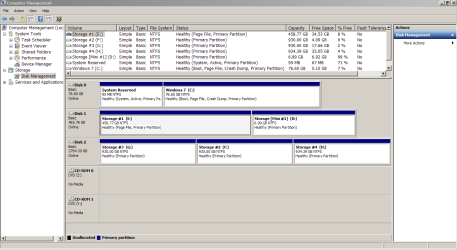
To understand what is now on your computer, with all drives attached, please launch Disk Manager (Launch Explorer and right click on My Computer - Manage - Disk Management (left panel - bottom)).
Expand the columns so we can read them and with the sniping tool take a snapshot. Post the image as an attachment (Go Advanced - Manage Attachments - Browse - Upload)
 

My Computers

System One System Two

  • Computer type
    PC/Desktop
    Computer Manufacturer/Model Number
    custom build
    OS
    Windows 7 HP 64
    CPU
    i5 6600K - 800MHz to 4200MHz
    Motherboard
    GA-Z170-HD3P
    Memory
    4+4G GSkill DDR4 3000
    Graphics Card(s)
    IG - Intel 530
    Monitor(s) Displays
    Samsung 226BW
    Screen Resolution
    1680x1050
    Hard Drives
    (1) -1 SM951 – 128GB M.2 AHCI PCIe SSD drive for Windows 7 and Lubuntu
    (2) -1 WD SATA 3 - 1T for Data
    (3) -1 WD SATA 3 - 1T for backup
    PSU
    Thermaltake 450W TR2 gold
    Keyboard
    Old and good Chicony mechanical keyboard
    Mouse
    Logitech mX performance - 9 buttons (had to disable some)
    Internet Speed
    500Mb/s
    Browser
    Firefox 64
    Other Info
    TinyWall firewall
  • Computer type
    Laptop
    System Manufacturer/Model Number
    Asus Q550LF
    OS
    Windows 7 Pro
    CPU
    i7-4500U 800MHz to 3.0GHz
    Motherboard
    Asus Q550LF
    Memory
    (4+4)G DDR3 1600
    Graphics Card(s)
    IG intel 4400 + NVIDIA GeForce GT 745M
    Sound Card
    Realtek
    Monitor(s) Displays
    LG Display LP156WF4-SPH1
    Screen Resolution
    1920 x 1080
    Hard Drives
    BX500 120G SSD for Windows and programs +
    1T HDD for data
    Internet Speed
    500 Mb/s
    Browser
    Firefox
    Other Info
    TinyWall firewall
Megahertz07 said:
Mulsiphix, glad you have your computer back but all credits are for you.
You really helped me think about the problem from a different direction though. I don't believe I would have found the solution if I had not talked to you, specifically ;).

I've attached the requested screenshot :cool:
 

Attachments

  • requested_dm_screenshot.png
    requested_dm_screenshot.png
    30.5 KB · Views: 5

My Computer

OS
Windows 7 Home Premium
CPU
Core 2 Duo E4300 @ 3.15GHz
Motherboard
MSI P6N 650i SLI Platinum
Memory
3GB GeIL DDR2-800Mhz
Graphics Card(s)
Nvidia GeForce 260
Sound Card
Creative X-Fi XtremeGamer / Logitech X-540
Monitor(s) Displays
Samsung 226BW
Hard Drives
500GB Samsung
320GB Seagate
1TB Hitachi
80GB Hitachi
PSU
Thermaltake Toughpower 750W
Case
Antec 900 Advanced Gaming Case
Cooling
Tuniq Tower 120
Last edited:

My Computers

System One System Two

  • Computer type
    PC/Desktop
    Computer Manufacturer/Model Number
    custom build
    OS
    Windows 7 HP 64
    CPU
    i5 6600K - 800MHz to 4200MHz
    Motherboard
    GA-Z170-HD3P
    Memory
    4+4G GSkill DDR4 3000
    Graphics Card(s)
    IG - Intel 530
    Monitor(s) Displays
    Samsung 226BW
    Screen Resolution
    1680x1050
    Hard Drives
    (1) -1 SM951 – 128GB M.2 AHCI PCIe SSD drive for Windows 7 and Lubuntu
    (2) -1 WD SATA 3 - 1T for Data
    (3) -1 WD SATA 3 - 1T for backup
    PSU
    Thermaltake 450W TR2 gold
    Keyboard
    Old and good Chicony mechanical keyboard
    Mouse
    Logitech mX performance - 9 buttons (had to disable some)
    Internet Speed
    500Mb/s
    Browser
    Firefox 64
    Other Info
    TinyWall firewall
  • Computer type
    Laptop
    System Manufacturer/Model Number
    Asus Q550LF
    OS
    Windows 7 Pro
    CPU
    i7-4500U 800MHz to 3.0GHz
    Motherboard
    Asus Q550LF
    Memory
    (4+4)G DDR3 1600
    Graphics Card(s)
    IG intel 4400 + NVIDIA GeForce GT 745M
    Sound Card
    Realtek
    Monitor(s) Displays
    LG Display LP156WF4-SPH1
    Screen Resolution
    1920 x 1080
    Hard Drives
    BX500 120G SSD for Windows and programs +
    1T HDD for data
    Internet Speed
    500 Mb/s
    Browser
    Firefox
    Other Info
    TinyWall firewall
Back
Top