Solved Win7 won't recognize external HD

winnseven7

New member
Member
Local time
6:26 AM
Messages
60
Hello
Win7 wont recognize external HD seagate st3500320as in my computer. It is recognized in bios though ,and in device mgr. How can I get this to be recognized in my computer so I can format it and use as a storage device. Seagate is connnected to my PC by a sata usb adapter. I have no problem getting WesternDigital HD to be recognized using adapter, just this seagate. Any thoughts?

Thanks
 

My Computer

Computer type
PC/Desktop
OS
Windows 7 Ultimate x64

My Computer

Computer type
PC/Desktop
Computer Manufacturer/Model Number
Custom
OS
10 Pro x64
CPU
Ryzen 9 3900X
Motherboard
Asrock x370 Tachi
Memory
64GB(4x16GB) DDR4
Graphics Card(s)
EVGA 1080ti FTW3
Sound Card
ASUS Xonar Essence STX (V4 Bursons), ODAC rev B, NFB-11, O2
Monitor(s) Displays
3xASUS PB278Q/R, Optoma HD142X
Screen Resolution
3x1440p, 1080p
Hard Drives
512GB 850 EVO(OS, Programs)
4TB (Movies)
3TB (Downloads)
3TB (Programs)
1TB HDD (Games)
2x6TB R1 (videos)
PSU
AX760
Case
Fractal Define R5
Cooling
NH-D15S
Keyboard
Massdrop Ctrl with Box Navy's
Mouse
G903, Alioth XXL Mat
Internet Speed
280/40
Antivirus
MBAM, ESET
Browser
Canary 64 Bit
Other Info
I also own a Thinkpad P50 Xeon 4K, X220T, X1C5
I am not trying to create a partition on a HD that has an OS on it. Like I said in post #1 "external".
 

My Computer

Computer type
PC/Desktop
OS
Windows 7 Ultimate x64

My Computer

Computer type
PC/Desktop
Computer Manufacturer/Model Number
Custom
OS
10 Pro x64
CPU
Ryzen 9 3900X
Motherboard
Asrock x370 Tachi
Memory
64GB(4x16GB) DDR4
Graphics Card(s)
EVGA 1080ti FTW3
Sound Card
ASUS Xonar Essence STX (V4 Bursons), ODAC rev B, NFB-11, O2
Monitor(s) Displays
3xASUS PB278Q/R, Optoma HD142X
Screen Resolution
3x1440p, 1080p
Hard Drives
512GB 850 EVO(OS, Programs)
4TB (Movies)
3TB (Downloads)
3TB (Programs)
1TB HDD (Games)
2x6TB R1 (videos)
PSU
AX760
Case
Fractal Define R5
Cooling
NH-D15S
Keyboard
Massdrop Ctrl with Box Navy's
Mouse
G903, Alioth XXL Mat
Internet Speed
280/40
Antivirus
MBAM, ESET
Browser
Canary 64 Bit
Other Info
I also own a Thinkpad P50 Xeon 4K, X220T, X1C5
I opened DM & no prompt.

disk 0 healthy (internal HD)
disk 1(seagate) external not initialized/unallocated
left clik hilite disk 1
right clik disk 1 /properties/general tab "this device is working properly"

clik help/disk management-

If a disk is offline, you must bring it online before you can initialize it or create volumes on it.

Seagate must be alien to windows, as Western digital is recognized easily .
 

My Computer

Computer type
PC/Desktop
OS
Windows 7 Ultimate x64
Hi winnseven7

What sort of Seagate HDD are you using.
Recently i bought a Seagate HDD 3TB and it is for home server type.
I wrote to Seagate as i need to know what sort of HDD did i bought.
There are 2 connections, namely, Ethernet and USB, which should i able to use.
As i thought it can use as HDD to connect to my computer thru USB.
The instruction only mentioned ethernet connection, so i went to Seagate website to confirm.
They reply (within 24 hrs) that this HDD i have, is for server type.
This HDD cannot use as normal External HDD connect by USB.
Even the shop, i mainly get from this shops, Challenger, as there are range of IT products, and others.
After i receive the reply from Seagate, i check with this Challenger shop staff.
She also said it is for connection to Router only.
Seagate also mentioned that the USB is to connect to other devices, such as printer thru USB.
It work perfectly, as home server.

You can go to Seagate.com to ask them more in details, that to say it is a reliable Support staff.

Below is more info on connection, as i bought a lot of HDD and get used to connection matters.
Do read if the above do not apply to your case.

If this is brand new HDD, you need to do this first.
Do not connect the external HDD before you switch on the computer.

Try to do this first.
Switch On the computer without connect to the brand new external HDD.
At the Windows is running.
You need to connect to the power adapter, if any.
For 5" external HDD, it must have come with an adapter power supply.
Then connect the USB &or SATA.
Wait for a while before you will see in the notification, "Found device, wait for the installing driver...."
USB & SATA may required about 5 secs to detect, as Windows will detect any change in USB every few secs.
Once the driver is found and connect, it will tell you that the device is ready.

The issue is the driver setting as it did not have the correct driver.
BIOS work differently from Windows.
BIOS will check and if any device found, update into the BIOS setting.

It is better to let the Windows OS to detect first as the Windows driver will be update accordingly.
For BIOS, the nec setting is inside the something "flash" as it required internal battery to run.

It is best to insert any USB &or SATA devices when the Windows OS is ready.

Thanks for reading.

Regards,
Eirc.
 

My Computer

Computer type
Laptop
Computer Manufacturer/Model Number
Toshiba L630 and L735
OS
Windows 7 x64
Hard Drives
240 GB SSD
Hello Eirc,
Thank you for what you wrote. I did do this- "Try to do this first.
Switch On the computer without connect to the brand new external HDD.
At the Windows is running. You need to connect to the power adapter, if any"
...
Windows Usually does "auto run" popup window as with Western Digital no problem.
This seagate is an older model barracuda st3500320as.
Welcome to the forum!
 

My Computer

Computer type
PC/Desktop
OS
Windows 7 Ultimate x64
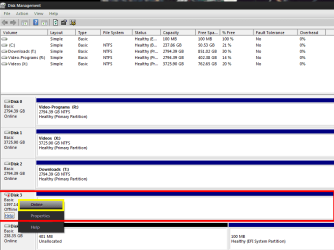
Your doing fine winseven7 you need to right click the disk like you saw and bring it online then it will ask you to initialize it. It did not bring it online because it probably thinks its foreign since it's on that adapter.
 

Attachments

  • disk online.png
    disk online.png
    33.1 KB · Views: 3

My Computer

Computer type
PC/Desktop
Computer Manufacturer/Model Number
Custom
OS
10 Pro x64
CPU
Ryzen 9 3900X
Motherboard
Asrock x370 Tachi
Memory
64GB(4x16GB) DDR4
Graphics Card(s)
EVGA 1080ti FTW3
Sound Card
ASUS Xonar Essence STX (V4 Bursons), ODAC rev B, NFB-11, O2
Monitor(s) Displays
3xASUS PB278Q/R, Optoma HD142X
Screen Resolution
3x1440p, 1080p
Hard Drives
512GB 850 EVO(OS, Programs)
4TB (Movies)
3TB (Downloads)
3TB (Programs)
1TB HDD (Games)
2x6TB R1 (videos)
PSU
AX760
Case
Fractal Define R5
Cooling
NH-D15S
Keyboard
Massdrop Ctrl with Box Navy's
Mouse
G903, Alioth XXL Mat
Internet Speed
280/40
Antivirus
MBAM, ESET
Browser
Canary 64 Bit
Other Info
I also own a Thinkpad P50 Xeon 4K, X220T, X1C5
Hello rvcjew

Steps taken-

PC on , power & usb connect to external HD. Right clik computer/manage.

This time I got a prompt window"initialize disk" in window disk 1(seagate) was checked. "Use the following partition style for the selected disks"..MBR was ticked/clik ok.

Welcome to the new simple volume wizard window pops up/next

Specify volume size window pops up , left at maximum default size/next

Assign drive letter or path window pops up, assign the following drive letter F is ticked/ next

Format partition window pops up. Format this volume with the following settings is ticked. File system NTFS, Allocation size default, Perform a quick format is ticked/ next...formatting....

Completing the new simple volume wizard window pops up"you have successfully completed wizard." clik finish.

Yes it is now recognized , thank you very much for your guidance. :)

=
My choice to select "online" as in your screenshot lower left, hilighted in yellow never was available.
Does the term "online " in Manage mean internet online or is it used as something else?
Western Digital is recognized without doing this manage operation, same adapter connecting to usb PC.

thanks again!
 

My Computer

Computer type
PC/Desktop
OS
Windows 7 Ultimate x64
Online means the disk is mounted in windows. Glad you got it sorted out.
 

My Computer

Computer type
PC/Desktop
Computer Manufacturer/Model Number
Custom
OS
10 Pro x64
CPU
Ryzen 9 3900X
Motherboard
Asrock x370 Tachi
Memory
64GB(4x16GB) DDR4
Graphics Card(s)
EVGA 1080ti FTW3
Sound Card
ASUS Xonar Essence STX (V4 Bursons), ODAC rev B, NFB-11, O2
Monitor(s) Displays
3xASUS PB278Q/R, Optoma HD142X
Screen Resolution
3x1440p, 1080p
Hard Drives
512GB 850 EVO(OS, Programs)
4TB (Movies)
3TB (Downloads)
3TB (Programs)
1TB HDD (Games)
2x6TB R1 (videos)
PSU
AX760
Case
Fractal Define R5
Cooling
NH-D15S
Keyboard
Massdrop Ctrl with Box Navy's
Mouse
G903, Alioth XXL Mat
Internet Speed
280/40
Antivirus
MBAM, ESET
Browser
Canary 64 Bit
Other Info
I also own a Thinkpad P50 Xeon 4K, X220T, X1C5
Back
Top