Win7 works smoothly, then Suddenly slows down.

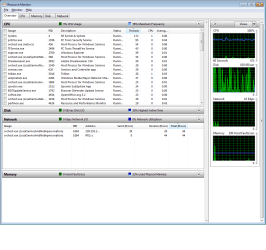
This is a screen for what I see. Sorry I am a noob at this computer stuff >_>

That clean boot link you sent me tell me a bunch of settings to change. will it be easy to revert them back to normal?
 

Attachments

  • tm_screen.jpg
    tm_screen.jpg
    105.8 KB · Views: 52

My Computer My Computer

At a glance

Windows 7 professional
OS
Windows 7 professional
Clean boot, you untick the box. When done you tick them again

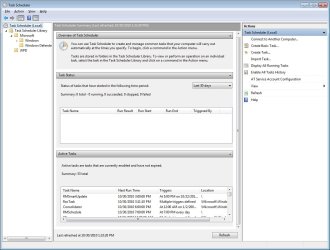
On task scheduler, in the left pane click on the various categories. You will see the schedules in each.
 

My Computer My Computer

At a glance

Windows 10, Home Clean InstallIntel Core2 processsor Q8200(2.33Ghz 1333FSB)...6 gbATI Radeon 256MB HD3650
Computer type
PC/Desktop
Computer Manufacturer/Model Number
Dell XPS 420
OS
Windows 10, Home Clean Install
CPU
Intel Core2 processsor Q8200(2.33Ghz 1333FSB) Quad Core Tech
Motherboard
Dell
Memory
6 gb
Graphics Card(s)
ATI Radeon 256MB HD3650
Sound Card
Intergrated 7.1 Channel Audio
Monitor(s) Displays
Dell SP2009W 20"
Hard Drives
640 GB Serial ATA Hard drive
Cooling
Fan
Keyboard
Dell USB Keyboard
Mouse
Dell Premium Optical USB
Internet Speed
DSL 2.85
Zero hour came. The computer still slowed down. No abnormal processes were being done and no cpu increases were detected. I let it run until 12pm today until I restarted (had to force reboot)

I ran another maleware scan on spyware doctor, and the other maleware program. both were negative.


EDIT:

Investigating the logs....

An hour before Zero Hour:
Activation context generation failed for "C:\Program Files (x86)\Common Files\Adobe AIR\Versions\1.0\Adobe AIR.dll".Error in manifest or policy file "C:\Program Files (x86)\Common Files\Adobe AIR\Versions\1.0\Adobe AIR.dll" on line 3. The value "MAJOR_VERSION.MINOR_VERSION.BUILD_NUMBER_MAJOR.BUILD_NUMBER_MINOR" of attribute "version" in element "assemblyIdentity" is invalid.


When stuck in shut down:

A timeout (30000 milliseconds) was reached while waiting for a transaction response from the sdCoreService service.
 
Last edited:

My Computer My Computer

At a glance

Windows 7 professional
OS
Windows 7 professional
Lets think about this for a minute, together.
Every night at the same time

Has to be something running in the computer or
Something external affecting it.

We did malwarebytes
Antivirus and both an negative
You say that no process began to run at that hour

Im at a loss
Those are the only possiblities.
A malfunction happens anytime.

Put it in clean boot state for the entire period that the problem occurs.
 

My Computer My Computer

At a glance

Windows 10, Home Clean InstallIntel Core2 processsor Q8200(2.33Ghz 1333FSB)...6 gbATI Radeon 256MB HD3650
Computer type
PC/Desktop
Computer Manufacturer/Model Number
Dell XPS 420
OS
Windows 10, Home Clean Install
CPU
Intel Core2 processsor Q8200(2.33Ghz 1333FSB) Quad Core Tech
Motherboard
Dell
Memory
6 gb
Graphics Card(s)
ATI Radeon 256MB HD3650
Sound Card
Intergrated 7.1 Channel Audio
Monitor(s) Displays
Dell SP2009W 20"
Hard Drives
640 GB Serial ATA Hard drive
Cooling
Fan
Keyboard
Dell USB Keyboard
Mouse
Dell Premium Optical USB
Internet Speed
DSL 2.85
=( I'm really just worried. My computer was made by PowerSpec. Maybe they have some sort of program running at that time? but that would be detected with maleware. gah this is so frustrating.
 

My Computer My Computer

At a glance

Windows 7 professional
OS
Windows 7 professional
Do the clean boot tonight
 

My Computer My Computer

At a glance

Windows 10, Home Clean InstallIntel Core2 processsor Q8200(2.33Ghz 1333FSB)...6 gbATI Radeon 256MB HD3650
Computer type
PC/Desktop
Computer Manufacturer/Model Number
Dell XPS 420
OS
Windows 10, Home Clean Install
CPU
Intel Core2 processsor Q8200(2.33Ghz 1333FSB) Quad Core Tech
Motherboard
Dell
Memory
6 gb
Graphics Card(s)
ATI Radeon 256MB HD3650
Sound Card
Intergrated 7.1 Channel Audio
Monitor(s) Displays
Dell SP2009W 20"
Hard Drives
640 GB Serial ATA Hard drive
Cooling
Fan
Keyboard
Dell USB Keyboard
Mouse
Dell Premium Optical USB
Internet Speed
DSL 2.85
Before doing clean boot, physically disconnect your PC from net. That way you'll determine is it something external causing the problem or not. And way are you sure that the trojan detected is false positive? Are you absolutely sure about that? Do google search for it, or upload it to VirusTotal - Free Online Virus, Malware and URL Scanner see the results

About this:
Activation context generation failed for "C:\Program Files (x86)\Common Files\Adobe AIR\Versions\1.0\Adobe AIR.dll".Error in manifest or policy file "C:\Program Files (x86)\Common Files\Adobe AIR\Versions\1.0\Adobe AIR.dll" on line 3. The value "MAJOR_VERSION.MINOR_VERSION.BUILD_NUMBER_MAJOR.BUILD_NUMBER_MINOR" of attribute "version" in element "assemblyIdentity" is invalid.
You may want to uninstall Adobe reader, and try one of this:

Foxit Software - Foxit Reader for Windows

Tracker Software Products :: PDF Creation Software, Free PDF Viewer
They are great, fast and FREE pdf programs, and widely recommended from members of this forum and around interwebz
cheers
 

My Computer My Computer

At a glance

Windows 7 Ultimate x32DualCore Intel Pentium E2200, 2218 MHz (11 x ...2 GB DDR2-800 DDR2 SDRAMnVIDIA GeForce 9500GT 1GB
Computer Manufacturer/Model Number
Micro-Star International/MS-7529
OS
Windows 7 Ultimate x32
CPU
DualCore Intel Pentium E2200, 2218 MHz (11 x 202)
Motherboard
MSI G31M3 V2 (MS-7529) (2 PCI, 1 PCI-E x16,2 DDR2 DIMM)
Memory
2 GB DDR2-800 DDR2 SDRAM
Graphics Card(s)
nVIDIA GeForce 9500GT 1GB
Sound Card
Realtek ALC888/1200 @ Intel 82801GB ICH7
Monitor(s) Displays
Samsung SyncMaster 2253BW (Digital) 22'' LCD
Screen Resolution
1680x1050
Hard Drives
SAMSUNG HD322IJ ATA Device (298 GB , IDE)
Thanks I'll be sure to give these a try tonight
 

My Computer My Computer

At a glance

Windows 7 professional
OS
Windows 7 professional
Just a thought:

If you have automatic Windows updates turned on, this is the time of day it is normally set up to take place and can be delayed by rebooting. I have noticed the same effects when "automatic updates" are being made, particularly on the first hours of the update dissemination to millions of computers. The automatic updates often make everything slow as molasses in the refrigerator. Also, the "automatic" update takes forever.

Next time you notice, do a manual update of Windows...
 

My Computer My Computer

At a glance

Windows 7AMD Athalon2 Gig
Computer Manufacturer/Model Number
Build
OS
Windows 7
CPU
AMD Athalon
Motherboard
Gigabyte
Memory
2 Gig
how do I turn this off?

EDIT: Zero hour came early today. 5 after midnight, and 10 min after a fresh reboot in clean boot mode..... everything came to a crawl.
 
Last edited:

My Computer My Computer

At a glance

Windows 7 professional
OS
Windows 7 professional

My Computer My Computer

At a glance

Windows 10, Home Clean InstallIntel Core2 processsor Q8200(2.33Ghz 1333FSB)...6 gbATI Radeon 256MB HD3650
Computer type
PC/Desktop
Computer Manufacturer/Model Number
Dell XPS 420
OS
Windows 10, Home Clean Install
CPU
Intel Core2 processsor Q8200(2.33Ghz 1333FSB) Quad Core Tech
Motherboard
Dell
Memory
6 gb
Graphics Card(s)
ATI Radeon 256MB HD3650
Sound Card
Intergrated 7.1 Channel Audio
Monitor(s) Displays
Dell SP2009W 20"
Hard Drives
640 GB Serial ATA Hard drive
Cooling
Fan
Keyboard
Dell USB Keyboard
Mouse
Dell Premium Optical USB
Internet Speed
DSL 2.85
In start search ,type windows update,then in the update window on the left there is a change setting link in there ,change the settings via the dropdown that gives you the option. by important updates.

Edit: Richard lightning fingers beat me to it. :D
 

My Computer My Computer

At a glance

Microsoft Windows 7 Home Premium 64-bit 7600IIx4 amd athelon 635 processor2x2gbati radeon HD 5450
Computer Manufacturer/Model Number
Hewlett packard/p6512uk
OS
Microsoft Windows 7 Home Premium 64-bit 7600
CPU
IIx4 amd athelon 635 processor
Motherboard
FOXCONN 2AA9
Memory
2x2gb
Graphics Card(s)
ati radeon HD 5450
Sound Card
(1) Realtek High Definition Audio (2) AMD High Definition
Monitor(s) Displays
samsung lcd tv 32"
Screen Resolution
1360x 768
Hard Drives
(1) WDC WD10 01FAES-60Z2A0 SATA Disk Device (2) Maxtor OneTouch USB Device (3) ST310003 33AS USB Device (4) WD My Book 1111 USB Device
PSU
?
Cooling
air!
Keyboard
wireless hp
Mouse
wireless Hp,optical
Internet Speed
1.10mb/s
Antivirus
MSE
Browser
Firefox
I decided to clean boot anyway. I restarted at 11:55. at 12:05am the slowdowns struck. Eerything came to a crawl. Yet my damn resource monitor showed NOTHING in terms of extra processes.

I could not shut down normally... yet again. I had to reboot by holding the shut down button on my case.

is there any way to log every damn thing my computer does?
 

My Computer My Computer

At a glance

Windows 7 professional
OS
Windows 7 professional
This is like a soap opera.
Try the advice, tomorrow about disconnecting from the internet. Im sorry I did not think of that one. It has potential.

You can type event viewer in search to look for any errors or problems
There is a log that will give complete computer activity, but I cannot think of the name. I will post when I do, .
 

My Computer My Computer

At a glance

Windows 10, Home Clean InstallIntel Core2 processsor Q8200(2.33Ghz 1333FSB)...6 gbATI Radeon 256MB HD3650
Computer type
PC/Desktop
Computer Manufacturer/Model Number
Dell XPS 420
OS
Windows 10, Home Clean Install
CPU
Intel Core2 processsor Q8200(2.33Ghz 1333FSB) Quad Core Tech
Motherboard
Dell
Memory
6 gb
Graphics Card(s)
ATI Radeon 256MB HD3650
Sound Card
Intergrated 7.1 Channel Audio
Monitor(s) Displays
Dell SP2009W 20"
Hard Drives
640 GB Serial ATA Hard drive
Cooling
Fan
Keyboard
Dell USB Keyboard
Mouse
Dell Premium Optical USB
Internet Speed
DSL 2.85
I actually pulled the plug on the net the second the slowdowns happened. They continued for 30 minutes until I shut down by force.

Since then I have restarted, updated windows .NET framework, and ATI drivers and turned off automatic checking for updates......

lets see what happens
 

My Computer My Computer

At a glance

Windows 7 professional
OS
Windows 7 professional
try deleting all cookies and LSO files!
 

My Computer My Computer

At a glance

Windows 7AMD Athalon2 Gig
Computer Manufacturer/Model Number
Build
OS
Windows 7
CPU
AMD Athalon
Motherboard
Gigabyte
Memory
2 Gig
I always empty my cookie folder. as for LSO, what is that exactly?
 

My Computer My Computer

At a glance

Windows 7 professional
OS
Windows 7 professional
well, Sorry for the double posting. thought I'd update that there was no Witching hour last night. I am not sure if that's because I turned off updates. or updated to the most recent .NET

I'll report back the next time this occurs
 

My Computer My Computer

At a glance

Windows 7 professional
OS
Windows 7 professional

My Computer My Computer

At a glance

Windows 7AMD Athalon2 Gig
Computer Manufacturer/Model Number
Build
OS
Windows 7
CPU
AMD Athalon
Motherboard
Gigabyte
Memory
2 Gig
So it happened again. I was able to get a screenshot of my recourse monitor window.

Left: NORMAL state, I restarted, and idled for 60 seconds and took a pic

Right: is during the system slowdown
 

Attachments

  • win7_normal.png
    win7_normal.png
    40.1 KB · Views: 21
  • win7_Slowdown.png
    win7_Slowdown.png
    36.8 KB · Views: 45

My Computer My Computer

At a glance

Windows 7 professional
OS
Windows 7 professional
Back
Top