Win7codecs

The x64 Components are an 'addon' to the 32bit installation.
addon = not a standalone product.
Okay, so tell me Shark. Right now I haven't encountered any problems with WMP 12, but I'm sure I will eventually, it's the default player in 7 Ultimate x64. If I install your codec pack, I shouldn't expect any future trouble playing any file type? You seem pretty knowledgable in this area, so I'm just asking if it's a good idea to install your codec pack as a preventative measure for future problems? I'm not a power media user or anything, just your normal video files I'll be trying to play.

The reason I'm leary of codec packs is that I've had a few bad experiences with them. A few times I had to reinstall the OS it was so bad.

One last question. Will it play flash video's, and VOB DVD media?

I can attest to Shark's codecs playing Flash videos - ".flv" files from YouTube. I haven't tried ".vob" files, but have used them for a lot of other video formats.

I can also state that Shark's codecs have NEVER hosed my system in any way, shape, or form.
 

My Computer

Computer Manufacturer/Model Number
Gateway, Toshiba Laptop, and Home Brew
OS
Windows 7 x64 HP, Windows 7 HP, Windows 7 Ult
CPU
Intel I3, Cerelon, Pentium 4 @ 3Ghz
Motherboard
Intel, Intel, Asus
Memory
8G, 3G, 3G
Graphics Card(s)
On-board Intel, On-board nVidia, nVIDIA card
Sound Card
on-board, on-board, SoundBlaster
Monitor(s) Displays
Hannspree HF237, Toshiba, SyncMaster 931B
Screen Resolution
default (all)
Hard Drives
1T internal, 320G internal, 160G internal, 1T networked
PSU
300w, unk, 650w
Case
black, black, grey
Cooling
air (all)
Keyboard
standard wired (all)
Mouse
standard wired (all)
Internet Speed
6M down, 768K up
Other Info
Home LAN through Linksys hub to 4 port and wireless switch/router. Networked HP 2600n. Wife's computer running Windows 7, and spare laptop running Ubuntu "Karmic Kola" (9.10).
I can attest to Shark's codecs playing Flash videos - ".flv" files from YouTube. I haven't tried ".vob" files, but have used them for a lot of other video formats.

I can also state that Shark's codecs have NEVER hosed my system in any way, shape, or form.
You've just about got me sold. Now if Shark says I need it, I'll install it. Thank you for your input. Especially that it never botched your system in any way. BIG PLUS!
 

My Computer

Computer Manufacturer/Model Number
NVIDIA
OS
Windows 7 Enterprise x64
CPU
AMD Athlon 64X2 Dual Core 3800+
Motherboard
GeForce 6100-M9
Memory
OCZ Platinum Dual Channel - 4x1Gb
Graphics Card(s)
NVIDIA GeForce 8800 GT PCI Express x16
Sound Card
Creative Audigy Sound Blaster Extreme PCI
Monitor(s) Displays
Compaq 7500
Screen Resolution
1024x768
Hard Drives
C: Seagate ST3250318AS SataII - 250Gb

D: Seagate ST3500418AS SataII - 500Gb
PSU
OCZ 600w Dual 12v Rails
Case
Thermaltake
Cooling
OCZ Heatsinks, Fans, and Thermal Paste on CPU & Chipsets
Keyboard
Logitech
Mouse
Radio Shack PS2
Internet Speed
Cable
Other Info
Dual Pioneer DVD/RW optical drives. LG CD/RW optical drive.
I've had a few bad experiences with them. A few times I had to reinstall the OS it was so bad.

One last question. Will it play flash video's, and VOB DVD media?

These bad experiences with K-crap and the re-installation of operating systems was my innitial incentive to create a pack for personal use. I've expanded a bit on the personal use part of the statement.

All filetypes are supported. FLV's will play immediately after installation. Some files will need you to make adjustments using the settings interface. Nothing about your playback ability is changed by default other than adding support for a wider range of media files.

Since you feel you do not have an immidiate need for the enhanced playback ability my package offers you, I do suggest that after installation you choose to associate all filetypes to the windows players using the button provided on the Help TAB of the settings interface.

If ever you do have a troublesome file, at the bottom of the settings application is a checkbox to use 'suggested settings' which will most likely solve the issue. If it is still a problem, please search my forum for answers.
 

My Computer

Computer Manufacturer/Model Number
Selfbuilt
OS
Windows 7 Ultimate 64bit
CPU
i7 2600k
Motherboard
asus P8Z68-V LE
Memory
16GB (4x4) corsair vengeance
Graphics Card(s)
Intel HD3000 iGPU / AMD HD6870 1024MB
Sound Card
bitstreamed to an Onkyo 609
Monitor(s) Displays
Asus VE278 27" LED / Bravia EX7 60" LED
Screen Resolution
native 1080p x2
Hard Drives
4x 2TB int. + 2x 2TB external and a SSD for the boot drive.
PSU
650w Antec
Case
NZXT tempest evo
Cooling
air/stock
Keyboard
Dell
Mouse
logitech m505
Internet Speed
dual: cable/blackberry tether for travel use
Other Info
BD re-writer //
asus notebook G73Jw
Okay I'm sold. One last bothersome question. Your codecs don't come bundled with another media player do they? The reason I ask is because you said I should select WMP as the default player. I always use that as my default player, and I don't want yet another player on my PC. I was already forced to use Nero media player with it's install, and I never use it at all. I like WMP.
 

My Computer

Computer Manufacturer/Model Number
NVIDIA
OS
Windows 7 Enterprise x64
CPU
AMD Athlon 64X2 Dual Core 3800+
Motherboard
GeForce 6100-M9
Memory
OCZ Platinum Dual Channel - 4x1Gb
Graphics Card(s)
NVIDIA GeForce 8800 GT PCI Express x16
Sound Card
Creative Audigy Sound Blaster Extreme PCI
Monitor(s) Displays
Compaq 7500
Screen Resolution
1024x768
Hard Drives
C: Seagate ST3250318AS SataII - 250Gb

D: Seagate ST3500418AS SataII - 500Gb
PSU
OCZ 600w Dual 12v Rails
Case
Thermaltake
Cooling
OCZ Heatsinks, Fans, and Thermal Paste on CPU & Chipsets
Keyboard
Logitech
Mouse
Radio Shack PS2
Internet Speed
Cable
Other Info
Dual Pioneer DVD/RW optical drives. LG CD/RW optical drive.
Okay I'm sold. One last bothersome question. Your codecs don't come bundled with another media player do they? The reason I ask is because you said I should select WMP as the default player. I always use that as my default player, and I don't want yet another player on my PC. I was already forced to use Nero media player with it's install, and I never use it at all. I like WMP.

Sorry if I'm stepping on Shark's tail, as it were... :)

The codecs use the Windows Media Player, or any other that you have installed. They do not contain their own player(s). When you want to use a file, right click on it to check and select WMP if it isn't the default.
 

My Computer

Computer Manufacturer/Model Number
Gateway, Toshiba Laptop, and Home Brew
OS
Windows 7 x64 HP, Windows 7 HP, Windows 7 Ult
CPU
Intel I3, Cerelon, Pentium 4 @ 3Ghz
Motherboard
Intel, Intel, Asus
Memory
8G, 3G, 3G
Graphics Card(s)
On-board Intel, On-board nVidia, nVIDIA card
Sound Card
on-board, on-board, SoundBlaster
Monitor(s) Displays
Hannspree HF237, Toshiba, SyncMaster 931B
Screen Resolution
default (all)
Hard Drives
1T internal, 320G internal, 160G internal, 1T networked
PSU
300w, unk, 650w
Case
black, black, grey
Cooling
air (all)
Keyboard
standard wired (all)
Mouse
standard wired (all)
Internet Speed
6M down, 768K up
Other Info
Home LAN through Linksys hub to 4 port and wireless switch/router. Networked HP 2600n. Wife's computer running Windows 7, and spare laptop running Ubuntu "Karmic Kola" (9.10).
Been using K crap as Shark calls it and I had problems playing mkv files, but now I installed his codecs they run very well no stuttering or sound problems, thankyou very much Mr Shark for all your hard work and dedication :)


mkv files play great with k-lite installed.
 

My Computer

Computer Manufacturer/Model Number
PartnersInc.Org
OS
7 Home Premium
Thanks guys...installing now. And yes, I still have my fingers crossed. ;)

So I download the x64 version from MajorGeeks? Download links would be helpful, Shark's website is confusing. A link to the first 32Bit installer, then the 64Bit addon would be great.
 

My Computer

Computer Manufacturer/Model Number
NVIDIA
OS
Windows 7 Enterprise x64
CPU
AMD Athlon 64X2 Dual Core 3800+
Motherboard
GeForce 6100-M9
Memory
OCZ Platinum Dual Channel - 4x1Gb
Graphics Card(s)
NVIDIA GeForce 8800 GT PCI Express x16
Sound Card
Creative Audigy Sound Blaster Extreme PCI
Monitor(s) Displays
Compaq 7500
Screen Resolution
1024x768
Hard Drives
C: Seagate ST3250318AS SataII - 250Gb

D: Seagate ST3500418AS SataII - 500Gb
PSU
OCZ 600w Dual 12v Rails
Case
Thermaltake
Cooling
OCZ Heatsinks, Fans, and Thermal Paste on CPU & Chipsets
Keyboard
Logitech
Mouse
Radio Shack PS2
Internet Speed
Cable
Other Info
Dual Pioneer DVD/RW optical drives. LG CD/RW optical drive.
Okay I'm sold. One last bothersome question. Your codecs don't come bundled with another media player do they? The reason I ask is because you said I should select WMP as the default player. I always use that as my default player, and I don't want yet another player on my PC. I was already forced to use Nero media player with it's install, and I never use it at all. I like WMP.

do yourself a favor and download media play classic. plays more than wmp. wmp is a resoursce hog and it is too intrusive.
 

My Computer

Computer Manufacturer/Model Number
PartnersInc.Org
OS
7 Home Premium
I don't want another media player. I like WMP 12 just fine. Thanks for the tip though.
 

My Computer

Computer Manufacturer/Model Number
NVIDIA
OS
Windows 7 Enterprise x64
CPU
AMD Athlon 64X2 Dual Core 3800+
Motherboard
GeForce 6100-M9
Memory
OCZ Platinum Dual Channel - 4x1Gb
Graphics Card(s)
NVIDIA GeForce 8800 GT PCI Express x16
Sound Card
Creative Audigy Sound Blaster Extreme PCI
Monitor(s) Displays
Compaq 7500
Screen Resolution
1024x768
Hard Drives
C: Seagate ST3250318AS SataII - 250Gb

D: Seagate ST3500418AS SataII - 500Gb
PSU
OCZ 600w Dual 12v Rails
Case
Thermaltake
Cooling
OCZ Heatsinks, Fans, and Thermal Paste on CPU & Chipsets
Keyboard
Logitech
Mouse
Radio Shack PS2
Internet Speed
Cable
Other Info
Dual Pioneer DVD/RW optical drives. LG CD/RW optical drive.
mkv files play great with k-lite installed.

that's why i don't rush to change codec packs.


one question, though: does shark codec pack support apple's mov/hdmov playback?
 

My Computer

OS
Windows 7 Professional x64 SP1
CPU
AMD Phenom II X6 1100T BE
Motherboard
ASUS M5A99X EVO
Memory
12GB (Kingston 4GB & 8GB DDR3 1333MHz Kits)
Graphics Card(s)
MSI GeForce N560GTX-Ti Twin Frozr II
Sound Card
ALC892, SB Audigy ES
Monitor(s) Displays
ViewSonic 24"
Screen Resolution
1920x1080
Hard Drives
OCZ Vertex 3 240GB SATA III, Seagate Barracuda 500GB SATA II, Seagate Barracuda Green 2TB SATA III, Seagate Barracuda LP 2TB SATA II
PSU
Corsair Professional Series Gold AX850
Case
Cooler Master HAF 932
Cooling
Zalman CNPS10X Performa, CM 230mm, Titan 140mm PWM
Keyboard
Logitech Illuminated
Mouse
Logitech G400 on SteelSeries 4HD
Other Info
M-Audio Oxygen 25, Xbox 360 Wired Controller
Been using K crap as Shark calls it and I had problems playing mkv files, but now I installed his codecs they run very well no stuttering or sound problems, thankyou very much Mr Shark for all your hard work and dedication :)


mkv files play great with k-lite installed.

I never had a problem myself
 

My Computer

Computer Manufacturer/Model Number
custom build
OS
Windows 7 Pro X64
CPU
AMD Phenom II X4 975 Black Edition
Motherboard
MSI 870A-G54 (FX)
Memory
CORSAIR Vengeance 8GB (2 x 4GB) 240-Pin DDR3 SDRAM DDR3 1600
Graphics Card(s)
ASUS EN9800GT HB/HTDI/512M GeForce 9800 GT 512MB 256-bit GDD
Sound Card
Realtek ALC892
Monitor(s) Displays
Viewsonic 19' 16:10
Screen Resolution
1680X1050
Hard Drives
Western Digital Caviar Black WD6401AALS 640GB 7200 RPM SATA,
Western Digital Caviar Black 1TB 7200RPM SATA
PSU
Thermaltake Purepower W0100RU 500W ATX 12V
Case
COOLER MASTER Elite RC-331-KKN1-GP Black SECC ATX Mid Tower
Cooling
Nothing beyond what etch part came with
Keyboard
Logitech G11
Mouse
USB Logitech gaming mouse
Internet Speed
Cable
Other Info
New CPU, Motherboard, and Ram installed 02/2012

Logitech G35 Headset
mkv files play great with k-lite installed.
do yourself a favor and download media play classic. plays more than wmp. wmp is a resoursce hog and it is too intrusive.
mkv files play great with k-lite installed.
I never had a problem myself

I think its cool how these K-crap users are fooled into using alternate players with builtin codecs to play thier files because the crappack they chose to install and use cant cut it in the Windows players. Best part is; these same K-crap promoters are in here reading about my alternate codecpacks because in the back of thier mind they know there must be something better.
 

My Computer

Computer Manufacturer/Model Number
Selfbuilt
OS
Windows 7 Ultimate 64bit
CPU
i7 2600k
Motherboard
asus P8Z68-V LE
Memory
16GB (4x4) corsair vengeance
Graphics Card(s)
Intel HD3000 iGPU / AMD HD6870 1024MB
Sound Card
bitstreamed to an Onkyo 609
Monitor(s) Displays
Asus VE278 27" LED / Bravia EX7 60" LED
Screen Resolution
native 1080p x2
Hard Drives
4x 2TB int. + 2x 2TB external and a SSD for the boot drive.
PSU
650w Antec
Case
NZXT tempest evo
Cooling
air/stock
Keyboard
Dell
Mouse
logitech m505
Internet Speed
dual: cable/blackberry tether for travel use
Other Info
BD re-writer //
asus notebook G73Jw
mkv files play great with k-lite installed.
do yourself a favor and download media play classic. plays more than wmp. wmp is a resoursce hog and it is too intrusive.
mkv files play great with k-lite installed.
I never had a problem myself

I think its cool how these K-crap users are fooled into using alternate players with builtin codecs to play thier files because the crappack they chose to install and use cant cut it in the Windows players. Best part is; these same K-crap promoters are in here reading about my alternate codecpacks because in the back of thier mind they know there must be something better.

+1 ;)
 

My Computer

Computer type
PC/Desktop
Computer Manufacturer/Model Number
LENOVO K450 @3.0GHZ
OS
64-bit Windows 8.1 Pro
CPU
Core(TM) i5 CPU 4330 Haswell @ 3.20GHz
Motherboard
LENOVO
Memory
12.00 GB
Graphics Card(s)
Intel(R) HD Graphics
Sound Card
Intel HD integtrated
Monitor(s) Displays
HP 25' ISP Monitor
Screen Resolution
1900/1020
Hard Drives
(1) ST1000DM003-1CH162 (2) Generic STORAGE DEVICE USB Device (3) Generic STORAGE DEVICE USB Device
Internet Speed
100mb down/10mb up
i understand that you got burned by K-Lite pack but it works for others. me.. i didn't even know about Shark007 pack until i joined these forums.

and now i consider it as another option worth to try out.
 

My Computer

OS
Windows 7 Professional x64 SP1
CPU
AMD Phenom II X6 1100T BE
Motherboard
ASUS M5A99X EVO
Memory
12GB (Kingston 4GB & 8GB DDR3 1333MHz Kits)
Graphics Card(s)
MSI GeForce N560GTX-Ti Twin Frozr II
Sound Card
ALC892, SB Audigy ES
Monitor(s) Displays
ViewSonic 24"
Screen Resolution
1920x1080
Hard Drives
OCZ Vertex 3 240GB SATA III, Seagate Barracuda 500GB SATA II, Seagate Barracuda Green 2TB SATA III, Seagate Barracuda LP 2TB SATA II
PSU
Corsair Professional Series Gold AX850
Case
Cooler Master HAF 932
Cooling
Zalman CNPS10X Performa, CM 230mm, Titan 140mm PWM
Keyboard
Logitech Illuminated
Mouse
Logitech G400 on SteelSeries 4HD
Other Info
M-Audio Oxygen 25, Xbox 360 Wired Controller
mkv files play great with k-lite installed.
do yourself a favor and download media play classic. plays more than wmp. wmp is a resoursce hog and it is too intrusive.
mkv files play great with k-lite installed.
I never had a problem myself

I think its cool how these K-crap users are fooled into using alternate players with builtin codecs to play thier files because the crappack they chose to install and use cant cut it in the Windows players. Best part is; these same K-crap promoters are in here reading about my alternate codecpacks because in the back of thier mind they know there must be something better.
I'm not fooled into anything. I already liked Media player classic before I ever downloaded K-light

Also there is a option to NOT install it and use the systems default media player


PS: The X64 ver did not come with any media player so it was a extra download


PSS:
Best part is; these same K-crap promoters are in here reading about my alternate codecpacks because in the back of thier mind they know there must be something better.
I was just trying to get a little more info on it since it was made by a 7 forum member
 

My Computer

Computer Manufacturer/Model Number
custom build
OS
Windows 7 Pro X64
CPU
AMD Phenom II X4 975 Black Edition
Motherboard
MSI 870A-G54 (FX)
Memory
CORSAIR Vengeance 8GB (2 x 4GB) 240-Pin DDR3 SDRAM DDR3 1600
Graphics Card(s)
ASUS EN9800GT HB/HTDI/512M GeForce 9800 GT 512MB 256-bit GDD
Sound Card
Realtek ALC892
Monitor(s) Displays
Viewsonic 19' 16:10
Screen Resolution
1680X1050
Hard Drives
Western Digital Caviar Black WD6401AALS 640GB 7200 RPM SATA,
Western Digital Caviar Black 1TB 7200RPM SATA
PSU
Thermaltake Purepower W0100RU 500W ATX 12V
Case
COOLER MASTER Elite RC-331-KKN1-GP Black SECC ATX Mid Tower
Cooling
Nothing beyond what etch part came with
Keyboard
Logitech G11
Mouse
USB Logitech gaming mouse
Internet Speed
Cable
Other Info
New CPU, Motherboard, and Ram installed 02/2012

Logitech G35 Headset
Shark, I'm still waiting for a direct download link to install your codecs, and a direct download link for the x64 addon. Thanks.

Max
 

My Computer

Computer Manufacturer/Model Number
NVIDIA
OS
Windows 7 Enterprise x64
CPU
AMD Athlon 64X2 Dual Core 3800+
Motherboard
GeForce 6100-M9
Memory
OCZ Platinum Dual Channel - 4x1Gb
Graphics Card(s)
NVIDIA GeForce 8800 GT PCI Express x16
Sound Card
Creative Audigy Sound Blaster Extreme PCI
Monitor(s) Displays
Compaq 7500
Screen Resolution
1024x768
Hard Drives
C: Seagate ST3250318AS SataII - 250Gb

D: Seagate ST3500418AS SataII - 500Gb
PSU
OCZ 600w Dual 12v Rails
Case
Thermaltake
Cooling
OCZ Heatsinks, Fans, and Thermal Paste on CPU & Chipsets
Keyboard
Logitech
Mouse
Radio Shack PS2
Internet Speed
Cable
Other Info
Dual Pioneer DVD/RW optical drives. LG CD/RW optical drive.
Shark, I'm still waiting for a direct download link to install your codecs, and a direct download link for the x64 addon. Thanks.

Max

Direct download links do not exist. This is FREE software and the cost to run file servers does not fall under the FREE category. The donations I receive do not even cover internet access costs, let alone a file server. Look for the MajorGeeks logo near the bottom of the information pages on my website.
 

My Computer

Computer Manufacturer/Model Number
Selfbuilt
OS
Windows 7 Ultimate 64bit
CPU
i7 2600k
Motherboard
asus P8Z68-V LE
Memory
16GB (4x4) corsair vengeance
Graphics Card(s)
Intel HD3000 iGPU / AMD HD6870 1024MB
Sound Card
bitstreamed to an Onkyo 609
Monitor(s) Displays
Asus VE278 27" LED / Bravia EX7 60" LED
Screen Resolution
native 1080p x2
Hard Drives
4x 2TB int. + 2x 2TB external and a SSD for the boot drive.
PSU
650w Antec
Case
NZXT tempest evo
Cooling
air/stock
Keyboard
Dell
Mouse
logitech m505
Internet Speed
dual: cable/blackberry tether for travel use
Other Info
BD re-writer //
asus notebook G73Jw
Okay, thanks Shark. I have them downloaded. I'll install them if WMP-12 runs into a file I can not play. The way I look at it is "If it aint' broke don't fix it." Rep'in you now for your hard work.

Max
 

My Computer

Computer Manufacturer/Model Number
NVIDIA
OS
Windows 7 Enterprise x64
CPU
AMD Athlon 64X2 Dual Core 3800+
Motherboard
GeForce 6100-M9
Memory
OCZ Platinum Dual Channel - 4x1Gb
Graphics Card(s)
NVIDIA GeForce 8800 GT PCI Express x16
Sound Card
Creative Audigy Sound Blaster Extreme PCI
Monitor(s) Displays
Compaq 7500
Screen Resolution
1024x768
Hard Drives
C: Seagate ST3250318AS SataII - 250Gb

D: Seagate ST3500418AS SataII - 500Gb
PSU
OCZ 600w Dual 12v Rails
Case
Thermaltake
Cooling
OCZ Heatsinks, Fans, and Thermal Paste on CPU & Chipsets
Keyboard
Logitech
Mouse
Radio Shack PS2
Internet Speed
Cable
Other Info
Dual Pioneer DVD/RW optical drives. LG CD/RW optical drive.
Error... help please

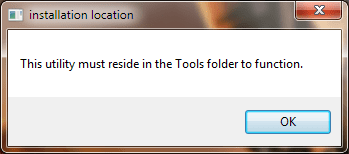
Please see attached:

Something went wrong at some point and I don't know how long ago to do a win restore. I thought the codec pack was uninstalled (as I was trying to install 2.4.4 and x64 2.5.0 today) When installing 2.4.4 it said it was already installed and would not let me, but the win7codec does NOT show up in the CP/uninstall a program list. I can install the x64 and uninstall it, but not the x86. The 32-bit settings application link is still in my All Programs folder, but when I click it, I get the below message.

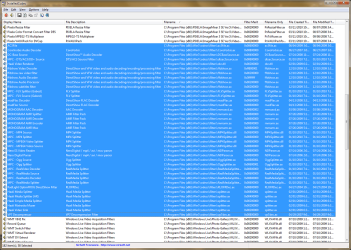
I ran the installedcodec application (C:\Program Files (x86)\Win7codecs\Tools) and it shows the codecs installed.

What can I do to get this remedied? Thanks Shark & friends!
 

Attachments

  • error.png
    error.png
    6.8 KB · Views: 4
  • Shark32Codec.png
    Shark32Codec.png
    261.3 KB · Views: 18

My Computer

Computer type
PC/Desktop
Computer Manufacturer/Model Number
CyberPower PC / Custom Intel X79 PC
OS
Windows 8.1 Professional x64
CPU
Intel Core i7-3930K 3.2 gHz Hex-Core (Turbo Boost 3.8 gHz)
Motherboard
ASUS P9X79 Pro (BIOS rev 4801)
Memory
8GB Corsair Vengeance DDR3-1600MHz 8-8-8-24
Graphics Card(s)
EVGA Superclocked GeForce GTX-580 1536MB
Sound Card
On-board 7.1 Realtek ALC898 HD Audio
Monitor(s) Displays
ASUS 27" 1080p MT276E
Screen Resolution
1920 x 1080
Hard Drives
Intel Cherryville 520 SSD 120GB (Main drive for OS)
WD Caviar Black 1TB 7200RPM 64MB Cache SATA 6
WD Caviar Blue 1TB 7200RPM 64MB Cache SATA 6
PSU
Corsair Professional Series AX850 80+ Gold
Case
Corsair Carbide 400R
Cooling
Corsair Hydro Series H60 / 9 x 120mm Thunderblade case fans
Keyboard
Microsoft Wireless Keyboard 3000 v2
Mouse
Microsoft Wireless Mouse 5000 - BlueTrack
Internet Speed
TWC Road Runner 30 Mbps
Antivirus
MS Security Essentials / Malwarebytes
Browser
IE 11
Other Info
LG Black 12X SATA BD-RW
Sony Optiarc Black 24X SATA DVD Burner
Logitech Web Cam Pro 9000
Panasonic 5.1 Surround System
Epson XP-310 Color Printer
Xbox One Controller
Xbox 360 PC Controller
Here is another satisfied registry cleaner user. Why people use them, i have no idea. All they do is destroy registry data. Guess you call that clean.

To solve your issue, go to C:\ProgramData\Win7codecs and order the directories in there by date. Enter the 2nd newest directory and then rightclick the MSI file, and choose 'Repair'

Afterwards, open the Settings Application and choose to uninstall it from the Help TAB.
 

My Computer

Computer Manufacturer/Model Number
Selfbuilt
OS
Windows 7 Ultimate 64bit
CPU
i7 2600k
Motherboard
asus P8Z68-V LE
Memory
16GB (4x4) corsair vengeance
Graphics Card(s)
Intel HD3000 iGPU / AMD HD6870 1024MB
Sound Card
bitstreamed to an Onkyo 609
Monitor(s) Displays
Asus VE278 27" LED / Bravia EX7 60" LED
Screen Resolution
native 1080p x2
Hard Drives
4x 2TB int. + 2x 2TB external and a SSD for the boot drive.
PSU
650w Antec
Case
NZXT tempest evo
Cooling
air/stock
Keyboard
Dell
Mouse
logitech m505
Internet Speed
dual: cable/blackberry tether for travel use
Other Info
BD re-writer //
asus notebook G73Jw
Back
Top