Win7pro in a VirtualPC - How?

CarvedDuck

New member
Member
Local time
4:32 AM
Messages
93
Hi all,

Is it possible to install my current win7pro in a Virtual PC without having to buy/Activate another copy?

I realize I would actually have to copies running, one to run the VPC and the other running within the VPC. But, being just one human being, I could only ever be using one at a time. Or, am I expected to add to "Microsoft Corp. today announced quarterly revenue of $20.49 billion," and buy a second copy?

Just had a very tenacious virus and I finally had to reinstall win7 and then go through installing all my software again. I had backups of the data and lost nothing but time. It cost me almost two 12-hour days to get back to where I was.

I would like to do everything from within the VPC this time and just backup the .VHD to a 64G thumb drive, maybe once a week. I know it would take an hour or so, but that's better than 2-days!

It is a Lenovo laptop and did not come with an install CD, but has a hidden recovery partition so it is not a simple matter to install a new copy from the CD.

Thanks.
 

My Computer

OS
Win7 Starter
Hello CarvedDuck,

I'm afraid not. Each installation (even virtual) will require it's own separate product key if you wanted to activate them, so you'll need to purchase another product key to be able to legally activate the second installation. :(
 

My Computer

Computer type
PC/Desktop
Computer Manufacturer/Model Number
Self built custom
OS
64-bit Windows 11 Pro for Workstations
CPU
Intel i7-8700K OC'd to 5 GHz
Motherboard
ASUS ROG Maximus XI Formula Z390
Memory
64 GB (4x16GB) G.SKILL TridentZ RGB DDR4 3600 MHz
Graphics Card(s)
ASUS ROG-STRIX-GTX1080TI-O11G-GAMING
Sound Card
Integrated
Monitor(s) Displays
2 x Samsung Odyssey G7 27"
Screen Resolution
2560x1440
Hard Drives
1TB Samsung 990 PRO M.2,
4TB Samsung 990 PRO PRO M.2,
TerraMaster F8 SSD Plus NAS
PSU
Seasonic Prime Titanium 850W
Case
Thermaltake Core P3
Cooling
Corsair Hydro H115i
Keyboard
Logitech wireless K800
Mouse
Logitech MX Master 4
Internet Speed
2 Gb/s Download and 100 Mb/s Upload
Antivirus
Malwarebyte Anti-Malware Premium
Browser
Google Chrome
Other Info
Logitech Z625 speaker system,
Logitech BRIO 4K Pro webcam,
HP Color LaserJet Pro MFP M477fdn,
APC SMART-UPS RT 1000 XL - SURT1000XLI,
Galaxy S23 Plus phone
CarvedDuck, this is another reason to have a disk imaging program. I do it periodically using Acronis and it takes about 10-15 minutes at most to completely restore my C drive. There are free or low cost imaging backup programs. Sorry for the time it took you to restore. And as the boss says, No you can't install the same copy of Windows 7 on more than one machine without a license which requires a purchase to help Microsoft.

macrium.com
is where you can download the free version of Macrium a recommended imaging program.
Rich
 

My Computer

Computer type
Laptop
Computer Manufacturer/Model Number
Toshiba Laptop Qosimo X870
OS
Windows 7 Pro x64 SP1
CPU
Intel Core I7
Motherboard
Toshiba Qosmio
Memory
16 Gigs
Graphics Card(s)
NVIDIA GeForce GTX 670M
Monitor(s) Displays
17.7" laptop
Screen Resolution
1600 x 900
Hard Drives
256 Gig SanDisk SSD for C
256 Gig Intel SSD for D
Internet Speed
50/25 FIOS
Antivirus
Vipre (all you can eat for 10 machines)
Browser
IE and FF
Other Info
I have dos 6.22, wfwg 3.11, win98, 2000 and xp VHD's available for testing. MS's Virtual PC works great.
Hello CarvedDuck,

I'm afraid not. Each installation (even virtual) will require it's own separate product key if you wanted to activate them, so you'll need to purchase another product key to be able to legally activate the second installation. :(


Hi there
@Brink -- not quite right -- there's a limiting pre-built version available for testing on the Ms site -- I've posted the link in the Virtualisation section (credit to DavidY for the initial post on the W8 Forum).

http://www.modern.ie/en-us/virtualization-tools#downloads

These can be extended 3 times via the slmgr command -- these are a great idea for doing quick testing and a POC (Proof of concept) to see if you like the product before spending money on a new W7 pro licence. Validity 90 days in the first instance.

@OP

If you decide you want to purchase the W7 system an idea is to request a copy from anybody on the Forum who has decided they no longer need their copy --has to be full retail to transfer the license -- at least that way you should get a decent copy. You ARE allowed to transfer the licence to another person / machine for the RETAIL copy although it will still need to be activated.

(Believe it or not there are a FEW souls who have decided to upgrade permanently to W8 !!).

Cheers
jimbo
 

My Computer

Computer type
PC/Desktop
Computer Manufacturer/Model Number
Custom built, several laptops HP/ASUS
OS
Linux CENTOS 7 / various Windows OS'es and servers
CPU
Intel i7 Intel i5
Memory
8GB, 16GB
Graphics Card(s)
On Motherboard
Sound Card
Realtek HD audio
Monitor(s) Displays
Apple Cinema display, Samsung LCD
Screen Resolution
1920 X 1080
Hard Drives
4 X 1TB SATA
Mouse
Toshiba wireless laser
Internet Speed
> 20MB up
CarvedDuck, this is another reason to have a disk imaging program.

Thanks Rich, I have been a long time fan of Macrium Reflect (MR) until I had a laptop stolen from our home and a lot of private information was compromised. Online banking, personal and family letters and emails etc.

I managed to stop any banking damage, but it caused a lot of work and worry at the time. On the new laptop I am using Truecrypt (TC) to encrypt the entire System and data. Because of that MR will not make a valid restore-able copy. IF, the parts that MR does image are restored they will be in the clear, as in, not encrypted. BUT, the restore will not boot because of the TC MBR. So the MB image is not secure.

I use Clonezilla to make image backups that will restore correctly AND are secure as encrypted images, but on a 250G drive an image takes about 7 hours to make, and 9+ hours to restore as Truecrypt encrypts all sectors so it looks like Data to the image process. The restore time I can live with but the image time is a pain.
 

My Computer

OS
Win7 Starter
Hello CarvedDuck,

I'm afraid not. Each installation (even virtual) will require it's own separate product key if you wanted to activate them, so you'll need to purchase another product key to be able to legally activate the second installation. :(


Hi there
@Brink -- not quite right -- there's a limiting pre-built version available for testing on the Ms site -- I've posted the link in the Virtualisation section (credit to DavidY for the initial post on the W8 Forum).

Cross-browser testing simplified | Testing made easier in Internet Explorer | modern.IE

These can be extended 3 times via the slmgr command -- these are a great idea for doing quick testing and a POC (Proof of concept) to see if you like the product before spending money on a new W7 pro licence. Validity 90 days in the first instance.

Cheers
jimbo

True, but you must ultimately have a separate key to activate it to be legal and comply with the EULA.

P.S. Jimbo, asking for keys is not allowed here.
 

My Computer

Computer type
PC/Desktop
Computer Manufacturer/Model Number
Self built custom
OS
64-bit Windows 11 Pro for Workstations
CPU
Intel i7-8700K OC'd to 5 GHz
Motherboard
ASUS ROG Maximus XI Formula Z390
Memory
64 GB (4x16GB) G.SKILL TridentZ RGB DDR4 3600 MHz
Graphics Card(s)
ASUS ROG-STRIX-GTX1080TI-O11G-GAMING
Sound Card
Integrated
Monitor(s) Displays
2 x Samsung Odyssey G7 27"
Screen Resolution
2560x1440
Hard Drives
1TB Samsung 990 PRO M.2,
4TB Samsung 990 PRO PRO M.2,
TerraMaster F8 SSD Plus NAS
PSU
Seasonic Prime Titanium 850W
Case
Thermaltake Core P3
Cooling
Corsair Hydro H115i
Keyboard
Logitech wireless K800
Mouse
Logitech MX Master 4
Internet Speed
2 Gb/s Download and 100 Mb/s Upload
Antivirus
Malwarebyte Anti-Malware Premium
Browser
Google Chrome
Other Info
Logitech Z625 speaker system,
Logitech BRIO 4K Pro webcam,
HP Color LaserJet Pro MFP M477fdn,
APC SMART-UPS RT 1000 XL - SURT1000XLI,
Galaxy S23 Plus phone
These can be extended 3 times via the slmgr command

Hi Jimbo,

Thanks for that but it would be a waste of time using the trial versions as they only renew for 3-months. In 9 months I am back to where I was.

In fact I think I recently read somewhere that MS had closed down or will be closing down that department and the trial stuff will be gone.

Also, I have to use VirtualPC 2007 as non of the newer MS Virtual options will run win2000 which I need for control of my home-built (in 2002) CNC machine that will only run under Win2000. Win7pro comes with a VirtualPC but I had to uninstall it as it would not host win2000.

Life is full of compromises.
 
Last edited by a moderator:

My Computer

OS
Win7 Starter
CarvedDuck,

If you like the free VMware Player is a great VM program that supports Windows 2000 VMs (guests).
 

My Computer

Computer type
PC/Desktop
Computer Manufacturer/Model Number
Self built custom
OS
64-bit Windows 11 Pro for Workstations
CPU
Intel i7-8700K OC'd to 5 GHz
Motherboard
ASUS ROG Maximus XI Formula Z390
Memory
64 GB (4x16GB) G.SKILL TridentZ RGB DDR4 3600 MHz
Graphics Card(s)
ASUS ROG-STRIX-GTX1080TI-O11G-GAMING
Sound Card
Integrated
Monitor(s) Displays
2 x Samsung Odyssey G7 27"
Screen Resolution
2560x1440
Hard Drives
1TB Samsung 990 PRO M.2,
4TB Samsung 990 PRO PRO M.2,
TerraMaster F8 SSD Plus NAS
PSU
Seasonic Prime Titanium 850W
Case
Thermaltake Core P3
Cooling
Corsair Hydro H115i
Keyboard
Logitech wireless K800
Mouse
Logitech MX Master 4
Internet Speed
2 Gb/s Download and 100 Mb/s Upload
Antivirus
Malwarebyte Anti-Malware Premium
Browser
Google Chrome
Other Info
Logitech Z625 speaker system,
Logitech BRIO 4K Pro webcam,
HP Color LaserJet Pro MFP M477fdn,
APC SMART-UPS RT 1000 XL - SURT1000XLI,
Galaxy S23 Plus phone
If you like the free VMware Player is a great VM program that supports Windows 2000 VMs (guests).

Thanks, been there and tried that before I reluctantly went to vpc2007. While it does run w2000 it does not honor any of the video drivers or adapters that I could find. It stays at 640 x 480 - 16 colors and that is just plain useless.

I think I can safely assure anyone and everyone that to usefully-run w2000 in a virtual anything, it has to be VPC2007. I have spent weeks on this stuff.
 

My Computer

OS
Win7 Starter
I use Clonezilla to make image backups that will restore correctly AND are secure as encrypted images, but on a 250G drive an image takes about 7 hours to make, and 9+ hours to restore as Truecrypt encrypts all sectors so it looks like Data to the image process. The restore time I can live with but the image time is a pain.

How much space is used on the 250GB drive?
Do you store your user data in the "C" (OS+programs) partition?

If you have everything in one partition, a different storage strategy might help.
Imaging is not the best/most efficient method for "User data" backups.
 

My Computer

Computer type
PC/Desktop
Computer Manufacturer/Model Number
home built
OS
Multi-Boot W7_Pro_x64 W8.1_Pro_x64 W10_Pro_x64 +Linux_VMs +Chromium_VM
CPU
AMD Athlon II x4 620
Motherboard
Gigabyte GA-MA785G-UD3H
Memory
6GB GSkill DDR2 800
Graphics Card(s)
AMD 4670 GPU + AMD 4200 IGP
Sound Card
on board Realtek ALC889A
Monitor(s) Displays
RCA 40" LCD TV, Insignia 32" LCD TV, HP 15" LCD monitor
Screen Resolution
1680 x 1050
Hard Drives
OCZ Vertex 3 120GB,
Samsung F3 1TB (3),
Several others - WD, Seagate, Hitachi, ...
PSU
Corsair 500 W
Case
Rosewill mid tower
Cooling
CM 90mm rifle
Keyboard
Gyration wireless, Logitech wireless, Dell USB wired
Mouse
Gyration wireless, Logitech wireless, V7 USB wired
Internet Speed
Spectrum - 100Mbps D / 10Mbps U
Antivirus
Avast, MBAM3, EMET, WinPatrol
Browser
Pale Moon, Firefox, IE
Other Info
2 multi-boot PC's
Mainly HTPC/Office/Gen purpose (no gaming).
Trendnet USB KVM.
LG DVD burner/Blue Ray Player.
Tray system for removable SATA backup drives.

Not currently OCd, under-volted.
I use Hybrid sleep, rarely re-boot or shutdown.

Hauppauge HD-PVR, Avermedia PCIe TV Tuner, Hauppauge PCI TV Tuner.
If you like the free VMware Player is a great VM program that supports Windows 2000 VMs (guests).

Thanks, been there and tried that before I reluctantly went to vpc2007. While it does run w2000 it does not honor any of the video drivers or adapters that I could find. It stays at 640 x 480 - 16 colors and that is just plain useless.

I think I can safely assure anyone and everyone that to usefully-run w2000 in a virtual anything, it has to be VPC2007. I have spent weeks on this stuff.


Hi there
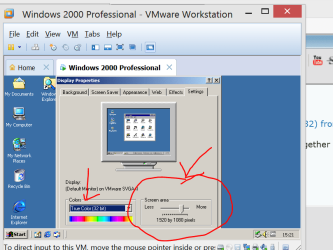
I'm running W2000, W98 and even Windows 3.11 under VMware -- installs just fine. !!! Host machine Windows 8 (and Windows 7) both X-64 enterprise versions . W7 Ultimate is approx equiv to W7 Enterprise but it should also work on W7 pro or even W7 Home premium.

With VMware running the VMware tools you then get "Virtual video drivers" which avoid the problem of having to have "Native Video drivers" for the GUEST.

Note that to get VMWARE TOOLS to install you must install SP4 for windows 2000 first --it's still surprisingly available from here (MS)

http://www.microsoft.com/en-gb/download/confirmation.aspx?id=4127


Cheers

jimbo
jimbo
 
Last edited:

My Computer

Computer type
PC/Desktop
Computer Manufacturer/Model Number
Custom built, several laptops HP/ASUS
OS
Linux CENTOS 7 / various Windows OS'es and servers
CPU
Intel i7 Intel i5
Memory
8GB, 16GB
Graphics Card(s)
On Motherboard
Sound Card
Realtek HD audio
Monitor(s) Displays
Apple Cinema display, Samsung LCD
Screen Resolution
1920 X 1080
Hard Drives
4 X 1TB SATA
Mouse
Toshiba wireless laser
Internet Speed
> 20MB up

Attachments

  • w2000.png
    w2000.png
    62.4 KB · Views: 2

My Computer

Computer type
PC/Desktop
Computer Manufacturer/Model Number
Custom built, several laptops HP/ASUS
OS
Linux CENTOS 7 / various Windows OS'es and servers
CPU
Intel i7 Intel i5
Memory
8GB, 16GB
Graphics Card(s)
On Motherboard
Sound Card
Realtek HD audio
Monitor(s) Displays
Apple Cinema display, Samsung LCD
Screen Resolution
1920 X 1080
Hard Drives
4 X 1TB SATA
Mouse
Toshiba wireless laser
Internet Speed
> 20MB up
Thanks Jimbo, I am using SP4, but was not aware of the later Patch. Downloading as I type.

Will let you know how it goes.
 

My Computer

OS
Win7 Starter
Hi there
don't forget to install VMware tools from the GUEST OS after installing the update -- you'll probably need to re-boot the VM.

Use the VM menu ==>install VMware tools.

Cheers
jimbo
 

My Computer

Computer type
PC/Desktop
Computer Manufacturer/Model Number
Custom built, several laptops HP/ASUS
OS
Linux CENTOS 7 / various Windows OS'es and servers
CPU
Intel i7 Intel i5
Memory
8GB, 16GB
Graphics Card(s)
On Motherboard
Sound Card
Realtek HD audio
Monitor(s) Displays
Apple Cinema display, Samsung LCD
Screen Resolution
1920 X 1080
Hard Drives
4 X 1TB SATA
Mouse
Toshiba wireless laser
Internet Speed
> 20MB up
Anyone running VMware, Can you use the .vhd's from the vpc from MS?
I have dos, win 3.11, win2000 win98, winxp and w7

Rich
 

My Computer

Computer type
Laptop
Computer Manufacturer/Model Number
Toshiba Laptop Qosimo X870
OS
Windows 7 Pro x64 SP1
CPU
Intel Core I7
Motherboard
Toshiba Qosmio
Memory
16 Gigs
Graphics Card(s)
NVIDIA GeForce GTX 670M
Monitor(s) Displays
17.7" laptop
Screen Resolution
1600 x 900
Hard Drives
256 Gig SanDisk SSD for C
256 Gig Intel SSD for D
Internet Speed
50/25 FIOS
Antivirus
Vipre (all you can eat for 10 machines)
Browser
IE and FF
Other Info
I have dos 6.22, wfwg 3.11, win98, 2000 and xp VHD's available for testing. MS's Virtual PC works great.

My Computer

Computer type
PC/Desktop
Computer Manufacturer/Model Number
Custom built, several laptops HP/ASUS
OS
Linux CENTOS 7 / various Windows OS'es and servers
CPU
Intel i7 Intel i5
Memory
8GB, 16GB
Graphics Card(s)
On Motherboard
Sound Card
Realtek HD audio
Monitor(s) Displays
Apple Cinema display, Samsung LCD
Screen Resolution
1920 X 1080
Hard Drives
4 X 1TB SATA
Mouse
Toshiba wireless laser
Internet Speed
> 20MB up
Back
Top