Window folder and System Volume information too large.

VaygrEmpire

New member
Local time
3:45 PM
Messages
3
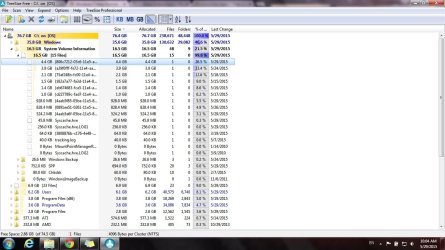
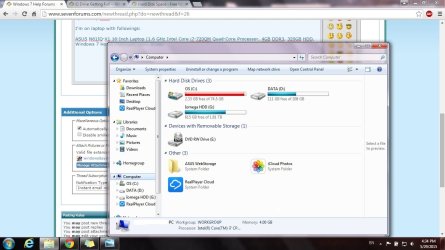
I did google a few times but couldn't find a way to solve. I'm using Windows 7 pro x64 (I think I upgraded from windows 7 home edition). I had same problem last week but while I was cleaning out some stuff windows was updated so I had to restart....and then there suddenly was 17 gbs free space. But ever since last update my HDD is down to attachments.

I'm on laptop with followings:

ASUS N61JQ-X1 16-Inch Laptop
1.6 GHz Intel Core i7-720QM Quad-Core Processor
4GB DDR3
320GB HDD
Windows 7 Home Premium

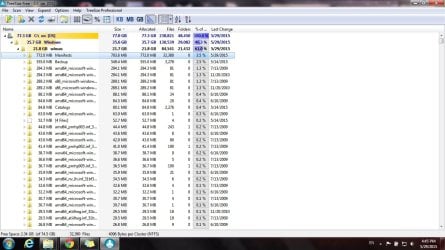
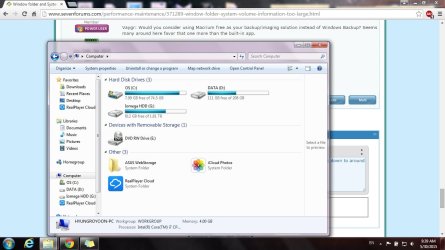
I'm using TuneUp Utilities 2011 (luckily the new guys who took over and messed up TuneUp stuff decided not to mess with anything before 2012 version) with Avast. As you guys can see from my attachments, Windows folder and System Volume Information alone are taking 50+ Gbs. I'm also wondering if I need all these crabs with amd64-microsoft-naturallanguages-blahblahblah? I have 84000 files of these craps. I do keep it hibernation which is about 3gbs. I moved system restore point to external HDD so no back up whatsoever in C drive, all games except few, which are located in D drive, are located in external HDD.

Is there any way I can possibly clean up from windows and system volume information without harming my computer? btw, I didn't do a single format ever since I bought this computer because it still runs smoothly. The only thing that's bothering me right now is C drive space, and I don't want to format because I'm going to grab a new machine for programming at the end of the year (and for star citizen).

So yeah. Is there way to permanently free up to at least 10 gbs? That'll help me a lot with everything.

Thanks in advance!
 

Attachments
  • Cdrive_almost_full.jpg
    Cdrive_almost_full.jpg
    106 KB · Views: 3
  • windows&systemvolume_50gbs.jpg
    windows&systemvolume_50gbs.jpg
    127.8 KB · Views: 1
  • do_i_need_all_these_craps.jpg
    do_i_need_all_these_craps.jpg
    131.7 KB · Views: 2

My Computer

OS
Windows 7 Professional 64 bit
Note: I see you moved System Restore to another drive, no idea how that affects the following! Follow it regardless.

Avast Bug

Please read https://forum.avast.com/index.php?topic=162041.0
Also check https://forum.avast.com/index.php?topic=166697.0

Avast sets System Restore disk usage % to 50.

You can try:
- go to control panel-> programs and features -> Avast -> change
- remove the component NG (down below).
- change % back to 10% (windows default) or whatever you like it
- restart
- check if % is what you set
- check restore points (seems this NG delete old restore points when run out of space)
- manually create a restore point if there are none
- open command prompt ->vssadmin list shadowstorage
- see how much space it takes.

You can also try uninstalling Grimefighter if above won't solve your problem.

For Windows folder:
Did you run Disk Cleanup yet?
 

My Computer

Computer type
PC/Desktop
Computer Manufacturer/Model Number
Custom Build
OS
Windows 7 Ultimate x64 SP1
CPU
AMD Phenom 2 1090T
Motherboard
Gigabyte GA-890FXA-UD5
Memory
2x8GB Kingston HyperX Fury Black 1600Mhz Unganged
Graphics Card(s)
MSI GTX 970 Gaming 4G
Sound Card
Realtek On-Board HD 7.1 Audio / Logitech G35
Monitor(s) Displays
3xAcer GD245HQ
Screen Resolution
1920x1080
Hard Drives
Samsung 850 Pro 512GB SSD - OS /
WD Caviar Black SATA 3 - 1 TBx2 - Dynamic RAID 0 /
WD Caviar Green SATA 2 - 640GBx2 - Dynamic RAID 0 /
WD Caviar Green SATA 2 - 640GB - Internal Backup /
Seagate Barracude SATA 3 - 3TB - External Backup/ Sync
PSU
HighPower 1000W
Case
Cooler Master HAF 932
Cooling
Noctua NH-D14
Keyboard
Logitech G19
Mouse
Logitech G500
Internet Speed
100/4 Mbit Cable (100GB quota)
Antivirus
ZoneAlarm Extreme Security / MBAM Pro / MBAE Free / SAS Free
Browser
IE 11 - Firefox - Chrome
Other Info
Logitech F710/ G27/ G940/ Z5500 // TrackIR 5 // Nvidia 3D Surround Vision
//GokAy

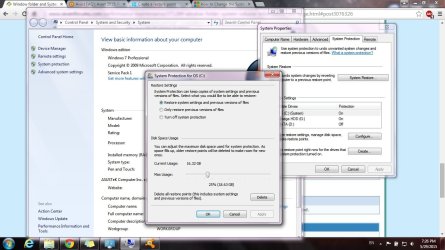
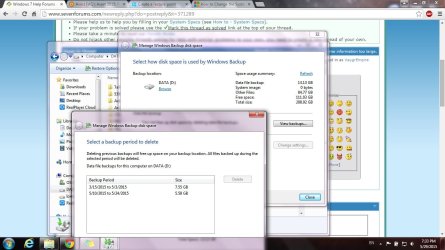
alright my bad. I did research on how to change location of system restore point "again" because I wasn't sure if I really did or not. I did change back up location on D but things are weird....first of all, C drive's system restore protection is ON with current usage as 16 gbs (which is close to what I set 25% of the whole drive). D drive is OFF but has back up files in the drive.

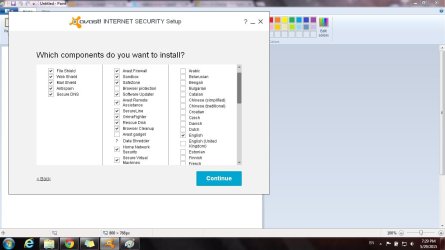
Now I tried to uninstall that NG feature.....nope, it's not there. I'm using, as you can see, Avast Internet Security and apparently it's not included...

Is there way to check how many system restore points/back up files I have like I do with D drive? So that I can reduce my C drive restore points % to lower value? I could guess but since it's drive with Windows system I want to take it carefully.

Edit: I did disk clean up, fragmentation, boot scan and anything I can play with TuneUp Utilities to try to free spaces....which is failing. :(
 

Attachments

  • Cdrive_system_restore_point.jpg
    Cdrive_system_restore_point.jpg
    123.6 KB · Views: 0
  • Ddrive_system_restore_point_off_but_backup_is_there.jpg
    Ddrive_system_restore_point_off_but_backup_is_there.jpg
    135.2 KB · Views: 0
  • Ummm_no_NG.jpg
    Ummm_no_NG.jpg
    68.5 KB · Views: 0
  • Ddrive_back_up_periods.jpg
    Ddrive_back_up_periods.jpg
    113.3 KB · Views: 1

My Computer

OS
Windows 7 Professional 64 bit
You have Avast Secure Virtual Machines installed.
Avast has "renamed" this NG tool, making things confusing ...
Remove Secure Virtual Machines, or wait for Avast to fix it.

Avast NG = Secure Virtual Machines = Sandbox (as i understand it).

I don't use any of the optional "bloat" and don't have the problem others have.
 

My Computer

Computer type
PC/Desktop
Computer Manufacturer/Model Number
home built
OS
Multi-Boot W7_Pro_x64 W8.1_Pro_x64 W10_Pro_x64 +Linux_VMs +Chromium_VM
CPU
AMD Athlon II x4 620
Motherboard
Gigabyte GA-MA785G-UD3H
Memory
6GB GSkill DDR2 800
Graphics Card(s)
AMD 4670 GPU + AMD 4200 IGP
Sound Card
on board Realtek ALC889A
Monitor(s) Displays
RCA 40" LCD TV, Insignia 32" LCD TV, HP 15" LCD monitor
Screen Resolution
1680 x 1050
Hard Drives
OCZ Vertex 3 120GB,
Samsung F3 1TB (3),
Several others - WD, Seagate, Hitachi, ...
PSU
Corsair 500 W
Case
Rosewill mid tower
Cooling
CM 90mm rifle
Keyboard
Gyration wireless, Logitech wireless, Dell USB wired
Mouse
Gyration wireless, Logitech wireless, V7 USB wired
Internet Speed
Spectrum - 100Mbps D / 10Mbps U
Antivirus
Avast, MBAM3, EMET, WinPatrol
Browser
Pale Moon, Firefox, IE
Other Info
2 multi-boot PC's
Mainly HTPC/Office/Gen purpose (no gaming).
Trendnet USB KVM.
LG DVD burner/Blue Ray Player.
Tray system for removable SATA backup drives.

Not currently OCd, under-volted.
I use Hybrid sleep, rarely re-boot or shutdown.

Hauppauge HD-PVR, Avermedia PCIe TV Tuner, Hauppauge PCI TV Tuner.
I updated my copy-paste solution to include Secure Virtual Machines and Sandbox. - Thanks David

I have personally uninstalled that feature from a friend's PC and it was called NG (Programs and Features-Avast-change). I couldn't see anything similar inside the program itself but grimefighter and sandbox was configurable from within the app (no idea if it would have corrected the issue though).

Vaygr: Would you consider using Macrium free as your backup/imaging solution instead of Windows Backup? Seems many around here favor that one more than the built-in app.
 

My Computer

Computer type
PC/Desktop
Computer Manufacturer/Model Number
Custom Build
OS
Windows 7 Ultimate x64 SP1
CPU
AMD Phenom 2 1090T
Motherboard
Gigabyte GA-890FXA-UD5
Memory
2x8GB Kingston HyperX Fury Black 1600Mhz Unganged
Graphics Card(s)
MSI GTX 970 Gaming 4G
Sound Card
Realtek On-Board HD 7.1 Audio / Logitech G35
Monitor(s) Displays
3xAcer GD245HQ
Screen Resolution
1920x1080
Hard Drives
Samsung 850 Pro 512GB SSD - OS /
WD Caviar Black SATA 3 - 1 TBx2 - Dynamic RAID 0 /
WD Caviar Green SATA 2 - 640GBx2 - Dynamic RAID 0 /
WD Caviar Green SATA 2 - 640GB - Internal Backup /
Seagate Barracude SATA 3 - 3TB - External Backup/ Sync
PSU
HighPower 1000W
Case
Cooler Master HAF 932
Cooling
Noctua NH-D14
Keyboard
Logitech G19
Mouse
Logitech G500
Internet Speed
100/4 Mbit Cable (100GB quota)
Antivirus
ZoneAlarm Extreme Security / MBAM Pro / MBAE Free / SAS Free
Browser
IE 11 - Firefox - Chrome
Other Info
Logitech F710/ G27/ G940/ Z5500 // TrackIR 5 // Nvidia 3D Surround Vision
Ok I uninstalled suggested Avast features which freed me about 3 gbs and also set system restore point for C drive down to around 10 gbs which gave me 8.3 gbs.....until today. Main problems are 1. Windows folder is too big (or is that normal?) 2. I'm loosing C drive day by day, sometimes hour by hour. It's keep decreasing without making any. It was 8.3 gbs yesterday. Today it's down by 300 mbs. And I don't remember making anything that's about that size yesterday. Is there way to see what was made recently?

on the other hand, my brother is keep saying I'm being hacked. I've been saying it's bs but....am I?
 

Attachments

  • hdd_usage_increasing_without_doing_anything.jpg
    hdd_usage_increasing_without_doing_anything.jpg
    100.2 KB · Views: 0

My Computer

OS
Windows 7 Professional 64 bit
Did you run Disk Cleanup on C yet? Search for it in Start menu.

300 MB "may" be from temp files, cache or System Volume backing up some stuff, slowly filling the allocated space.

My Windows folder is 22 GB.

You can search for modified files from Windows Explorer, click search box and select Date Modified.
 

My Computer

Computer type
PC/Desktop
Computer Manufacturer/Model Number
Custom Build
OS
Windows 7 Ultimate x64 SP1
CPU
AMD Phenom 2 1090T
Motherboard
Gigabyte GA-890FXA-UD5
Memory
2x8GB Kingston HyperX Fury Black 1600Mhz Unganged
Graphics Card(s)
MSI GTX 970 Gaming 4G
Sound Card
Realtek On-Board HD 7.1 Audio / Logitech G35
Monitor(s) Displays
3xAcer GD245HQ
Screen Resolution
1920x1080
Hard Drives
Samsung 850 Pro 512GB SSD - OS /
WD Caviar Black SATA 3 - 1 TBx2 - Dynamic RAID 0 /
WD Caviar Green SATA 2 - 640GBx2 - Dynamic RAID 0 /
WD Caviar Green SATA 2 - 640GB - Internal Backup /
Seagate Barracude SATA 3 - 3TB - External Backup/ Sync
PSU
HighPower 1000W
Case
Cooler Master HAF 932
Cooling
Noctua NH-D14
Keyboard
Logitech G19
Mouse
Logitech G500
Internet Speed
100/4 Mbit Cable (100GB quota)
Antivirus
ZoneAlarm Extreme Security / MBAM Pro / MBAE Free / SAS Free
Browser
IE 11 - Firefox - Chrome
Other Info
Logitech F710/ G27/ G940/ Z5500 // TrackIR 5 // Nvidia 3D Surround Vision
Do NOT attempt to remove any files from the C:\Windows\winsxs folder by ANY route other than the Windows Disk Cleanup utility - there are files in there that are the ONLY copy on your system, even if you think you see them in the System32 folder as well!

The winsxs folder is the master repository for almost all Windows files - messing with it manually almost inevitably involves changing permissions, which lowers the systems resistance to attack, and can cause problems with other areas.

The DiskClean utility does have a couple of problems, but running it once, and then doing a check for updates will get the system back to a fully-updated state.
It should NOT be run on a regular basis - at least until MS fix the known problems.
 

My Computer

Computer type
Laptop
Computer Manufacturer/Model Number
Asus K52F or Lenovo B51-80
OS
Win 7 x64 Home Premium (and x86 VirtualBox VM)/Win10
CPU
i3 370M/i7 6500U
Motherboard
Asus/Lenovo
Memory
8GB - finally :)/8GB
Graphics Card(s)
it's an i3, dude!/dual Intel&nVidia
Sound Card
onboard
Monitor(s) Displays
15.6" built-in
Screen Resolution
1366x768/1920x1080
Hard Drives
750GB Seagate internal
Sundry external drives attached to other computers on the local network
1TB SSD on the Lenovo
PSU
n/a
Internet Speed
as much as I can get - usually on a dongle/phone, so <1MB/s
Antivirus
MSE/Defender
Browser
IE11/12/Edge/Chrome/FF(if I must)
Back
Top