

- Local time
- 4:26 AM
- Messages
- 75
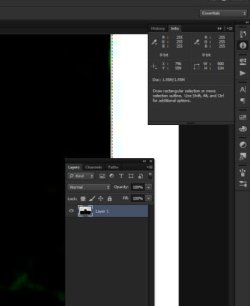
I came home from work and discovered that my computer had been updated to Windows 10. Pretty underhanded move on Microsoft's part, but I thought I'd give it a whirl. Everything seems fine except now when I open Photoshop everything is so tiny I can't really work in the program anymore. Attached is a screenshot of what I mean.
I have checked the display settings and they are all correct for my monitors, but as you can see it's still to dang small. Also, whenever I hover over the menu items and try to choose one of them from the pop out list it flicks to the next menu item and I can't choose what I wanted. It's very annoying and I can't figure out what's wrong.
I joined just to ask about this, because if I can't find a solution I'm going back to Windows 7.
Thanks in advance for any help.
I have checked the display settings and they are all correct for my monitors, but as you can see it's still to dang small. Also, whenever I hover over the menu items and try to choose one of them from the pop out list it flicks to the next menu item and I can't choose what I wanted. It's very annoying and I can't figure out what's wrong.
I joined just to ask about this, because if I can't find a solution I'm going back to Windows 7.
Thanks in advance for any help.
Attachments
My Computer
At a glance
Windows 7 Home Premium 64BitIntel Core 2 Quad Q6600G.Skill PC2-6400 DDR2 8GBASUS NVIDIA GeForce 9600 GSO
- Computer type
- PC/Desktop
- OS
- Windows 7 Home Premium 64Bit
- CPU
- Intel Core 2 Quad Q6600
- Motherboard
- GIGABYTE P35-DS4
- Memory
- G.Skill PC2-6400 DDR2 8GB
- Graphics Card(s)
- ASUS NVIDIA GeForce 9600 GSO
- Sound Card
- Diamond XS51 Xtreme 5.1
- Monitor(s) Displays
- (2) DELL S2340M 23" HD LEDs
- Hard Drives
- Seagate ST1000DM003-1ER162 1TB | Seagate ST500DM002-1BD142 500GB | ASUS DRW-24B1ST DVD+R DL
- PSU
- PC Power & Cooling Silencer 610
- Case
- Ultra m998
- Cooling
- ThermalRight Ultra 120E
- Keyboard
- Logitech K811, K360
- Mouse
- Logitech Performance MX


