
Windows 10 on a USB stick

whs

New member
Guru
Gold Member
VIP
Local time
9:00 PM
Messages
26,200
Location
Florida in winter, Black Forest/Germany
For those that are interested I have posted a tutorial on the tenforums that explains how to install Windows 10 on an external device.

Windows 10 to go - without Enterprise

PS: Just ran it on my laptop. Boot in 10 sec and shutdown in 2 sec. Fantastic !! Unfortunately my desktop does not boot from USB3 - only USB2 and eSata.
 
Last edited:

My Computer My Computer

At a glance

Vista, Windows7, Mint Mate, Zorin, Windows 8from 1.6GHz Duo to i7
Computer Manufacturer/Model Number
HP, Dell, Gateway, Toshiba - 4 laptops and 2 desktops
OS
Vista, Windows7, Mint Mate, Zorin, Windows 8
CPU
from 1.6GHz Duo to i7
Monitor(s) Displays
2x HP w2207
Hard Drives
5x HDD, 7x SSD, 12x Externals
Keyboard
with trackball - no mices
Mouse
Trackball mice
Internet Speed
DSL 6000
How about another link or cut and paste that we can see??
im registered at ten forums but cant open that still.
Is this for running right from the usb stick? or for installing to a drive?
I was looking for something like this this morning as I just got a new 32gb thumb drive so I have like 5 free unused thumbdrives now that everythings copied to the 32gb.
 

My Computer My Computer

At a glance

Win 7 64 UltimateAMD 8350 Bulldozer 4ghz6gbATI Radeon HD 5770 X 2
Computer type
PC/Desktop
Computer Manufacturer/Model Number
JRockZ
OS
Win 7 64 Ultimate
CPU
AMD 8350 Bulldozer 4ghz
Motherboard
Asus M5a97 R2
Memory
6gb
Graphics Card(s)
ATI Radeon HD 5770 X 2
Sound Card
Board
Monitor(s) Displays
Dual Gateway 19" and 32" TV 3 displays at once :D
Screen Resolution
1440X900
Hard Drives
OCZ Agility SSD Patriot Blaze 120
PSU
750 Watt Thermaltake Tough Power
Case
Diablotek EVO Mid Tower Case CPA-6170 - 8X 120mm case fans
Cooling
Corsair Liquid Cooled
Antivirus
NAV
Browser
Always IE
Try this link

Windows 10 Forums

And yes, it is for running Windows 10 TP directly from the stick. Take the stick with the fastest access time. Check that with HD Tune.
 

My Computer My Computer

At a glance

Vista, Windows7, Mint Mate, Zorin, Windows 8from 1.6GHz Duo to i7
Computer Manufacturer/Model Number
HP, Dell, Gateway, Toshiba - 4 laptops and 2 desktops
OS
Vista, Windows7, Mint Mate, Zorin, Windows 8
CPU
from 1.6GHz Duo to i7
Monitor(s) Displays
2x HP w2207
Hard Drives
5x HDD, 7x SSD, 12x Externals
Keyboard
with trackball - no mices
Mouse
Trackball mice
Internet Speed
DSL 6000
Ok great and nope still getting
  1. Your user account may not have sufficient privileges to access this page. Are you trying to edit someone else's post, access administrative features or some other privileged system?
  2. If you are trying to post, the administrator may have disabled your account, or it may be awaiting activation.
Ive already tested speeds thanks WHS!!
 

My Computer My Computer

At a glance

Win 7 64 UltimateAMD 8350 Bulldozer 4ghz6gbATI Radeon HD 5770 X 2
Computer type
PC/Desktop
Computer Manufacturer/Model Number
JRockZ
OS
Win 7 64 Ultimate
CPU
AMD 8350 Bulldozer 4ghz
Motherboard
Asus M5a97 R2
Memory
6gb
Graphics Card(s)
ATI Radeon HD 5770 X 2
Sound Card
Board
Monitor(s) Displays
Dual Gateway 19" and 32" TV 3 displays at once :D
Screen Resolution
1440X900
Hard Drives
OCZ Agility SSD Patriot Blaze 120
PSU
750 Watt Thermaltake Tough Power
Case
Diablotek EVO Mid Tower Case CPA-6170 - 8X 120mm case fans
Cooling
Corsair Liquid Cooled
Antivirus
NAV
Browser
Always IE
Sorry for the troubles. I have made a PDF and uploaded it to my OneDrive. If you left click on the icon, you can read it in your browser. If you right click on the icon, you can download the PDF.
 

My Computer My Computer

At a glance

Vista, Windows7, Mint Mate, Zorin, Windows 8from 1.6GHz Duo to i7
Computer Manufacturer/Model Number
HP, Dell, Gateway, Toshiba - 4 laptops and 2 desktops
OS
Vista, Windows7, Mint Mate, Zorin, Windows 8
CPU
from 1.6GHz Duo to i7
Monitor(s) Displays
2x HP w2207
Hard Drives
5x HDD, 7x SSD, 12x Externals
Keyboard
with trackball - no mices
Mouse
Trackball mice
Internet Speed
DSL 6000
Thank you very much WHS!!! Appreciate it
 

My Computer My Computer

At a glance

Win 7 64 UltimateAMD 8350 Bulldozer 4ghz6gbATI Radeon HD 5770 X 2
Computer type
PC/Desktop
Computer Manufacturer/Model Number
JRockZ
OS
Win 7 64 Ultimate
CPU
AMD 8350 Bulldozer 4ghz
Motherboard
Asus M5a97 R2
Memory
6gb
Graphics Card(s)
ATI Radeon HD 5770 X 2
Sound Card
Board
Monitor(s) Displays
Dual Gateway 19" and 32" TV 3 displays at once :D
Screen Resolution
1440X900
Hard Drives
OCZ Agility SSD Patriot Blaze 120
PSU
750 Watt Thermaltake Tough Power
Case
Diablotek EVO Mid Tower Case CPA-6170 - 8X 120mm case fans
Cooling
Corsair Liquid Cooled
Antivirus
NAV
Browser
Always IE
You are welcome. Any time.
 

My Computer My Computer

At a glance

Vista, Windows7, Mint Mate, Zorin, Windows 8from 1.6GHz Duo to i7
Computer Manufacturer/Model Number
HP, Dell, Gateway, Toshiba - 4 laptops and 2 desktops
OS
Vista, Windows7, Mint Mate, Zorin, Windows 8
CPU
from 1.6GHz Duo to i7
Monitor(s) Displays
2x HP w2207
Hard Drives
5x HDD, 7x SSD, 12x Externals
Keyboard
with trackball - no mices
Mouse
Trackball mice
Internet Speed
DSL 6000
WHS once the stick is created it is only bootable from the specific machine you set it up on correct? Not like a Ubuntu stick you can boot from almost any pc from what I gather?
I just skimmed tut real fast so far,, waik is 4+hr d/l for my slow internet ughh!
 

My Computer My Computer

At a glance

Win 7 64 UltimateAMD 8350 Bulldozer 4ghz6gbATI Radeon HD 5770 X 2
Computer type
PC/Desktop
Computer Manufacturer/Model Number
JRockZ
OS
Win 7 64 Ultimate
CPU
AMD 8350 Bulldozer 4ghz
Motherboard
Asus M5a97 R2
Memory
6gb
Graphics Card(s)
ATI Radeon HD 5770 X 2
Sound Card
Board
Monitor(s) Displays
Dual Gateway 19" and 32" TV 3 displays at once :D
Screen Resolution
1440X900
Hard Drives
OCZ Agility SSD Patriot Blaze 120
PSU
750 Watt Thermaltake Tough Power
Case
Diablotek EVO Mid Tower Case CPA-6170 - 8X 120mm case fans
Cooling
Corsair Liquid Cooled
Antivirus
NAV
Browser
Always IE
No, you can boot it on any PC that can boot from USB.
 

My Computer My Computer

At a glance

Vista, Windows7, Mint Mate, Zorin, Windows 8from 1.6GHz Duo to i7
Computer Manufacturer/Model Number
HP, Dell, Gateway, Toshiba - 4 laptops and 2 desktops
OS
Vista, Windows7, Mint Mate, Zorin, Windows 8
CPU
from 1.6GHz Duo to i7
Monitor(s) Displays
2x HP w2207
Hard Drives
5x HDD, 7x SSD, 12x Externals
Keyboard
with trackball - no mices
Mouse
Trackball mice
Internet Speed
DSL 6000
I have uploaded the Imagex folder to my OneDrive. That is all you need from the WAIK and it is only a few KBs. It is the 64bit version. If you need 32bit, let me know.

Right click on the OneDrive icon and download the folder. Then put the imagex.exe on your desktop.
 

My Computer My Computer

At a glance

Vista, Windows7, Mint Mate, Zorin, Windows 8from 1.6GHz Duo to i7
Computer Manufacturer/Model Number
HP, Dell, Gateway, Toshiba - 4 laptops and 2 desktops
OS
Vista, Windows7, Mint Mate, Zorin, Windows 8
CPU
from 1.6GHz Duo to i7
Monitor(s) Displays
2x HP w2207
Hard Drives
5x HDD, 7x SSD, 12x Externals
Keyboard
with trackball - no mices
Mouse
Trackball mice
Internet Speed
DSL 6000
Win 8 iso?

Thanks for the post whs, I downloaded and started following the pdf, so far so good until Step 3 installing the BD ROM. That step directs to mount a Win8 iso, I don't have a Win8 iso, maybe I missed it but I thought this would work for Win7.

I've downloaded the imagex from your onedrive and am ready (I think) but the Win8 iso direction stopped me from going on.

I'm using Win7 Home Premium 64x. Also have Win7 Pro 64x on a laptop.
 

My Computer My Computer

At a glance

Windows 11 Home x64AMD Ryzen 5 5600GG.SKILL Ripjaws Gaming Series (2x8G) DDR4None (AMD Radeon Graphics on MB and CPU)
Computer type
PC/Desktop
Computer Manufacturer/Model Number
Self built
OS
Windows 11 Home x64
CPU
AMD Ryzen 5 5600G
Motherboard
ASUSTeK Prime B450M-A II
Memory
G.SKILL Ripjaws Gaming Series (2x8G) DDR4
Graphics Card(s)
None (AMD Radeon Graphics on MB and CPU)
Sound Card
None (integrated on MB)
Monitor(s) Displays
Acer S200HLAbd Black 20"
Screen Resolution
1600 x 900
Hard Drives
Samsung SSD 840 EVO 120GB (W10)
WD Blue 500G SATA 6G WDBAAX5000ENC-NRSN (Backup/Storage)
PSU
Corsair CX500 500W ATX12V v2.3 80 Plus Bronze Active PFC
Case
Unknown
Cooling
CPU-stock cooling fan, 1 extra 80mm case fan
Keyboard
Azio KB505U Large Print Tri-Color Illuminated USB Keyboard
Mouse
MS Optical Wheel Mouse (USB)
Internet Speed
ATT Fiber 5000/VOIP 5G down/5G up
Antivirus
Win Defender, SAS, Spyware Blaster all free editions
Browser
Firefox, Waterfox, sometimes Edge
That's a typo in the tutorial. It should read Windows 10. I will correct that.

Also, I found out later that my imagex.exe may not work on your PC. It does create the bootable stick but there may be a booting problem. Try it anyhow. I would be interested in the result. If it does not work, you will have to download your own WAIK - unfortunately.
 

My Computer My Computer

At a glance

Vista, Windows7, Mint Mate, Zorin, Windows 8from 1.6GHz Duo to i7
Computer Manufacturer/Model Number
HP, Dell, Gateway, Toshiba - 4 laptops and 2 desktops
OS
Vista, Windows7, Mint Mate, Zorin, Windows 8
CPU
from 1.6GHz Duo to i7
Monitor(s) Displays
2x HP w2207
Hard Drives
5x HDD, 7x SSD, 12x Externals
Keyboard
with trackball - no mices
Mouse
Trackball mice
Internet Speed
DSL 6000
Thank you for the very fast response, that was my first thought that it was a typo. I wanted to ask just to be sure though.

Again thank you very much for the post, very easy to follow instructions, and putting it all on your onedrive :)

Edit: I will post back my results, may not be today but I will report back.
 
Last edited:

My Computer My Computer

At a glance

Windows 11 Home x64AMD Ryzen 5 5600GG.SKILL Ripjaws Gaming Series (2x8G) DDR4None (AMD Radeon Graphics on MB and CPU)
Computer type
PC/Desktop
Computer Manufacturer/Model Number
Self built
OS
Windows 11 Home x64
CPU
AMD Ryzen 5 5600G
Motherboard
ASUSTeK Prime B450M-A II
Memory
G.SKILL Ripjaws Gaming Series (2x8G) DDR4
Graphics Card(s)
None (AMD Radeon Graphics on MB and CPU)
Sound Card
None (integrated on MB)
Monitor(s) Displays
Acer S200HLAbd Black 20"
Screen Resolution
1600 x 900
Hard Drives
Samsung SSD 840 EVO 120GB (W10)
WD Blue 500G SATA 6G WDBAAX5000ENC-NRSN (Backup/Storage)
PSU
Corsair CX500 500W ATX12V v2.3 80 Plus Bronze Active PFC
Case
Unknown
Cooling
CPU-stock cooling fan, 1 extra 80mm case fan
Keyboard
Azio KB505U Large Print Tri-Color Illuminated USB Keyboard
Mouse
MS Optical Wheel Mouse (USB)
Internet Speed
ATT Fiber 5000/VOIP 5G down/5G up
Antivirus
Win Defender, SAS, Spyware Blaster all free editions
Browser
Firefox, Waterfox, sometimes Edge
whs, I've done all things to get it to work except having Win10. I don't know what I was thinking when I started :confused: maybe that I could install it on a stick from your directions to try it out, I don't know and can't explain it.
Couple things, I got the same error after downloading and using WAIK as I did using the imagex from your onedrive (only took about 10 minutes for the download, I have a pretty good connection so that was no problem)

The error occurred when I was using the command prompt to transfer from BD ROM to the USB stick. It was worth a try anyway, wish I hadn't been so thick about it and realized I needed a Win10 iso to start out with to get it work.

Thanks for putting a tutorial together, I'm sure it would have worked for me if I actually had Win10, I'm happy with Win7 but at some point in the future I'll have to move on to the next OS.
 

My Computer My Computer

At a glance

Windows 11 Home x64AMD Ryzen 5 5600GG.SKILL Ripjaws Gaming Series (2x8G) DDR4None (AMD Radeon Graphics on MB and CPU)
Computer type
PC/Desktop
Computer Manufacturer/Model Number
Self built
OS
Windows 11 Home x64
CPU
AMD Ryzen 5 5600G
Motherboard
ASUSTeK Prime B450M-A II
Memory
G.SKILL Ripjaws Gaming Series (2x8G) DDR4
Graphics Card(s)
None (AMD Radeon Graphics on MB and CPU)
Sound Card
None (integrated on MB)
Monitor(s) Displays
Acer S200HLAbd Black 20"
Screen Resolution
1600 x 900
Hard Drives
Samsung SSD 840 EVO 120GB (W10)
WD Blue 500G SATA 6G WDBAAX5000ENC-NRSN (Backup/Storage)
PSU
Corsair CX500 500W ATX12V v2.3 80 Plus Bronze Active PFC
Case
Unknown
Cooling
CPU-stock cooling fan, 1 extra 80mm case fan
Keyboard
Azio KB505U Large Print Tri-Color Illuminated USB Keyboard
Mouse
MS Optical Wheel Mouse (USB)
Internet Speed
ATT Fiber 5000/VOIP 5G down/5G up
Antivirus
Win Defender, SAS, Spyware Blaster all free editions
Browser
Firefox, Waterfox, sometimes Edge
Hi Sreve, this is just supposed to be a fun project. Here is another similar (and easier) one if you want to have a really useful OS on a stick - watch the video demo in the tutorial.

Tutorial on One Drive


Left click on the OneDrive icon if you want to read it in the berowser, right click when you want to download the PDF.
 

My Computer My Computer

At a glance

Vista, Windows7, Mint Mate, Zorin, Windows 8from 1.6GHz Duo to i7
Computer Manufacturer/Model Number
HP, Dell, Gateway, Toshiba - 4 laptops and 2 desktops
OS
Vista, Windows7, Mint Mate, Zorin, Windows 8
CPU
from 1.6GHz Duo to i7
Monitor(s) Displays
2x HP w2207
Hard Drives
5x HDD, 7x SSD, 12x Externals
Keyboard
with trackball - no mices
Mouse
Trackball mice
Internet Speed
DSL 6000
Nice tutorial indeed but the requirement to download huge WAIK for Windows is waste of bandwidth. Those who run "Win8.0/8.1/10" already has new DISM which is the successor of old Imagex. The user doesn't need to download anything simply to apply the wim.

DISM Image Management Command-Line Options

DISM /Apply-Image can apply the Win10 image to USB.

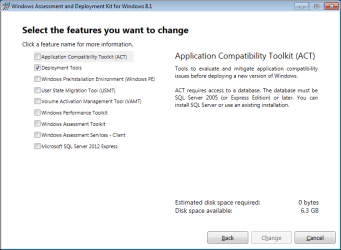
The version of DISM included with 7 doesn't have WIM apply functions but still there is no need to download full WAIK. Just download and run the ADK Setup from Download Windows Assessment and Deployment Kit (Windows ADK) for Windows 8.1 Update from Official Microsoft Download Center and deselect everything except "Deployment Tools". Then the download will be reduced to around 55MB and when the setup is done, there will be "Windows kits\Windows ADK\Deployment and imagingTools" Command Prompt on start menu. Use that command prompt to execute Win8 version of DISM commands including WIM apply operations, Bcdboot etc.

Example : Dism /apply-image /imagefile:H:\Sources\Install.wim /index:1 /ApplyDir:F:\

Where "H:" is the virtual CD drive and "F:" is the USB stick.

DISM for Win7.png
 
Last edited:

My Computer My Computer

At a glance

Windows 7 Ultimate x64
Computer type
PC/Desktop
OS
Windows 7 Ultimate x64
Very good point. With your permission I will add that to the tutorial. Thanks for posting that.
 

My Computer My Computer

At a glance

Vista, Windows7, Mint Mate, Zorin, Windows 8from 1.6GHz Duo to i7
Computer Manufacturer/Model Number
HP, Dell, Gateway, Toshiba - 4 laptops and 2 desktops
OS
Vista, Windows7, Mint Mate, Zorin, Windows 8
CPU
from 1.6GHz Duo to i7
Monitor(s) Displays
2x HP w2207
Hard Drives
5x HDD, 7x SSD, 12x Externals
Keyboard
with trackball - no mices
Mouse
Trackball mice
Internet Speed
DSL 6000
With your permission I will add that to the tutorial.

Of course you can :).
 

My Computer My Computer

At a glance

Windows 7 Ultimate x64
Computer type
PC/Desktop
OS
Windows 7 Ultimate x64
Thanks
 

My Computer My Computer

At a glance

Vista, Windows7, Mint Mate, Zorin, Windows 8from 1.6GHz Duo to i7
Computer Manufacturer/Model Number
HP, Dell, Gateway, Toshiba - 4 laptops and 2 desktops
OS
Vista, Windows7, Mint Mate, Zorin, Windows 8
CPU
from 1.6GHz Duo to i7
Monitor(s) Displays
2x HP w2207
Hard Drives
5x HDD, 7x SSD, 12x Externals
Keyboard
with trackball - no mices
Mouse
Trackball mice
Internet Speed
DSL 6000
Hi whs

Since "Win8" family can mount ISO files without the help of third party tools, i would also recommend to include a link to ISO Images - Mount or Unmount in step 3.
 

My Computer My Computer

At a glance

Windows 7 Ultimate x64
Computer type
PC/Desktop
OS
Windows 7 Ultimate x64
Back
Top