
Windows 2000 in VM Under Win 7??

The VM is currently set up as:
Primary IP: 192.168.0.250/255.255.255.0
AlternateIP: 192.168.25.240/255.255.255.0

Networking works, but only to 0.x and 25.x devices. 10.x, where the gateway is can't be reached (obviously with these settings).

So bridged works. Now need NAT to work through host.
 

My Computer

Computer Manufacturer/Model Number
DYI
OS
Win 7 x64 Professional
CPU
Intel Core i5-750 2.67Ghz
Motherboard
Gigabyte P55M-UD4
Memory
4gb
Graphics Card(s)
Nvidia GeForce 9500GT 512mb
Sound Card
On MB
Monitor(s) Displays
Lg Flatron
Screen Resolution
1280 x 1024
Hard Drives
C: 200mb Maxtor SATA 3
D: 500gb WD SATA 3
Jeffs,

The "simpler" thing would be setting up a "Router VM" and use that "Router VM" to route your Win2K VM traffic to your LAN.
The "harder" thing would be for you to troubleshoot why the darn NAT mode doesn't work...

zzz2496
 

My Computer

Computer Manufacturer/Model Number
Self Built
OS
Windows7 Ultimate 64bit
CPU
Intel Core 2 Quad Q6600
Motherboard
Abit IN9-32X-MMAX
Memory
DDR2 Adata 4GB
Graphics Card(s)
Nvidia GeForce GTX 285 1024 and Nvidia GeForce 8800GT 512
Sound Card
Asus Xonar HDAV 1.3
Monitor(s) Displays
Dell 2407WFP and BenQ 2400v and Philips 150v3
Screen Resolution
3840x1200 and 1024x768
Hard Drives
2 WDC 1TB
1 WDC 1.5TB
1 WDC 640GB
1 WDC 320GB
1 Seagate 200GB
PSU
Corsair TX 850W
Case
Cooler Master HAF932
Cooling
Arctic Cooling Freezer Extreme and plenty of fans...
Keyboard
MicrosoftNaturalKeyboard 4000/Apple Alu keyboard/Dinovo mini
Mouse
Logitech G5/MarbleMouseTrackball/PerformanceMX/SpacePilotPRO
Internet Speed
1.5Mbps down/384Kbps up
Other Info
APC SURT 1000XL
Logitech Z-560
Wiimote
Mikrotik Router
Linksys (now Cisco) SD2008 8 port Gigabit switch
Linksys WRT54G (acting as AP)
Apple wireless Aluminium keyboard
Apple Magic Mouse
Xbox360 wired controller
Looking over the SUN documentation under NAT, I see no reason why this should NOT be working...

Will "shared folders" work without the network working on the VM?
 

My Computer

Computer Manufacturer/Model Number
DYI
OS
Win 7 x64 Professional
CPU
Intel Core i5-750 2.67Ghz
Motherboard
Gigabyte P55M-UD4
Memory
4gb
Graphics Card(s)
Nvidia GeForce 9500GT 512mb
Sound Card
On MB
Monitor(s) Displays
Lg Flatron
Screen Resolution
1280 x 1024
Hard Drives
C: 200mb Maxtor SATA 3
D: 500gb WD SATA 3
I honestly don't know, I always treat my VMs as a real computer, I don't want them to interact with my host "natively", which means if there's some malware/virus/whatever infected the VM, I need to make sure that the host is unharmed...

zzz2496
 

My Computer

Computer Manufacturer/Model Number
Self Built
OS
Windows7 Ultimate 64bit
CPU
Intel Core 2 Quad Q6600
Motherboard
Abit IN9-32X-MMAX
Memory
DDR2 Adata 4GB
Graphics Card(s)
Nvidia GeForce GTX 285 1024 and Nvidia GeForce 8800GT 512
Sound Card
Asus Xonar HDAV 1.3
Monitor(s) Displays
Dell 2407WFP and BenQ 2400v and Philips 150v3
Screen Resolution
3840x1200 and 1024x768
Hard Drives
2 WDC 1TB
1 WDC 1.5TB
1 WDC 640GB
1 WDC 320GB
1 Seagate 200GB
PSU
Corsair TX 850W
Case
Cooler Master HAF932
Cooling
Arctic Cooling Freezer Extreme and plenty of fans...
Keyboard
MicrosoftNaturalKeyboard 4000/Apple Alu keyboard/Dinovo mini
Mouse
Logitech G5/MarbleMouseTrackball/PerformanceMX/SpacePilotPRO
Internet Speed
1.5Mbps down/384Kbps up
Other Info
APC SURT 1000XL
Logitech Z-560
Wiimote
Mikrotik Router
Linksys (now Cisco) SD2008 8 port Gigabit switch
Linksys WRT54G (acting as AP)
Apple wireless Aluminium keyboard
Apple Magic Mouse
Xbox360 wired controller
I think it's reached a point where "this won't work" (NAT), which kind of sucks after all this work. So, either I'm going to have to stay in bridged mode and use a temporary 10.x address or give up and go with no network, which is useless for my needs.

As I said, I've been looking over the SUN documentation and NAT should work, and the guest 2K system should be 10.0.2.x, but it's just reporting as 0.0.0.0 in ipconfig. Apparently ipconfig is the ONLY way I can see in 2k to see your IP address. It hadn't reached the "status" screen yet - that had to wait until XP.

As for the VAX access, I've been told I can install the DENnet drivers in the XP Mode VM that came with W7 and that the terminal mode program will work fine in there, so there's my VAX workaround for when I need to get to it twice a year...
 

My Computer

Computer Manufacturer/Model Number
DYI
OS
Win 7 x64 Professional
CPU
Intel Core i5-750 2.67Ghz
Motherboard
Gigabyte P55M-UD4
Memory
4gb
Graphics Card(s)
Nvidia GeForce 9500GT 512mb
Sound Card
On MB
Monitor(s) Displays
Lg Flatron
Screen Resolution
1280 x 1024
Hard Drives
C: 200mb Maxtor SATA 3
D: 500gb WD SATA 3
I think it's reached a point where "this won't work" (NAT), which kind of sucks after all this work. So, either I'm going to have to stay in bridged mode and use a temporary 10.x address or give up and go with no network, which is useless for my needs.

As I said, I've been looking over the SUN documentation and NAT should work, and the guest 2K system should be 10.0.2.x, but it's just reporting as 0.0.0.0 in ipconfig. Apparently ipconfig is the ONLY way I can see in 2k to see your IP address. It hadn't reached the "status" screen yet - that had to wait until XP.

As for the VAX access, I've been told I can install the DENnet drivers in the XP Mode VM that came with W7 and that the terminal mode program will work fine in there, so there's my VAX workaround for when I need to get to it twice a year...

NAT as in native mode in VirtualBox feature, in your case is "this won't work" assumption is regrettably true... But NAT can be implemented in many ways, as I said before, create another new VM that will host a "Router" installation will do just as well as Native NAT. I believe IPCop will make you smile... or Vyatta (if you prefer Cisco IOS like interface). These Linux "Routers" will do NAT for you... Though they'll rob some RAM off your host...

zzz2496

Edit: Pick one from this list, I personally use Vyatta, IPCop, and Mikrotik (Mikrotik is not in the list, I use it on my routerboard, and it works brilliantly)
Edit2: pfSense/Monowall are OK too (small memory footprint)
 

My Computer

Computer Manufacturer/Model Number
Self Built
OS
Windows7 Ultimate 64bit
CPU
Intel Core 2 Quad Q6600
Motherboard
Abit IN9-32X-MMAX
Memory
DDR2 Adata 4GB
Graphics Card(s)
Nvidia GeForce GTX 285 1024 and Nvidia GeForce 8800GT 512
Sound Card
Asus Xonar HDAV 1.3
Monitor(s) Displays
Dell 2407WFP and BenQ 2400v and Philips 150v3
Screen Resolution
3840x1200 and 1024x768
Hard Drives
2 WDC 1TB
1 WDC 1.5TB
1 WDC 640GB
1 WDC 320GB
1 Seagate 200GB
PSU
Corsair TX 850W
Case
Cooler Master HAF932
Cooling
Arctic Cooling Freezer Extreme and plenty of fans...
Keyboard
MicrosoftNaturalKeyboard 4000/Apple Alu keyboard/Dinovo mini
Mouse
Logitech G5/MarbleMouseTrackball/PerformanceMX/SpacePilotPRO
Internet Speed
1.5Mbps down/384Kbps up
Other Info
APC SURT 1000XL
Logitech Z-560
Wiimote
Mikrotik Router
Linksys (now Cisco) SD2008 8 port Gigabit switch
Linksys WRT54G (acting as AP)
Apple wireless Aluminium keyboard
Apple Magic Mouse
Xbox360 wired controller
Something has come up since my last entry. I spoke with my IT friend, and we looked at the list of assigned IPs. I had remembered there were several temporary IP addresses that we used here in R&D, but I thought they were just that, temporary. It seems they were always set aside for R&D use for whatever we needed an occasional IP address for, and wouldn't be assigned to anything else. The available ones are from 10.170 to 179. So, I've taken one of them for use with the VM in bridged mode. This can safely be left in place on the VM and it won't be reused, since I am in R&D,, it's one of my addresses. If I create any other VMs, I can use it on those too as long as I don't run the VMs simultaneously.

So, THAT solves the network issue. The display is solved. I would like to try to get the mouse issue solved so that I don't have to work in this "capture" mode because it's a pain. I suspect though that when I try to install the VBOX add on for the mouse again, I'll get BSODs again, so I'll try that a little later after I've copied the vhdk file again.

So, now that networking is working, what's the best way to share data between these machines? Just do it the way I've always done it, as if the machine is "real"?
 

My Computer

Computer Manufacturer/Model Number
DYI
OS
Win 7 x64 Professional
CPU
Intel Core i5-750 2.67Ghz
Motherboard
Gigabyte P55M-UD4
Memory
4gb
Graphics Card(s)
Nvidia GeForce 9500GT 512mb
Sound Card
On MB
Monitor(s) Displays
Lg Flatron
Screen Resolution
1280 x 1024
Hard Drives
C: 200mb Maxtor SATA 3
D: 500gb WD SATA 3
So, now that networking is working, what's the best way to share data between these machines? Just do it the way I've always done it, as if the machine is "real"?

YES !!!! :)

Sorry for the long answer, I didn't realize that my firefox tab didn't refresh every 3 minutes...

zzz2496
 

My Computer

Computer Manufacturer/Model Number
Self Built
OS
Windows7 Ultimate 64bit
CPU
Intel Core 2 Quad Q6600
Motherboard
Abit IN9-32X-MMAX
Memory
DDR2 Adata 4GB
Graphics Card(s)
Nvidia GeForce GTX 285 1024 and Nvidia GeForce 8800GT 512
Sound Card
Asus Xonar HDAV 1.3
Monitor(s) Displays
Dell 2407WFP and BenQ 2400v and Philips 150v3
Screen Resolution
3840x1200 and 1024x768
Hard Drives
2 WDC 1TB
1 WDC 1.5TB
1 WDC 640GB
1 WDC 320GB
1 Seagate 200GB
PSU
Corsair TX 850W
Case
Cooler Master HAF932
Cooling
Arctic Cooling Freezer Extreme and plenty of fans...
Keyboard
MicrosoftNaturalKeyboard 4000/Apple Alu keyboard/Dinovo mini
Mouse
Logitech G5/MarbleMouseTrackball/PerformanceMX/SpacePilotPRO
Internet Speed
1.5Mbps down/384Kbps up
Other Info
APC SURT 1000XL
Logitech Z-560
Wiimote
Mikrotik Router
Linksys (now Cisco) SD2008 8 port Gigabit switch
Linksys WRT54G (acting as AP)
Apple wireless Aluminium keyboard
Apple Magic Mouse
Xbox360 wired controller
Long answer?
 

My Computer

Computer Manufacturer/Model Number
DYI
OS
Win 7 x64 Professional
CPU
Intel Core i5-750 2.67Ghz
Motherboard
Gigabyte P55M-UD4
Memory
4gb
Graphics Card(s)
Nvidia GeForce 9500GT 512mb
Sound Card
On MB
Monitor(s) Displays
Lg Flatron
Screen Resolution
1280 x 1024
Hard Drives
C: 200mb Maxtor SATA 3
D: 500gb WD SATA 3
I mean I responded way too slow (compared to yesterday)

Edit: pardon the weird english... :o
 

My Computer

Computer Manufacturer/Model Number
Self Built
OS
Windows7 Ultimate 64bit
CPU
Intel Core 2 Quad Q6600
Motherboard
Abit IN9-32X-MMAX
Memory
DDR2 Adata 4GB
Graphics Card(s)
Nvidia GeForce GTX 285 1024 and Nvidia GeForce 8800GT 512
Sound Card
Asus Xonar HDAV 1.3
Monitor(s) Displays
Dell 2407WFP and BenQ 2400v and Philips 150v3
Screen Resolution
3840x1200 and 1024x768
Hard Drives
2 WDC 1TB
1 WDC 1.5TB
1 WDC 640GB
1 WDC 320GB
1 Seagate 200GB
PSU
Corsair TX 850W
Case
Cooler Master HAF932
Cooling
Arctic Cooling Freezer Extreme and plenty of fans...
Keyboard
MicrosoftNaturalKeyboard 4000/Apple Alu keyboard/Dinovo mini
Mouse
Logitech G5/MarbleMouseTrackball/PerformanceMX/SpacePilotPRO
Internet Speed
1.5Mbps down/384Kbps up
Other Info
APC SURT 1000XL
Logitech Z-560
Wiimote
Mikrotik Router
Linksys (now Cisco) SD2008 8 port Gigabit switch
Linksys WRT54G (acting as AP)
Apple wireless Aluminium keyboard
Apple Magic Mouse
Xbox360 wired controller
I'm trying to establish a network connection to/from the VM. Preferably from Win 7 to the VM, which already has some folders set to share from the physical implementation. (actually the entire C: drive is set to share, with a password).

See attached, should "unidentified network" be there (I don't think so, I think it's a "left over" from something):
 

Attachments

  • Capture5.PNG
    Capture5.PNG
    48 KB · Views: 4

My Computer

Computer Manufacturer/Model Number
DYI
OS
Win 7 x64 Professional
CPU
Intel Core i5-750 2.67Ghz
Motherboard
Gigabyte P55M-UD4
Memory
4gb
Graphics Card(s)
Nvidia GeForce 9500GT 512mb
Sound Card
On MB
Monitor(s) Displays
Lg Flatron
Screen Resolution
1280 x 1024
Hard Drives
C: 200mb Maxtor SATA 3
D: 500gb WD SATA 3
Err... Ignore the VirtualBox Host only network connection... We don't use is right now, so we can safely ignore it.
The "VirtualBox Host-only network" interface is installed by VirtualBox by default, and it shows there because Windows will list any working and will try to map the topography of that link. Since it's not being used now, and it is there doing nothing, Windows try to map, and see nothing... thus the "Unidentified Network" message.

zzz2496
 

My Computer

Computer Manufacturer/Model Number
Self Built
OS
Windows7 Ultimate 64bit
CPU
Intel Core 2 Quad Q6600
Motherboard
Abit IN9-32X-MMAX
Memory
DDR2 Adata 4GB
Graphics Card(s)
Nvidia GeForce GTX 285 1024 and Nvidia GeForce 8800GT 512
Sound Card
Asus Xonar HDAV 1.3
Monitor(s) Displays
Dell 2407WFP and BenQ 2400v and Philips 150v3
Screen Resolution
3840x1200 and 1024x768
Hard Drives
2 WDC 1TB
1 WDC 1.5TB
1 WDC 640GB
1 WDC 320GB
1 Seagate 200GB
PSU
Corsair TX 850W
Case
Cooler Master HAF932
Cooling
Arctic Cooling Freezer Extreme and plenty of fans...
Keyboard
MicrosoftNaturalKeyboard 4000/Apple Alu keyboard/Dinovo mini
Mouse
Logitech G5/MarbleMouseTrackball/PerformanceMX/SpacePilotPRO
Internet Speed
1.5Mbps down/384Kbps up
Other Info
APC SURT 1000XL
Logitech Z-560
Wiimote
Mikrotik Router
Linksys (now Cisco) SD2008 8 port Gigabit switch
Linksys WRT54G (acting as AP)
Apple wireless Aluminium keyboard
Apple Magic Mouse
Xbox360 wired controller
Ignored. Does it go away when the VM is not running, or will it always be there? If it's removed, will it return?

OK, I have network connectivity from W7 to the VM's C: drive. For some reason W7 is not listing the machines symbolically in the network list at the moment (same "browser service" issue most likely), so I connected to the VM with X: assigned as \\192.168.10.170\c

I think we're there.... finally.

...ah, but there's more. No, not the mouse issue.
 

My Computer

Computer Manufacturer/Model Number
DYI
OS
Win 7 x64 Professional
CPU
Intel Core i5-750 2.67Ghz
Motherboard
Gigabyte P55M-UD4
Memory
4gb
Graphics Card(s)
Nvidia GeForce 9500GT 512mb
Sound Card
On MB
Monitor(s) Displays
Lg Flatron
Screen Resolution
1280 x 1024
Hard Drives
C: 200mb Maxtor SATA 3
D: 500gb WD SATA 3
It won't go away, it will go away if you uninstall VirtualBox. Look into list of Network Interfaces (either in Device manager or in Network Connections), it will show up in there, and not in use...

zzz2496
 

My Computer

Computer Manufacturer/Model Number
Self Built
OS
Windows7 Ultimate 64bit
CPU
Intel Core 2 Quad Q6600
Motherboard
Abit IN9-32X-MMAX
Memory
DDR2 Adata 4GB
Graphics Card(s)
Nvidia GeForce GTX 285 1024 and Nvidia GeForce 8800GT 512
Sound Card
Asus Xonar HDAV 1.3
Monitor(s) Displays
Dell 2407WFP and BenQ 2400v and Philips 150v3
Screen Resolution
3840x1200 and 1024x768
Hard Drives
2 WDC 1TB
1 WDC 1.5TB
1 WDC 640GB
1 WDC 320GB
1 Seagate 200GB
PSU
Corsair TX 850W
Case
Cooler Master HAF932
Cooling
Arctic Cooling Freezer Extreme and plenty of fans...
Keyboard
MicrosoftNaturalKeyboard 4000/Apple Alu keyboard/Dinovo mini
Mouse
Logitech G5/MarbleMouseTrackball/PerformanceMX/SpacePilotPRO
Internet Speed
1.5Mbps down/384Kbps up
Other Info
APC SURT 1000XL
Logitech Z-560
Wiimote
Mikrotik Router
Linksys (now Cisco) SD2008 8 port Gigabit switch
Linksys WRT54G (acting as AP)
Apple wireless Aluminium keyboard
Apple Magic Mouse
Xbox360 wired controller
Now, I would now like to create another VM and install Windows 98 into it.

I have an application that is used to program Siemans PLCs, but the darn think ONLY runs under Windows 98. We have a W98 machine especially left hanging around here with that program installed on it, but the machine is a piece of shit that's on it's last legs. A VM would be PERFECT for the few times a year this would be needed.

The application's requirements are a serial port, and a software "key" gets installed to the hard drive (from a floppy disk). I assume the key would go to the VM hard drive. The only floppy drive I have is a USB one, so the Win98 VM would need to recognize that (big challenge I think) or the VM make the OS think it's a "true" floppy drive.

What are my chances?

I have a W98 CD hanging around here somewhere. I guess I create a new VM, but how do I get the install started?
 

My Computer

Computer Manufacturer/Model Number
DYI
OS
Win 7 x64 Professional
CPU
Intel Core i5-750 2.67Ghz
Motherboard
Gigabyte P55M-UD4
Memory
4gb
Graphics Card(s)
Nvidia GeForce 9500GT 512mb
Sound Card
On MB
Monitor(s) Displays
Lg Flatron
Screen Resolution
1280 x 1024
Hard Drives
C: 200mb Maxtor SATA 3
D: 500gb WD SATA 3
Create the VM, load the disk, attach the physical disk into the VM... Install away...

Now for that COM device... I personally never tried it but VirtualBox does have a COM port "connector" (if I can call it as such), you can have your ways on it... :)

So, before we go too far, the "Windows 2000 in VM Under Win 7??" problem, it is solved... right?
Well... it is technically running with some limitation (mouse driver not installed, BSODed the VM).
For Windows 98, you should make a new thread...

zzz2496
 

My Computer

Computer Manufacturer/Model Number
Self Built
OS
Windows7 Ultimate 64bit
CPU
Intel Core 2 Quad Q6600
Motherboard
Abit IN9-32X-MMAX
Memory
DDR2 Adata 4GB
Graphics Card(s)
Nvidia GeForce GTX 285 1024 and Nvidia GeForce 8800GT 512
Sound Card
Asus Xonar HDAV 1.3
Monitor(s) Displays
Dell 2407WFP and BenQ 2400v and Philips 150v3
Screen Resolution
3840x1200 and 1024x768
Hard Drives
2 WDC 1TB
1 WDC 1.5TB
1 WDC 640GB
1 WDC 320GB
1 Seagate 200GB
PSU
Corsair TX 850W
Case
Cooler Master HAF932
Cooling
Arctic Cooling Freezer Extreme and plenty of fans...
Keyboard
MicrosoftNaturalKeyboard 4000/Apple Alu keyboard/Dinovo mini
Mouse
Logitech G5/MarbleMouseTrackball/PerformanceMX/SpacePilotPRO
Internet Speed
1.5Mbps down/384Kbps up
Other Info
APC SURT 1000XL
Logitech Z-560
Wiimote
Mikrotik Router
Linksys (now Cisco) SD2008 8 port Gigabit switch
Linksys WRT54G (acting as AP)
Apple wireless Aluminium keyboard
Apple Magic Mouse
Xbox360 wired controller
Yea, that's solved. I will try the mouse again, but the main issue IS solved YEA!

You can go to sleep now since it's 3:30am.
 

My Computer

Computer Manufacturer/Model Number
DYI
OS
Win 7 x64 Professional
CPU
Intel Core i5-750 2.67Ghz
Motherboard
Gigabyte P55M-UD4
Memory
4gb
Graphics Card(s)
Nvidia GeForce 9500GT 512mb
Sound Card
On MB
Monitor(s) Displays
Lg Flatron
Screen Resolution
1280 x 1024
Hard Drives
C: 200mb Maxtor SATA 3
D: 500gb WD SATA 3
Ahahahhaha :D

Nice, another problem solved, YEAH !!!

zzz2496
 

My Computer

Computer Manufacturer/Model Number
Self Built
OS
Windows7 Ultimate 64bit
CPU
Intel Core 2 Quad Q6600
Motherboard
Abit IN9-32X-MMAX
Memory
DDR2 Adata 4GB
Graphics Card(s)
Nvidia GeForce GTX 285 1024 and Nvidia GeForce 8800GT 512
Sound Card
Asus Xonar HDAV 1.3
Monitor(s) Displays
Dell 2407WFP and BenQ 2400v and Philips 150v3
Screen Resolution
3840x1200 and 1024x768
Hard Drives
2 WDC 1TB
1 WDC 1.5TB
1 WDC 640GB
1 WDC 320GB
1 Seagate 200GB
PSU
Corsair TX 850W
Case
Cooler Master HAF932
Cooling
Arctic Cooling Freezer Extreme and plenty of fans...
Keyboard
MicrosoftNaturalKeyboard 4000/Apple Alu keyboard/Dinovo mini
Mouse
Logitech G5/MarbleMouseTrackball/PerformanceMX/SpacePilotPRO
Internet Speed
1.5Mbps down/384Kbps up
Other Info
APC SURT 1000XL
Logitech Z-560
Wiimote
Mikrotik Router
Linksys (now Cisco) SD2008 8 port Gigabit switch
Linksys WRT54G (acting as AP)
Apple wireless Aluminium keyboard
Apple Magic Mouse
Xbox360 wired controller
Just in closing here, why doesn't the time/date stamp on the VM file change when the VM is used? As such it doesn't get backed up (as a file) because it's attributes don't change. It get picked up on my image backup, but that's all. I'm using the backup utilities built into W7, so it's not easy to restore a file.
 

My Computer

Computer Manufacturer/Model Number
DYI
OS
Win 7 x64 Professional
CPU
Intel Core i5-750 2.67Ghz
Motherboard
Gigabyte P55M-UD4
Memory
4gb
Graphics Card(s)
Nvidia GeForce 9500GT 512mb
Sound Card
On MB
Monitor(s) Displays
Lg Flatron
Screen Resolution
1280 x 1024
Hard Drives
C: 200mb Maxtor SATA 3
D: 500gb WD SATA 3
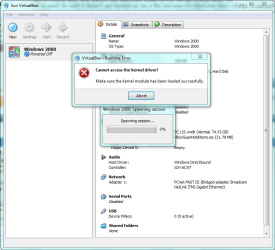
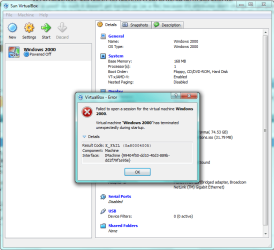
AARGGGHHHH!

I just went to start up the W2K VM and got this. Nothing has changed since I shut the VM down yesterday. The only thing changed on the host PC is some new software installed. The first image you get when you click "Start". The second one is after you click "Abort".
 

Attachments

  • Capture6.PNG
    Capture6.PNG
    42 KB · Views: 4
  • Capture7.PNG
    Capture7.PNG
    42.2 KB · Views: 6

My Computer

Computer Manufacturer/Model Number
DYI
OS
Win 7 x64 Professional
CPU
Intel Core i5-750 2.67Ghz
Motherboard
Gigabyte P55M-UD4
Memory
4gb
Graphics Card(s)
Nvidia GeForce 9500GT 512mb
Sound Card
On MB
Monitor(s) Displays
Lg Flatron
Screen Resolution
1280 x 1024
Hard Drives
C: 200mb Maxtor SATA 3
D: 500gb WD SATA 3
Back
Top