Windows 7 32bit Hard drive issue...

Squizzel

New member
Local time
1:36 PM
Messages
3
After finally upgrading to windows 7, I am having a issue with a IDE drive. Everything is up and running just fine but when I try to hook up a old ide drive with lots of "stuff" on it, windows 7 won't load correctly. It will just get stuck at the load screen and never get to the desktop.


Any suggestions!?! Thanks!
 

My Computer

OS
Windows 7 32bit
CPU
Intel Core 2 Duo E6600
Motherboard
p5n-e sli
Memory
4 Gigs at 400 MHz
Graphics Card(s)
GTX 260
Sound Card
On Board
Hard Drives
1 150 Gig Raptor - Sata
1tb Sata drive
500 gig - IDE drive
Welcome to SF, Squizzel. Please fill in your system specs. Is this an internal drive? Is it trying to load on the "stuff" drive, or the operating system drive? Is your bios set correctly for two drives? Is your other drive an IDE?
 

My Computer

Computer Manufacturer/Model Number
Dell and Custom
OS
Systems 1 and 2: Windows 7 Enterprise x64, Win 8 Developer
CPU
System 1: i7 [email protected], System 2: AMD FX-4100 Zambezi 3.6G
Motherboard
System 1:Dell 06NWYK System 2: ASUS M5A97 AM3+
Memory
System 1: 8GB System 2: 8GB
Graphics Card(s)
System 1: ATI FirePro V4800 System 2: Radeon HD 6850
Sound Card
System 1: onboard System 2: onboard
Monitor(s) Displays
System1: Viewsonic HDMI 24"
Screen Resolution
System 1: 1920x1080 System 2: 1920x1080
Hard Drives
System 1: Mirrored .5B drives System 2: Seagate Barracuda ST1000DM003 1TB 7200 RPM 64MB Cache SATA 6.0Gb/s
Case
System 1: Dell System 2: Cooler Master
Internet Speed
10 MBPS
Try an external enclosure and attach it via USB.
 

My Computer

Computer Manufacturer/Model Number
HP, Dell, Gateway, Toshiba - 4 laptops and 2 desktops
OS
Vista, Windows7, Mint Mate, Zorin, Windows 8
CPU
from 1.6GHz Duo to i7
Monitor(s) Displays
2x HP w2207
Hard Drives
5x HDD, 7x SSD, 12x Externals
Keyboard
with trackball - no mices
Mouse
Trackball mice
Internet Speed
DSL 6000
Thanks! I updated my stats..

It is a internal drive and it is set to be the last drive to boot so it should never boot from it.

What do you mean about the bio's set for 2 drives??

My other drives are sata!

Thanks!
 

My Computer

OS
Windows 7 32bit
CPU
Intel Core 2 Duo E6600
Motherboard
p5n-e sli
Memory
4 Gigs at 400 MHz
Graphics Card(s)
GTX 260
Sound Card
On Board
Hard Drives
1 150 Gig Raptor - Sata
1tb Sata drive
500 gig - IDE drive
Congratulation. You have an Asus mobo. Just like me! :)
Here is your manual: http://static.compusa.com/pdf/Asus_P5N-E_SLI_Manual.pdf

In order to get into your bios, hit the DEL key while the computer is booting up. If it starts Windows, you are too late. Just tape the DEL key every two seconds.

Your primary drive is sata, the other is ide.

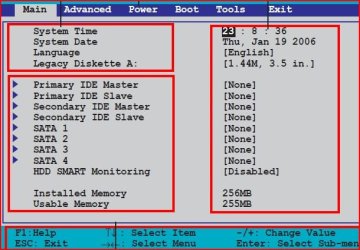
Your bios attachment will look like the following. Make the appropriate changes for sata and bios:
 

Attachments

  • asus-bios.JPG
    asus-bios.JPG
    50.3 KB · Views: 3

My Computer

Computer Manufacturer/Model Number
Dell and Custom
OS
Systems 1 and 2: Windows 7 Enterprise x64, Win 8 Developer
CPU
System 1: i7 [email protected], System 2: AMD FX-4100 Zambezi 3.6G
Motherboard
System 1:Dell 06NWYK System 2: ASUS M5A97 AM3+
Memory
System 1: 8GB System 2: 8GB
Graphics Card(s)
System 1: ATI FirePro V4800 System 2: Radeon HD 6850
Sound Card
System 1: onboard System 2: onboard
Monitor(s) Displays
System1: Viewsonic HDMI 24"
Screen Resolution
System 1: 1920x1080 System 2: 1920x1080
Hard Drives
System 1: Mirrored .5B drives System 2: Seagate Barracuda ST1000DM003 1TB 7200 RPM 64MB Cache SATA 6.0Gb/s
Case
System 1: Dell System 2: Cooler Master
Internet Speed
10 MBPS
After finally upgrading to windows 7, I am having a issue with a IDE drive. Everything is up and running just fine but when I try to hook up a old ide drive with lots of "stuff" on it, windows 7 won't load correctly. It will just get stuck at the load screen and never get to the desktop.


Any suggestions!?! Thanks!

Welcome to SevenForums.

If you are still having problems, then:
Make a System Repair Disc (this you should do regardless),
Insert the System Repair Disc.
Shutdown your computer completely.
Remove power cord
Reattach power cord (this makes sure you really shutdown)
PowerUp your computer, booting from the CD. (make bios change if needbe)
Go to a command prompt (I'll give link for this)
enter following commands,
Diskpart
list disk

for each disk shown, and one at a time,
select disk N where N is a numeral
detail disk

Does the drive that you think you are booting from, show as Boot Disk: Yes when you gave the detail disk command?

exit your way out.
http://www.sevenforums.com/tutorials/668-system-recovery-options.html
 

My Computer

Computer Manufacturer/Model Number
Toshiba Satellite S875D-S7239 laptop
OS
MS Windows 7 Ultimate SP1 64-bit
CPU
AMD A10-4600M
Motherboard
AMD Pumori (Socket FT1)
Memory
6.00 GB Dual-Channel DDR3 @ 798MHz (11-11-12-28)
Graphics Card(s)
AMD Radeon HD 7660G
Sound Card
High Definition Audio Device
Monitor(s) Displays
Generic PnP Monitor (1600x900@60Hz)
Screen Resolution
1600x900@60Hz
Hard Drives
SSD 119GB Corsair CSSD-V128GB2 ATA Device
Keyboard
Standard PS/2 Keyboard
Mouse
HP Wireless Optical Mobile Mouse Model FHA-3410
Internet Speed
What the local pub, local coffee shop offers.
Other Info
Optical Drive:MATSHITA BD-CMB UJ160B ATA Device


Also have an Asus ha1002xp netbook with Win 7 Ultimate installed.
I assume the drive uses jumpers to select between Master and Slave like most old IDE drives do.
Do you have the jumper set to Slave?
 

My Computer

Computer type
PC/Desktop
Computer Manufacturer/Model Number
Alienware Aurora ALX R4
OS
Windows 10 Pro (x64)
CPU
Intel Core i7-3930K (3.2GHz - 4.5GHz)
Motherboard
Alienware Aurora-R4 x79
Memory
4x Samsung 4GB PC3-12800 DDR3 (16GB 1600MHz)
Graphics Card(s)
Nvidia Geforce GTX 690
Sound Card
SteelSeries Siberia Elite
Monitor(s) Displays
Dell UltraSharp U3011
Screen Resolution
2560x1600
Hard Drives
Samsung 850 Pro 256 GB, Seagate 1TB Desktop Hybrid HDD, 2x Western Digital 4TB Green HDD
PSU
875W Some Dell PSU <.<
Case
Alienware Aurora ALX
Cooling
Custom Liquid Cooling (EK CPU & GPU blocks) dual EK 480RAD
Keyboard
Logitech G710+ Mechanical
Mouse
Logitech G700s
Internet Speed
Verizon Fios (50 mbps average)
Other Info
Server: Intel NUC D54250WYK: i5-4250U, 16GB, 256 GB mSATA, Windows Server 2012 R2
I am trying some of the suggestions above today, thanks for everyone's input. It is set to master, I am going to switch it right now.
 

My Computer

OS
Windows 7 32bit
CPU
Intel Core 2 Duo E6600
Motherboard
p5n-e sli
Memory
4 Gigs at 400 MHz
Graphics Card(s)
GTX 260
Sound Card
On Board
Hard Drives
1 150 Gig Raptor - Sata
1tb Sata drive
500 gig - IDE drive
Back
Top