Windows 7 32bit on Intel Celeron N2840

georgegl

New member
Local time
5:10 PM
Messages
2
The Lenovo S20 - 30 laptop has an Intel Celeron N2840 cpu. (a 64bit cpu) And 2GB RAM. And probably UEFI bios.
And Windows 8.1 with Bing 64bit preinstalled.

I'd like to install Windows 7 32bit. (Home Premium). A clean install.
Is this possible? In the hardware level, is this possible?
 

My Computer My Computer

Computer type
Laptop
Computer Manufacturer/Model Number
Lenovo, HP
OS
Windows 8.1
1. Check in disk management whether the C partition is encrypted. This may be an instant Go device.

2. You probably have only a 32GB disk. I think W8.1 is a lot better on that. It is small and fast.

3. Check your BIOS whether you can shut off Secure Boot and set it to Legacy Made.

I think you will have more trouble than it is worth changing the OS. I have a couple of similar devices like that (Asus T100 and Asus X205). They run perfectly with W8.1.
 

My Computer My Computer

Computer Manufacturer/Model Number
HP, Dell, Gateway, Toshiba - 4 laptops and 2 desktops
OS
Vista, Windows7, Mint Mate, Zorin, Windows 8
CPU
from 1.6GHz Duo to i7
Monitor(s) Displays
2x HP w2207
Hard Drives
5x HDD, 7x SSD, 12x Externals
Keyboard
with trackball - no mices
Mouse
Trackball mice
Internet Speed
DSL 6000
I had 320Gb HDD. (and, you describe the HP Spread 14)
My problem is that I want to install the Wordperfect 6.2 for DOS. Impossible to install it in 64bit systems. And I do not want to use vDos or other emulators... This is the reason I want Windows 7 32bit. Or even better Windows 98x... But this is impossible I think.
I can replace the hdd with a very small ssd of about 8GB or even smaller. A 2GB sd card through sata converter ecc, but...
I am searchin' for a very light word processor machine and now with the chromebooks are a lot of them out there but probably none of them compatible with what I want.
I had find also some vintage 7 kilos laptops on ebay but Jesus! :D
 

My Computer My Computer

Computer type
Laptop
Computer Manufacturer/Model Number
Lenovo, HP
OS
Windows 8.1
Why don't you run W98 in Virtual. For W7 you don't have enough RAM. Give W98 512MB of RAM. W8 32bit can very well run in the remaining 1.5GBs. I have that exact configuration running Linux in virtual on my X205 that also has 2GB of RAM. Here is a tutorial I made that gives you all the instructions (click on the tile on my OneDrive I linked). My example there is running W10 and W8.1, but it would be the same for W98.
 

My Computer My Computer

Computer Manufacturer/Model Number
HP, Dell, Gateway, Toshiba - 4 laptops and 2 desktops
OS
Vista, Windows7, Mint Mate, Zorin, Windows 8
CPU
from 1.6GHz Duo to i7
Monitor(s) Displays
2x HP w2207
Hard Drives
5x HDD, 7x SSD, 12x Externals
Keyboard
with trackball - no mices
Mouse
Trackball mice
Internet Speed
DSL 6000
Why don't you run W98 in Virtual.

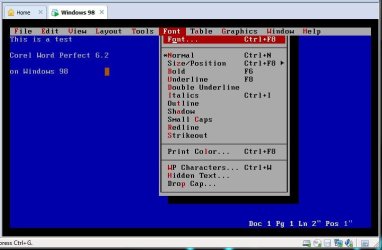
You beat me to it. Here's a screenshot of Wordperfect 6.2 for DOS running in Windows 98 in VMware.

wp62.jpg

It's kinda dire. I'd say stick with 8.1 Bing and use Office.
 

My Computer My Computer

Computer type
PC/Desktop
Computer Manufacturer/Model Number
self build
OS
Windows 7 Pro x64 sp1
CPU
i7 4770K
Motherboard
MSI B85M-E45
Memory
8GB Corsair Vengeance 1600MHz
Graphics Card(s)
onboard
Monitor(s) Displays
LG 27MP35
Screen Resolution
1920-1080
Hard Drives
Seagate 2TB
PSU
Cooler Master GX 750
Case
Antec 300
Cooling
Seidon 120V
Internet Speed
60/18
Antivirus
MSE
Browser
Firefox
And if you don't want to buy the MS Office (which I think is worth it's money), use Libre Office. That is a fine office suite too. I use that in Linux.
 

My Computer My Computer

Computer Manufacturer/Model Number
HP, Dell, Gateway, Toshiba - 4 laptops and 2 desktops
OS
Vista, Windows7, Mint Mate, Zorin, Windows 8
CPU
from 1.6GHz Duo to i7
Monitor(s) Displays
2x HP w2207
Hard Drives
5x HDD, 7x SSD, 12x Externals
Keyboard
with trackball - no mices
Mouse
Trackball mice
Internet Speed
DSL 6000
Back
Top