Solved All browsers crash on Windows 7 32bit only

Points as I see here ...

  • All browsers crash.
  • Windows 7 32 bit only. Even after clean reinstall.
  • Happens on several machines, identically. Not on this one only.
  • In this machine, and the other ones, no browser crash with any other OS than windows 7 32 bit.
I have a question to you. Are all the machines those are yielding browser crash got the OS installed with the same ISO or disc?
 

My Computer My Computer

At a glance

Microsoft Windows 10 Pro Insider Preview 64-bitIntel(R) Core(TM) i3-4130 CPU @ 3.40GHzCorsair Vengence 4GB x2 (8.00GB Dual-Channel ...2047MB GeForce GTS 450 (ZOTAC International)
Computer type
PC/Desktop
Computer Manufacturer/Model Number
Self Assembled
OS
Microsoft Windows 10 Pro Insider Preview 64-bit
CPU
Intel(R) Core(TM) i3-4130 CPU @ 3.40GHz
Motherboard
Gigabyte Technology Co., Ltd. B85M-D3H
Memory
Corsair Vengence 4GB x2 (8.00GB Dual-Channel DDR3 @ 798MHz)
Graphics Card(s)
2047MB GeForce GTS 450 (ZOTAC International)
Sound Card
Onboard (Realtek High Definition Audio)
Monitor(s) Displays
LG Flatron E2040T
Screen Resolution
1600x900
Hard Drives
Western Digital 1 TB
Seagate 500 GB
PSU
Corsair VS550
Case
Cooler Master K380
Cooling
Cooler Master Seidon 120V Plus
Keyboard
Logitech MK260r
Mouse
Logitech MK260r
Internet Speed
PMPL Broadband
Antivirus
Windows Defender + MBAM
Browser
Firefox
Other Info
Dell Studio 15" Laptop
Exactly, test the install media from step one of the reinstall tutorial under my signature pic below.

Compare also The install you are doing to the one in that tutorial which compile everything that works best in tens of thousands of installs we've directly helped with here, and which has been used by 1.5 million consumers without a single complaint.
 
Are all these computer Activated properly?

I would suggest just working on one computer that has the problem.
When the problem is repaired the repair may work on the rest of the computers with the same problem.

For that one problem computer post the System Information so we can take a look. Use this programs to do so.

This tutorial by Kari will help

http://www.sevenforums.com/tutorials/311593-speccy-publish-snapshot-your-system-specs.html

To put things in some sort of order:

1. One problem computer

2. Windows 7 installed and Activated properly

3. Post system specs
 

My Computer My Computer

At a glance

Windows 10 Pro. 64/ version 1709 Windows 7 Pr...Intel i7-6800K @ 4.3Corsair Platinum 16 gig @2400EVGA GTX 1070 OC
Computer type
PC/Desktop
Computer Manufacturer/Model Number
Home made Desktop
OS
Windows 10 Pro. 64/ version 1709 Windows 7 Pro/64
CPU
Intel i7-6800K @ 4.3
Motherboard
ASUS X-99 Deluxe II
Memory
Corsair Platinum 16 gig @2400
Graphics Card(s)
EVGA GTX 1070 OC
Monitor(s) Displays
Asus 27" LED LCD/VE278Q
Screen Resolution
1920-1080 or 1280-720 HDMI
Hard Drives
INTEL SSD 730-240 Gb Sata 3.0/
PSU
EVGA Platium 1200W
Case
Phanteks Luxe Tempered Glass 8 fans/ one radiator
Cooling
XSPC/ Water Cooled CPU
Keyboard
Das 4 Professional
Mouse
Logitech M705/MX Anywhere 2-S
Internet Speed
100 mbits
Antivirus
Microsoft Security Essentials/ Malwarebytes Premium 3.0/ SAS
Browser
I.E. 11 default/Firefox/ ISP Time Warner Cable/Spectrum
Other Info
LG BluRay Burner/
Sound system-KLipsch-THX/
Icy Dock ssd Hot Swap bays.
The OP doesn't have access to the Lab after 2pmET so he won't be back until tomorrow AM.
 

My Computer My Computer

At a glance

Windows 7 Pro-x64i7-2600 3.4GHz - 3.8GHz Turbo8Gb - 2x4GB, Muskin 991770 PC3-1333Integrated Intel HD 2000
Computer type
PC/Desktop
Computer Manufacturer/Model Number
Built 2/11/2011
OS
Windows 7 Pro-x64
CPU
i7-2600 3.4GHz - 3.8GHz Turbo
Motherboard
Intel DH67BL-B3
Memory
8Gb - 2x4GB, Muskin 991770 PC3-1333
Graphics Card(s)
Integrated Intel HD 2000
Sound Card
Integrated Intel 10.1 HD, RealTek ALC892
Monitor(s) Displays
Asus LCD VH222H, Haier HL24XSL2a
Screen Resolution
1920x1080, 1920x1080
Hard Drives
Crucial SSD C300-128Gb,
Western Digital WD5002AALX - 500Gb,
Western Digital WD7501AALS - 750Gb
PSU
Seasonic 650W 80+ Gold Modular
Case
Rosewill Defender
Cooling
Stock CPU, Four 120mm case fans, PCH fan added
Keyboard
Logitech EX100 Y-RBH94 Wireless
Mouse
Logitech EX100 M-RCE95 Wireless
Internet Speed
3.0/1.5 Mbs
Antivirus
Microsoft Security Essentials
Browser
Microsoft Internet Explorer 11
Other Info
Antec Veris Premier-Multimedia IR Station,
Cyber Accoustics-3602 Speakers,
AFT XM-5U Card Reader,
Hauppauge TV-HVR-2250,
Sony LX300 USB Turntable
That's fine, we can wait.
 

My Computer My Computer

At a glance

Windows 10 Pro. 64/ version 1709 Windows 7 Pr...Intel i7-6800K @ 4.3Corsair Platinum 16 gig @2400EVGA GTX 1070 OC
Computer type
PC/Desktop
Computer Manufacturer/Model Number
Home made Desktop
OS
Windows 10 Pro. 64/ version 1709 Windows 7 Pro/64
CPU
Intel i7-6800K @ 4.3
Motherboard
ASUS X-99 Deluxe II
Memory
Corsair Platinum 16 gig @2400
Graphics Card(s)
EVGA GTX 1070 OC
Monitor(s) Displays
Asus 27" LED LCD/VE278Q
Screen Resolution
1920-1080 or 1280-720 HDMI
Hard Drives
INTEL SSD 730-240 Gb Sata 3.0/
PSU
EVGA Platium 1200W
Case
Phanteks Luxe Tempered Glass 8 fans/ one radiator
Cooling
XSPC/ Water Cooled CPU
Keyboard
Das 4 Professional
Mouse
Logitech M705/MX Anywhere 2-S
Internet Speed
100 mbits
Antivirus
Microsoft Security Essentials/ Malwarebytes Premium 3.0/ SAS
Browser
I.E. 11 default/Firefox/ ISP Time Warner Cable/Spectrum
Other Info
LG BluRay Burner/
Sound system-KLipsch-THX/
Icy Dock ssd Hot Swap bays.
Points as I see here ...

  • All browsers crash.
  • Windows 7 32 bit only. Even after clean reinstall.
  • Happens on several machines, identically. Not on this one only.
  • In this machine, and the other ones, no browser crash with any other OS than windows 7 32 bit.
I have a question to you. Are all the machines those are yielding browser crash got the OS installed with the same ISO or disc?
The lab computers are installed with a USB MAK OS. The school computers as well as the teachers laptop also suffer these symptoms. And I'm not sure if those are also MAK but I doubt it's the same image. No matter the computer specs only 32bit Win7 OS has this issue. Ironically I have a computer that runs Windows 8 and Windows 7 64 bit with only 2gb of ram and they have no issue what so ever.

Are all these computer Activated properly?

I would suggest just working on one computer that has the problem.
When the problem is repaired the repair may work on the rest of the computers with the same problem.

For that one problem computer post the System Information so we can take a look. Use this programs to do so.

This tutorial by Kari will help

http://www.sevenforums.com/tutorials/311593-speccy-publish-snapshot-your-system-specs.html

To put things in some sort of order:

1. One problem computer

2. Windows 7 installed and Activated properly

3. Post system specs

I have been using only one lab computer for testing purposes. Let me get that program onto the server and load it in and I'll have the specs up shortly.
 

My Computer My Computer

At a glance

32bitintel core i54gb ddr3intel hd graphics
Computer type
PC/Desktop
Computer Manufacturer/Model Number
Dell
OS
32bit
CPU
intel core i5
Memory
4gb ddr3
Graphics Card(s)
intel hd graphics
Hard Drives
1 tb SATA drive
Antivirus
Avira
Browser
IE/Opera/Firefox/Chrome
Confirmed with my teacher that at least 4 different images, .isos are used for these computers. I have a freshly installed win 7 admin machine I just got up running yesterday that's not using any previous image .iso. I will be attempting to see if the same issues occur.

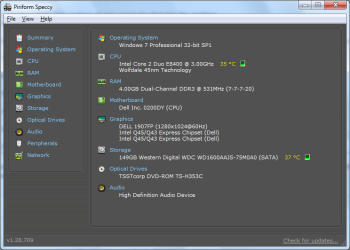
Attached is a snap of Speccy. Both Enterprise (Admin I freshly installed yesterday running the Enterprise) and Professional 32bit have the same issue.
 

Attachments

  • Speccy.png
    Speccy.png
    24.4 KB · Views: 0
Last edited:

My Computer My Computer

At a glance

32bitintel core i54gb ddr3intel hd graphics
Computer type
PC/Desktop
Computer Manufacturer/Model Number
Dell
OS
32bit
CPU
intel core i5
Memory
4gb ddr3
Graphics Card(s)
intel hd graphics
Hard Drives
1 tb SATA drive
Antivirus
Avira
Browser
IE/Opera/Firefox/Chrome
The computer under question is having a grandfather network driver.
Code:
[COLOR=Red]11/5/2009[/COLOR] 8:35:19 PM   C:\Windows\system32\DRIVERS\e1k6232.sys

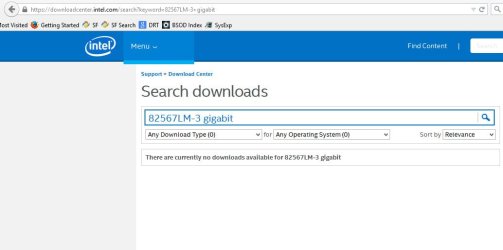
Search for any possible update to the Intel(R) 82567LM-3 Gigabit Network Connection from Support | Dell US and see how it goes.
 

My Computer My Computer

At a glance

Microsoft Windows 10 Pro Insider Preview 64-bitIntel(R) Core(TM) i3-4130 CPU @ 3.40GHzCorsair Vengence 4GB x2 (8.00GB Dual-Channel ...2047MB GeForce GTS 450 (ZOTAC International)
Computer type
PC/Desktop
Computer Manufacturer/Model Number
Self Assembled
OS
Microsoft Windows 10 Pro Insider Preview 64-bit
CPU
Intel(R) Core(TM) i3-4130 CPU @ 3.40GHz
Motherboard
Gigabyte Technology Co., Ltd. B85M-D3H
Memory
Corsair Vengence 4GB x2 (8.00GB Dual-Channel DDR3 @ 798MHz)
Graphics Card(s)
2047MB GeForce GTS 450 (ZOTAC International)
Sound Card
Onboard (Realtek High Definition Audio)
Monitor(s) Displays
LG Flatron E2040T
Screen Resolution
1600x900
Hard Drives
Western Digital 1 TB
Seagate 500 GB
PSU
Corsair VS550
Case
Cooler Master K380
Cooling
Cooler Master Seidon 120V Plus
Keyboard
Logitech MK260r
Mouse
Logitech MK260r
Internet Speed
PMPL Broadband
Antivirus
Windows Defender + MBAM
Browser
Firefox
Other Info
Dell Studio 15" Laptop
Updating drivers made no impact.
 

Attachments

  • updated driver.png
    updated driver.png
    48.6 KB · Views: 0

My Computer My Computer

At a glance

32bitintel core i54gb ddr3intel hd graphics
Computer type
PC/Desktop
Computer Manufacturer/Model Number
Dell
OS
32bit
CPU
intel core i5
Memory
4gb ddr3
Graphics Card(s)
intel hd graphics
Hard Drives
1 tb SATA drive
Antivirus
Avira
Browser
IE/Opera/Firefox/Chrome
Where did you get the driver? Link?

For 4gb RAM you should be running 64 bit Windows 7, otherwise .6 gb is wasted unless the Resource Monitor proves it is being used for hardware. 32 bit can only utilize 3.4gb RAM.
 
Where did you get the driver? Link?

For 4gb RAM you should be running 64 bit Windows 7, otherwise .6 gb is wasted unless the Resource Monitor proves it is being used for hardware. 32 bit can only utilize 3.4gb RAM.

Product Support | Dell US

The District is too cheap to buy MAK for 64 bit. We are forced to use 32bit in the school system here.
 

My Computer My Computer

At a glance

32bitintel core i54gb ddr3intel hd graphics
Computer type
PC/Desktop
Computer Manufacturer/Model Number
Dell
OS
32bit
CPU
intel core i5
Memory
4gb ddr3
Graphics Card(s)
intel hd graphics
Hard Drives
1 tb SATA drive
Antivirus
Avira
Browser
IE/Opera/Firefox/Chrome
Any MS key can be used interchangeably for 32- or 64-bit. Try a test install with x64.

Confirm the LAN device with Hardware Identification.

Enable hardware auto-updating via Windows Update (Step 3) then Check for Updates, install all Important and Optional to make sure you have all drivers Windows wants and are fully patched. Having no SP2 makes all patching critical.

Test the RAM - Test with Memtest86+ for 6-8 passes or overnight.

Establish a totally clean boot, with only MSE starting with Windows.

Flush DNS

Run another full scan with Malwarebytes this time followed by AdwCleaner.

Reinstall Flashplayer.

Clean out all temp files and cookies in all Browsers, remove all Add-Ons except flash, reset IE to defaults in Advanced tab saving nothing, uninstall Chrome spyware, try other browsers.

Work through the other Troubleshooting Steps for Windows 7 which often unmask the problem.
 
Any MS key can be used interchangeably for 32- or 64-bit. Try a test install with x64.

Confirm the LAN device with Hardware Identification.

Enable hardware auto-updating via Windows Update (Step 3) then Check for Updates, install all Important and Optional to make sure you have all drivers Windows wants and are fully patched. Having no SP2 makes all patching critical.

Test the RAM - Test with Memtest86+ for 6-8 passes or overnight.

Establish a totally clean boot, with only MSE starting with Windows.

Flush DNS

Run another full scan with Malwarebytes this time followed by AdwCleaner.

Reinstall Flashplayer.

Clean out all temp files and cookies in all Browsers, remove all Add-Ons except flash, reset IE to defaults in Advanced tab saving nothing, uninstall Chrome spyware, try other browsers.

Work through the other Troubleshooting Steps for Windows 7 which often unmask the problem.

I know you're trying to help, but we have done all of these things already. My instructor is allowing me to pursue this because it's of interest to us. We are a technical college studying networking. It is very unlikely this is a hardware issue as that would mean hundreds of computers on the district level are all going bad at the same time. Is there any other things we can try?

Also
Testing on other OS had no issues on the machines. I tested Windows 7 64bit, Windows XP, Windows 8(8.1) 32 and 64 bit.

This is happening on several machines not just one. I have done testing on fresh installs so it's not malware, nor is it hardware issues.

I have done sfc/ scannow as well as chkdsk /f and winsock resetting.

I've reinstalled the web browsers as well as made multiple new user accounts.
 

My Computer My Computer

At a glance

32bitintel core i54gb ddr3intel hd graphics
Computer type
PC/Desktop
Computer Manufacturer/Model Number
Dell
OS
32bit
CPU
intel core i5
Memory
4gb ddr3
Graphics Card(s)
intel hd graphics
Hard Drives
1 tb SATA drive
Antivirus
Avira
Browser
IE/Opera/Firefox/Chrome
Well that's what I'd do. But then what do I know? :rolleyes:

Once you did the due diligence (9/10 of which is not reported as done) then I was going to elevate this to my friend Rayda who is a top Networking MVP.
 
Most probably your network chip does not have a driver update available.
2015-06-16_201531.jpg
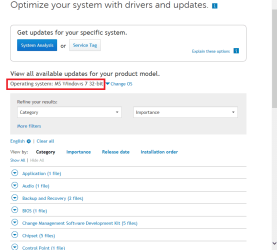
Are you sure that the driver that you are getting from Dell is for windows7? I am not.
 

My Computer My Computer

At a glance

Microsoft Windows 10 Pro Insider Preview 64-bitIntel(R) Core(TM) i3-4130 CPU @ 3.40GHzCorsair Vengence 4GB x2 (8.00GB Dual-Channel ...2047MB GeForce GTS 450 (ZOTAC International)
Computer type
PC/Desktop
Computer Manufacturer/Model Number
Self Assembled
OS
Microsoft Windows 10 Pro Insider Preview 64-bit
CPU
Intel(R) Core(TM) i3-4130 CPU @ 3.40GHz
Motherboard
Gigabyte Technology Co., Ltd. B85M-D3H
Memory
Corsair Vengence 4GB x2 (8.00GB Dual-Channel DDR3 @ 798MHz)
Graphics Card(s)
2047MB GeForce GTS 450 (ZOTAC International)
Sound Card
Onboard (Realtek High Definition Audio)
Monitor(s) Displays
LG Flatron E2040T
Screen Resolution
1600x900
Hard Drives
Western Digital 1 TB
Seagate 500 GB
PSU
Corsair VS550
Case
Cooler Master K380
Cooling
Cooler Master Seidon 120V Plus
Keyboard
Logitech MK260r
Mouse
Logitech MK260r
Internet Speed
PMPL Broadband
Antivirus
Windows Defender + MBAM
Browser
Firefox
Other Info
Dell Studio 15" Laptop
Any MS key can be used interchangeably for 32- or 64-bit. Try a test install with x64.

Confirm the LAN device with Hardware Identification.

Enable hardware auto-updating via Windows Update (Step 3) then Check for Updates, install all Important and Optional to make sure you have all drivers Windows wants and are fully patched. Having no SP2 makes all patching critical.

Test the RAM - Test with Memtest86+ for 6-8 passes or overnight.

Establish a totally clean boot, with only MSE starting with Windows.

Flush DNS

Run another full scan with Malwarebytes this time followed by AdwCleaner.

Reinstall Flashplayer.

Clean out all temp files and cookies in all Browsers, remove all Add-Ons except flash, reset IE to defaults in Advanced tab saving nothing, uninstall Chrome spyware, try other browsers.

Work through the other Troubleshooting Steps for Windows 7 which often unmask the problem.

1. Was tested already
2. Confirmed
3. Already set
4. Skipping this
5. Was done yesterday and tested today (the admin machine) still has issues.
6. Was done
7. Skipping this
8. Done
9. Done
10. All of these things were done prior or done with previous inquiries.

I am not saying you don't know what you're doing, but I'm saying we aren't your typical 97% either. And I feel like I'm chasing my tail and making no progress here. I'm sure you can understand that.
 

My Computer My Computer

At a glance

32bitintel core i54gb ddr3intel hd graphics
Computer type
PC/Desktop
Computer Manufacturer/Model Number
Dell
OS
32bit
CPU
intel core i5
Memory
4gb ddr3
Graphics Card(s)
intel hd graphics
Hard Drives
1 tb SATA drive
Antivirus
Avira
Browser
IE/Opera/Firefox/Chrome

Attachments

  • Dell.png
    Dell.png
    17.8 KB · Views: 0

My Computer My Computer

At a glance

32bitintel core i54gb ddr3intel hd graphics
Computer type
PC/Desktop
Computer Manufacturer/Model Number
Dell
OS
32bit
CPU
intel core i5
Memory
4gb ddr3
Graphics Card(s)
intel hd graphics
Hard Drives
1 tb SATA drive
Antivirus
Avira
Browser
IE/Opera/Firefox/Chrome
There may be something in the install and setup that is causing the problem. No one of the 1.5 million who've used Clean Reinstall Windows 7 has reported browser crashes. So limit yourself to only the tools and methods there which compile everything that works best.

You might do a diagnostic install where you start with wiping the hard drive of any code which can interfere using Diskpart Clean Command. I would use 64 bit.

Then install the OS with only ethernet cable attached. Install LAN driver if needed when install finishes. Enable hardware auto-updating via Windows Update (Step 3) then Check for Updates, install all Important and Optional with reboots until no more are offered.

Before each group of Updates use IE to see if it crashes. This can pinpoint a driver causing the crash. If these crash before Updates then it would point to the hardware or OS media. However there might also be a patch missing that remedies this, so proceed with all Updates and scour the Dell Downloads page for all patches to consider.

If no crashes install each Program, testing the browser after each one is installed. Same with settings changes.
 
There may be something in the install and setup that is causing the problem. No one of the 1.5 million who've used Clean Reinstall Windows 7 has reported browser crashes. So limit yourself to only the tools and methods there which compile everything that works best.

You might do a diagnostic install where you start with wiping the hard drive of any code which can interfere using Diskpart Clean Command. I would use 64 bit.

Then install the OS with only ethernet cable attached. Install LAN driver if needed when install finishes. Enable hardware auto-updating via Windows Update (Step 3) then Check for Updates, install all Important and Optional with reboots until no more are offered.

Before each group of Updates use IE to see if it crashes. This can pinpoint a driver causing the crash. If these crash before Updates then it would point to the hardware or OS media. However there might also be a patch missing that remedies this, so proceed with all Updates and scour the Dell Downloads page for all patches to consider.

If no crashes install each Program, testing the browser after each one is installed. Same with settings changes.

Just made another fresh install without doing ANY updates. No web browsers crash. The only difference between the fresh install and this lab computer is Windows Updates and Networking programs/AV is installed on this computer.(Programs should be irrelevant though because the student computers which are district regulated have none of these programs on them)

Also I can't use 64 bit as the MAK licenses we are issued are only for 32bit.

My instructor and I may think that the WSUS has a bad windows update that it sent out to all of the computers.

Update: It was a bad WSUS file sent out to the computers. Thank you guys for the help.
 
Last edited:

My Computer My Computer

At a glance

32bitintel core i54gb ddr3intel hd graphics
Computer type
PC/Desktop
Computer Manufacturer/Model Number
Dell
OS
32bit
CPU
intel core i5
Memory
4gb ddr3
Graphics Card(s)
intel hd graphics
Hard Drives
1 tb SATA drive
Antivirus
Avira
Browser
IE/Opera/Firefox/Chrome
I know of no exceptions to all Windows 7 licenses being interchangeable for either 32 or 64-bit.

Now install small groups of updates testing the browser after each reboot. Whenever the browser crashes, that would mean that something you did just beforehand triggered it. If it's a group of updates, uninstall them one at a time to test the browser again.

It's very important to keep track of everything you do and limited in the beginning to just small groups of updates which can be uninstalled or rolled back using System Restore.
 
Back
Top