Windows 7 5.1 surround problems (realtek)

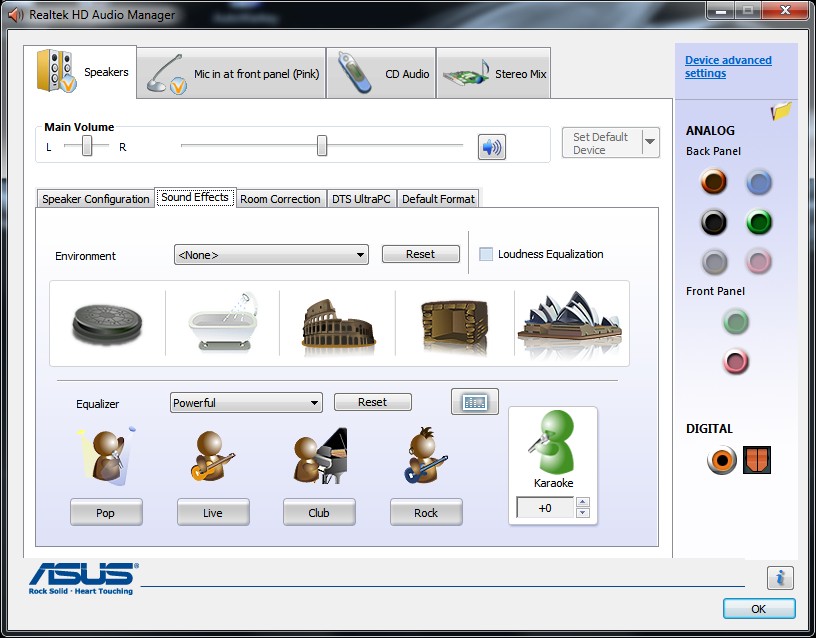
This is the software I downloaded from Realtek High Definition Audio Codecs, although it seems it may have something to do with my motherboard as well. I just noticed the big
logo.png
in the window. I'll update my realtek drivers tonight and see if anything changes.

Update: Just updated to R2.51 drivers instead of R2.49 and it's the same.
 

My Computer My Computer

OS
Home Premium x64
CPU
Intel e7400 2.8GHz Dual Core, OC @ 3.36GHz
Motherboard
Gigabyte GA-EP43-DS3L/S3L
Memory
4GB DDR2 1066
Graphics Card(s)
Nvidia GeForce 9800 GT
Sound Card
Realtek Surround Onboard.
Monitor(s) Displays
ASUS VW224, 22 Inch and Samsung SyncMaster 713v
Screen Resolution
Main Screen @1680x1050, Secondary @ 1280x1024
Hard Drives
Western Digital WD3200AAKS 320GB 7200 RPM SATA 3.0Gb/s
PSU
Thermaltake Purepower W0100RU 500W
Case
Rosewill R5601-BK Screw-less
Cooling
Two 120mm fans and Stock CPU fans
Keyboard
Old Dell Keyboard my neighbor gave me.
Mouse
Logitech MX518
Internet Speed
6Kbps
Other Info
Logitech X-540 70 watts 5.1 Speakers
Hmm...I have an evga X58 3xsli motherboard. Maybe I can try downloading a driver from their website. So even though you just updated to the newest driver via the Realtek website you still have the option to change the connectors?
 

My Computer My Computer

OS
Windows 7 Pro 64bit
CPU
Intel Core i7 920
Motherboard
evga x58
Memory
OCZ Gold 6gb
Graphics Card(s)
GTX285
Sound Card
asus xonar st
Monitor(s) Displays
Samsung T240HD
Hard Drives
3xWD black 500gb
PSU
Corsair 850watt
Case
Antec 900
Cooling
Xigmatek Dark Knight and stock Antec 900 fans
Keyboard
Logitech Illuminated
Mouse
Coolermaster Sentinel
Yeah thats right and I still have the big
logo.png
logo
 

My Computer My Computer

OS
Home Premium x64
CPU
Intel e7400 2.8GHz Dual Core, OC @ 3.36GHz
Motherboard
Gigabyte GA-EP43-DS3L/S3L
Memory
4GB DDR2 1066
Graphics Card(s)
Nvidia GeForce 9800 GT
Sound Card
Realtek Surround Onboard.
Monitor(s) Displays
ASUS VW224, 22 Inch and Samsung SyncMaster 713v
Screen Resolution
Main Screen @1680x1050, Secondary @ 1280x1024
Hard Drives
Western Digital WD3200AAKS 320GB 7200 RPM SATA 3.0Gb/s
PSU
Thermaltake Purepower W0100RU 500W
Case
Rosewill R5601-BK Screw-less
Cooling
Two 120mm fans and Stock CPU fans
Keyboard
Old Dell Keyboard my neighbor gave me.
Mouse
Logitech MX518
Internet Speed
6Kbps
Other Info
Logitech X-540 70 watts 5.1 Speakers
I might trying downloading it from another place...Maybe my motherboard does not allow for on the fly connector retasking?? I don't know if that is strictly a software issue or if it could also have something to do with the motherboard construction.

Either way, this should have been fixed either by Microsoft or by Realtek long ago. This thread has been open for a long time, and there is no solution other than workarounds which work for some people and do not work for others.
 

My Computer My Computer

OS
Windows 7 Pro 64bit
CPU
Intel Core i7 920
Motherboard
evga x58
Memory
OCZ Gold 6gb
Graphics Card(s)
GTX285
Sound Card
asus xonar st
Monitor(s) Displays
Samsung T240HD
Hard Drives
3xWD black 500gb
PSU
Corsair 850watt
Case
Antec 900
Cooling
Xigmatek Dark Knight and stock Antec 900 fans
Keyboard
Logitech Illuminated
Mouse
Coolermaster Sentinel
I have the ALC1200 audio chipset. I think the last version I've tested was the R2.42. Under Windows Seven I didn't had any 5.1 sound with that version.

Does the R2.52 changed anything or not? Have anyone with ALC1200 tested it?
 

My Computer My Computer

OS
Windows 7 x64
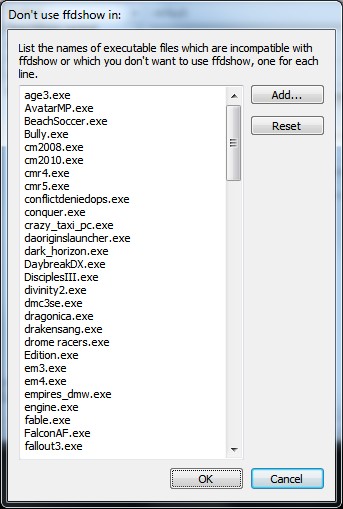
I got the 5.1 sound to work by using the ffdshow audio decoder. Only problem is that your audio player has to support this.

These steps work with GOM player and Media Player Classic Home Cinema.
Right Click Player -> Filters - ffdShow Audio Decoder - Properties
Now you have 2 options.
1. Check Dolby Decoder and check Apply Dolby Pro Logic II decoding to all stereo sources. (I am currently using this setting and it sounds great)
2. Check Mixer and check Expand stereo to surround. With this option you can modify the surround matrix to your needs.
 

My Computer My Computer

OS
Windows 7 Ultimate x64
Hi guys, I'm new here. Nice vbulletin forum & very beautiful worked out!

To the stuff now, here is my solution to Windows Media Player 12. The same goes for other applications, you just have to install ffdshow (eg K-Lite Mega Codec Pack).

For any questions, check my specs @ my profile.


You need to be an system administrator! Follow the pictures...


Check my audio settings in the next 3 pics
zYeD7.jpg

hbBCq.jpg

cH5BT.jpg


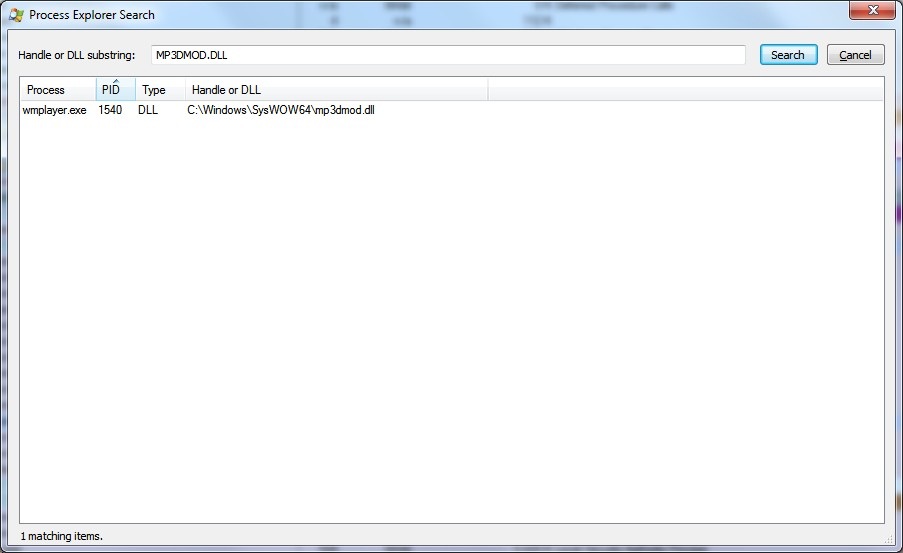
Play an MP3 file with your WMP12. Open process explorer and search (CTRL-F) for the MP3DMOD.DLL that your WMP12 is using to play MP3 files
MeE4x.jpg


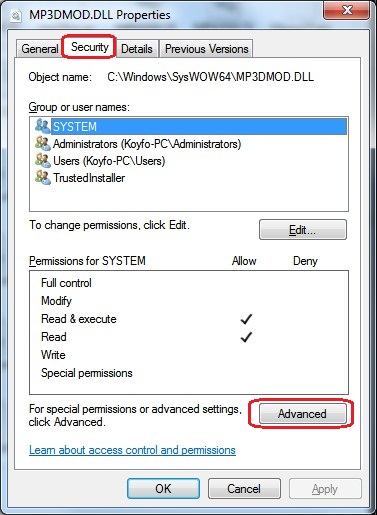
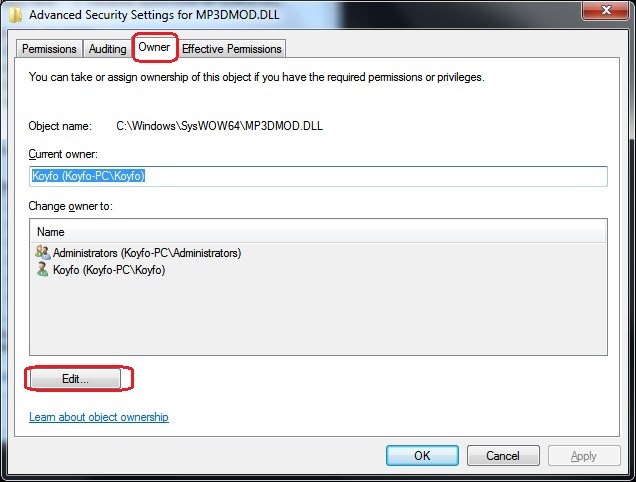
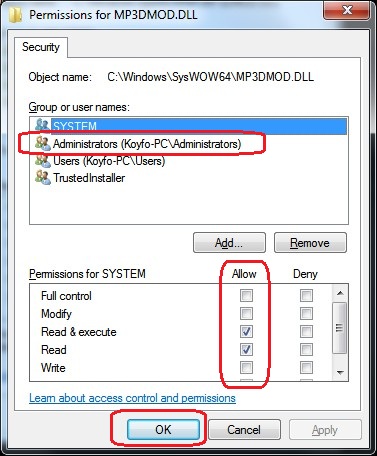
Now go find it, and take ownership of it
UEiED.jpg

hoD9h.jpg

LtQDa.jpg


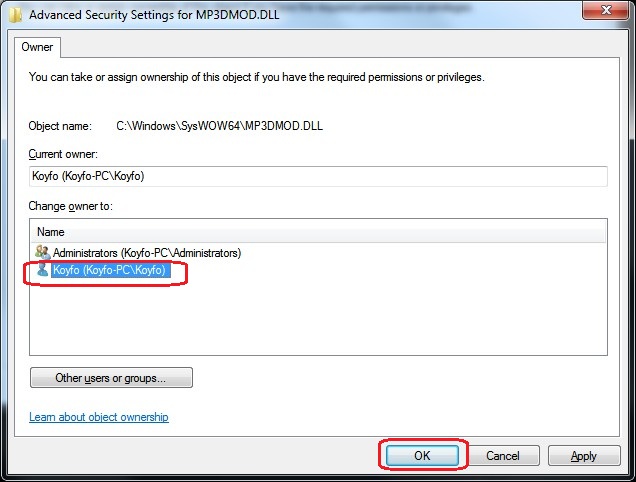
Select FULL ownership!
v7tmK.jpg


Now that you have ownership, rename it to MP3DMOD.DLL.BAK or keep it in a backup place, forcing WMP12 that way to use another decoder (ffdshow)


ne7Mj.jpg


Remove wmplayer.exe from the list
l0pMC.jpg


Apply the Mixer filter and make these settings
xsw3o.jpg


Now enjoy real 2+2+1+1 sound :p
 

My Computer My Computer

Computer Manufacturer/Model Number
Me
OS
Windows 7 Ultimate SP1 x64
CPU
AMD Phenom(tm) II X4 955
Motherboard
Asus M4A79T Deluxe
Memory
Kingston HyperX 2x4GB 1600MHz
Graphics Card(s)
Asus EAH6970 DCII/2DI4S/2GD5
Sound Card
Realtek ALC1200 @ ATI SB750 - High Definition
Monitor(s) Displays
LG W2253 (Digital) [22" LCD]
Screen Resolution
1920x1080
Hard Drives
OCZ-AGILITY2 ATA Device (50 GB, SATA-II)
ST31000340AS ATA Device (1000 GB, 7200 RPM, SATA-II)
WDC WD1002FBYS-02A6B0 ATA Device (1000 GB, 7200 RPM, SATA-II)
PSU
Enermax Infinity 720Watt
Case
Themaltake Soprano Dx
Cooling
Thermaltake Max Orb
Keyboard
Microsoft Multimedia Keyboard (PS/2)
Mouse
Microsoft USB Basic Optical Mouse (IntelliPoint)
Internet Speed
U/D 18655/1020 Kbps
Now enjoy real 2+2+1+1 sound :p

and this will only affect Media Player 12? I use the Zune program a lot to listen to music. I also play games(which work in 5.1)

Edit: Just followed your instructions, verified that it works with mp12. Do you know how to make the Zune program do this? I'll just learn to use Media Player 12 :-)

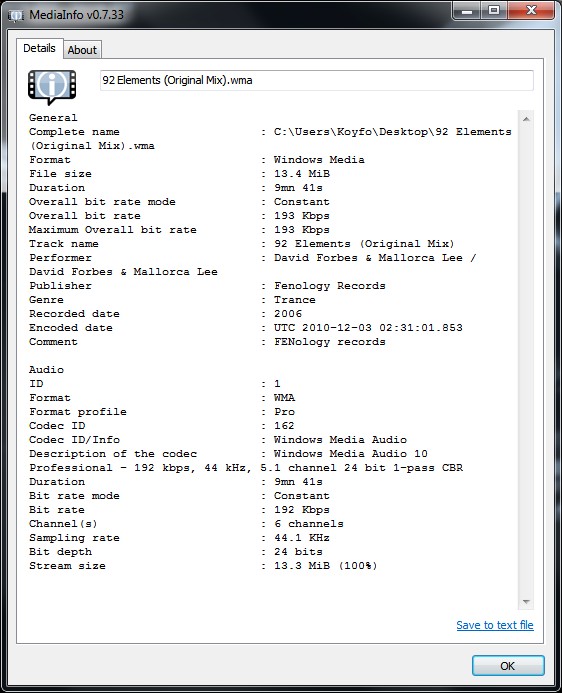
Update: One more thing, can this be done with .wma files?
 
Last edited:

My Computer My Computer

OS
Home Premium x64
CPU
Intel e7400 2.8GHz Dual Core, OC @ 3.36GHz
Motherboard
Gigabyte GA-EP43-DS3L/S3L
Memory
4GB DDR2 1066
Graphics Card(s)
Nvidia GeForce 9800 GT
Sound Card
Realtek Surround Onboard.
Monitor(s) Displays
ASUS VW224, 22 Inch and Samsung SyncMaster 713v
Screen Resolution
Main Screen @1680x1050, Secondary @ 1280x1024
Hard Drives
Western Digital WD3200AAKS 320GB 7200 RPM SATA 3.0Gb/s
PSU
Thermaltake Purepower W0100RU 500W
Case
Rosewill R5601-BK Screw-less
Cooling
Two 120mm fans and Stock CPU fans
Keyboard
Old Dell Keyboard my neighbor gave me.
Mouse
Logitech MX518
Internet Speed
6Kbps
Other Info
Logitech X-540 70 watts 5.1 Speakers
Well i don't know if Zune uses ffdshow. If it uses it, then you are ok! You can easily check if ffdshow is used to decode the file you are playing via taskbar!

Xl60A.png
 

My Computer My Computer

Computer Manufacturer/Model Number
Me
OS
Windows 7 Ultimate SP1 x64
CPU
AMD Phenom(tm) II X4 955
Motherboard
Asus M4A79T Deluxe
Memory
Kingston HyperX 2x4GB 1600MHz
Graphics Card(s)
Asus EAH6970 DCII/2DI4S/2GD5
Sound Card
Realtek ALC1200 @ ATI SB750 - High Definition
Monitor(s) Displays
LG W2253 (Digital) [22" LCD]
Screen Resolution
1920x1080
Hard Drives
OCZ-AGILITY2 ATA Device (50 GB, SATA-II)
ST31000340AS ATA Device (1000 GB, 7200 RPM, SATA-II)
WDC WD1002FBYS-02A6B0 ATA Device (1000 GB, 7200 RPM, SATA-II)
PSU
Enermax Infinity 720Watt
Case
Themaltake Soprano Dx
Cooling
Thermaltake Max Orb
Keyboard
Microsoft Multimedia Keyboard (PS/2)
Mouse
Microsoft USB Basic Optical Mouse (IntelliPoint)
Internet Speed
U/D 18655/1020 Kbps
Well i don't know if Zune uses ffdshow. If it uses it, then you are ok! You can easily check if ffdshow is used to decode the file you are playing via taskbar!

Xl60A.png

Ah yeah I assumed as much. I don't see the WMA codec in it's list so I guess I'll just have to re-rip a few of my cds(like 5 of them are WMA instead of MP3 for some reason)
 

My Computer My Computer

OS
Home Premium x64
CPU
Intel e7400 2.8GHz Dual Core, OC @ 3.36GHz
Motherboard
Gigabyte GA-EP43-DS3L/S3L
Memory
4GB DDR2 1066
Graphics Card(s)
Nvidia GeForce 9800 GT
Sound Card
Realtek Surround Onboard.
Monitor(s) Displays
ASUS VW224, 22 Inch and Samsung SyncMaster 713v
Screen Resolution
Main Screen @1680x1050, Secondary @ 1280x1024
Hard Drives
Western Digital WD3200AAKS 320GB 7200 RPM SATA 3.0Gb/s
PSU
Thermaltake Purepower W0100RU 500W
Case
Rosewill R5601-BK Screw-less
Cooling
Two 120mm fans and Stock CPU fans
Keyboard
Old Dell Keyboard my neighbor gave me.
Mouse
Logitech MX518
Internet Speed
6Kbps
Other Info
Logitech X-540 70 watts 5.1 Speakers
wma%207%208%209.png


I found a few WMA codecs but none that work for my files.
 

My Computer My Computer

OS
Home Premium x64
CPU
Intel e7400 2.8GHz Dual Core, OC @ 3.36GHz
Motherboard
Gigabyte GA-EP43-DS3L/S3L
Memory
4GB DDR2 1066
Graphics Card(s)
Nvidia GeForce 9800 GT
Sound Card
Realtek Surround Onboard.
Monitor(s) Displays
ASUS VW224, 22 Inch and Samsung SyncMaster 713v
Screen Resolution
Main Screen @1680x1050, Secondary @ 1280x1024
Hard Drives
Western Digital WD3200AAKS 320GB 7200 RPM SATA 3.0Gb/s
PSU
Thermaltake Purepower W0100RU 500W
Case
Rosewill R5601-BK Screw-less
Cooling
Two 120mm fans and Stock CPU fans
Keyboard
Old Dell Keyboard my neighbor gave me.
Mouse
Logitech MX518
Internet Speed
6Kbps
Other Info
Logitech X-540 70 watts 5.1 Speakers
I don't have wma files. Almost everything is in mp3.
Anyways, i tried converting an mp3 to the following wma formats.

3WPJl.jpg
uAmv1.jpg


Both files play normally without ffdshow. WMP does not use ffdshow to decode it. :shock:
 

My Computer My Computer

Computer Manufacturer/Model Number
Me
OS
Windows 7 Ultimate SP1 x64
CPU
AMD Phenom(tm) II X4 955
Motherboard
Asus M4A79T Deluxe
Memory
Kingston HyperX 2x4GB 1600MHz
Graphics Card(s)
Asus EAH6970 DCII/2DI4S/2GD5
Sound Card
Realtek ALC1200 @ ATI SB750 - High Definition
Monitor(s) Displays
LG W2253 (Digital) [22" LCD]
Screen Resolution
1920x1080
Hard Drives
OCZ-AGILITY2 ATA Device (50 GB, SATA-II)
ST31000340AS ATA Device (1000 GB, 7200 RPM, SATA-II)
WDC WD1002FBYS-02A6B0 ATA Device (1000 GB, 7200 RPM, SATA-II)
PSU
Enermax Infinity 720Watt
Case
Themaltake Soprano Dx
Cooling
Thermaltake Max Orb
Keyboard
Microsoft Multimedia Keyboard (PS/2)
Mouse
Microsoft USB Basic Optical Mouse (IntelliPoint)
Internet Speed
U/D 18655/1020 Kbps
ah thanks, I'll just delete and rip them in MP3.
 

My Computer My Computer

OS
Home Premium x64
CPU
Intel e7400 2.8GHz Dual Core, OC @ 3.36GHz
Motherboard
Gigabyte GA-EP43-DS3L/S3L
Memory
4GB DDR2 1066
Graphics Card(s)
Nvidia GeForce 9800 GT
Sound Card
Realtek Surround Onboard.
Monitor(s) Displays
ASUS VW224, 22 Inch and Samsung SyncMaster 713v
Screen Resolution
Main Screen @1680x1050, Secondary @ 1280x1024
Hard Drives
Western Digital WD3200AAKS 320GB 7200 RPM SATA 3.0Gb/s
PSU
Thermaltake Purepower W0100RU 500W
Case
Rosewill R5601-BK Screw-less
Cooling
Two 120mm fans and Stock CPU fans
Keyboard
Old Dell Keyboard my neighbor gave me.
Mouse
Logitech MX518
Internet Speed
6Kbps
Other Info
Logitech X-540 70 watts 5.1 Speakers
EUREKA!

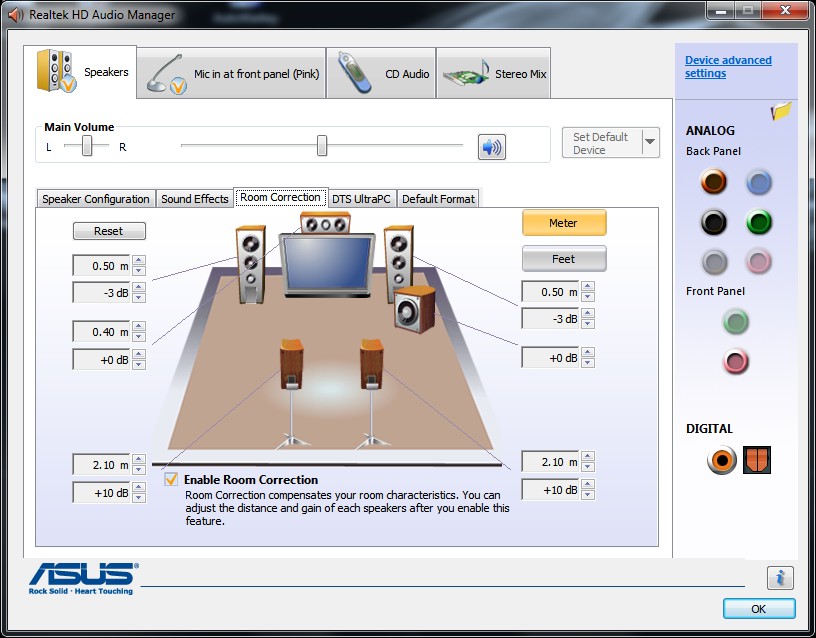
This worked for me but not until I also hit the Configure button and selected 5.1 Surround

here's what worked for me to get sound out of my rear speakers-

right-click on taskbar speakers > playback devices > properties > enhancements > enable Environment (ROOM) and Speaker fill

hope that helps someone!
 

My Computer My Computer

OS
Win 7 Home Premium 64
5.1 direct 6 channel cable issue.


Hi, I recently upgrded my speakers from a very old Creative cambridge 2.1 to a Logitech z5500 on my recently purchased system with the following configuration

Processor: Intel i7 860
Mobo: MSI Big Bang Fuzion (LGA 1156)
For reference : http://www.msi.com/product/mb/Big-Ba...l#/?div=Detail
RAM: 4GB DDR3
Grafix card: ATI HD 5970
HDD: WD Black 1
Audio: Xfi card provided with Mobo

My problem is that I am not able to make all the speakers (Especially the centre 1) functional using the 6 channel direct cable to connect to the sound card. Instead if I use the Coaxial cable all the speakers work fine but am not able to configure the speakers depth and alignment as the Realtek manager does not show the 5.1 arrangement like in the 6 channel direct cable.

I have another issue

Scenario: I am doing a voice over skype while in the middle of a game Battlefield badcompany2 suddenly when I alt tab to accept a conference call or some other call the realtek Audio manager pops up and the frnt panel Mic and headfones get disabled and the pig plug in pop up dialog pops up again and when I confirm they get disabled and this loops again and again while my friends voices are shuffling from my headfones to speakers to headfones again.
 

My Computer My Computer

OS
Windows 7 x64
CPU
INtel i7 860
Motherboard
MSI Big Bang Fuzion (LGA 1156)
Memory
4GB OCZ
Graphics Card(s)
ATI HD 5970
Sound Card
Xfi Realtek
Monitor(s) Displays
ACer H235H
Hard Drives
WD green 1.5
WD Back 1
PSU
Coolermaster UCP 900
Case
Collermaster HAF922
Cooling
OEM
Just downloaded the newest 1.4.2011 update...still does not fix this ridiculous problem. Has anyone been able to manage a solution instead of a work around involving Dolby Prologic II which not everybody has, or the terrible sounding speaker fill option?

All I want to do at this point is clone my front speaker audio to the rear speaker audio...this worked just fine in Windows XP without any sort of tinkering or setup. It worked when I plugged everything in.

Was this an error in Windows XP? Why did it work on the old OS and not now? I have never had rear speakers but yet they worked at all times with any software. I get full sound out of the "rear speakers" when I do the test in the HD Audio toolbar.

I was not able to get that pin selector working in the system registry.
 

My Computer My Computer

OS
Windows 7 Pro 64bit
CPU
Intel Core i7 920
Motherboard
evga x58
Memory
OCZ Gold 6gb
Graphics Card(s)
GTX285
Sound Card
asus xonar st
Monitor(s) Displays
Samsung T240HD
Hard Drives
3xWD black 500gb
PSU
Corsair 850watt
Case
Antec 900
Cooling
Xigmatek Dark Knight and stock Antec 900 fans
Keyboard
Logitech Illuminated
Mouse
Coolermaster Sentinel
Well you might as well get over it, Windows 7 is just a beta piece of crap. Looks great but functions like crap. The sound problem will never be fixed. Now they are talking bout windows 8. For what??? 7 never worked why try another one.
 

My Computer My Computer

OS
windows 7
The key to 5/7.1 sound in Windows 7 is simple. It has everything to do with "Run as administrator".

When installing drivers and player software "run as administrator".

After installing player software change the compatibility Privilege Level properties of executables to "run this program as an administrator".

I'm using Arcsoft TotalMedia Theater 3 but I also have Powerdvd 7 and 9 working.
 

My Computer My Computer

Computer Manufacturer/Model Number
Home built
OS
Windows 7 Professional
CPU
Intel Core 2 Quad Q6600 2.4ghz Processor
Motherboard
Gigabyte GA-P35-DS4 r2.0
Memory
2x2gb G-Skill DDR2 800 PC6400
Graphics Card(s)
Sapphire Radeon HD3870 512mb GDDR4 PCI-E HDCP Graphics
Sound Card
Realtek ALC889A
Monitor(s) Displays
ASUS VW246H HDMI & Samsung 240T DVI
Hard Drives
150gb Western Digital WD1500ADFD Raptor 10,000rpm SATA/150

150gb Western Digital WD1500HLFS Raptor 10,000rpm SATA/150

1tb Samsung Spinpoint F1 7200rpm 32M SATA2 HD103UJ
PSU
Cooler Master Real Power Pro 750watt Power Supply
Case
NZXT Zero Black/Silver Aluminum ATX Full Tower Case w/8 fans
Cooling
Rosewill RCX-Z775-EX Heatpipe Cooler
Another joke! Why should the normal user have to run everything as administrator in win7? It should just work!

And yes exclusive mode applications will allow rear and side speaker functionability but not for playing music and stuff like that.

So like I said...
 

My Computer My Computer

OS
windows 7
J

...All I want to do at this point is clone my front speaker audio to the rear speaker audio...this worked just fine in Windows XP without any sort of tinkering or setup. It worked when I plugged everything in. ...

Hi. I just joined here due to this amazing thread.
I used a splitter cable to have 2 front outs, 1 to my receiver and 1 to a receiver in the basement. But then I started getting feedback from the basement if someone was listening to something else downstairs (like the radio).
So I retasked the rear out to front out. That worked great, but wouldn't save the setting. So I tried using the front headphone jack, but of course, that silenced the speakers.
Finally, I found a reference to the folder in the upper right next to the word ANALOG. Check the box that disables front panel detection. Then you can use the headphone jack for speaker out without turning off the main speakers.

I'm not having any problems with W7, but I'm only using this PC to play music. I'm using Media Monkey, which makes itunes look amateur. Try it, you'll like it.

Doesn't it seem strange that this Realtek Audio Manager doesn't appear to have any kind of help file?

EDIT: I'd like to add that although I said I'm not having any problems with W7, the did fix a few things that weren't broken with XP. Fortunately, I didn't have to deal with Vista. My wife did, and that was bad enough.
 
Last edited:

My Computer My Computer

Computer Manufacturer/Model Number
Emachines EL1352
OS
Windows 7 Home Premium 64
Back
Top