Windows 7 5.1 surround problems (realtek)

wmaster

New member
Local time
10:12 AM
Messages
6
In my Windows 7 beta I cannot get the 5.1 surround sound to work properly. I have an integrated realtek hd chip (which works perfectly fine in Vista). The 5.1 sound works well when testing the sound in the windows sound settings but whenever I try some other playback (wmp or whatever) only the front left speaker works.
I have also tried installing latest drivers from Realtek (5.1 works in their sound control aswell), some older drivers and of course the standard windows driver, all with the same results.
Any solutions or hint available out there? Thanks.
 

My Computer

OS
Windows 7 Beta
Same crap here. Been on this for hours now.. Have my setup hooked to Onkyo 5.1 surround sound and would like it back!
 

My Computer

OS
Windows 7
I also have the exact same problem. I guess I am going to have to pull out the old audigy card and see if I can get that to work. But if you do figure something out please let me know.
 

My Computer

OS
Windows 7
Are any / all / some of you using hte W7 drivers or the Realtek 2.14 HD drivers?
 

My Computers

System One System Two

  • Computer type
    PC/Desktop
    Computer Manufacturer/Model Number
    The Beast Model A (homebrew)
    OS
    Windows 11 21H2 Current build
    CPU
    AMD Ryzen 9 3950X
    Motherboard
    MSI MEG X570 GODLIKE
    Memory
    4 * 32 GB - Corsair Vengeance 3600 MHz
    Graphics Card(s)
    EVGA GeForce RTX 3080 Ti XC3 ULTRA GAMING (12G-P5-3955-KR)
    Sound Card
    Realtek® ALC1220 Codec
    Monitor(s) Displays
    2x Eve Spectrum ES07D03 4K Gaming Monitor (Matte) | Eve Spec
    Screen Resolution
    3x 3840 x 2160
    Hard Drives
    3x Samsung 980 Pro NVMe PCIe 4 M.2 2 TB SSD (MZ-V8P2T0B/AM) } 3x Sabrent Rocket NVMe 4.0 1 TB SSD
    PSU
    PC Power & Cooling’s Silencer Series 1050 Watt, 80 Plus Plat
    Case
    Fractal Design Define 7 XL Dark ATX Full Tower Case
    Cooling
    SteelSeries Apex Pro Wired Gaming Keyboard
    Keyboard
    SteelSeries Apex Pro
    Mouse
    Logitech MX Master 3S | MX Master 3 for business
    Internet Speed
    AT&T LightSpeed Gigabit Duplex Ftth
    Antivirus
    Windows Defender + MB 3
    Browser
    Nightly (default) + Firefox (stable),Chrome, Edge
  • Computer type
    PC/Desktop
    System Manufacturer/Model Number
    Dell Latitude E5470
    OS
    ChromeOS Flex Dev Channel (current)
    CPU
    Intel(R) Core(TM) i5-6300U CPU @ 2.40GHz, 2501 Mhz, 2 Core(s), 4 Logical Processor(s)
    Motherboard
    Dell
    Memory
    16 GB
    Graphics Card(s)
    Intel(R) HD Graphics 520
    Sound Card
    Intel(R) HD Graphics 520 + RealTek Audio
    Monitor(s) Displays
    Dell laptop display 15"
    Screen Resolution
    1920 * 1080
    Hard Drives
    Toshiba 128GB M.2 22300 drive
    INTEL Cherryville 520 Series SSDSC2CW180A 180 GB SATA III SSD
    PSU
    Dell
    Case
    Dell
    Cooling
    Dell
    Keyboard
    Dell
    Mouse
    Logitech MX Master 3S (shared w. Sys 1) | Dell TouchPad
    Internet Speed
    AT&T LightSpeed Gigabit Duplex Ftth
I have tried both several times with failure :/
 

My Computer

OS
Windows 7 Beta
I don't use the Realtek built in sound, but at first I had a similiar problem with my Creative X-Fi Platinum Champion card.

To make it work properly I had to go into the Sound applet from control panel and set the speakers as my default playback device as Windows chose the SPDIF out as the default which left me with................Yup one front left speaker working and none of the others even though creative diagnostics found nothing wrong. Once I did this it all works fine for me.

I realize that yous use a different sound card than I do but I do hope this works for you as it did for me.

Brubern
 

My Computer

Computer Manufacturer/Model Number
I Build My Own
OS
Windows 7 Ultimate x64
CPU
Intel i7-980X Extreme Edition
Motherboard
eVga x58 Classified 3
Memory
Corsair Dominator GT PC3-16000 12 Gig
Graphics Card(s)
eVga GTX 570 x3 OC Threeway SLI
Sound Card
Creative X-Fi Platinum Champion Series
Monitor(s) Displays
Dell Ultra Sharp U2711 27 - inch Widescreen Flat Panel
Screen Resolution
2560 x 1440 (WQHD) resolution
Hard Drives
Crucial RealSSD C300 128GB SATA III MLC
2 WD VelociRaptor 300g in Raid 0
PSU
Corsair 1200
Case
Corsair 800D
Cooling
Liquid using Heatkiller Blocks and Koolance control
Keyboard
MS Sidewinder
Mouse
RAZER Naga Molten
Internet Speed
25 Meg FIOS
Are any / all / some of you using hte W7 drivers or the Realtek 2.14 HD drivers?

I have been using W7 drivers, I downloaded the other drivers and W7 said it didn't support them (XP and Vista version)
 

My Computer

OS
Windows 7
The realtek HD drivers worked fine for me but what i really hate with this realtek HD on board sound is the Speaker Fill option... With Creative i could use cmss and Surround which put winamp music through all four speakers clearly. With this realtek it sounds like someone listening to music underwater(rears). The worst music rear sound i have ever heard from a sound source. I googled this and found others with the same issue there is a fix but its its just a hack job.
 

My Computer

OS
Win 7 Ultimate 64 RTM
CPU
Q6600 @ 3.03GHZ
Motherboard
ASRock Penryn1600SLI-110d
Memory
8GB @ 338MHZ
Graphics Card(s)
Palit GTX260 @ 707/1544/1200
Sound Card
[4.1 ] - Creative Labs XFI-GAMER
Monitor(s) Displays
SyncMaster T240 24" Dvi/HDMi
Screen Resolution
1920x1200
Hard Drives
Hitachi 500GB
PSU
Winpower 750Watt
Case
Thermaltake Soprano
Cooling
Oem Cooler
Keyboard
HP Keyboard
Mouse
Optical Microsoft Mouse
Internet Speed
3MBIT 350kb/s+
Shower Option

The realtek HD drivers worked fine for me but what i really hate with this realtek HD on board sound is the Speaker Fill option... With Creative i could use cmss and Surround which put winamp music through all four speakers clearly. With this realtek it sounds like someone listening to music underwater(rears). The worst music rear sound i have ever heard from a sound source. I googled this and found others with the same issue there is a fix but its its just a hack job.

Hi Neil, you weren't using it with the highlighted option below were you? :p
 

Attachments

  • Realtek HD.PNG
    Realtek HD.PNG
    90.6 KB · Views: 15,817

My Computer

OS
Windows Se7en Ultimate x64
CPU
AMD Athlon Phenom II 550 (Dual Core at the moment)
Motherboard
DFI LPJR790GX-M2RS
Memory
4GB OCZ reaper DDR2 PC8500 1066
Graphics Card(s)
CrosssFire 2 x Sapphire RADEON HD3650 (512 MB GDDR3)
Sound Card
Built-in
Monitor(s) Displays
Samsung LE-40B551 40 in. HDTV, HP w2007v, Elo Touchscreen
Screen Resolution
1920 x 1080 pixels
Hard Drives
OCZ Agility Series 30GB SATA II 2.5" Solid State Drive
Samsung Spinpoint F3 1TB SATA II
Samsung Spinpoint F1 500GB SATA II
Western Digital Caviar 500GB SATA II
PSU
OCZ 600W StealthXStream
Case
Antec P180 Mini
Cooling
Scythe Ninja Copper Cooler 5th Anniversary Limited Edition
Keyboard
Cordless Desktop® EX 90
Mouse
Cordless Desktop® EX 90
Internet Speed
Hamster-in-a-wheel
Other Info
WinTV-NOVA-T PCI
Altec Lansing ACS56
Just to let you know, I have got this to work pretty well now. Not sure exactly what made this work but I'm again using the latest Realtek HD drivers and after very much fiddling in the Realtek control panel I checked the 'Speaker fill' and 'Bass Management' options and voila! Also played around a little with 'Room correction' to enhance the sound.
I'm very much certain that I did test these settings before so I don't know what caused the 'working-trigger'. The Realtek control panel is just horrible anyways :)
 

My Computer

OS
Windows 7 Beta
Hi Neil, you weren't using it with the highlighted option below were you? :p

No , its a common problem just google it and see what i mean. It goes back as far as 2007 its related to VISTA & Windows 7. Not a problem with windows XP.

Example

"Speaker Fill" checkbox, which is worse than the plague, effectively doing nothing but "simulating" surround - the rear speakers have a lot of frequency domains missing (they're mostly just treble and some faint presence) and they often feel delayed as well
capturevl9.jpg


Also read this quote

(which is especially true about Realtek's Speaker Fill option when compared to Creative's CMSS which does the same thing 5 times better).

and more

When I enable speaker fill, the rear speakers output sound at a pretty low level, but when you get up close to check them, it is clearly putting out distorted audio. The only way I can describe it is that the rear's sound like you are listening to low-bitrate audio from an Internet station, and seems to be concentrated at the high end of the freqency spectrum. I don't understand why it worked fine in XP x64, and it works ok in Kubuntu 8.04 Hardy as well. I don't even need to do anything special in Linux, I just adjust the individual channel levels to balance out the sound.. SO I'm not sure why it doesn't work that way on Windows; even still I am about to reinstall XP x64 today to verify it still works properly there.

and more

What solutions do you have when running Vista x64? I can't stand the fact that my brand new speakers sound distorted from the two rear ones.

See what i mean :p
 

My Computer

OS
Win 7 Ultimate 64 RTM
CPU
Q6600 @ 3.03GHZ
Motherboard
ASRock Penryn1600SLI-110d
Memory
8GB @ 338MHZ
Graphics Card(s)
Palit GTX260 @ 707/1544/1200
Sound Card
[4.1 ] - Creative Labs XFI-GAMER
Monitor(s) Displays
SyncMaster T240 24" Dvi/HDMi
Screen Resolution
1920x1200
Hard Drives
Hitachi 500GB
PSU
Winpower 750Watt
Case
Thermaltake Soprano
Cooling
Oem Cooler
Keyboard
HP Keyboard
Mouse
Optical Microsoft Mouse
Internet Speed
3MBIT 350kb/s+
UPDATE 4: Foxconn replied again and suggested I try reassigning the ports and moving the wires to the new ports. Doing so made no difference. When the orange center/subwoofer wire was plugged into the newly assigned center/subwoofer port, I still get the center channel playing through the physical center and the subwoofer channel playing though the front two speakers and not the subwoofer as it should. This makes me think it is a driver issue and not a hardware issue.

Here is my tests and their results:

Test 1:

Ports assigned as default in book:

Green=Fronts but orange center/sub wire plugged into this port:
Clicking the L front speaker in the control panel outputs through the physical center speaker
Clicking the R front speaker outputs through both the fronts and not the physical subwoofer as it should

Orange=Center/Subwoofer but green fronts wire plugged into this port:
Clicking the center speaker in the control panel outputs through the physical L front speaker
Clicking the subwoofer in the control panel outputs through the physical R front speaker

Black=Rears and black rears wire left plugged into this port:
Clicking the L rear speaker in the control panel outputs through the physical L rear speaker
Clicking the R rear speaker in the control panel outputs through the physical R rear speaker

Ports reassigned as follows:

Green=Center/Subwoofer and orange center/sub wire plugged into this port:
Clicking the center speaker in the control panel outputs through the physical center speaker
Clicking the subwoofer outputs through both the fronts and not the physical subwoofer as it should

Orange=Fronts and green fronts wire plugged into this port:
Clicking the L front speaker in the control panel outputs through the physical L front speaker
Clicking the R front speaker in the control panel outputs through the physical R front speaker

Black=Rears and black rears wire left plugged into this port:
Clicking the L rear speaker in the control panel outputs through the physical L rear speaker
Clicking the R rear speaker in the control panel outputs through the physical R rear speaker


Test 2:

Ports assigned as default in book:

Green=Fronts and green fronts wire plugged into this port:
Clicking the L front speaker in the control panel outputs through the physical L front speaker
Clicking the R front speaker in the control panel outputs through the physical R front speaker

Orange=Center/Subwoofer but black rears wire plugged into this port:
Clicking the center speaker in the control panel outputs through the physical L rear speaker
Clicking the subwoofer in the control panel outputs through the physical R rear speaker

Black=Rears but orange center/sub wire plugged into this port:
Clicking the L rear speaker in the control panel outputs through the physical center speaker
Clicking the R rear speaker outputs through both the fronts and not the physical subwoofer as it should

Ports reassigned as follows:

Green=Fronts and green fronts wire plugged into this port:
Clicking the L front speaker in the control panel outputs through the physical L front speaker
Clicking the R front speaker in the control panel outputs through the physical R front speaker

Orange=Rears and black rears wire plugged into this port:
Clicking the L rear speaker in the control panel outputs through the physical L rear speaker
Clicking the R rear speaker in the control panel outputs through the physical R rear speaker

Black= Center/Subwoofer and orange center/sub wire plugged into this port:
Clicking the center speaker in the control panel outputs through the physical center speaker
Clicking the subwoofer outputs through both the fronts and not the physical subwoofer as it should

Summary:

Basically, no matter where I plug the orange center/subwoofer wire into and reassign that port to be the center/subwoofer port, the center channel works as it should and plays through the physical center speaker, but the subwoofer output goes to both front speakers instead of the subwoofer as it should.

If I leave the default port assignments as they are listed in the manual and simply change the wires, the problem moves to whatever control panel speaker pair is assigned to the physical center/subwoofer speakers and the L control panel speaker (front or rear) plays through the physical center speaker and the R control panel speaker(front or rear) plays through both of the physical speakers (front or rear) that the control panel pair is assigned and not the subwoofer as it should.

To me it seems as though the subwoofer channel output is assigned to the two front channels and not to a separate subwoofer channel by itself at the driver level.

UPDATE 3: Foxconn replied (pretty quickly I might add) and suggested that I disconnect the front audio header connection which I did but it did not help in either Windows 7 Beta or in Windows XP Pro. Here is my reply back:

Thanks for the fast reply. I removed the front audio header connection and verified the correct speaker connections. I have Front speakers to green, Rear speakers to black, and center/sub to orange. All my other speakers work correctly, including the center speaker. It is just the subwoofer output that is misdirected. It keeps going to the front speakers. If I select the swap center/sub option in the realtek control panel then the center channel goes to the front speakers and the subwoofer output gets directed to the center speaker. I also tried selecting just the enable bass management but I do not see any options to change anything once that is selected and the subwoofer output still goes to the front speakers. I am using the latest WinXP 32 bit drivers from the realtek site (R2.14 released 1/9/2009) driver version 5.10.0.5772 dated 1/6/2009.

(Oops, in update 3 above I mis-spoke and said the subwoofer output went to the rears...it still goes to the fronts, corrected above now.)


UPDATE 2: I emailed Foxconn and they were no help. They said that because the MB is not certified for Windows 7 beta that they suggested I try Windows XP or Vista (no surprise). So, I installed my old Windows XP Pro 32 bit (do not have a 64 bit version). The problem is still there under Windows XP. Seems to me that this is a defect in the Realtek drivers. I will be building another computer exactly like mine so I will be able to see if it happens on another Destroyer motherboard (I suspect it will). I re-emailed Foxconn to see if they would help now that I tried it under Windows XP and I also emailed Realtek.


UPDATE: I installed the drivers from the Realtek site (2.14) and now I have speaker configuration available but I get subwoofer output from my front speakers. I have the subwoofer/center channel speaker plugged into the orange connector on the motherboard and have the correct port mapping selected for the orange port. I tried selecting various things like bass management and swap center/subwoofer, etc. but nothing comes out of the subwoofer.


I am also having problems with realtek HD audio in Windows 7 beta. The Realtek HD control panel would not show any speaker configurations. Also, I get subwoofer sound through my front speakers. If I enable speaker fill and bass management I still get sound from the right front speaker. The speakers worked fine a couple of hours ago under Windows XP on my old motherboard with the Creative Audigy 2 ZS card. I have the Klipsch 5.1 ultras and the Foxconn Destroyer motherboard. I am using the updated drivers (R1.91) from Foxconn's site.
 
Last edited:

My Computer

OS
Windows 7 Beta 64 Bit
CPU
AMD Phenom II X4 940 B.E. @ 3Ghz
Motherboard
Foxconn Destoyer
Memory
8GB Crucial Ballistics
Graphics Card(s)
Onboard Geforce 8000 series for now
Sound Card
Onboard Realtek HD Audio for now
Monitor(s) Displays
Samsung SyncMaster 220WM x2
Screen Resolution
1680x1050
Hard Drives
WD 1TB SATA II Caviar Black x2
PSU
OCZ GameXstream 600W
Case
Antec 900
Cooling
Stock
Keyboard
Logitech Cordless Media
Mouse
Cordless Mouseman Optical
Internet Speed
Comcast HSI
The only decent Realtek driver I have found so far is 2.11, I tried 2.14 but found it was a bit buggy, this one I have now works great 0 issues.
 

My Computer

Computer Manufacturer/Model Number
Home Brew
OS
Windows 7 Ultimate Vista Ultimate x64
CPU
Core 2 Duo E8500 3.16Ghz @ 3.8Ghz
Motherboard
eVGA 750i FTW
Memory
2x2Gigs Patriot PC2-6400 LL
Graphics Card(s)
Inno3D GeForce GTX260 216 SP
Monitor(s) Displays
ASUS VW222U 22" 2ms Response time
Screen Resolution
1680x1050
Hard Drives
SATA 150GB
SATA II 250GB
USB IDE 750GB Ext.
PSU
HYTEC 600W & Thermaltake 650W Toughpower Power Exp
Case
Thermaltake Armor LCS (Liquid Cooling System)
Cooling
Liquid Cooling System
Keyboard
Logitech G15 Gaming Keyboard
Mouse
Logitech G9 Gaming Mouse
Just tried the R2.11 and have the same problem. I uninstalled the Realtek driver again to prepare to install the R2.14 and let Microsoft install there own driver. Same problem with the Microsoft driver. I hope this is not a hardware issue. Can't wait to build the other computer to see if this is a problem with the other Destroyer MB too.
 

My Computer

OS
Windows 7 Beta 64 Bit
CPU
AMD Phenom II X4 940 B.E. @ 3Ghz
Motherboard
Foxconn Destoyer
Memory
8GB Crucial Ballistics
Graphics Card(s)
Onboard Geforce 8000 series for now
Sound Card
Onboard Realtek HD Audio for now
Monitor(s) Displays
Samsung SyncMaster 220WM x2
Screen Resolution
1680x1050
Hard Drives
WD 1TB SATA II Caviar Black x2
PSU
OCZ GameXstream 600W
Case
Antec 900
Cooling
Stock
Keyboard
Logitech Cordless Media
Mouse
Cordless Mouseman Optical
Internet Speed
Comcast HSI
hey guys it has been solved the realtek surround problem i downloaded the vista driver 32/64 bit r214 from the realtek site and i changed how the cables were plugged in and it worked properly the whole 5 speakers and the subwoofer surround in the test and games and everything i am not an excepert but 0 issues
 

My Computer

OS
windows seven build 6801
I am also using the latest Realtek drivers. I did not reassign the ports though...they should work as advertised I would think. I will try to reassign the sub/center output and see if that changes anything.

If that does fix my problem is that something that Foxconn can fix with a BIOS update?
 

My Computer

OS
Windows 7 Beta 64 Bit
CPU
AMD Phenom II X4 940 B.E. @ 3Ghz
Motherboard
Foxconn Destoyer
Memory
8GB Crucial Ballistics
Graphics Card(s)
Onboard Geforce 8000 series for now
Sound Card
Onboard Realtek HD Audio for now
Monitor(s) Displays
Samsung SyncMaster 220WM x2
Screen Resolution
1680x1050
Hard Drives
WD 1TB SATA II Caviar Black x2
PSU
OCZ GameXstream 600W
Case
Antec 900
Cooling
Stock
Keyboard
Logitech Cordless Media
Mouse
Cordless Mouseman Optical
Internet Speed
Comcast HSI
well i dont claim to know much about if the update of the bios will have any effect on the surround problem that you have i didnt have to change the bios for it to work . and i tell u it works very good just try to re-assign the output and tell me if it worked with u or no thank you
 

My Computer

OS
windows seven build 6801
It made no difference to reassign the ports. See the update in my original post above.
 

My Computer

OS
Windows 7 Beta 64 Bit
CPU
AMD Phenom II X4 940 B.E. @ 3Ghz
Motherboard
Foxconn Destoyer
Memory
8GB Crucial Ballistics
Graphics Card(s)
Onboard Geforce 8000 series for now
Sound Card
Onboard Realtek HD Audio for now
Monitor(s) Displays
Samsung SyncMaster 220WM x2
Screen Resolution
1680x1050
Hard Drives
WD 1TB SATA II Caviar Black x2
PSU
OCZ GameXstream 600W
Case
Antec 900
Cooling
Stock
Keyboard
Logitech Cordless Media
Mouse
Cordless Mouseman Optical
Internet Speed
Comcast HSI
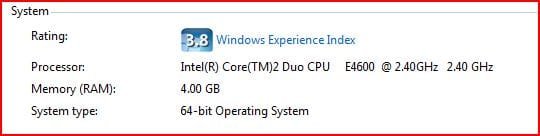
i uploaded a picture of how the realtek drive looks like in my pc and how i connected the cables i hope it will help you after all my be it was pure luck in my case
btw my motherboard is gigabyte
 

Attachments

  • realtek hd audio manager.JPG
    realtek hd audio manager.JPG
    79.8 KB · Views: 10,032
  • my system data.JPG
    my system data.JPG
    18.1 KB · Views: 1,219

My Computer

OS
windows seven build 6801
Setting up my speaker assignments as yours is shown did not help either. Still get the subwoofer output through the two front speakers and not the subwoofer. I think this problem may be unique to the Destroyer motherboard.
 

My Computer

OS
Windows 7 Beta 64 Bit
CPU
AMD Phenom II X4 940 B.E. @ 3Ghz
Motherboard
Foxconn Destoyer
Memory
8GB Crucial Ballistics
Graphics Card(s)
Onboard Geforce 8000 series for now
Sound Card
Onboard Realtek HD Audio for now
Monitor(s) Displays
Samsung SyncMaster 220WM x2
Screen Resolution
1680x1050
Hard Drives
WD 1TB SATA II Caviar Black x2
PSU
OCZ GameXstream 600W
Case
Antec 900
Cooling
Stock
Keyboard
Logitech Cordless Media
Mouse
Cordless Mouseman Optical
Internet Speed
Comcast HSI
Back
Top