Windows 7 5.1 surround problems (realtek)

Already tried! Still no fix! Unfortunately! Waiting for new drivers! :confused:

It's has already worked for someone running Win7 but you may need to do this first.

Quote:YupYup
If you are running the latest realtek drivers and don't see the keys just add them(right click, new binary value).

Quote: Shadow946
YES Thank you very much, YupYup. This worked perfectly!

The new drivers are out and don't support jack reassignment. So you need to add the registry keys for it to work, after that you can edit them.
 

My Computer My Computer

Computer type
PC/Desktop
Computer Manufacturer/Model Number
Home built
OS
Windows 7 Ult, Windows 8.1 Pro,
CPU
Q9650-4.275GHz, E8600 4.5GHz, E6750-3.8GHz
Motherboard
Evga 780i FTW
Memory
G.Skill PC2 9600 1200Mhz 5 5 5 15 2T
Graphics Card(s)
GTX480
Sound Card
Asus Xonar D2
Monitor(s) Displays
HannsG
Screen Resolution
1680X1050
Hard Drives
GSkill Phoenix Pro 120GB SSD
PSU
ThermalTake Toughpower 1000Watt modular
Case
ThermalTake XaserV
Cooling
Xigmatek S1283
Keyboard
Logitech G15
Mouse
Logitech G9
Internet Speed
T1
this **** still doesn't work.

On another thread i read this: "
Ok by some miracle i figured it out for those who have this problem just download the xp version of the drivers extract them run the xp version of the realtek control panel and disable front panel detection like usual i now have a fully working windows 7 system woooo!"

The only problem is: the XP .exe file won't install on vista/windows7
The seperate driver files won't install either because windows keeps saying "there is already a newer and better driver installed" ... What a ****load of ****
 

My Computer My Computer

OS
windows 7
Finally new drivers. I'll try them right now to see if my problem is solved :D.

Still not solved, back to Win 7 generic drivers...
 
Last edited:

My Computer My Computer

OS
Windows 7
CPU
AMD x2 4000+ (2.5 GHz)
Motherboard
Asrock NF6P-Vista
Memory
4 GB DDR2
Graphics Card(s)
ATI HD4850 HIS
Sound Card
Realtek ALC662 (onboard)
Monitor(s) Displays
Samsung 2233SN 22"
Hard Drives
Western Digital 160 GB
I installed r2.30 downloaded from official site and that solved my problem...
 

My Computer My Computer

Computer Manufacturer/Model Number
Microsoft
OS
Windows 7 Ultimate x86
CPU
AMD Athlon 64 x2 Dual Core 5000+
Motherboard
ECS
Memory
Trancend 3x1GB
Graphics Card(s)
GeForce 9800gt 512dd3
Sound Card
Integrated
Monitor(s) Displays
LG204WS
Hard Drives
Western Digital 160GB
Maxtor 80GB
Trancend external hdd 320GB
Cooling
CM
i downloaded them too and it didn't solve my problem. and i have RTM version
 

My Computer My Computer

OS
Windows 7
CPU
Intel D (2 x 3.0 GHZ)
Motherboard
ASRock Wolfdale 1333-D667 R2
Memory
2048 MB
Graphics Card(s)
GeForce 200 series
Sound Card
Realtek
Monitor(s) Displays
2 monitors, 22inch acer and 17inch HP running same time
Hard Drives
only 160gb
Case
custom made
Keyboard
flat lol
Internet Speed
FiOS 15Mbs
Using the realtek utility might also help.


My Computer My Computer

Computer type
PC/Desktop
Computer Manufacturer/Model Number
Home built
OS
Windows 7 Ult, Windows 8.1 Pro,
CPU
Q9650-4.275GHz, E8600 4.5GHz, E6750-3.8GHz
Motherboard
Evga 780i FTW
Memory
G.Skill PC2 9600 1200Mhz 5 5 5 15 2T
Graphics Card(s)
GTX480
Sound Card
Asus Xonar D2
Monitor(s) Displays
HannsG
Screen Resolution
1680X1050
Hard Drives
GSkill Phoenix Pro 120GB SSD
PSU
ThermalTake Toughpower 1000Watt modular
Case
ThermalTake XaserV
Cooling
Xigmatek S1283
Keyboard
Logitech G15
Mouse
Logitech G9
Internet Speed
T1
I don't have that. I only have this, which looks totally different. And as I stated before, testing in this utility works perfectly for all 5 speakers but this is the only application where they work. everywhere else, only 2 speakers work.

capturei.png
 

My Computer My Computer

OS
Windows 7
CPU
Intel D (2 x 3.0 GHZ)
Motherboard
ASRock Wolfdale 1333-D667 R2
Memory
2048 MB
Graphics Card(s)
GeForce 200 series
Sound Card
Realtek
Monitor(s) Displays
2 monitors, 22inch acer and 17inch HP running same time
Hard Drives
only 160gb
Case
custom made
Keyboard
flat lol
Internet Speed
FiOS 15Mbs
Same Problem

Same Problem here exactly. games and the config tests works for all 5.1 speakers but on media player, winamp, bsplayer, basiclly everything just 2 speakers.

someone knows how to solve this problem once and for all?
i've tried everything that you guys suggested on this thread
 

My Computer My Computer

OS
windows 7
nope. you'd be surprised how many things i've tried. i only got one solution but its fake. i downloaded the realtek.exe or whatever it was called that was from windows XP and ran it and then it let me do it but the only thing it let me do, was just use every single speaker as the front ones. so i got music out of all of them but it wasn't surround really, it was just like you'd use 5 speakers the same exact sound. which wasn't really that great compared to what i had on windows xp.
 

My Computer My Computer

OS
Windows 7
CPU
Intel D (2 x 3.0 GHZ)
Motherboard
ASRock Wolfdale 1333-D667 R2
Memory
2048 MB
Graphics Card(s)
GeForce 200 series
Sound Card
Realtek
Monitor(s) Displays
2 monitors, 22inch acer and 17inch HP running same time
Hard Drives
only 160gb
Case
custom made
Keyboard
flat lol
Internet Speed
FiOS 15Mbs
oh really..

so i hope that the problem will be solved by a windows update or realtek update, i guess now there nothing much to do.
 

My Computer My Computer

OS
windows 7
Maybe solved

Hi!

I think i solved the same problem ( only 2 front speakers used ).

Just turn in room correction!
My 5.1 AC3 movie test was fine with this setting.
Winamp needed that Vista sound 5.1 plugin :(

But it's a half solution
 

My Computer My Computer

OS
Windows 7
Dolby thingy..

Guys, I think I found the solution!!!

My problem was exactly like yours and I had tried every method mentioned. However salvation was actually right before my eyes :D

Now, go to Control Panel -> Hardware and Sound -> Sound

Now, choose "Speakers" and press "Properties".

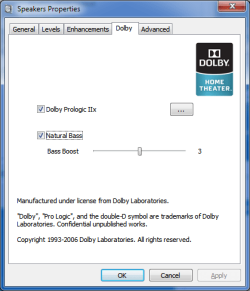
Right there, you must be seing a "Dolby" tab. Go to that one and enable "Pro Logic IIx"

The sound now can be heard as stereo upmix. However, I must state that this upmix is not exactly like upmix in Windows XP, it's more like the one that is in Windows Vista (I think i must say, it's like Creative CMSS; not like Dolby Surround)

However, I liked it that way and it's not bad at all, I think.

And also, I didn't read the whole forum - so if this solution is already posted; sorry for that...
 

Attachments

  • prothingy.png
    prothingy.png
    12.8 KB · Views: 122

My Computer My Computer

Computer Manufacturer/Model Number
N-A
OS
Windows 7 RC1
CPU
AMD Phenom II X3 720 @ 3,4 Ghz
Motherboard
Gigabyte GA-MA785GT-UD3H
Memory
2 GB Kingston DDR3 1333 Mhz
Graphics Card(s)
-ONBOARD- ATI Radeon HD 4200
Sound Card
-ONBOARD- Realtek ALC889A
Monitor(s) Displays
INCA 20" LCD 16:10 Widescreen
Screen Resolution
1680x1050
Hard Drives
160 GB Samsung SATA2 7200 Rpm NCQ
PSU
Thermaltake 430 Watt
Case
Thermaltake WingRS 430 Watt
Cooling
--Stock--
Thanks, but unfortunately I don't have that tab.
 

My Computer My Computer

OS
Windows 7
CPU
AMD x2 4000+ (2.5 GHz)
Motherboard
Asrock NF6P-Vista
Memory
4 GB DDR2
Graphics Card(s)
ATI HD4850 HIS
Sound Card
Realtek ALC662 (onboard)
Monitor(s) Displays
Samsung 2233SN 22"
Hard Drives
Western Digital 160 GB
No fix in new Realtek R2.32 driver! :-(
 

My Computer My Computer

OS
Windows 7 Enterprise x64
My sound chipset is ALC889A, I must say that...

It was available in the R2.26 version and R2.32 version (which can be found as the latest driver in Realtek company website)

However, I must also clearify that this Dolby ProLogic thing doesn't always produce good results. I found out that it causes some electro-techno musics to become distorted.
 

My Computer My Computer

Computer Manufacturer/Model Number
N-A
OS
Windows 7 RC1
CPU
AMD Phenom II X3 720 @ 3,4 Ghz
Motherboard
Gigabyte GA-MA785GT-UD3H
Memory
2 GB Kingston DDR3 1333 Mhz
Graphics Card(s)
-ONBOARD- ATI Radeon HD 4200
Sound Card
-ONBOARD- Realtek ALC889A
Monitor(s) Displays
INCA 20" LCD 16:10 Widescreen
Screen Resolution
1680x1050
Hard Drives
160 GB Samsung SATA2 7200 Rpm NCQ
PSU
Thermaltake 430 Watt
Case
Thermaltake WingRS 430 Watt
Cooling
--Stock--
I have this problem also, nothing from above works..

So as temporary solution i use a 3.5mm jack-split. I know it's just stereo sound, but now i can use my 5 speakers instead of 3 without crappy matrix sounds...

Still hope for a driverupdate from Realtek soon.

grtz
 

My Computer My Computer

OS
Windows 7 Ultimate x86
CPU
Intel Core2 Quad Q6600 @2.4gHz
Motherboard
XFX nForce 780i SLI
Memory
4GB Corsair @800mHz
Graphics Card(s)
2x XFX 8800gt 512mb alpha dog SLI
Sound Card
Onboard Realtek High Definition 5.1
Monitor(s) Displays
Samsung T220 22inch
Hard Drives
Western Digital 80GB
Western Digital 1000GB
Samsung F1 Spinpoint 1000GB
Samsung F2 Eco Spinpoint 1500GB
PSU
Antec TruePower
Case
Antec Nine Hundred Retail, Zwart
Cooling
Antec: 120 mm: 4x 200 mm:1x
I am really surprised that they still haven't found a fix for it.
 

My Computer My Computer

OS
Windows 7
CPU
Intel D (2 x 3.0 GHZ)
Motherboard
ASRock Wolfdale 1333-D667 R2
Memory
2048 MB
Graphics Card(s)
GeForce 200 series
Sound Card
Realtek
Monitor(s) Displays
2 monitors, 22inch acer and 17inch HP running same time
Hard Drives
only 160gb
Case
custom made
Keyboard
flat lol
Internet Speed
FiOS 15Mbs
Hello Guys,

First of all i am sorry for my english :) still trying to make it better :))
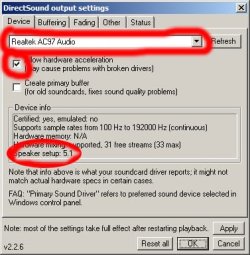
let's work on our common problems :) i found some plugins for 5.1 on winamp and driver for realtek + ac97.

Winamp > Preferences > Plugins > Output > DirectSound Output > Configure

http://www.neowin.net/forum/uploads/post-107-1091723974.jpg

These 2 links are for 5.1 on Winamp for Windows 7

VL Sound for Vista v1.0.0.5 - Winamp
A3D Output Plug-in - Winamp

These 2 links are for Realtek Driver and Realtek Audio Software

Link 1

Link 2

I hope, all these things will solve your problems ;) Have a nice day! :party:


After i have done all these, my surround system has started to work :) ( 5.1 )
 

Attachments

  • post-107-1091723974.jpg
    post-107-1091723974.jpg
    64.8 KB · Views: 21

My Computer My Computer

OS
Windows 7
the realtek hd drivers worked fine for me but what i really hate with this realtek hd on board sound is the speaker fill option... With creative i could use cmss and surround which put winamp music through all four speakers clearly. With this realtek it sounds like someone listening to music underwater(rears). The worst music rear sound i have ever heard from a sound source. I googled this and found others with the same issue there is a fix but its its just a hack job.

hi neil, you weren't using it with the highlighted option below were you? :p


can you please help!!! How did you get that option on realtek???? I had same thing like --change sound room and all that you have in that picture, but when i downloaded new realtek it doesnt give me that option and my sound like ****t...............
 

My Computer My Computer

Computer Manufacturer/Model Number
toshiba A205-S4777
OS
Windows 7 --previously (Vista)
Motherboard
??/
Hard Drives
sata
Back
Top