
All,
As of late, I have been experiencing random freezes and lockups on my PC. These problems started when I upgraded my Home Premium install from 32 bit to 64 bit and I have eliminated all common causes for freezes: All drivers and system updates are up to date, Ran Memtest+ and have tested the disk (all OK) reformatted the disk and reinstalled Windows, cleaned the innards of the PC in case of temperature issues and checked the seating of the internal components.
I am completely stumped and I have no idea as to what is causing the freezes, I would be very grateful if any of you could render assistance.
Specifications:
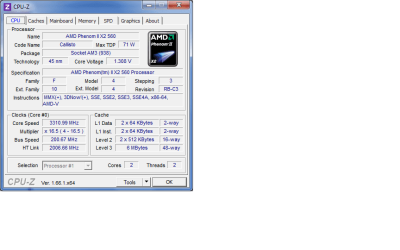
CPU: AMD PHENOM II X2 560 (3.30GHz/6MB CACHE/AM3) - BLACK EDITION
PSU: 450W
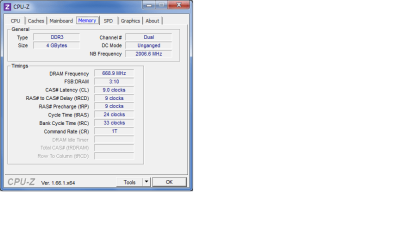
RAM: 4GB SAMSUNG DDR3 DUAL-DDR3 1333MHz (2 X 2GB)
GPU: 2GB NVIDIA GEFORCE GTX460 - 2 DVI,HDMI,VGA - DirectX® 11, 3D Vision Ready
HDD: 500GB SERIAL ATA 3-Gb/s HARD DRIVE WITH 8MB CACHE (7,200rpm)
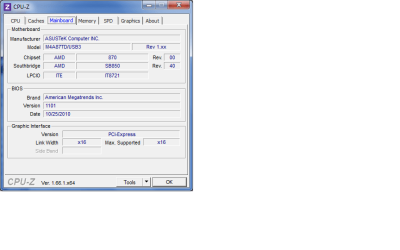
Motherboard: ASUS® M4A87TD/USB3: DUAL DDR3,SATA 6.0GB/s, USB 3.0
Sound: VIADeck Integrated.
Networking: Realtek Ethernet.
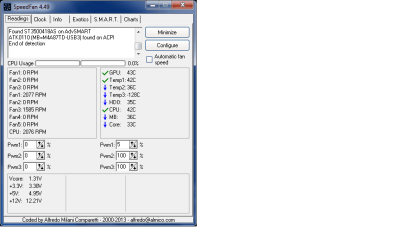
I have also attached the zipped reports from the diagnostic tool and various screenshots of Speedfan and CPU-Z readouts.
Thank you.
As of late, I have been experiencing random freezes and lockups on my PC. These problems started when I upgraded my Home Premium install from 32 bit to 64 bit and I have eliminated all common causes for freezes: All drivers and system updates are up to date, Ran Memtest+ and have tested the disk (all OK) reformatted the disk and reinstalled Windows, cleaned the innards of the PC in case of temperature issues and checked the seating of the internal components.
I am completely stumped and I have no idea as to what is causing the freezes, I would be very grateful if any of you could render assistance.
Specifications:
CPU: AMD PHENOM II X2 560 (3.30GHz/6MB CACHE/AM3) - BLACK EDITION
PSU: 450W
RAM: 4GB SAMSUNG DDR3 DUAL-DDR3 1333MHz (2 X 2GB)
GPU: 2GB NVIDIA GEFORCE GTX460 - 2 DVI,HDMI,VGA - DirectX® 11, 3D Vision Ready
HDD: 500GB SERIAL ATA 3-Gb/s HARD DRIVE WITH 8MB CACHE (7,200rpm)
Motherboard: ASUS® M4A87TD/USB3: DUAL DDR3,SATA 6.0GB/s, USB 3.0
Sound: VIADeck Integrated.
Networking: Realtek Ethernet.
I have also attached the zipped reports from the diagnostic tool and various screenshots of Speedfan and CPU-Z readouts.
Thank you.
Attachments
Last edited:
My Computer
At a glance
Windows 7 Home Premium 64 BitAMD PHENOM II X2 560 (3.30GHz/6MB CACHE/AM3)4GB SAMSUNG DDR3 DUAL-DDR3 1333MHz (2 X 2GB)Nvidia Geforce 460 GTX (2GB)
- Computer type
- PC/Desktop
- Computer Manufacturer/Model Number
- PC Specialist
- OS
- Windows 7 Home Premium 64 Bit
- CPU
- AMD PHENOM II X2 560 (3.30GHz/6MB CACHE/AM3)
- Motherboard
- ASUS® M4A87TD/USB3: DUAL DDR3,SATA 6.0GB/s, USB 3.0
- Memory
- 4GB SAMSUNG DDR3 DUAL-DDR3 1333MHz (2 X 2GB)
- Graphics Card(s)
- Nvidia Geforce 460 GTX (2GB)
- Hard Drives
- 500GB SERIAL ATA 3-Gb/s HARD DRIVE WITH 8MB CACHE (7,200rpm)
- Antivirus
- AVG Free Antivirus
- Browser
- Waterfox


