
Windows 7 64-bit - keep getting out of memory message

Gorham

New member
Member
Local time
2:19 AM
Messages
59
Location
Gorham, Maine
I'm running Windows 7 64-bit with 3GB memory and everything up to date.

I suspect Firefox in this but I keep getting a running-out-of-memory message and Windows asks to shut down offending programs. This often happens when I'm only running Firefox and I know it's a memory hog anyway. And the system does indeed shut down Firefox. I'm not sure what would happen with multiple files open because I err.. kind of ignored the message when it first started happening.

Anyway, one of the solutions offered is to change pagefile size although they don't give any hints as to how to determine what it should be.

I get a little twitchy changing windows automatic settings for things like this but what I have done is clear the automatically manage all drives box. Then I left my "C" drive alone and added the drives with applications to be system managed. This is primarily the drive I run most of my apps from.

Will what I've done have any effect on my virtual memory or do I just have to remember to close and clear Firefox periodically? Or something else??

Thanks as usual for the help.

-G.
 

My Computer My Computer

At a glance

Windows 7 Professional 64bitIntel Core i3-2020 @ 3.3GHz3.00 GBIntel HD Graphics Family
Computer Manufacturer/Model Number
Dell Optiplex 990
OS
Windows 7 Professional 64bit
CPU
Intel Core i3-2020 @ 3.3GHz
Memory
3.00 GB
Graphics Card(s)
Intel HD Graphics Family
Sound Card
Realtek High Definition Audio (integrated)
Monitor(s) Displays
Dell P2411H Analog (flat screen)
Screen Resolution
1920 x 1080
Hard Drives
300 GB SATA (Internal)
300 GB SATA (External) x 2
LaCie d2 quadra 500 GB
FreeAgency GoFlex Drive (NTFS) 2 TB
PSU
Yup
Case
Black
Cooling
2 fans
Keyboard
Microsoft ComfortCurve 2000
Mouse
Microsoft Optical
Internet Speed
Apparently a variable. Supposed to be cable modem speed.
Hi,
Use this Temp files delete,
You must save it to your desktop and run it from there,
Right click it from your desktop and click on Run as administrator and Start the scanner,
Shut your machine down after it finishes "if" prompted to otherwise just close,
TFC - Temp File Cleaner by OldTimer Download - Geeks to Go Forum
 

My Computer My Computer

At a glance

Win-7-Pro64bit 7-H-Prem-64biti7-5930K 2nd i9-9940x both water blocked VRM'...Trident-z 3200C14 2nd Trident-z 3600C16EVGA 1080ti ftw3 2nd Titan Xp both water blocked
Computer type
PC/Desktop
Computer Manufacturer/Model Number
Custom assembled by me :}
OS
Win-7-Pro64bit 7-H-Prem-64bit
CPU
i7-5930K 2nd i9-9940x both water blocked VRM's too
Motherboard
ASUS SABERTOOTH X99 2nd ASUS x299 Apex
Memory
Trident-z 3200C14 2nd Trident-z 3600C16
Graphics Card(s)
EVGA 1080ti ftw3 2nd Titan Xp both water blocked
Sound Card
Built-in Realtek
Monitor(s) Displays
1-AOC G2460PG 24"G-Sync 144Hz/ 2nd 1-ASUS VG248QE 24" 144Hz
Screen Resolution
1920 x 1080 144Hz
Hard Drives
2-Samsung M.2 Evo & Evo Plus
2-Samsung 850 EVO 500GB SSD's/ 3-2.5 W.D. Black 1tb-&3-1tb/3-3.5 WD Black 1tb hdd's
PSU
EVGA SuperNOVA 1000-P2 2nd 1200-P2
Case
2-Corsair Obsidian Series 450D Black ATX Mid Tower
Cooling
Custom water loops
Keyboard
Logitech G710+/ 2nd Logitech G910
Mouse
2-RedDragon M901 Perdition 16400 dpi Gaming mouse = wired
Internet Speed
Comcast Ping 19ms 89.31mbps download speed 6.12mbps upload
Antivirus
Malwarebytes Pro/ Superantispyware Pro
Browser
FireFox & Pale moon
Other Info
2nd ASUS X299 Apex/Intel i9-9940x with Custom water loop/7H-Prem-x64/Corsair 450D case/Ram Trident-z 3600C16 4x8gb / Samsung970Evo plus 500gb SSD/Dual ssd EZ swap evo/PSU EVGA SuperNova 1200w-P2 80+Platinum/GPU Titan Xp /8-ML-140 on push-pull on 2-280GTX rads
Post a screenshot of Task Manager - Performance tab when the problem occurs. This will provide a valuable overview of the memory situation.
 

My Computer My Computer

At a glance

Windows 7 Pro 64 bitXeon W35208 GBNvidia Geforce 210
Computer type
PC/Desktop
Computer Manufacturer/Model Number
HP
OS
Windows 7 Pro 64 bit
CPU
Xeon W3520
Memory
8 GB
Graphics Card(s)
Nvidia Geforce 210
I did run the Temp File Cleaner but only netted 47 MB out of it. I do keep the machine clean. One way I manage Firefox is to run PurgeFox frequently; it's set to clear out the cache as well as clean up other stuff on my machine including temp files and the recycle bin. TFC did pick up (I think) a few resistant temp files in my user directory.

Anyway, right now it seems to be running well. When it happens again, I will post a screenshot of the Task Manager Performance screen; should I also post a shot of the Resource Monitor?

Thanks for responding so quickly.

-G.
 

My Computer My Computer

At a glance

Windows 7 Professional 64bitIntel Core i3-2020 @ 3.3GHz3.00 GBIntel HD Graphics Family
Computer Manufacturer/Model Number
Dell Optiplex 990
OS
Windows 7 Professional 64bit
CPU
Intel Core i3-2020 @ 3.3GHz
Memory
3.00 GB
Graphics Card(s)
Intel HD Graphics Family
Sound Card
Realtek High Definition Audio (integrated)
Monitor(s) Displays
Dell P2411H Analog (flat screen)
Screen Resolution
1920 x 1080
Hard Drives
300 GB SATA (Internal)
300 GB SATA (External) x 2
LaCie d2 quadra 500 GB
FreeAgency GoFlex Drive (NTFS) 2 TB
PSU
Yup
Case
Black
Cooling
2 fans
Keyboard
Microsoft ComfortCurve 2000
Mouse
Microsoft Optical
Internet Speed
Apparently a variable. Supposed to be cable modem speed.
Hi
Yes we love screen shots :)
Also if you don't mind post a msconfig/ startup section shot.
 

My Computer My Computer

At a glance

Win-7-Pro64bit 7-H-Prem-64biti7-5930K 2nd i9-9940x both water blocked VRM'...Trident-z 3200C14 2nd Trident-z 3600C16EVGA 1080ti ftw3 2nd Titan Xp both water blocked
Computer type
PC/Desktop
Computer Manufacturer/Model Number
Custom assembled by me :}
OS
Win-7-Pro64bit 7-H-Prem-64bit
CPU
i7-5930K 2nd i9-9940x both water blocked VRM's too
Motherboard
ASUS SABERTOOTH X99 2nd ASUS x299 Apex
Memory
Trident-z 3200C14 2nd Trident-z 3600C16
Graphics Card(s)
EVGA 1080ti ftw3 2nd Titan Xp both water blocked
Sound Card
Built-in Realtek
Monitor(s) Displays
1-AOC G2460PG 24"G-Sync 144Hz/ 2nd 1-ASUS VG248QE 24" 144Hz
Screen Resolution
1920 x 1080 144Hz
Hard Drives
2-Samsung M.2 Evo & Evo Plus
2-Samsung 850 EVO 500GB SSD's/ 3-2.5 W.D. Black 1tb-&3-1tb/3-3.5 WD Black 1tb hdd's
PSU
EVGA SuperNOVA 1000-P2 2nd 1200-P2
Case
2-Corsair Obsidian Series 450D Black ATX Mid Tower
Cooling
Custom water loops
Keyboard
Logitech G710+/ 2nd Logitech G910
Mouse
2-RedDragon M901 Perdition 16400 dpi Gaming mouse = wired
Internet Speed
Comcast Ping 19ms 89.31mbps download speed 6.12mbps upload
Antivirus
Malwarebytes Pro/ Superantispyware Pro
Browser
FireFox & Pale moon
Other Info
2nd ASUS X299 Apex/Intel i9-9940x with Custom water loop/7H-Prem-x64/Corsair 450D case/Ram Trident-z 3600C16 4x8gb / Samsung970Evo plus 500gb SSD/Dual ssd EZ swap evo/PSU EVGA SuperNova 1200w-P2 80+Platinum/GPU Titan Xp /8-ML-140 on push-pull on 2-280GTX rads
Well try though I would I couldn't get it to that point. I really overloaded Firefox with more tabs than I usually open and it slowed down in rather a nasty way but didn't crash or give me warnings. So I guess I'll mark this as solved and refer back to it with a new thread if the warning comes again. ... which it probably will as soon as I do that.

Thanks as usual for the help and I'm oh so sure I'll "see" you soon.

-G.
 

My Computer My Computer

At a glance

Windows 7 Professional 64bitIntel Core i3-2020 @ 3.3GHz3.00 GBIntel HD Graphics Family
Computer Manufacturer/Model Number
Dell Optiplex 990
OS
Windows 7 Professional 64bit
CPU
Intel Core i3-2020 @ 3.3GHz
Memory
3.00 GB
Graphics Card(s)
Intel HD Graphics Family
Sound Card
Realtek High Definition Audio (integrated)
Monitor(s) Displays
Dell P2411H Analog (flat screen)
Screen Resolution
1920 x 1080
Hard Drives
300 GB SATA (Internal)
300 GB SATA (External) x 2
LaCie d2 quadra 500 GB
FreeAgency GoFlex Drive (NTFS) 2 TB
PSU
Yup
Case
Black
Cooling
2 fans
Keyboard
Microsoft ComfortCurve 2000
Mouse
Microsoft Optical
Internet Speed
Apparently a variable. Supposed to be cable modem speed.
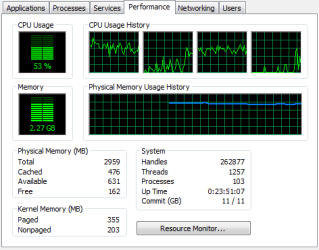
Well it happened just this morning and it would seem to be soon enough to reopen the thread. Hope I'm right about that.

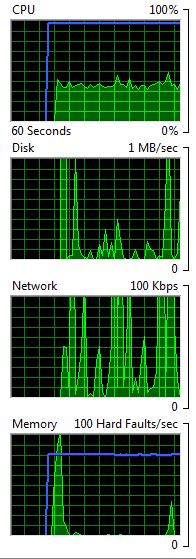
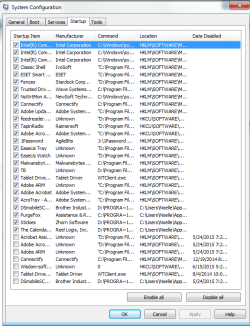
Anyway, same situation. Warning. I ignored so I could go get the screen shots. Firefox was still open for the two task manager items and then it closed FF which was the only app open until I started with the screen shots. Uh.. you'll notice the msconfig-start shot is a composite of three screens; I do wish Microsoft would make some of those boxes scalable. Anyway, here goes...

Ugh. It reordered them and I can't figure out how to resize them. Sorry.

Anyway, hope they help.

Thx as usual.
 

Attachments

  • performance.png
    performance.png
    7.8 KB · Views: 9
  • resource monitor.png
    resource monitor.png
    3.7 KB · Views: 9
  • msconfig-start.png
    msconfig-start.png
    25.2 KB · Views: 2

My Computer My Computer

At a glance

Windows 7 Professional 64bitIntel Core i3-2020 @ 3.3GHz3.00 GBIntel HD Graphics Family
Computer Manufacturer/Model Number
Dell Optiplex 990
OS
Windows 7 Professional 64bit
CPU
Intel Core i3-2020 @ 3.3GHz
Memory
3.00 GB
Graphics Card(s)
Intel HD Graphics Family
Sound Card
Realtek High Definition Audio (integrated)
Monitor(s) Displays
Dell P2411H Analog (flat screen)
Screen Resolution
1920 x 1080
Hard Drives
300 GB SATA (Internal)
300 GB SATA (External) x 2
LaCie d2 quadra 500 GB
FreeAgency GoFlex Drive (NTFS) 2 TB
PSU
Yup
Case
Black
Cooling
2 fans
Keyboard
Microsoft ComfortCurve 2000
Mouse
Microsoft Optical
Internet Speed
Apparently a variable. Supposed to be cable modem speed.
The problem is caused by the commit charge hitting the commit limit as shown by "Commit (GB) 11/11".
I suspect that the pagefile is system managed and is being forced to it's configured limit by the rising commit. A larger pagefile would buy you some time before the problem occurs but is unlikely to prevent it.

Post a screenshot of Resource Monitor - Memory tab, showing processes sorted by Commit. Hopefully this will revels the problem.
 

My Computer My Computer

At a glance

Windows 7 Pro 64 bitXeon W35208 GBNvidia Geforce 210
Computer type
PC/Desktop
Computer Manufacturer/Model Number
HP
OS
Windows 7 Pro 64 bit
CPU
Xeon W3520
Memory
8 GB
Graphics Card(s)
Nvidia Geforce 210
Okay. I just took the shot but all is reasonably quiet just now. Do you want me to take it again when I'm having the problem?

I did resize it a bit but wanted to leave the data large enough to read (or at least I hope I did).
 

Attachments

  • commit.png
    commit.png
    68.3 KB · Views: 1

My Computer My Computer

At a glance

Windows 7 Professional 64bitIntel Core i3-2020 @ 3.3GHz3.00 GBIntel HD Graphics Family
Computer Manufacturer/Model Number
Dell Optiplex 990
OS
Windows 7 Professional 64bit
CPU
Intel Core i3-2020 @ 3.3GHz
Memory
3.00 GB
Graphics Card(s)
Intel HD Graphics Family
Sound Card
Realtek High Definition Audio (integrated)
Monitor(s) Displays
Dell P2411H Analog (flat screen)
Screen Resolution
1920 x 1080
Hard Drives
300 GB SATA (Internal)
300 GB SATA (External) x 2
LaCie d2 quadra 500 GB
FreeAgency GoFlex Drive (NTFS) 2 TB
PSU
Yup
Case
Black
Cooling
2 fans
Keyboard
Microsoft ComfortCurve 2000
Mouse
Microsoft Optical
Internet Speed
Apparently a variable. Supposed to be cable modem speed.
Back
Top