Windows 7/64 Home Premium Update errors 9C59 & 800736B3

angevoyageur

New member
Local time
5:28 AM
Messages
5
Hi,

I tried a lot of things trying to resolve this issue but nothing worked.
I finally follow the procedure described on this forum, in the hope someone here can help.

I activated the Administrateur account (my system is in French) and ran the CheckSUR and Windows Update from this account as otherwise I can't access the CBS log file.
I joined the requested files,
Thank you by advance.
Alain
 

Attachments
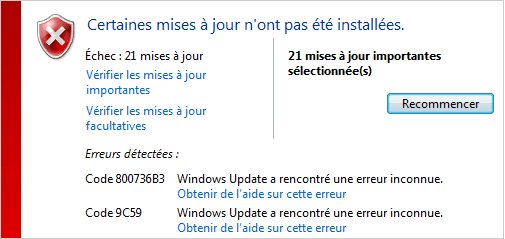
  • WinupdateErrors.png
    WinupdateErrors.png
    6.7 KB · Views: 13

My Computer My Computer

Computer type
PC/Desktop
OS
Windows 7 Home Premium 64 bits
Your SFC scan was clear - but the background CBS data shows some severe problems.
PLease run the CheckSUR tool, and post the results...

Please download and save the CheckSUR tool from http://support.microsoft.com/kb/947821
(you'll need to look in the details for Windows 7, downloading from the Microsoft Download Center)

Run it - The tool can take anywhere from 5 mins to a couple of hours to run (or 'Install') depending on how much it has to do, and may exit silently - it may appear to freeze for most of that time, but be patient.
The result is logged in the C:\Windows\Logs\CBS\CheckSUR.log file - and an archive …\checksur.persist.log file

Then zip the CheckSUR.log and upload it to your reply.
 

My Computer My Computer

Computer type
Laptop
Computer Manufacturer/Model Number
Asus K52F or Lenovo B51-80
OS
Win 7 x64 Home Premium (and x86 VirtualBox VM)/Win10
CPU
i3 370M/i7 6500U
Motherboard
Asus/Lenovo
Memory
8GB - finally :)/8GB
Graphics Card(s)
it's an i3, dude!/dual Intel&nVidia
Sound Card
onboard
Monitor(s) Displays
15.6" built-in
Screen Resolution
1366x768/1920x1080
Hard Drives
750GB Seagate internal
Sundry external drives attached to other computers on the local network
1TB SSD on the Lenovo
PSU
n/a
Internet Speed
as much as I can get - usually on a dongle/phone, so <1MB/s
Antivirus
MSE/Defender
Browser
IE11/12/Edge/Chrome/FF(if I must)
No errors reported.
 

Attachments

My Computer My Computer

Computer type
PC/Desktop
OS
Windows 7 Home Premium 64 bits
Not quite!
Code:
Checking Package Manifests and Catalogs
(w) CBS Catalog Expired 0x800B0101 servicing\Packages\Package_11_for_KB2729094~31bf3856ad364e35~amd64~~6.1.1.0.cat  
(w) CBS Catalog Expired 0x800B0101 servicing\Packages\Package_2_for_KB2705219~31bf3856ad364e35~amd64~~6.1.1.1.cat  
(w) CBS Catalog Expired 0x800B0101 servicing\Packages\Package_5_for_KB2647753~31bf3856ad364e35~amd64~~6.1.3.1.cat  
(w) CBS Catalog Expired 0x800B0101 servicing\Packages\Package_for_KB2732500_SP1~31bf3856ad364e35~amd64~~6.1.1.0.cat
These are old updates - and were fixed some time ago because of this problem, so you've had the problem since then.

The classic fix is to uninstall the patches, and then reinstall them - which is a little frought.

Try using this - Windows Update error 800b0101 - Windows Help
https://technet.microsoft.com/en-us/library/security/2749655.aspx?f=255&MSPPError=-2147217396
 

My Computer My Computer

Computer type
Laptop
Computer Manufacturer/Model Number
Asus K52F or Lenovo B51-80
OS
Win 7 x64 Home Premium (and x86 VirtualBox VM)/Win10
CPU
i3 370M/i7 6500U
Motherboard
Asus/Lenovo
Memory
8GB - finally :)/8GB
Graphics Card(s)
it's an i3, dude!/dual Intel&nVidia
Sound Card
onboard
Monitor(s) Displays
15.6" built-in
Screen Resolution
1366x768/1920x1080
Hard Drives
750GB Seagate internal
Sundry external drives attached to other computers on the local network
1TB SSD on the Lenovo
PSU
n/a
Internet Speed
as much as I can get - usually on a dongle/phone, so <1MB/s
Antivirus
MSE/Defender
Browser
IE11/12/Edge/Chrome/FF(if I must)
So, I followed the procedure to uninstall the package indicated in CheckSUR.log :

(w) CBS Catalog Expired 0x800B0101 servicing\Packages\Package_11_for_KB2729094~31bf3856ad364e35~amd64~~6.1.1.0.cat
(w) CBS Catalog Expired 0x800B0101 servicing\Packages\Package_2_for_KB2705219~31bf3856ad364e35~amd64~~6.1.1.1.cat
(w) CBS Catalog Expired 0x800B0101 servicing\Packages\Package_5_for_KB2647753~31bf3856ad364e35~amd64~~6.1.3.1.cat
(w) CBS Catalog Expired 0x800B0101 servicing\Packages\Package_for_KB2732500_SP1~31bf3856ad364e35~amd64~~6.1.1.0.cat

It works for the first KB2729094. But I got an error for KB2705219 (see picture1). I joined the CBS.log.
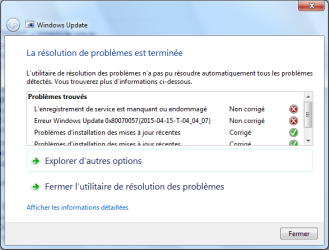
I also tried the automatic troubleshooter as indicated in the same link, but here too I got an error (see picture2).
If I run the Windows Update after the first uninstall, it reinstall it (KB2729094) and then I got the same errors as previously.

Any idea ?
 

Attachments

  • Picture1.png
    Picture1.png
    86.2 KB · Views: 1
  • Picture2.png
    Picture2.png
    18.8 KB · Views: 8

My Computer My Computer

Computer type
PC/Desktop
OS
Windows 7 Home Premium 64 bits
It looks like none of the related errors for that got into the CBS log :(

Please post the C:\Windows\windowsupdate.log file, and then run CheckSUR again, and we'll see what we find.
 

My Computer My Computer

Computer type
Laptop
Computer Manufacturer/Model Number
Asus K52F or Lenovo B51-80
OS
Win 7 x64 Home Premium (and x86 VirtualBox VM)/Win10
CPU
i3 370M/i7 6500U
Motherboard
Asus/Lenovo
Memory
8GB - finally :)/8GB
Graphics Card(s)
it's an i3, dude!/dual Intel&nVidia
Sound Card
onboard
Monitor(s) Displays
15.6" built-in
Screen Resolution
1366x768/1920x1080
Hard Drives
750GB Seagate internal
Sundry external drives attached to other computers on the local network
1TB SSD on the Lenovo
PSU
n/a
Internet Speed
as much as I can get - usually on a dongle/phone, so <1MB/s
Antivirus
MSE/Defender
Browser
IE11/12/Edge/Chrome/FF(if I must)
What a hell !!!
Attached the WindowsUpdate log file.
Thank you for your patience.

EDIT:
The CheckSUR reports nothing.
 

Attachments

Last edited:

My Computer My Computer

Computer type
PC/Desktop
OS
Windows 7 Home Premium 64 bits
CheckSUR is happy - there's nothing to do with the uninstall in the WU log :(

Maybe we'll find something in the Event logs?

Open Event Viewer
click on the Windows logs entry in the left pane to expand it.
Now click on the Application entry - wait while it loads.
Click on 'File' in the menu bar and select Save...
Save the file as Appevt.evtx
Repeat for the System log
then zip both, and upload them.
 

My Computer My Computer

Computer type
Laptop
Computer Manufacturer/Model Number
Asus K52F or Lenovo B51-80
OS
Win 7 x64 Home Premium (and x86 VirtualBox VM)/Win10
CPU
i3 370M/i7 6500U
Motherboard
Asus/Lenovo
Memory
8GB - finally :)/8GB
Graphics Card(s)
it's an i3, dude!/dual Intel&nVidia
Sound Card
onboard
Monitor(s) Displays
15.6" built-in
Screen Resolution
1366x768/1920x1080
Hard Drives
750GB Seagate internal
Sundry external drives attached to other computers on the local network
1TB SSD on the Lenovo
PSU
n/a
Internet Speed
as much as I can get - usually on a dongle/phone, so <1MB/s
Antivirus
MSE/Defender
Browser
IE11/12/Edge/Chrome/FF(if I must)
Here the events.
 

My Computer My Computer

Computer type
PC/Desktop
OS
Windows 7 Home Premium 64 bits
Back
Top