Windows 7 Home Premium 64-bit Update - Error Code 800736B3

kkortje

New member
Local time
11:44 PM
Messages
3
Hello :)
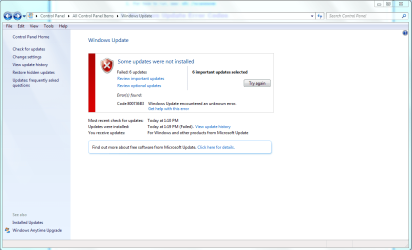
I'm having a problem installing Windows Updates on my Windows 7 Home Premium 64-bit PC - the update process ends with the error code: 800736B3 (see attached screenshot)

I have tried following several suggested courses of action I obtained from several sources, none of which has resolved the problem, including Methods 1 & 2 of Microsoft's

Windows update error code 800736B3 failes to install (KB974455, - Microsoft Community

sfc /scannow -> no errors reported

System Update Readiness Tool -> downloaded, installed successfully - no errors reported.

After running both of these, restarted my PC and then tried to install the Windows updates again - no luck, same error reported.

So now I will see if anyone here can help me?

Thank-you very much in advance for any assistance you can provide.

:)

Kevin

p.s. the CBS.zip file I created as per the Windows Update Posting Instructions was 76MB, so too large to post! There are several large .cab files in that folder (CbsPersist_%.cab) - can I exclude those from the zip file?

Edit: Added CBS.zip file with .log files only from C:\Windows\Logs\CBS folder
 

Attachments
  • Windows Update Error Code 800736B3 - 2015-03-17.PNG
    Windows Update Error Code 800736B3 - 2015-03-17.PNG
    49.3 KB · Views: 3
Last edited:

My Computer My Computer

Computer type
PC/Desktop
Computer Manufacturer/Model Number
HP p6709c
OS
Windows 7 Home Premium SP1 64-bit
CPU
Intel Core i5-2300 CPU @ 2.80GHz
Memory
16.0 GB
Browser
Google Chrome
I'm trying to figure out what exactly this error code means... it's not as easy to find like BSOD bugcheck codes, lol.

What updates failed exactly?
 

My Computer My Computer

Computer type
PC/Desktop
Computer Manufacturer/Model Number
Custom Build
OS
Windows 10 Home x64
CPU
AMD FX-8320 @ 3.5 GHz
Motherboard
Gigabyte GA-990FXA-UD3 (rev. 4.0)
Memory
4 x 2 GB G Skill Ripjaws DDR3-1600
Graphics Card(s)
EVGA Nvidia GTX 550 Ti 1 GB
Sound Card
Realtek
Monitor(s) Displays
Acer S201HL
Screen Resolution
1600x900
Hard Drives
1 x 240 GB OCZ SSD
1 x 60 GB Intel SSD
1 x 1 TB Samsung HDD
PSU
Silverstone Strider 750w Modular
Case
Antec 300 Illusion
Cooling
Air
Keyboard
Microsoft
Mouse
HP
Antivirus
Microsoft Security Essentials
Browser
Google Chrome
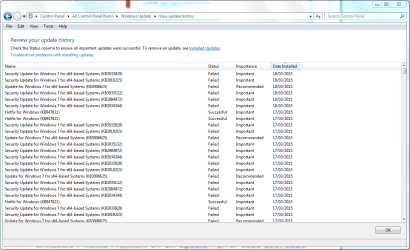
The following Windows Updates are failing: (see attached screenshot)

Security Update for Windows 7 for x64-based Systems (KB3033929)
Security Update for Windows 7 for x64-based Systems (KB3019215)
Update for Windows 7 for x64-based Systems (KB3006625)
Security Update for Windows 7 for x64-based Systems (KB3035132)
Security Update for Windows 7 for x64-based Systems (KB2984972)
Security Update for Windows 7 for x64-based Systems (KB3034344)

Reviewing my update history, it looks like the oldest of these (KB2984972) started failing back on October 16, 2014.
 

Attachments

  • WindowsUpdateHistory - Failed Updates.PNG
    WindowsUpdateHistory - Failed Updates.PNG
    38.6 KB · Views: 2

My Computer My Computer

Computer type
PC/Desktop
Computer Manufacturer/Model Number
HP p6709c
OS
Windows 7 Home Premium SP1 64-bit
CPU
Intel Core i5-2300 CPU @ 2.80GHz
Memory
16.0 GB
Browser
Google Chrome

My Computer My Computer

Computer type
PC/Desktop
Computer Manufacturer/Model Number
Custom Build
OS
Windows 10 Home x64
CPU
AMD FX-8320 @ 3.5 GHz
Motherboard
Gigabyte GA-990FXA-UD3 (rev. 4.0)
Memory
4 x 2 GB G Skill Ripjaws DDR3-1600
Graphics Card(s)
EVGA Nvidia GTX 550 Ti 1 GB
Sound Card
Realtek
Monitor(s) Displays
Acer S201HL
Screen Resolution
1600x900
Hard Drives
1 x 240 GB OCZ SSD
1 x 60 GB Intel SSD
1 x 1 TB Samsung HDD
PSU
Silverstone Strider 750w Modular
Case
Antec 300 Illusion
Cooling
Air
Keyboard
Microsoft
Mouse
HP
Antivirus
Microsoft Security Essentials
Browser
Google Chrome
The error code here usually seems to mean some major problems in the registry - and I haven't had much luck identifying the cause/solution with it.
The CheckSUR and SFC scans are clear, and there's nothing amiss in the background of the CBS.log file.

Please post the C:\Windows\windowsupdate.log file, and the CBSPersist files (you'll have to zip them, since cab files can't be posted to the forum).
 

My Computer My Computer

Computer type
Laptop
Computer Manufacturer/Model Number
Asus K52F or Lenovo B51-80
OS
Win 7 x64 Home Premium (and x86 VirtualBox VM)/Win10
CPU
i3 370M/i7 6500U
Motherboard
Asus/Lenovo
Memory
8GB - finally :)/8GB
Graphics Card(s)
it's an i3, dude!/dual Intel&nVidia
Sound Card
onboard
Monitor(s) Displays
15.6" built-in
Screen Resolution
1366x768/1920x1080
Hard Drives
750GB Seagate internal
Sundry external drives attached to other computers on the local network
1TB SSD on the Lenovo
PSU
n/a
Internet Speed
as much as I can get - usually on a dongle/phone, so <1MB/s
Antivirus
MSE/Defender
Browser
IE11/12/Edge/Chrome/FF(if I must)
I have attached the C:\Windows\windowsupdate.log file, and 3 of the CBCpersist files - the other CBSpersist files are too large to upload to this site, even when I zip them.

Any suggestions much appreciated.

thx,

Kevin
 

Attachments

My Computer My Computer

Computer type
PC/Desktop
Computer Manufacturer/Model Number
HP p6709c
OS
Windows 7 Home Premium SP1 64-bit
CPU
Intel Core i5-2300 CPU @ 2.80GHz
Memory
16.0 GB
Browser
Google Chrome
Hmmm
I think I need to take a look at your CBS registry entries and see if I can work out where the corruption is - and how widespread it is.
Please follow these instructions carefully - mistakes can be terminal!

Open Regedit, and navigate to the
HKEY_LOCAL_MACHINE\SOFTWARE\Microsoft\Windows\CurrentVersion
Key - expand it, and find the
Component Based Servicing
Subkey - right-click on it and select Export.
Change the 'Save as type' to 'Registry HiveFiles' and name the file CBScrb
Save it to your desktop, then compress it, and upload it.
 

My Computer My Computer

Computer type
Laptop
Computer Manufacturer/Model Number
Asus K52F or Lenovo B51-80
OS
Win 7 x64 Home Premium (and x86 VirtualBox VM)/Win10
CPU
i3 370M/i7 6500U
Motherboard
Asus/Lenovo
Memory
8GB - finally :)/8GB
Graphics Card(s)
it's an i3, dude!/dual Intel&nVidia
Sound Card
onboard
Monitor(s) Displays
15.6" built-in
Screen Resolution
1366x768/1920x1080
Hard Drives
750GB Seagate internal
Sundry external drives attached to other computers on the local network
1TB SSD on the Lenovo
PSU
n/a
Internet Speed
as much as I can get - usually on a dongle/phone, so <1MB/s
Antivirus
MSE/Defender
Browser
IE11/12/Edge/Chrome/FF(if I must)
Back
Top