windows 7 64bit ult or linux mint cinnamon

2009joseph

Member
Member
VIP
Local time
5:04 PM
Messages
251
hello i have went and dont it again lol . i got another ledgent of a dell e6430 core i5 again so now thats 3 i have and well there cheap ebay buys . anyways the one i got was dirt cheap came with no ssd or power cable so thats why . and well i have a few spare ssd about and the windows sticker on the back did not have a product code so it must been a school one. well i cleaned it out put on new cpu paste on it and a spare 250gb ssd in it plus 16gb of samsumg matching ram and i thought for a change i will try linux mint cinnamon 64bit on it and you can get it to act and look like windows 7 withn the uk landscape theme on it with picture and sounds .tbh i have to say i do like it and its running prety well on it .but on my laptop i still have the windows 7 ult 64bit on it and i love it . but with the linux os you dont need to buy a antivirus i guess on it .whats your guys thoughts on it
 

My Computer My Computer

At a glance

WINDOWS 7 64BIT ultimate8GB
Computer type
Laptop
Computer Manufacturer/Model Number
dell latitude e6430
OS
WINDOWS 7 64BIT ultimate
Memory
8GB
Hard Drives
sandisk extreme pro 480gb ssd
Antivirus
free avast
Why not run Linux? It is definitely safer, and unless you need Windows for something, why not have at least one machine that runs Linux? If nothing else, it's educational, you will learn new things. It can also be handy at times. Linux can be so handy that Microsoft themselves have embedded it in Windows as the Linux subsystem. Some people use it for the great tools, like the partition editor. And with the future of Windows unclear you may really need Linux at some point. (Why is Windows' future unclear? Have you tried running Windows 11? Who knows what they will do next, but the trajectory for awhile now has not been up).
 

My Computer My Computer

At a glance

Windows 7 x64 SP1AMD Athlon 64 X2 6000+ / 3.0 GHz6 GB
Computer type
PC/Desktop
Computer Manufacturer/Model Number
Gateway GT5656
OS
Windows 7 x64 SP1
CPU
AMD Athlon 64 X2 6000+ / 3.0 GHz
Motherboard
NVIDIA GeForce 6150 SE
Memory
6 GB
Monitor(s) Displays
Lenovo LED
Screen Resolution
1920 X 1080
Hard Drives
Windows on 500 GB spinner; Ubuntu 16 on Sandisk 250GB SSD; Bodhi5 on Samsung 250GB SSD; another old spinner for fooling around.
PSU
Original that came with computer
Keyboard
Logitech wireless
Mouse
Logitech wireless
Antivirus
Microsoft Sec Essentials
Browser
Vivaldi
Why not run Linux? It is definitely safer, and unless you need Windows for something, why not have at least one machine that runs Linux? If nothing else, it's educational, you will learn new things. It can also be handy at times. Linux can be so handy that Microsoft themselves have embedded it in Windows as the Linux subsystem. Some people use it for the great tools, like the partition editor. And with the future of Windows unclear you may really need Linux at some point. (Why is Windows' future unclear? Have you tried running Windows 11? Who knows what they will do next, but the trajectory for awhile now has not been up).
i tried win 10 tbh i dont like it and well i went back to win 7 64bit ultimate on the main laptop running avast antivirus . i actually do like linux mint cinnamon its good and well im getting my wife used to it ,i just connected my printer up to it the other day loading the drivers etc on it. aye the future of windows as u say is gone . but i was googling my laptop and they said linux mint cinnamon 22.3 Xfce Edition is the one for my dell e6430 core i5 3rd gen laptops . my wife likes the windows 7 m2007 microsoft word that i have on it compared to the linux word .but as i say she will get used to the linux version of Microsoft word lol
 

My Computer My Computer

At a glance

WINDOWS 7 64BIT ultimate8GB
Computer type
Laptop
Computer Manufacturer/Model Number
dell latitude e6430
OS
WINDOWS 7 64BIT ultimate
Memory
8GB
Hard Drives
sandisk extreme pro 480gb ssd
Antivirus
free avast
I have never needed antivirus on win7 following safe computing practices with a modern browser.

The thing is, looking forward, how long will modern browser support remain?

Besides that, security, meh nobody has ever been able to state a single thing that my win7 boxes were vulnerable to in my very typical HOME uses of them, and so so many years later after being online the whole time, never exploited, so I call security a nonsense nothingburger. If you are behind a router, and firewall is enabled, security is about entry points and that's your applications.

If you want to give up the compatibility of Windows and spend a lot of time learning 'nix, that's a hobby that you can choose. People running 'nix often pat themselves on the back that they could eventually get most of the functionality they had in windows, if they settle for constant compromises and learn over and over, every new software they're stuck with. Seems like gluttons for punishment to me, like no life, this is their hobby and it's good to have hobbies but mine isn't going to ruin my productivity at things I do daily. I'm a contractor and work online for several clients and 'nix for that? Heck no, I need to get things done NOW, not after jumping through hoops.

My point is, 'nix is a choice. It's not a bad choice if you have the time to invest in it, but it doesn't really have much to do with "I have older hardware". That is the least of the concerns because you're not talking about hardware so old that you're limited to something like 1GB system memory... If you want to go 'nix, it's every bit as applicable to the newest hardware support available. Do it or don't, but don't think it's relevant to having a little bit aged system.

I ran a self built dial up 'nix router 30 years ago. The light footprint was great, it taught me that 'nix is great for single purpose systems. I revisited it every now and then, and it's still great for limited purpose systems. Many more apps now, much better hardware support. I don't want much better. I want the target OS even if it means running older apps that don't have security issues because don't need internet access to run.

I don't want 'nix to look like Win7. I want win7 to look like Win2K. ;) That was when the GUI and settings interface was no-nonsense instead of color gradient impediments to what icons were supposed to be, and extra wasted space and clicks to get anything done. [/rant]

 
Last edited:

My Computers My Computers

  • At a glance

    Windows 7 Ultimate 64bitJ19004GB DDR3 1333Intel 7 Gen IGP
    Computer type
    PC/Desktop
    Computer Manufacturer/Model Number
    custom
    OS
    Windows 7 Ultimate 64bit
    CPU
    J1900
    Motherboard
    ASROCK Q1900M
    Memory
    4GB DDR3 1333
    Graphics Card(s)
    Intel 7 Gen IGP
    Hard Drives
    Multiple SATA & USB3
    Antivirus
    Defender
    Browser
    Latest Chrome & Older Firefox
  • At a glance

    Win7 Ultimate SP1 x64AMD Phenom II x4 BE 96516GB as 4 x 4GBGTX 1060
    Computer type
    PC/Desktop
    System Manufacturer/Model Number
    Cobbled Together Leftover Parts
    OS
    Win7 Ultimate SP1 x64
    CPU
    AMD Phenom II x4 BE 965
    Motherboard
    Asus M4A785TD-V Evo
    Memory
    16GB as 4 x 4GB
    Graphics Card(s)
    GTX 1060
    Sound Card
    Via Envy Chaintech AV-710
    Monitor(s) Displays
    Samsung TVs
    Screen Resolution
    4K
    Hard Drives
    0 - Just SSDs in this box.
I have never needed antivirus on win7 following safe computing practices with a modern browser.

The thing is, looking forward, how long will modern browser support remain?

Besides that, security, meh nobody has ever been able to state a single thing that my win7 boxes were vulnerable to in my very typical HOME uses of them, and so so many years later after being online the whole time, never exploited, so I call security a nonsense nothingburger. If you are behind a router, and firewall is enabled, security is about entry points and that's your applications.

If you want to give up the compatibility of Windows and spend a lot of time learning 'nix, that's a hobby that you can choose. People running 'nix often pat themselves on the back that they could eventually get most of the functionality they had in windows, if they settle for constant compromises and learn over and over, every new software they're stuck with. Seems like gluttons for punishment to me, like no life, this is their hobby and it's good to have hobbies but mine isn't going to ruin my productivity at things I do daily. I'm a contractor and work online for several clients and 'nix for that? Heck no, I need to get things done NOW, not after jumping through hoops.

My point is, 'nix is a choice. It's not a bad choice if you have the time to invest in it, but it doesn't really have much to do with "I have older hardware". That is the least of the concerns because you're not talking about hardware so old that you're limited to something like 1GB system memory... If you want to go 'nix, it's every bit as applicable to the newest hardware support available. Do it or don't, but don't think it's relevant to having a little bit aged system.

I ran a self built dial up 'nix router 30 years ago. The light footprint was great, it taught me that 'nix is great for single purpose systems. I revisited it every now and then, and it's still great for limited purpose systems. Many more apps now, much better hardware support. I don't want much better. I want the target OS even if it means running older apps that don't have security issues because don't need internet access to run.

I don't want 'nix to look like Win7. I want win7 to look like Win2K. ;) That was when the GUI and settings interface was no-nonsense instead of color gradient impediments to what icons were supposed to be, and extra wasted space and clicks to get anything done. [/rant]
thanks for your input well tbh i do really love windows 7 ultd 64bit and i like vcl player and 2007 Microsoft word .those are the main things i use and like you i like simple things that work and i am not a person that wants to keep playing with things that work and as you say linux there is work with it to get it going and well i got a bit of a sickness of when i bought my older laptop a dell e6430 core i5 3rd gen i liked it and a great machine never lays down and always works great that my wife needed one also for her work and printing things so i got another dirt cheap one off ebay which came as is no hdd or os on it and i put a scandisc extreme pro 500gb ssd into it and 16gb ram . that one also i got win 7 ultd 64bit on it and working great also . and i seen another one on ebay thought was cheap and kina thought i could get it and set it up and sell it well i put another spare ssd into it and well i put on linux on it for the fun and tried it for a while . its just a bit of getting used to but for sure i love windows 7 tbh
 

My Computer My Computer

At a glance

WINDOWS 7 64BIT ultimate8GB
Computer type
Laptop
Computer Manufacturer/Model Number
dell latitude e6430
OS
WINDOWS 7 64BIT ultimate
Memory
8GB
Hard Drives
sandisk extreme pro 480gb ssd
Antivirus
free avast
hello i have went and dont it again lol . i got another ledgent of a dell e6430 core i5 again so now thats 3 i have and well there cheap ebay buys . anyways the one i got was dirt cheap came with no ssd or power cable so thats why . and well i have a few spare ssd about and the windows sticker on the back did not have a product code so it must been a school one. well i cleaned it out put on new cpu paste on it and a spare 250gb ssd in it plus 16gb of samsumg matching ram and i thought for a change i will try linux mint cinnamon 64bit on it and you can get it to act and look like windows 7 withn the uk landscape theme on it with picture and sounds .tbh i have to say i do like it and its running prety well on it .but on my laptop i still have the windows 7 ult 64bit on it and i love it . but with the linux os you dont need to buy a antivirus i guess on it .whats your guys thoughts on it
To be honest, Linux is not ready yet for consumer hardware, but if you want to learn it Linux Mint is a good starting point as it's really easy to learn. Also, you needn't buy an antivirus to use Windows 7. Windows 7 built-in security and firewall are ok, but if you really need an antivirus you can look at free options like MalwareBytes or MSE.
 

My Computers My Computers

  • At a glance

    Windows 7 Home Premium 64-bit SP1Intel Core 2 Quad Q9650 (OVERCLOCK 3.8GHz)6GB DDR2 (Kingston)SAPPHRIE ATI HD 3870
    Computer type
    PC/Desktop
    Computer Manufacturer/Model Number
    Custom Build
    OS
    Windows 7 Home Premium 64-bit SP1
    CPU
    Intel Core 2 Quad Q9650 (OVERCLOCK 3.8GHz)
    Motherboard
    GIGABYTE GA-P35-DS3 Rev 2.0
    Memory
    6GB DDR2 (Kingston)
    Graphics Card(s)
    SAPPHRIE ATI HD 3870
    Sound Card
    Creative Sound Blaster Audigy 2 ZS Platinum Pro (SB0360)
    Monitor(s) Displays
    Hyundai U90D 19'' 75Hz 5ms TFT
    Screen Resolution
    1280x1024 75Hz (DVI)
    Hard Drives
    500GB Seagate ST3500413AS 7200 RPM Mechanical Hard Disk (OS DRIVE)
    1TB Western Digital WDC10EARS 5400RPM Mechanical Hard Disk
    PSU
    Be Quiet! 700W ATX PSU
    Case
    Unknown\Generic
    Cooling
    Scythe Samurai Z LGA775 Cooler
    Keyboard
    Microsoft Multimedia Keyboard 1.0A
    Mouse
    Microsoft Wheel Mouse Optical USB-PS/2 Compatible (BLACK)
    Internet Speed
    200Mbit/s FTTH (COSMOTE Fiber Plan)
    Antivirus
    MalwareBytes Free
    Browser
    Pale Moon/Firefox ESR 115
    Other Info
    Additional Expansions:

    SUNIX SUN1989 1x Serial/1x Parallel PCIe x1 Card
    Creative Sound Blaster Audigy 2 ZS Platinum Pro (SB0360) - Sony MHC 3700 Amplifier - KODA 8Ω/30W Speaker
    Pinnacle PCTV 310i PCI TV
    VIA 3x USB/ 2x 1394 PCI Card

    Disk Drives:

    Toshiba/Samsung CDDW SH-S203D DVD-RW (SATA)
    Sony/NEC OptiArc AD-5240S DVD-RW (SATA)
    Sony MPF920 3.5" HD Diskette Drive
    Printers: HP DeskJet 450 (USB)
  • At a glance

    Windows 7 Professional 64-Bit SP1Intel Core 2 Duo T5600 1.83GHzHynix/Samsung 4GB DDR2Intel Express 945
    Computer type
    Laptop
    System Manufacturer/Model Number
    HP Compaq NC4400 SubNotebook
    OS
    Windows 7 Professional 64-Bit SP1
    CPU
    Intel Core 2 Duo T5600 1.83GHz
    Motherboard
    HP Stock
    Memory
    Hynix/Samsung 4GB DDR2
    Graphics Card(s)
    Intel Express 945
    Sound Card
    SoundMAX
    Monitor(s) Displays
    HP LCD Panel
    Screen Resolution
    1024x768 60Hz
    Hard Drives
    120GB CRUCIAL M4 SSD (Updated Firmware)
    PSU
    HP ED465AA AC Adapter + Stock HP Battery
    Case
    Stock
    Cooling
    Stock
    Keyboard
    Stock
    Mouse
    Microsoft Optical Mouse USB
    Internet Speed
    5-50 Megabits/sec. (Wi-Fi FTTH)
    Browser
    Pale Moon
    Antivirus
    Malwarebytes
    Other Info
    With a Genuine Docking Station.
To be honest, Linux is not ready yet for consumer hardware, but if you want to learn it Linux Mint is a good starting point as it's really easy to learn. Also, you needn't buy an antivirus to use Windows 7. Windows 7 built-in security and firewall are ok, but if you really need an antivirus you can look at free options like MalwareBytes or MSE.
i still use my windows 7 laptop all the time but i have avast paid version still on it and i have malewarebites alos i use that to scan things i download before opening them. the linux laptop which is a spare one my wife is using it and it seems to be working great and no probles yet tbh.
 

My Computer My Computer

At a glance

WINDOWS 7 64BIT ultimate8GB
Computer type
Laptop
Computer Manufacturer/Model Number
dell latitude e6430
OS
WINDOWS 7 64BIT ultimate
Memory
8GB
Hard Drives
sandisk extreme pro 480gb ssd
Antivirus
free avast
i still use my windows 7 laptop all the time but i have avast paid version still on it and i have malewarebites alos i use that to scan things i download before opening them. the linux laptop which is a spare one my wife is using it and it seems to be working great and no probles yet tbh.
I recommend against running 2 AVs in the same time. It can REALLY slow down your computer.
 

My Computers My Computers

  • At a glance

    Windows 7 Home Premium 64-bit SP1Intel Core 2 Quad Q9650 (OVERCLOCK 3.8GHz)6GB DDR2 (Kingston)SAPPHRIE ATI HD 3870
    Computer type
    PC/Desktop
    Computer Manufacturer/Model Number
    Custom Build
    OS
    Windows 7 Home Premium 64-bit SP1
    CPU
    Intel Core 2 Quad Q9650 (OVERCLOCK 3.8GHz)
    Motherboard
    GIGABYTE GA-P35-DS3 Rev 2.0
    Memory
    6GB DDR2 (Kingston)
    Graphics Card(s)
    SAPPHRIE ATI HD 3870
    Sound Card
    Creative Sound Blaster Audigy 2 ZS Platinum Pro (SB0360)
    Monitor(s) Displays
    Hyundai U90D 19'' 75Hz 5ms TFT
    Screen Resolution
    1280x1024 75Hz (DVI)
    Hard Drives
    500GB Seagate ST3500413AS 7200 RPM Mechanical Hard Disk (OS DRIVE)
    1TB Western Digital WDC10EARS 5400RPM Mechanical Hard Disk
    PSU
    Be Quiet! 700W ATX PSU
    Case
    Unknown\Generic
    Cooling
    Scythe Samurai Z LGA775 Cooler
    Keyboard
    Microsoft Multimedia Keyboard 1.0A
    Mouse
    Microsoft Wheel Mouse Optical USB-PS/2 Compatible (BLACK)
    Internet Speed
    200Mbit/s FTTH (COSMOTE Fiber Plan)
    Antivirus
    MalwareBytes Free
    Browser
    Pale Moon/Firefox ESR 115
    Other Info
    Additional Expansions:

    SUNIX SUN1989 1x Serial/1x Parallel PCIe x1 Card
    Creative Sound Blaster Audigy 2 ZS Platinum Pro (SB0360) - Sony MHC 3700 Amplifier - KODA 8Ω/30W Speaker
    Pinnacle PCTV 310i PCI TV
    VIA 3x USB/ 2x 1394 PCI Card

    Disk Drives:

    Toshiba/Samsung CDDW SH-S203D DVD-RW (SATA)
    Sony/NEC OptiArc AD-5240S DVD-RW (SATA)
    Sony MPF920 3.5" HD Diskette Drive
    Printers: HP DeskJet 450 (USB)
  • At a glance

    Windows 7 Professional 64-Bit SP1Intel Core 2 Duo T5600 1.83GHzHynix/Samsung 4GB DDR2Intel Express 945
    Computer type
    Laptop
    System Manufacturer/Model Number
    HP Compaq NC4400 SubNotebook
    OS
    Windows 7 Professional 64-Bit SP1
    CPU
    Intel Core 2 Duo T5600 1.83GHz
    Motherboard
    HP Stock
    Memory
    Hynix/Samsung 4GB DDR2
    Graphics Card(s)
    Intel Express 945
    Sound Card
    SoundMAX
    Monitor(s) Displays
    HP LCD Panel
    Screen Resolution
    1024x768 60Hz
    Hard Drives
    120GB CRUCIAL M4 SSD (Updated Firmware)
    PSU
    HP ED465AA AC Adapter + Stock HP Battery
    Case
    Stock
    Cooling
    Stock
    Keyboard
    Stock
    Mouse
    Microsoft Optical Mouse USB
    Internet Speed
    5-50 Megabits/sec. (Wi-Fi FTTH)
    Browser
    Pale Moon
    Antivirus
    Malwarebytes
    Other Info
    With a Genuine Docking Station.
hello i have went and dont it again lol . i got another ledgent of a dell e6430 core i5 again so now thats 3 i have and well there cheap ebay buys . anyways the one i got was dirt cheap came with no ssd or power cable so thats why . and well i have a few spare ssd about and the windows sticker on the back did not have a product code so it must been a school one. well i cleaned it out put on new cpu paste on it and a spare 250gb ssd in it plus 16gb of samsumg matching ram and i thought for a change i will try linux mint cinnamon 64bit on it and you can get it to act and look like windows 7 withn the uk landscape theme on it with picture and sounds .tbh i have to say i do like it and its running prety well on it .but on my laptop i still have the windows 7 ult 64bit on it and i love it . but with the linux os you dont need to buy a antivirus i guess on it .whats your guys thoughts on it
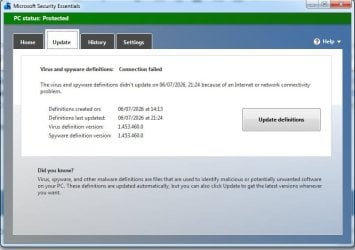
Microsoft security essentials works well

mse-06-07-26.jpg
 

My Computers My Computers

  • At a glance

    7 X64i5 84002x8gb 3200mhz
    Computer type
    PC/Desktop
    OS
    7 X64
    CPU
    i5 8400
    Motherboard
    gigabyte b365m ds3h
    Memory
    2x8gb 3200mhz
    Hard Drives
    various
    PSU
    pure power 11 400w cm
    Case
    Coolermaster
    Cooling
    cryorig m9i
  • At a glance

    7x64g54008gb ddr4 2400
    Computer type
    PC/Desktop
    OS
    7x64
    CPU
    g5400
    Motherboard
    ga b365m ds3h
    Memory
    8gb ddr4 2400
    PSU
    xfx pro 450w

My Computer My Computer

At a glance

WINDOWS 7 64BIT ultimate8GB
Computer type
Laptop
Computer Manufacturer/Model Number
dell latitude e6430
OS
WINDOWS 7 64BIT ultimate
Memory
8GB
Hard Drives
sandisk extreme pro 480gb ssd
Antivirus
free avast
Dual boot SSD drive containing both Win 7 and Linux Mint be possible, but most Linux users suggest installing Win OS first and then the Linux system. See LinuxMint forums for particulars. Same dual boot configuration with Win 10 and Linux.

IDK if a dual boot drive with Win 7 and Win 10 will work, but possibly so. A dual boot setup with Win 7 and Win 11 may be highly problematic.

A lot of BIOS settings must be identical for dual boot of both OSs, so set things up beforehand. Not hard once one knows what settings must be configured.

Some computers will allow starting on a Win 10 SSD, then internally switching to an independent Win 7 drive internally wired to same computer--NOT a virtual Machine, but two separate and wired-in SSDs.

Some computers, such as Dell E6420 (and similar series) laptops allow quickly removing SSD within its caddy and replacing it with another SSD with its caddy. Takes more time to describe than to do. Cold start after substitution of one SSD/OS for another is required.

Note that all the abovementioned alternatives make use of "high-speed" and internally powered data paths/wiring. Use of external (usually externally powered) drive caddys/devices which do NOT directly connect to typical HDD/SSD internal data wiring will be quite slow, and possibly not useful except during a night-long data backup.
 

My Computers My Computers

  • At a glance

    Win 7 Pro x64Intel Core2 Duo16 GBNvidia
    Computer type
    PC/Desktop
    Computer Manufacturer/Model Number
    Dell
    OS
    Win 7 Pro x64
    CPU
    Intel Core2 Duo
    Memory
    16 GB
    Graphics Card(s)
    Nvidia
    Hard Drives
    single 1Tb SSD
    Antivirus
    Win Defender
    Browser
    TBD
  • Computer type
    PC/Desktop
I agree that dual-booting Windows 7 with 10 or 11 is a bad idea. I ran into serious permission errors that took days to resolve. Also, each system would do a disk check on boot, and find "errors" on the other one, and "fix" them by deleting a bunch of stuff, sometimes taking a half hour or more. Then the other system would see that it was now different, so it would do another disk check, and..so forth.

Dual booting Windows and Linux is fine. Yes, easier to install Windows first, but doable the other way if you know what you're doing.
 

My Computer My Computer

At a glance

Windows 7 x64 SP1AMD Athlon 64 X2 6000+ / 3.0 GHz6 GB
Computer type
PC/Desktop
Computer Manufacturer/Model Number
Gateway GT5656
OS
Windows 7 x64 SP1
CPU
AMD Athlon 64 X2 6000+ / 3.0 GHz
Motherboard
NVIDIA GeForce 6150 SE
Memory
6 GB
Monitor(s) Displays
Lenovo LED
Screen Resolution
1920 X 1080
Hard Drives
Windows on 500 GB spinner; Ubuntu 16 on Sandisk 250GB SSD; Bodhi5 on Samsung 250GB SSD; another old spinner for fooling around.
PSU
Original that came with computer
Keyboard
Logitech wireless
Mouse
Logitech wireless
Antivirus
Microsoft Sec Essentials
Browser
Vivaldi
i just have one laptop a dell e6430 core i5 3320m running windows 7 with paid avast antivirus and the other one i have linux mint cinnamon which seems to run good its a dell e6430 core i5 as well but i haven't bothered with dule boot as the ssd i have is only 500gb in it and well with my wife using it for things i just dont have the space on the sdd to use up same goes with my win7 one that dont have duel boot as i just run win 7 and with all my things i have the sdd is filling up fast lol . i just have the linux set up in the way it actually looks like and sounds the same as windows 7 lol when it comes to my wife and me we just like simple things that work and well these older dell e6430 core i5 they work great . tbh what the difference between the two i like the dell e6430 3320m core i5 better lol
 

My Computer My Computer

At a glance

WINDOWS 7 64BIT ultimate8GB
Computer type
Laptop
Computer Manufacturer/Model Number
dell latitude e6430
OS
WINDOWS 7 64BIT ultimate
Memory
8GB
Hard Drives
sandisk extreme pro 480gb ssd
Antivirus
free avast
Back
Top