
windows 7 add option to recovery console

ghk84

New member
Local time
11:02 AM
Messages
12
hello to everyone well done for this great forum to the admins.
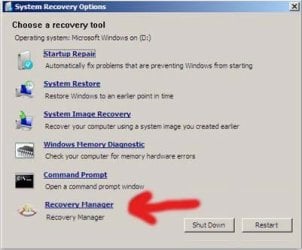
i would like to know if its posible to add options to the recovery tool like this for example
it would be very helpful to add norton ghost image for example or erd tools etc..
thanks:D
 

Attachments

  • c02073860.jpg
    c02073860.jpg
    36.8 KB · Views: 33

My Computer My Computer

At a glance

Windows 7 Ultimate x64Core i58gb ddr3 1600radeon 7850
Computer type
PC/Desktop
Computer Manufacturer/Model Number
Custom Build
OS
Windows 7 Ultimate x64
CPU
Core i5
Memory
8gb ddr3 1600
Graphics Card(s)
radeon 7850
Antivirus
Eset Nod32 v7
Browser
Chrome
I doubt that this would be possible. Where would the data to customize this be stored?
 

My Computer My Computer

At a glance

Windows 7 Pro 64 bitXeon W35208 GBNvidia Geforce 210
Computer type
PC/Desktop
Computer Manufacturer/Model Number
HP
OS
Windows 7 Pro 64 bit
CPU
Xeon W3520
Memory
8 GB
Graphics Card(s)
Nvidia Geforce 210
there must be a way, laptop companies do that all the time!
stored them to another partition the question is how they add it to the console
 

My Computer My Computer

At a glance

Windows 7 Ultimate x64Core i58gb ddr3 1600radeon 7850
Computer type
PC/Desktop
Computer Manufacturer/Model Number
Custom Build
OS
Windows 7 Ultimate x64
CPU
Core i5
Memory
8gb ddr3 1600
Graphics Card(s)
radeon 7850
Antivirus
Eset Nod32 v7
Browser
Chrome
Laptop companies often have access to the Windows source code and are thus able to make such customizations. You do not.
 

My Computer My Computer

At a glance

Windows 7 Pro 64 bitXeon W35208 GBNvidia Geforce 210
Computer type
PC/Desktop
Computer Manufacturer/Model Number
HP
OS
Windows 7 Pro 64 bit
CPU
Xeon W3520
Memory
8 GB
Graphics Card(s)
Nvidia Geforce 210
It is achievable. I came across an article on MSDN resource page that detailed the step needed to accomplish it.
 

My Computer My Computer

At a glance

Windows 7 x86
Computer type
PC/Desktop
Computer Manufacturer/Model Number
Custom Build
OS
Windows 7 x86
It is achievable. I came across an article on MSDN resource page that detailed the step needed to accomplish it.

do you have the link?
 

My Computer My Computer

At a glance

Windows 7 Ultimate x64Core i58gb ddr3 1600radeon 7850
Computer type
PC/Desktop
Computer Manufacturer/Model Number
Custom Build
OS
Windows 7 Ultimate x64
CPU
Core i5
Memory
8gb ddr3 1600
Graphics Card(s)
radeon 7850
Antivirus
Eset Nod32 v7
Browser
Chrome
still no solution guys? anyone?
 

My Computer My Computer

At a glance

Windows 7 Ultimate x64Core i58gb ddr3 1600radeon 7850
Computer type
PC/Desktop
Computer Manufacturer/Model Number
Custom Build
OS
Windows 7 Ultimate x64
CPU
Core i5
Memory
8gb ddr3 1600
Graphics Card(s)
radeon 7850
Antivirus
Eset Nod32 v7
Browser
Chrome
As far as the ones I've worked on the OEMs have included a special program for their recovery/Factory Restore process. Sometimes they have written their own program or have cooperated with others such as Nero and Roxio for doing it for them, especially for making the restore DVDs or USB Thumb/Flash drive.
 

My Computer My Computer

At a glance

Windows 7 Ultimate 64-bit, Windows 8.1 64-bit...
Computer type
PC/Desktop
Computer Manufacturer/Model Number
Customs, Dell, Gateway, HP, Toshiba, Acer, ASUS
OS
Windows 7 Ultimate 64-bit, Windows 8.1 64-bit, Mac OS X 10.10, Linux Mint 17, Windows 10 Pro TP
Keyboard
Microsoft
Mouse
Microsoft
Back
Top