
Windows 7 aero not working

Priunord

New member
Local time
1:01 PM
Messages
7
Hey, ive got an issue with my copy of windows and aero not working, the task bar is grey and I cant get it to start working again, ive looked around but found no solution, any ideas? Im including a picture

y18k0.png
 

My Computer My Computer

Computer Manufacturer/Model Number
Asus
OS
Windows 7 Home premium 64 bit
CPU
Intel i7 920 @2.67GHz
Motherboard
GC5290
Memory
9216MB DDR3
Graphics Card(s)
NVIDIA GeForce GTX 260
Sound Card
Inbuilt
Monitor(s) Displays
SMP2270HD
Screen Resolution
1920x1080
Hard Drives
1x372GB
1x548GB
Internet Speed
50MB
Hey, ive got an issue with my copy of windows and aero not working, the task bar is grey and I cant get it to start working again, ive looked around but found no solution, any ideas? Im including a picture

y18k0.png

1. Right Click on the desktop
2. Click Personalize
3. There should be a list of themes, scroll down to "Aero Themes"
4. Click on any of the themes listed in this area to enable one
5. Aero should be enabled now, if your PC's video card can handle the effects.
 

My Computer My Computer

Computer Manufacturer/Model Number
HP (Pavilion)
OS
Windows 7 Ultimate x64
CPU
AMD Phenom Quad
Memory
6 GB
Graphics Card(s)
Zotac Nvidia GeForce 220 SE
Sound Card
Realtek HD Audio
Monitor(s) Displays
ViewSonic 22" and/or LG HDTV 25"
Hard Drives
Hard Drive 1: 450GB, Win 7 Ultimate x64 Installed

Hard Drive 2: 250GB, Win XP Pro x64 Installed
Case
Standard HP Pavilion Case
Cooling
Standard Heat Sink, stand-alone video card cooling unit
Keyboard
HP Standard Keyboard
Mouse
HP Standard Mouse
Under aero themes, all themes are greyed out and I am unable to click them
 

My Computer My Computer

Computer Manufacturer/Model Number
Asus
OS
Windows 7 Home premium 64 bit
CPU
Intel i7 920 @2.67GHz
Motherboard
GC5290
Memory
9216MB DDR3
Graphics Card(s)
NVIDIA GeForce GTX 260
Sound Card
Inbuilt
Monitor(s) Displays
SMP2270HD
Screen Resolution
1920x1080
Hard Drives
1x372GB
1x548GB
Internet Speed
50MB

My Computer My Computer

Computer Manufacturer/Model Number
HP (Pavilion)
OS
Windows 7 Ultimate x64
CPU
AMD Phenom Quad
Memory
6 GB
Graphics Card(s)
Zotac Nvidia GeForce 220 SE
Sound Card
Realtek HD Audio
Monitor(s) Displays
ViewSonic 22" and/or LG HDTV 25"
Hard Drives
Hard Drive 1: 450GB, Win 7 Ultimate x64 Installed

Hard Drive 2: 250GB, Win XP Pro x64 Installed
Case
Standard HP Pavilion Case
Cooling
Standard Heat Sink, stand-alone video card cooling unit
Keyboard
HP Standard Keyboard
Mouse
HP Standard Mouse
Please help us to help you. Can you please post your system specs under your User CP (just click the link, I've already done the grunt work of finding the right page for you)

If you don't know them, then try using Speccy to find out :)

Post back when your done :)
 

My Computer My Computer

Computer type
PC/Desktop
Computer Manufacturer/Model Number
Medion Erazer (note to self: insert model number) - with custom additions
OS
Windows 10 Pro x64
CPU
Intel Core i5 7400 @ 3.00GHz
Motherboard
OEM supllied with PC
Memory
8GB 2133Mhz DDR4 (OEM supplied)
Graphics Card(s)
Gygabyte Windforce GTX 1050Ti (Factory Overclocked)
Sound Card
Realtek
Monitor(s) Displays
Acer Al1980 + HKC
Screen Resolution
1360*768(HKC) / 1280*1024(Acer)
Hard Drives
1TB Toshiba
1TB WD Caviar Green
120GB Samsung Evo 840
PSU
OEM supplied (no power rating on case)
Case
OEM Supplied
Cooling
Stock
Keyboard
Logitech Wireless
Mouse
Logitect Wireless
Internet Speed
40Mb/s Down 10Mb/s Up
Antivirus
Defender
Browser
Firefox
You might have a look at this too. Click the Windows logo, type in "sys" and open "System".
1.Click Advanced System Settings
2.click the Setting button
3.Make sure Enable transparent glass is checked.

View attachment 148954
hope this helps.:geek:
 
Last edited:

My Computer My Computer

Computer type
PC/Desktop
Computer Manufacturer/Model Number
Home Built Desktop By DataTech
OS
Windows 7 Ultimate X64 SP1
CPU
Intel i5-2550K, Differing ~4.4-4.8GHz No built in GPU
Motherboard
ASUS P8Z68-V PRO/GEN3
Memory
16GB G.Skill Sniper 1866MHz @ 2133MHz 2x8GB
Graphics Card(s)
ASUS GTX650TIB-DC2OC-2GD5, (650TI Boost)
Sound Card
Onboard Realtek 5-1
Monitor(s) Displays
Samsung P2570HD
Screen Resolution
1920x1080
Hard Drives
Samsung 840 Pro 256GB SSD for OS, 500GB Seagate Constellation (Enterprise drive) for Data
PSU
Corsair HX650W
Case
Inwin Dragon Rider
Cooling
Hyper 212 EVO w/two Noctua fans, push-pull, @1300 RPM
Keyboard
E-Z Eyes, bright yellow keys with large characters
Mouse
steelseries SENSEI Laser Pro Gaming
Internet Speed
48-51Mbs Mbs down, 11 Mbs up Xfinity Cable
Antivirus
Norton Internet Security 2013
Browser
IE 10, Opera, Pale Moon if needed
Other Info
4 case fans, LG BluRay-RE, ASUS DVD-RW, Mr. Fusion power supply, 1.21 gigawatts.
@SevenUltimate Tried that, didnt work, also tried How to enable Windows 7 Aero theme? | Windows 7 Themes with no luck
24qob9x.jpg
edit: this is what happens when i try that method

@severedsolo Updated

@Britton30 Heres a pictured of me trying that, I dont have the option for part 3
30wvz9t.png
 

My Computer My Computer

Computer Manufacturer/Model Number
Asus
OS
Windows 7 Home premium 64 bit
CPU
Intel i7 920 @2.67GHz
Motherboard
GC5290
Memory
9216MB DDR3
Graphics Card(s)
NVIDIA GeForce GTX 260
Sound Card
Inbuilt
Monitor(s) Displays
SMP2270HD
Screen Resolution
1920x1080
Hard Drives
1x372GB
1x548GB
Internet Speed
50MB
That is odd.
1. Have you reinstalled Windows?
2. Have you updated BIOS or graphics drivers?
A. Installed any new software?
3. Has Aero worked in the past...what were you doing when you 1st noticed Aero missing?
 

My Computer My Computer

Computer type
PC/Desktop
Computer Manufacturer/Model Number
Home Built Desktop By DataTech
OS
Windows 7 Ultimate X64 SP1
CPU
Intel i5-2550K, Differing ~4.4-4.8GHz No built in GPU
Motherboard
ASUS P8Z68-V PRO/GEN3
Memory
16GB G.Skill Sniper 1866MHz @ 2133MHz 2x8GB
Graphics Card(s)
ASUS GTX650TIB-DC2OC-2GD5, (650TI Boost)
Sound Card
Onboard Realtek 5-1
Monitor(s) Displays
Samsung P2570HD
Screen Resolution
1920x1080
Hard Drives
Samsung 840 Pro 256GB SSD for OS, 500GB Seagate Constellation (Enterprise drive) for Data
PSU
Corsair HX650W
Case
Inwin Dragon Rider
Cooling
Hyper 212 EVO w/two Noctua fans, push-pull, @1300 RPM
Keyboard
E-Z Eyes, bright yellow keys with large characters
Mouse
steelseries SENSEI Laser Pro Gaming
Internet Speed
48-51Mbs Mbs down, 11 Mbs up Xfinity Cable
Antivirus
Norton Internet Security 2013
Browser
IE 10, Opera, Pale Moon if needed
Other Info
4 case fans, LG BluRay-RE, ASUS DVD-RW, Mr. Fusion power supply, 1.21 gigawatts.
Try creating a new user account. This will insure that all the default settings reset. Log into this account to determine if aero is functioning properly here.
 

My Computer My Computer

Computer Manufacturer/Model Number
custom
OS
windows 7 ultimate x64
CPU
AMD Athlon II X3 445 Rana 45nm Technology
Motherboard
BIOSTAR Group N68S3B
Memory
8gbram
Graphics Card(s)
32MB GeForce 7025 / nForce 630a (Biostar Microtech Int'l)
Screen Resolution
1280x1024
Hard Drives
488GB Seagate ST350041 3AS SCSI Disk Device (ATA)
PSU
400w ?
Keyboard
usb
Mouse
usb
Just tried creating another account, no aero there either

I havent reinstalled windows, havent updates bios or driver, I install new software frequently, but aero hasnt worked in a few months, but did work for about 8 months since i purchased the computer
 

My Computer My Computer

Computer Manufacturer/Model Number
Asus
OS
Windows 7 Home premium 64 bit
CPU
Intel i7 920 @2.67GHz
Motherboard
GC5290
Memory
9216MB DDR3
Graphics Card(s)
NVIDIA GeForce GTX 260
Sound Card
Inbuilt
Monitor(s) Displays
SMP2270HD
Screen Resolution
1920x1080
Hard Drives
1x372GB
1x548GB
Internet Speed
50MB
try this Windows Aero Glass visual effects are not working or displayed

choose run now..

you could also go to start menu and type in services and under component services open services
scroll down to themes. see that it is set to automatic if not rite click it then properties and choose automatic and apply then ok.
 

My Computer My Computer

Computer Manufacturer/Model Number
custom
OS
windows 7 ultimate x64
CPU
AMD Athlon II X3 445 Rana 45nm Technology
Motherboard
BIOSTAR Group N68S3B
Memory
8gbram
Graphics Card(s)
32MB GeForce 7025 / nForce 630a (Biostar Microtech Int'l)
Screen Resolution
1280x1024
Hard Drives
488GB Seagate ST350041 3AS SCSI Disk Device (ATA)
PSU
400w ?
Keyboard
usb
Mouse
usb
The run now solution did the troubleshoot, and told me nothing was wrong
n4cl0y.png


I opened services and it was set to manual, but I changed it, and still nothing, Ill try a restart though and see if thats needed to take effect
 

My Computer My Computer

Computer Manufacturer/Model Number
Asus
OS
Windows 7 Home premium 64 bit
CPU
Intel i7 920 @2.67GHz
Motherboard
GC5290
Memory
9216MB DDR3
Graphics Card(s)
NVIDIA GeForce GTX 260
Sound Card
Inbuilt
Monitor(s) Displays
SMP2270HD
Screen Resolution
1920x1080
Hard Drives
1x372GB
1x548GB
Internet Speed
50MB
Hi,

Try the following...

1, Click :orb: and type Troubleshoot into the search box
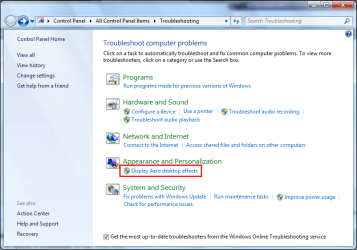
2, Click Troubleshooting
3, Click Display Aero Desktop Effects

Troubleshoot.PNG

See if it comes up with any issues regarding your desktop effects.
   Note
This is not the same as FixIt and may pick up different issues
 

My Computer My Computer

Computer Manufacturer/Model Number
Compaq Desktop
OS
Windows 7 Ultimate x64
CPU
AMD Sempron Dual Core
Memory
3GB
Graphics Card(s)
NVIDIA GeForce 6150SE nForce 430
Screen Resolution
1024x768
Hard Drives
150GB Sata
Just tried it, same thing saying couldnt identify the problem
wlspz7.png
 

My Computer My Computer

Computer Manufacturer/Model Number
Asus
OS
Windows 7 Home premium 64 bit
CPU
Intel i7 920 @2.67GHz
Motherboard
GC5290
Memory
9216MB DDR3
Graphics Card(s)
NVIDIA GeForce GTX 260
Sound Card
Inbuilt
Monitor(s) Displays
SMP2270HD
Screen Resolution
1920x1080
Hard Drives
1x372GB
1x548GB
Internet Speed
50MB
maybe you could install a new windows 7 on a partition if you have the disk , and if it does not work then you know it is hardware graphics card related maybe i dont know maybe wana the gurus on here will have an answer or idea
 

My Computer My Computer

Computer Manufacturer/Model Number
custom
OS
windows 7 ultimate x64
CPU
AMD Athlon II X3 445 Rana 45nm Technology
Motherboard
BIOSTAR Group N68S3B
Memory
8gbram
Graphics Card(s)
32MB GeForce 7025 / nForce 630a (Biostar Microtech Int'l)
Screen Resolution
1280x1024
Hard Drives
488GB Seagate ST350041 3AS SCSI Disk Device (ATA)
PSU
400w ?
Keyboard
usb
Mouse
usb
Priunord from some of your screenshots it looks to me as if that is an Aero theme your are using, but maybe not a Windows one? Are you using a 3rd party theme, like Window Blinds, for example? some of those don't play well with Win 7.
 

My Computer My Computer

Computer type
PC/Desktop
Computer Manufacturer/Model Number
Home Built Desktop By DataTech
OS
Windows 7 Ultimate X64 SP1
CPU
Intel i5-2550K, Differing ~4.4-4.8GHz No built in GPU
Motherboard
ASUS P8Z68-V PRO/GEN3
Memory
16GB G.Skill Sniper 1866MHz @ 2133MHz 2x8GB
Graphics Card(s)
ASUS GTX650TIB-DC2OC-2GD5, (650TI Boost)
Sound Card
Onboard Realtek 5-1
Monitor(s) Displays
Samsung P2570HD
Screen Resolution
1920x1080
Hard Drives
Samsung 840 Pro 256GB SSD for OS, 500GB Seagate Constellation (Enterprise drive) for Data
PSU
Corsair HX650W
Case
Inwin Dragon Rider
Cooling
Hyper 212 EVO w/two Noctua fans, push-pull, @1300 RPM
Keyboard
E-Z Eyes, bright yellow keys with large characters
Mouse
steelseries SENSEI Laser Pro Gaming
Internet Speed
48-51Mbs Mbs down, 11 Mbs up Xfinity Cable
Antivirus
Norton Internet Security 2013
Browser
IE 10, Opera, Pale Moon if needed
Other Info
4 case fans, LG BluRay-RE, ASUS DVD-RW, Mr. Fusion power supply, 1.21 gigawatts.
looks like google chrome to me
 

My Computer My Computer

Computer Manufacturer/Model Number
custom
OS
windows 7 ultimate x64
CPU
AMD Athlon II X3 445 Rana 45nm Technology
Motherboard
BIOSTAR Group N68S3B
Memory
8gbram
Graphics Card(s)
32MB GeForce 7025 / nForce 630a (Biostar Microtech Int'l)
Screen Resolution
1280x1024
Hard Drives
488GB Seagate ST350041 3AS SCSI Disk Device (ATA)
PSU
400w ?
Keyboard
usb
Mouse
usb
A very odd thing just happened, computer told me it had to update, and a shocking 25 updates later, odd being that I update my computer constantly, aero is working again. I was just using a theme that i chose in windows 7 nothing external. This was the first restart since re-enabling themes so that might have been it, otherwise nothing else has changed, not counting the numerous programmed I tried to run but didn't display any problems

Best guess is that it was changing themes to auto, instead of manual

heres a pic, thanks to everyone who helped
2j8l7c.png
 

My Computer My Computer

Computer Manufacturer/Model Number
Asus
OS
Windows 7 Home premium 64 bit
CPU
Intel i7 920 @2.67GHz
Motherboard
GC5290
Memory
9216MB DDR3
Graphics Card(s)
NVIDIA GeForce GTX 260
Sound Card
Inbuilt
Monitor(s) Displays
SMP2270HD
Screen Resolution
1920x1080
Hard Drives
1x372GB
1x548GB
Internet Speed
50MB
Hooray!!:party::busted: Glad it is working for you!!
 

My Computer My Computer

Computer type
PC/Desktop
Computer Manufacturer/Model Number
Home Built Desktop By DataTech
OS
Windows 7 Ultimate X64 SP1
CPU
Intel i5-2550K, Differing ~4.4-4.8GHz No built in GPU
Motherboard
ASUS P8Z68-V PRO/GEN3
Memory
16GB G.Skill Sniper 1866MHz @ 2133MHz 2x8GB
Graphics Card(s)
ASUS GTX650TIB-DC2OC-2GD5, (650TI Boost)
Sound Card
Onboard Realtek 5-1
Monitor(s) Displays
Samsung P2570HD
Screen Resolution
1920x1080
Hard Drives
Samsung 840 Pro 256GB SSD for OS, 500GB Seagate Constellation (Enterprise drive) for Data
PSU
Corsair HX650W
Case
Inwin Dragon Rider
Cooling
Hyper 212 EVO w/two Noctua fans, push-pull, @1300 RPM
Keyboard
E-Z Eyes, bright yellow keys with large characters
Mouse
steelseries SENSEI Laser Pro Gaming
Internet Speed
48-51Mbs Mbs down, 11 Mbs up Xfinity Cable
Antivirus
Norton Internet Security 2013
Browser
IE 10, Opera, Pale Moon if needed
Other Info
4 case fans, LG BluRay-RE, ASUS DVD-RW, Mr. Fusion power supply, 1.21 gigawatts.
Try To change Motherboard.Because some time main problem in motherboard
 

My Computer My Computer

Computer type
PC/Desktop
Computer Manufacturer/Model Number
Custom Build
OS
Windows 7 Ultimate & Enterprise x32bit
CPU
Intel ® Pentium Dual Core 3.0GHZ
Motherboard
Biostar G31M+
Memory
3.0 GB DDR2 RAM
Graphics Card(s)
Intel ® G33/G31 Express Chipset Family
Sound Card
Realtek High Definition Audio Driver
Screen Resolution
1600 × 900
Hard Drives
250GB Seagate HDD
Internet Speed
14.4 Mbps
Antivirus
Avast! Premier!
Browser
Google Chrome
Back
Top