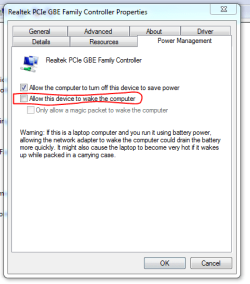
hello
my win 7 is alt tabbing every 10/15 min... the problem accours when i restart Windows then after 1/2 hours it stops...
when iam in a game it minimizes to the desktop... if iam in Windows with a Window open its like clicking with the mouse in the desktop background and then click the Window again... it happens very fast in less than a second...
the only way to make it stop is to disconnect the internet cable, but if i connect the internet cable the alt tabbing comes backup again....
ive tried this solutions none of it worked:
safe mode/
run malwarebytes
cccleaner
combofix
unistall / install antivurs (AVG ver 2015.0.5751) - run full scan / rootkit /etc...
---------------------//-----------------------------------
i cant track the problem in task manager nothing shows up in application/processes or services ... and ive been killing useless services
ive made a custom view event viewer with the option (Interactive Services detection)
but i cant track whats causing the alt tabbing.... i cant fin an option in Windows that detects this
like ive said above the only way i found to stop it is to unplug the internet cable....
anyone has a clue of how to find out whats causing the alt tabbing....
my win 7 is alt tabbing every 10/15 min... the problem accours when i restart Windows then after 1/2 hours it stops...
when iam in a game it minimizes to the desktop... if iam in Windows with a Window open its like clicking with the mouse in the desktop background and then click the Window again... it happens very fast in less than a second...
the only way to make it stop is to disconnect the internet cable, but if i connect the internet cable the alt tabbing comes backup again....
ive tried this solutions none of it worked:
safe mode/
run malwarebytes
cccleaner
combofix
unistall / install antivurs (AVG ver 2015.0.5751) - run full scan / rootkit /etc...
---------------------//-----------------------------------
i cant track the problem in task manager nothing shows up in application/processes or services ... and ive been killing useless services
ive made a custom view event viewer with the option (Interactive Services detection)
but i cant track whats causing the alt tabbing.... i cant fin an option in Windows that detects this
like ive said above the only way i found to stop it is to unplug the internet cable....
anyone has a clue of how to find out whats causing the alt tabbing....
My Computer
At a glance
windows 7 ultimate 64bits
- Computer type
- PC/Desktop
- OS
- windows 7 ultimate 64bits