Windows 7 and extra 12 GB upon install

Apotter

New member
Member
Local time
6:16 PM
Messages
32
Location
Athens, Greece
Hi folks,
Tried to search for my problem here but couldn't find anything so here I am.
I installed Windows 7 Ultimate 64bit a couple of months ago on a 64GB SSD. During the first step of the installation, Windows 7 recommended to use extra 12GB (or so) for creating an extra partition to ensure stability of the system. True, half of the SSD space was taken when installation finished successfully. Any idea why this is and do I really need it? SSDs are small and space is running out quickly.
Thanks.

Edit... while I'm at the drive space issue.. Any idea if I really need pagefile ? I have 12 GBram.. pagefile takes another extra 10 GB constantly.
 

My Computer My Computer

Computer Manufacturer/Model Number
Personally Assembled
OS
Windows 7 Ultimate x64
CPU
Intel Core I7 920
Motherboard
Evga X58 SLI LE
Memory
12 GB Corsair DDR3-1600 PC3 12800
Graphics Card(s)
eVGA GeForce GTS 250 1 GB
Sound Card
Presonus Firebox/FS
Monitor(s) Displays
LG W2753 27"
Screen Resolution
1920x1080
Hard Drives
2x A-DATA SSD 64GB
1x WD VR 150GB 10K (Internal)
2x WD RE3 750 GB (32MB cache, 7200) (Internal)
5x Various WD (External)
PSU
CoolerMaster UCP 1100W
Case
Lian Li PC-50 Aluminum Tower
Cooling
CoolerMaster V10
Keyboard
Standard MS keyboard
Mouse
Standard MS mouse
Internet Speed
24/1 Mbit ADSL2+
That partition is for repair purposes, but I don't have it. I installed everything in C:. You can delete that partition, but you will have to rely on using the installation disks for any repair needed.
 

My Computer My Computer

Computer Manufacturer/Model Number
DIY
OS
W7x64 Pro, SuSe 12.1/** W7 x64 Pro, XP MCE
CPU
Phenom II 1090T w/Noctua NH-D14 /**4400+ X2 w/CM Hyper TX 3
Motherboard
ASRock 890FX Deluxe 4/**A8N-SLI
Memory
2 x 2GB Patriot PGS34g1600LLKA/**4x1GB Corsair VS
Graphics Card(s)
EVGA GTX460 SC/**EVGA 8800GTS
Sound Card
Asus Xonar D2X/**Xonar D1
Monitor(s) Displays
Acer X233H, Dell E152FPc /**LG M237-WD
Screen Resolution
1920x1080 & 1024x768/**1980x1080
Hard Drives
WDC 2TB, 1.5TB, 1TB, 500GB,Seagate 500GB , Maxtor 80GB /**500GB Seagate & WDC 1TB Black
PSU
CM RS600 w/ APC BX1000G/**Antec 500 TP w/ APC BX1000
Case
HAF922/**Antec 1040IIB
Cooling
3x200mm, 1x140 and 1x120mm/**5x80mm fans
Keyboard
Logitech Media USB/**Saitek Eclipse
Mouse
Cordless Trackman Wheel/**Ditto
Internet Speed
3.3Mbps
Other Info
SB 560 5.1 w/ Sennheiser RS140/**Creative T20 speakers, Dvico FusionHDTV7 Gold RT, Cisco E3000, HP 5510V AIO, Linksys E3000, Belkin F5U237 hub and **F5D8055 adapter
(** = 2nd rig)
Thanks for the quick response.. I too installed Windows on C:, of course the "partition" that was created is probably hidden since it doesn't appear in Explorer.
 

My Computer My Computer

Computer Manufacturer/Model Number
Personally Assembled
OS
Windows 7 Ultimate x64
CPU
Intel Core I7 920
Motherboard
Evga X58 SLI LE
Memory
12 GB Corsair DDR3-1600 PC3 12800
Graphics Card(s)
eVGA GeForce GTS 250 1 GB
Sound Card
Presonus Firebox/FS
Monitor(s) Displays
LG W2753 27"
Screen Resolution
1920x1080
Hard Drives
2x A-DATA SSD 64GB
1x WD VR 150GB 10K (Internal)
2x WD RE3 750 GB (32MB cache, 7200) (Internal)
5x Various WD (External)
PSU
CoolerMaster UCP 1100W
Case
Lian Li PC-50 Aluminum Tower
Cooling
CoolerMaster V10
Keyboard
Standard MS keyboard
Mouse
Standard MS mouse
Internet Speed
24/1 Mbit ADSL2+
I can't be certain, because it has been a while since I had an installation that included the system partition, but I don't remember it being hidden, but then I always have it set to show hidden files and folders, etc. When in Disk Management, do you see it there?
 

My Computer My Computer

Computer Manufacturer/Model Number
DIY
OS
W7x64 Pro, SuSe 12.1/** W7 x64 Pro, XP MCE
CPU
Phenom II 1090T w/Noctua NH-D14 /**4400+ X2 w/CM Hyper TX 3
Motherboard
ASRock 890FX Deluxe 4/**A8N-SLI
Memory
2 x 2GB Patriot PGS34g1600LLKA/**4x1GB Corsair VS
Graphics Card(s)
EVGA GTX460 SC/**EVGA 8800GTS
Sound Card
Asus Xonar D2X/**Xonar D1
Monitor(s) Displays
Acer X233H, Dell E152FPc /**LG M237-WD
Screen Resolution
1920x1080 & 1024x768/**1980x1080
Hard Drives
WDC 2TB, 1.5TB, 1TB, 500GB,Seagate 500GB , Maxtor 80GB /**500GB Seagate & WDC 1TB Black
PSU
CM RS600 w/ APC BX1000G/**Antec 500 TP w/ APC BX1000
Case
HAF922/**Antec 1040IIB
Cooling
3x200mm, 1x140 and 1x120mm/**5x80mm fans
Keyboard
Logitech Media USB/**Saitek Eclipse
Mouse
Cordless Trackman Wheel/**Ditto
Internet Speed
3.3Mbps
Other Info
SB 560 5.1 w/ Sennheiser RS140/**Creative T20 speakers, Dvico FusionHDTV7 Gold RT, Cisco E3000, HP 5510V AIO, Linksys E3000, Belkin F5U237 hub and **F5D8055 adapter
(** = 2nd rig)

My Computer My Computer

Computer Manufacturer/Model Number
DIY
OS
W7x64 Pro, SuSe 12.1/** W7 x64 Pro, XP MCE
CPU
Phenom II 1090T w/Noctua NH-D14 /**4400+ X2 w/CM Hyper TX 3
Motherboard
ASRock 890FX Deluxe 4/**A8N-SLI
Memory
2 x 2GB Patriot PGS34g1600LLKA/**4x1GB Corsair VS
Graphics Card(s)
EVGA GTX460 SC/**EVGA 8800GTS
Sound Card
Asus Xonar D2X/**Xonar D1
Monitor(s) Displays
Acer X233H, Dell E152FPc /**LG M237-WD
Screen Resolution
1920x1080 & 1024x768/**1980x1080
Hard Drives
WDC 2TB, 1.5TB, 1TB, 500GB,Seagate 500GB , Maxtor 80GB /**500GB Seagate & WDC 1TB Black
PSU
CM RS600 w/ APC BX1000G/**Antec 500 TP w/ APC BX1000
Case
HAF922/**Antec 1040IIB
Cooling
3x200mm, 1x140 and 1x120mm/**5x80mm fans
Keyboard
Logitech Media USB/**Saitek Eclipse
Mouse
Cordless Trackman Wheel/**Ditto
Internet Speed
3.3Mbps
Other Info
SB 560 5.1 w/ Sennheiser RS140/**Creative T20 speakers, Dvico FusionHDTV7 Gold RT, Cisco E3000, HP 5510V AIO, Linksys E3000, Belkin F5U237 hub and **F5D8055 adapter
(** = 2nd rig)
No, I've already checked DM and the only thing that appears there and not in Explorer is the 100 MB system reserved partition. Something's telling me that these extra GB are actually taken by a hidden image file of some kind, which wouldn't be very wise if the whole FS of the drive collapses and the only solution is to re-format. Anyways. I'll probably just be very careful with updating windows with large files and continue installing every other software on a standard HDD.

About the 100MB partition removal - No need really. 100MB won't help much.. Perhaps I could just either disable the page file or decrease it's size manually if possible as it was on XP. Thanks for the support!
 

My Computer My Computer

Computer Manufacturer/Model Number
Personally Assembled
OS
Windows 7 Ultimate x64
CPU
Intel Core I7 920
Motherboard
Evga X58 SLI LE
Memory
12 GB Corsair DDR3-1600 PC3 12800
Graphics Card(s)
eVGA GeForce GTS 250 1 GB
Sound Card
Presonus Firebox/FS
Monitor(s) Displays
LG W2753 27"
Screen Resolution
1920x1080
Hard Drives
2x A-DATA SSD 64GB
1x WD VR 150GB 10K (Internal)
2x WD RE3 750 GB (32MB cache, 7200) (Internal)
5x Various WD (External)
PSU
CoolerMaster UCP 1100W
Case
Lian Li PC-50 Aluminum Tower
Cooling
CoolerMaster V10
Keyboard
Standard MS keyboard
Mouse
Standard MS mouse
Internet Speed
24/1 Mbit ADSL2+
During the first step of the installation, Windows 7 recommended to use extra 12GB (or so) for creating an extra partition to ensure stability of the system.
The extra partition that Windows wants to create for stability purposes should have been for 100MB....not 12GB.

True, half of the SSD space was taken when installation finished successfully. Any idea why this is and do I really need it? SSDs are small and space is running out quickly.
Ok, if this is a desktop computer....do you have a standard mechanical hard drive in the system in addition to your SSD? If so, you could put the page file onto this second drive rather than the SSD.

Also, if this is a desktop, you may not want to use the hibernate feature which creates another file which is equal to the amount of RAM that you have on the system. You can disable hibernation from an elevated command prompt with powercfg -H off

Finally, check your system restore settings and lower the amount of disk space that system restore is consuming on your C drive. Right click Computer, Properties, System Protection, highlight C, click on Configure and you can see how much space is being used and how much space it could use at a maximum.


Generally speaking, with 12GB of RAM...a pagefile isn't likely to be necessary. It's possible though to stumble upon an application from time to time which is required to see a pagefile on the system. If this is the case, you might get an error saying that you don't have any virtual memory configured. But like I said above, if you have another hard drive which can be used for storing of the pagefile...you might want to just move it and leave it in place just to be safe.
 

My Computer My Computer

Computer Manufacturer/Model Number
Self-Built in July 2009
OS
Windows 7 Ultimate x64
CPU
Intel Q9550 2.83Ghz OC'd to 3.40Ghz
Motherboard
Gigabyte GA-EP45-UD3R rev. 1.1, F12 BIOS
Memory
8GB G.Skill PI DDR2-800, 4-4-4-12 timings
Graphics Card(s)
EVGA 1280MB Nvidia GeForce GTX570
Sound Card
Realtek ALC899A 8 channel onboard audio
Monitor(s) Displays
23" Acer x233H
Screen Resolution
1920x1080
Hard Drives
Intel X25-M 80GB Gen 2 SSD
Western Digital 1TB Caviar Black, 32MB cache. WD1001FALS
PSU
Corsair 620HX modular
Case
Antec P182
Cooling
stock
Keyboard
ABS M1 Mechanical
Mouse
Logitech G9 Laser Mouse
Internet Speed
15/2 cable modem
Other Info
Windows and Linux enthusiast. Logitech G35 Headset.
  • Like
Reactions: Dom
Somehow, it didn't click when you said 12GB. The system partitition that I was talking about is usually only 100-200MBs. As I said before, look in Disk Management to see what it shows for partitions, also check the freespace to see if the visible partition space and freespace add up to the size of your SSD. If so, there wouldn't be any place left for another partition.
 

My Computer My Computer

Computer Manufacturer/Model Number
DIY
OS
W7x64 Pro, SuSe 12.1/** W7 x64 Pro, XP MCE
CPU
Phenom II 1090T w/Noctua NH-D14 /**4400+ X2 w/CM Hyper TX 3
Motherboard
ASRock 890FX Deluxe 4/**A8N-SLI
Memory
2 x 2GB Patriot PGS34g1600LLKA/**4x1GB Corsair VS
Graphics Card(s)
EVGA GTX460 SC/**EVGA 8800GTS
Sound Card
Asus Xonar D2X/**Xonar D1
Monitor(s) Displays
Acer X233H, Dell E152FPc /**LG M237-WD
Screen Resolution
1920x1080 & 1024x768/**1980x1080
Hard Drives
WDC 2TB, 1.5TB, 1TB, 500GB,Seagate 500GB , Maxtor 80GB /**500GB Seagate & WDC 1TB Black
PSU
CM RS600 w/ APC BX1000G/**Antec 500 TP w/ APC BX1000
Case
HAF922/**Antec 1040IIB
Cooling
3x200mm, 1x140 and 1x120mm/**5x80mm fans
Keyboard
Logitech Media USB/**Saitek Eclipse
Mouse
Cordless Trackman Wheel/**Ditto
Internet Speed
3.3Mbps
Other Info
SB 560 5.1 w/ Sennheiser RS140/**Creative T20 speakers, Dvico FusionHDTV7 Gold RT, Cisco E3000, HP 5510V AIO, Linksys E3000, Belkin F5U237 hub and **F5D8055 adapter
(** = 2nd rig)
@pparks1

I was thinking to go to the System Restore earlier and see what's going on there but now I remembered I set this to 1% of C: right after installation. On the other hand, Hibernation turn-off released 9 GB right away and the pagefile was set to "system-managed" and yet it was ~12 GB. I set this to 800-1024.. This will take effect afte restart of course, but still there are like 10 GB missing. I'll do a thorough search of large system files after the restart.

@seekermeister

I'm quite certain it said GBs because I remember being shocked :)
I have nothing big installed on the SSD rather than a few small 1-10 MB programs I use frequently and about a total of 1 or so GB of Windows Update files... I have no large temp files, nor files in Documents/Downloads but still let's say all that is another gig.
I have ~19GB of free space now, 10 more after restart, windows/program files is 16 or 20 GB = 49... 10 gigs still gone, although I'm sure it's more than 10.

Anyway, let me now restart.
Thank you guys.
 

My Computer My Computer

Computer Manufacturer/Model Number
Personally Assembled
OS
Windows 7 Ultimate x64
CPU
Intel Core I7 920
Motherboard
Evga X58 SLI LE
Memory
12 GB Corsair DDR3-1600 PC3 12800
Graphics Card(s)
eVGA GeForce GTS 250 1 GB
Sound Card
Presonus Firebox/FS
Monitor(s) Displays
LG W2753 27"
Screen Resolution
1920x1080
Hard Drives
2x A-DATA SSD 64GB
1x WD VR 150GB 10K (Internal)
2x WD RE3 750 GB (32MB cache, 7200) (Internal)
5x Various WD (External)
PSU
CoolerMaster UCP 1100W
Case
Lian Li PC-50 Aluminum Tower
Cooling
CoolerMaster V10
Keyboard
Standard MS keyboard
Mouse
Standard MS mouse
Internet Speed
24/1 Mbit ADSL2+
I run an 80GB SSD. I turned off hibernation, put my pagefile on another drive. I also redirected by browser caches to the standard drive.

With Windows 7 64-bit installed, plus the apps that I use and Wolfenstein and Crysis being used, I'm consuming about 25-30GB of space total. I have around 45-50GB free on my drive, which Windows reports as 74GB. And I have the 100MB system reserved partition as well.

Generally speaking, Windows will set the page file to be equal to the amount of RAM in your box. Thus, 12GB would be about right if it's system managed.

Run a tool like WinDirStat or TreeSize free...which will show you which folder are consuming the space. And don't be concerned about C:\windows\winsxs...it's not really as big as these tools report it to be. I have demonstrated this point in this thread;
http://www.sevenforums.com/general-...folder-not-actually-consuming-lots-space.html
 

My Computer My Computer

Computer Manufacturer/Model Number
Self-Built in July 2009
OS
Windows 7 Ultimate x64
CPU
Intel Q9550 2.83Ghz OC'd to 3.40Ghz
Motherboard
Gigabyte GA-EP45-UD3R rev. 1.1, F12 BIOS
Memory
8GB G.Skill PI DDR2-800, 4-4-4-12 timings
Graphics Card(s)
EVGA 1280MB Nvidia GeForce GTX570
Sound Card
Realtek ALC899A 8 channel onboard audio
Monitor(s) Displays
23" Acer x233H
Screen Resolution
1920x1080
Hard Drives
Intel X25-M 80GB Gen 2 SSD
Western Digital 1TB Caviar Black, 32MB cache. WD1001FALS
PSU
Corsair 620HX modular
Case
Antec P182
Cooling
stock
Keyboard
ABS M1 Mechanical
Mouse
Logitech G9 Laser Mouse
Internet Speed
15/2 cable modem
Other Info
Windows and Linux enthusiast. Logitech G35 Headset.
I just noticed that Windows folder is almost 30 GB (1/3 being used by winsxs.. wasnt that dlls cache?) .. and a couple of TeamViewer log files each ~2 GB.. this is odd. Now this may explain my missing space but also makes the windows installation message I got meaningless... unless all windows files have copies in case one goes bad.

Well, thanks guys, I don't think there is much to be done about Win7 taking so much space. I'll be perfectly safe in the future with the near 20 GBs we just freed.
 

My Computer My Computer

Computer Manufacturer/Model Number
Personally Assembled
OS
Windows 7 Ultimate x64
CPU
Intel Core I7 920
Motherboard
Evga X58 SLI LE
Memory
12 GB Corsair DDR3-1600 PC3 12800
Graphics Card(s)
eVGA GeForce GTS 250 1 GB
Sound Card
Presonus Firebox/FS
Monitor(s) Displays
LG W2753 27"
Screen Resolution
1920x1080
Hard Drives
2x A-DATA SSD 64GB
1x WD VR 150GB 10K (Internal)
2x WD RE3 750 GB (32MB cache, 7200) (Internal)
5x Various WD (External)
PSU
CoolerMaster UCP 1100W
Case
Lian Li PC-50 Aluminum Tower
Cooling
CoolerMaster V10
Keyboard
Standard MS keyboard
Mouse
Standard MS mouse
Internet Speed
24/1 Mbit ADSL2+
A 30GB Windows folder is pretty darn big. On my work laptop (32-bit enterprise 7), I'm using 9.67GB according to Windows Explorer. On my work desktop (64-bit ultimate 7), I'm using 11.9GB.

As stated before, the WinSXS folder is VERY misleading;
http://www.sevenforums.com/general-...folder-not-actually-consuming-lots-space.html

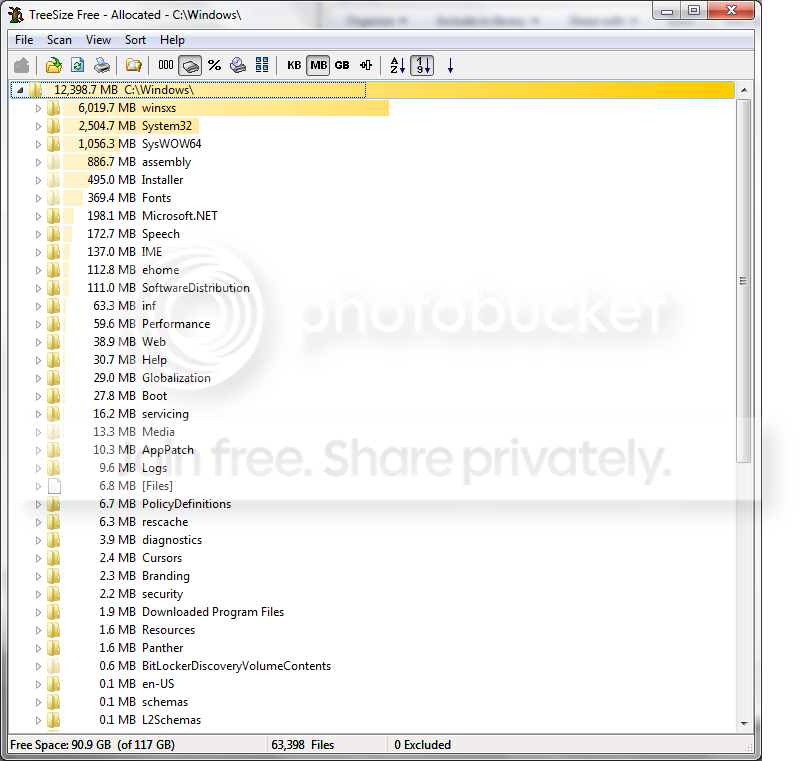
Run something like TreeSpaceFree and see where your space is going in C:\windows.

Here is mine from my 64-bit system for reference;
WindowsFolderSpaceUsed.png
 

My Computer My Computer

Computer Manufacturer/Model Number
Self-Built in July 2009
OS
Windows 7 Ultimate x64
CPU
Intel Q9550 2.83Ghz OC'd to 3.40Ghz
Motherboard
Gigabyte GA-EP45-UD3R rev. 1.1, F12 BIOS
Memory
8GB G.Skill PI DDR2-800, 4-4-4-12 timings
Graphics Card(s)
EVGA 1280MB Nvidia GeForce GTX570
Sound Card
Realtek ALC899A 8 channel onboard audio
Monitor(s) Displays
23" Acer x233H
Screen Resolution
1920x1080
Hard Drives
Intel X25-M 80GB Gen 2 SSD
Western Digital 1TB Caviar Black, 32MB cache. WD1001FALS
PSU
Corsair 620HX modular
Case
Antec P182
Cooling
stock
Keyboard
ABS M1 Mechanical
Mouse
Logitech G9 Laser Mouse
Internet Speed
15/2 cable modem
Other Info
Windows and Linux enthusiast. Logitech G35 Headset.
In Explorer Winsxs is reported 0 bytes and 0 files, although i see files in it. I checked drice C with a small tool i dug off the net (Primitive File Size Chart) and Winsxs is reported 8.97 GB there. About the total Windows folder size... well, I was mistaken.. it's actually 24.52 GB - I was looking at the wrong row. Still this is quite more than what's supposed to be..
 

My Computer My Computer

Computer Manufacturer/Model Number
Personally Assembled
OS
Windows 7 Ultimate x64
CPU
Intel Core I7 920
Motherboard
Evga X58 SLI LE
Memory
12 GB Corsair DDR3-1600 PC3 12800
Graphics Card(s)
eVGA GeForce GTS 250 1 GB
Sound Card
Presonus Firebox/FS
Monitor(s) Displays
LG W2753 27"
Screen Resolution
1920x1080
Hard Drives
2x A-DATA SSD 64GB
1x WD VR 150GB 10K (Internal)
2x WD RE3 750 GB (32MB cache, 7200) (Internal)
5x Various WD (External)
PSU
CoolerMaster UCP 1100W
Case
Lian Li PC-50 Aluminum Tower
Cooling
CoolerMaster V10
Keyboard
Standard MS keyboard
Mouse
Standard MS mouse
Internet Speed
24/1 Mbit ADSL2+
In Explorer Winsxs is reported 0 bytes and 0 files, although i see files in it. I checked drice C with a small tool i dug off the net (Primitive File Size Chart) and Winsxs is reported 8.97 GB there. About the total Windows folder size... well, I was mistaken.. it's actually 24.52 GB - I was looking at the wrong row. Still this is quite more than what's supposed to be..

Please download TreeSizeFree from the web and tell it to scan C:\windows and post your results. We should be able to flush this out.

http://www.jam-software.com/freeware/index.shtml
 

My Computer My Computer

Computer Manufacturer/Model Number
Self-Built in July 2009
OS
Windows 7 Ultimate x64
CPU
Intel Q9550 2.83Ghz OC'd to 3.40Ghz
Motherboard
Gigabyte GA-EP45-UD3R rev. 1.1, F12 BIOS
Memory
8GB G.Skill PI DDR2-800, 4-4-4-12 timings
Graphics Card(s)
EVGA 1280MB Nvidia GeForce GTX570
Sound Card
Realtek ALC899A 8 channel onboard audio
Monitor(s) Displays
23" Acer x233H
Screen Resolution
1920x1080
Hard Drives
Intel X25-M 80GB Gen 2 SSD
Western Digital 1TB Caviar Black, 32MB cache. WD1001FALS
PSU
Corsair 620HX modular
Case
Antec P182
Cooling
stock
Keyboard
ABS M1 Mechanical
Mouse
Logitech G9 Laser Mouse
Internet Speed
15/2 cable modem
Other Info
Windows and Linux enthusiast. Logitech G35 Headset.
Back
Top