Windows 7 and windows 2003

ohsocute69

New member
Member
Local time
2:13 PM
Messages
69
i have currently got windows 7 32bit . pleanty of room im wanting to run windows 2003.

(dual boot) how do i got about this ...
i tried to install windows 2003 which i did but then i lost windows 7

so i had to reisnstall windows 7 again so now i dont have 2003..

im lost about partioning the pc .......how do i do this to perform a dual boot
 

My Computer

OS
32
Do you have 2 HDDs by any chance? That would make things a lot easier.
 

My Computer

Computer Manufacturer/Model Number
HP, Dell, Gateway, Toshiba - 4 laptops and 2 desktops
OS
Vista, Windows7, Mint Mate, Zorin, Windows 8
CPU
from 1.6GHz Duo to i7
Monitor(s) Displays
2x HP w2207
Hard Drives
5x HDD, 7x SSD, 12x Externals
Keyboard
with trackball - no mices
Mouse
Trackball mice
Internet Speed
DSL 6000
no sorry i dont , i thought i could just do it by loading the cd and partioning ...
my mian idea would be to drop say windows 2003 down then open up windows 7:sarc:
 

My Computer

OS
32

My Computer

Computer Manufacturer/Model Number
HP, Dell, Gateway, Toshiba - 4 laptops and 2 desktops
OS
Vista, Windows7, Mint Mate, Zorin, Windows 8
CPU
from 1.6GHz Duo to i7
Monitor(s) Displays
2x HP w2207
Hard Drives
5x HDD, 7x SSD, 12x Externals
Keyboard
with trackball - no mices
Mouse
Trackball mice
Internet Speed
DSL 6000
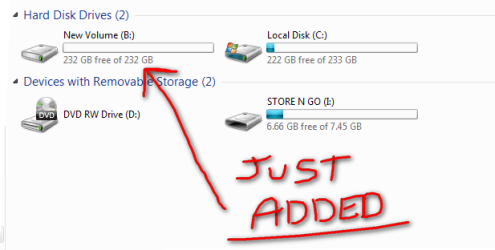
oh here is what i have done ... now ......

as i have windows 2003 cd now what do i do ?? .......

obviously turn the machine off then load the windows 2003 disc but evertime i do it
i cant load back windows 7 .....

how do i choose this drive in set up instalation on the win 2003:( thanks mandy
 

Attachments

  • 2010-12-13_202956.png
    2010-12-13_202956.png
    19.5 KB · Views: 4

My Computer

OS
32

My Computers

System One System Two

  • Computer type
    PC/Desktop
    Computer Manufacturer/Model Number
    PowerSpec G164
    OS
    WIN10
    CPU
    AMD Ryzen 5 3600 6-Core Processor 3.59 GHz
    Memory
    16.0 GB
    Internet Speed
    VERY FAST>>>!!!
  • Antivirus
    ESET Security Premium
Your Win2003 clobbert the Win7 MBR because you were not following the guidance. Now you have to fix the MBR http://www.sevenforums.com/tutorials/20864-mbr-restore-windows-7-master-boot-record.html

Then I would clean the new disk, physically disconnect the Win7 disk and install Win2003 on the new disk. Replug the Win7 disk and change the boot sequence in the BIOS.

With that method both systems do not get into each others hair and you have 2 neatly seperated systems.
 

My Computer

Computer Manufacturer/Model Number
HP, Dell, Gateway, Toshiba - 4 laptops and 2 desktops
OS
Vista, Windows7, Mint Mate, Zorin, Windows 8
CPU
from 1.6GHz Duo to i7
Monitor(s) Displays
2x HP w2207
Hard Drives
5x HDD, 7x SSD, 12x Externals
Keyboard
with trackball - no mices
Mouse
Trackball mice
Internet Speed
DSL 6000
Back
Top