Windows 7 ATI fullscreen problem

jedislayer5000

New member
Local time
7:01 AM
Messages
4
Location
Victoria, BC Canada
i have researched this for hours and have not come up with any good results, i have an ati mobility radeon hd5650 graphics card with windows 7 and when i play some pc games two of them being star wars kotor 1 and 2 i get these black bars on the sides of the screen which didnt happen with windows vista.. ive tried going into the ccc control panel and changing the displays to "fullscreen" and ive changed my laptops native resolution (which is 1920 x 1080) and so far no success whatsoever... also i changed the resolution of the game from the game and 1280 x 1024 is the largest which has a little window inside my screen with the game in it, btw im playing on an acer aspire 8942g with 18.4" screen. any help would be greatly appreciated :)
 

My Computer

Computer Manufacturer/Model Number
Acer Aspire AS8942G
OS
windows 7
CPU
Intel Core i3 M 330 @ 2.13 GHz
Motherboard
Acer Aspire 8942G
Memory
4.00 GB (3.86 GB usable)
Graphics Card(s)
ATI Mobility Radeon HD5650
Sound Card
ATI Radeon HDMI
Monitor(s) Displays
Mobile PC Display 18.4" 1920 x 1080
Hard Drives
450 GB
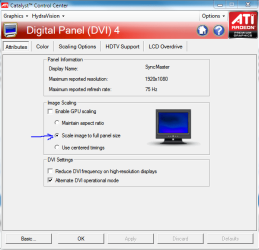
Open CCC > Click GRAPHICS tab at top left > Select DESKTOPS & DISPLAYS > Right click the monitor at the bottom right and select configure > Select SCALE IMAGE TO FULL PANEL SIZE
 

Attachments

  • gpuscale.PNG
    gpuscale.PNG
    24.6 KB · Views: 533

My Computer

Computer Manufacturer/Model Number
Rig 1
OS
Windows 7 Ultimate x64
CPU
AMD Phenom II X4 940 Black Edition @ 3.4GHz (AM2+)
Motherboard
Gigabyte GA-MA790X-UD4P (AM2+)
Memory
Corsair CM2X4096-8500C5 (4 X 2GB)
Graphics Card(s)
XFX Radeon HD 5770 / Diamond Radeon HD 5770 CrossFireX
Sound Card
Asus Xonar DS (PCI)
Monitor(s) Displays
Samsung SyncMaster 932bw+ (3)
Screen Resolution
4320x900
Hard Drives
OCZ Vertex 2 80 GB - Windows 7 System --
WD Caviar Black 1TB - Music, Movies, Vids, Pics --
WD Caviar Black 640GB - User Profiles & Games --
WD My Book 320GB external
PSU
Corsair CMPSU-750TX
Case
Cooler Master HAF 932
Cooling
Corsair Hydro Series H50
Keyboard
Logitech Desktop Wave
Mouse
Logitech LX8 Laser
Internet Speed
20 down / 2 up
Other Info
LG GGC-H20L Blu-Ray / HDDVD combo --
Hauppauge HVR-1250 --
Silverstone MFP-51 --
Logitech Webcam C600

My Computer

Computer type
PC/Desktop
Computer Manufacturer/Model Number
Custom built by me.
OS
Windows 10 Pro
CPU
Intel Core i7-4770K (3.5Ghz)
Motherboard
Gigabyte G1 Sniper 5 (F10 Bios)
Memory
32 gig Corsair Dominator Platinum (4x8Gig)
Graphics Card(s)
Sapphire Tri-X R9 Fury
Sound Card
Soundblaster ZXR
Monitor(s) Displays
NEC PA242W 24" LCD Monitor
Screen Resolution
1920 x 1200
Hard Drives
Primary - Samsung 850 Pro (512gig), Samsung 840 Pro (256gig), 2TB WD Caviar Black.
PSU
EVGA Supernova 1000 G2
Case
Cooler Master HAF X
Cooling
Corsair H100i with Corsair Air Series SP120 Quiet Fans
Keyboard
Logitech Wireless Wave
Mouse
Logitech Performance MX
Internet Speed
High Speed Cable
Antivirus
Norton Security
Browser
IE11
Other Info
Memory Timings - 1866MHz @ 9-9-9-27-1T @ 1.5 volts
thanks for the responses, i have already set it to fullscreen in ccc (pic) and the games that im trying to get fullscreen dont have any advanced graphics options like left 4 dead etc they just have 800 x 600, 1024 x 728, 1200 x 1024 resolutions all of which are a box in the middle of the screen and not being stretched
jjj.png
 

My Computer

Computer Manufacturer/Model Number
Acer Aspire AS8942G
OS
windows 7
CPU
Intel Core i3 M 330 @ 2.13 GHz
Motherboard
Acer Aspire 8942G
Memory
4.00 GB (3.86 GB usable)
Graphics Card(s)
ATI Mobility Radeon HD5650
Sound Card
ATI Radeon HDMI
Monitor(s) Displays
Mobile PC Display 18.4" 1920 x 1080
Hard Drives
450 GB
bump. anyone have any answers?
 

My Computer

Computer Manufacturer/Model Number
Acer Aspire AS8942G
OS
windows 7
CPU
Intel Core i3 M 330 @ 2.13 GHz
Motherboard
Acer Aspire 8942G
Memory
4.00 GB (3.86 GB usable)
Graphics Card(s)
ATI Mobility Radeon HD5650
Sound Card
ATI Radeon HDMI
Monitor(s) Displays
Mobile PC Display 18.4" 1920 x 1080
Hard Drives
450 GB
Try updating your graphics card for better graphics n responce
 

My Computer

Computer Manufacturer/Model Number
P4i6G
OS
Microsoft windows 7 ultimate 32 bit
CPU
Intel pentium 4 4ghz
Motherboard
Intel
Memory
1gb ram
Graphics Card(s)
NVIDIA GeForce 7600 GS
Sound Card
Creative sound blaster live
Monitor(s) Displays
Samsung SyncMaster 923NW
Hard Drives
40 gb western digital
160 gb western digital
PSU
ANTEC SIGNATURE 400W
Case
Antec blue server / gamers
Cooling
Fan cooling
Other Info
very stable pc XD
they just have 800 x 600, 1024 x 728, 1200 x 1024 resolutions all of which are a box in the middle of the screen and not being stretched

Are you trying to run the game at 1920 x1080?

If you are, that's not going to work since the resolutions you posted are the only resolutions the game supports. Since your screen resolution (1920 x1080) is greater than the games highest resolution, the game will be "boxed".

You could try lowering your screen's resolution to match the game. Or... you could try and hack to games .ini file to include higher resolutions, but that will require a bit of research on your part.

Good luck.

What game is it by the way???
 

My Computer

Computer type
PC/Desktop
Computer Manufacturer/Model Number
Custom built by me.
OS
Windows 10 Pro
CPU
Intel Core i7-4770K (3.5Ghz)
Motherboard
Gigabyte G1 Sniper 5 (F10 Bios)
Memory
32 gig Corsair Dominator Platinum (4x8Gig)
Graphics Card(s)
Sapphire Tri-X R9 Fury
Sound Card
Soundblaster ZXR
Monitor(s) Displays
NEC PA242W 24" LCD Monitor
Screen Resolution
1920 x 1200
Hard Drives
Primary - Samsung 850 Pro (512gig), Samsung 840 Pro (256gig), 2TB WD Caviar Black.
PSU
EVGA Supernova 1000 G2
Case
Cooler Master HAF X
Cooling
Corsair H100i with Corsair Air Series SP120 Quiet Fans
Keyboard
Logitech Wireless Wave
Mouse
Logitech Performance MX
Internet Speed
High Speed Cable
Antivirus
Norton Security
Browser
IE11
Other Info
Memory Timings - 1866MHz @ 9-9-9-27-1T @ 1.5 volts
they just have 800 x 600, 1024 x 728, 1200 x 1024 resolutions all of which are a box in the middle of the screen and not being stretched

Are you trying to run the game at 1920 x1080?

If you are, that's not going to work since the resolutions you posted are the only resolutions the game supports. Since your screen resolution (1920 x1080) is greater than the games highest resolution, the game will be "boxed".

You could try lowering your screen's resolution to match the game. Or... you could try and hack to games .ini file to include higher resolutions, but that will require a bit of research on your part.

Good luck.

What game is it by the way???

the game is star wars kotor 1 and 2 and my laptop could somewhow magically with no tweaking whatsoever run it in full screen and it looked good. all my gfx everything is upgraded
 

My Computer

Computer Manufacturer/Model Number
Acer Aspire AS8942G
OS
windows 7
CPU
Intel Core i3 M 330 @ 2.13 GHz
Motherboard
Acer Aspire 8942G
Memory
4.00 GB (3.86 GB usable)
Graphics Card(s)
ATI Mobility Radeon HD5650
Sound Card
ATI Radeon HDMI
Monitor(s) Displays
Mobile PC Display 18.4" 1920 x 1080
Hard Drives
450 GB
Back
Top