
Windows 7 Auto-update (controlling it)

johntkucz

New member
Member
VIP
Local time
7:06 AM
Messages
126
Hey mates,

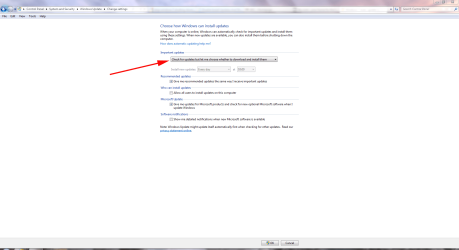
This is a very "beginner"question. I'm somewhat familiar with windows (not as much as I thought or wanted to be) , but basically the problem is this. Windows shuts down on a regular basis in the middle of work, quitting every program, reboots, and isntalls updates. I am pretty sure this is related ot the "action center" and whatnot, but how do I control that so that it
asks if it wants to restart (in the past, it asked to postpone 10 min, 4 hours etc) now it doesnt' seem to be doing that.
where I set how frequently it does that.

Thanks.
 

My Computer

Computer Manufacturer/Model Number
self-built
OS
windows 7 pro
CPU
6100 3.3ghz zambezi amd
Motherboard
asus m5a97
Memory
8gb_kingston_ddr3_1333_pc310600
Graphics Card(s)
gigabyte_geforce_440gt_1gb
Monitor(s) Displays
asus_vs247hp and dell_19"
Hard Drives
7200 rpm barracuda seagate 2tb
PSU
antec_500w_green
Case
rosewill_future_gaming_case
Keyboard
i-rocks scissor-switch white keyboard
Mouse
mouse for life kengsington
Internet Speed
~400kb/s down DSL
Other Info
I'm VERY interested in building my own rig flatscreens and running ubuntu and windows home premium or prof. I've tripled-booted (mac os rubbish, ubuntu great!, and windows solid). Designing hardware rig: this forum might be a good resource!

Some of these parts are to a rig that is in the process of being built!
My Computer

Computer Manufacturer/Model Number
HP Pavilion Elite 495UK
OS
Windows 7 Ultimate SP1 64-Bit
CPU
Intel Core i7 870 @ 2.93GHz
Motherboard
MSI 2A9C (CPU1)
Memory
8Gb Dual-Channel DDR3 @ 664MHz
Graphics Card(s)
nVidia GeForce GTX 460 1024MB dedicated RAM
Sound Card
Realtek HD Audio
Monitor(s) Displays
HP2310i
Screen Resolution
1920 x 1080
Hard Drives
1x1954GB Hitachi HDS22020ALA 330 (RAID), 1x1954GB Hitachi External for backup and storage
PSU
460W
Case
HP Elite
Cooling
Air cooled
Keyboard
Logitech K750 solar-powered keyboard
Mouse
Logitech Wireless M180 mouse
Internet Speed
2Mb
Other Info
Pure Avanti Flow Internet Radio with iPod Dock, 64Gb iPod, HP USB Speakers, Sony MDR-V500 Headphones, Sony Vaio F-Series Laptop
This is just another FWIW observation. Starting in September 2007, Microsoft initated what many called a "stealth" update policy. The source in my previous post was last updated in July 2009 so presumably Microsoft is still using "stealth" updates even if you have your machine set to:

Update Services are "turned on" if you choose one of the following settings: (i) install updates automatically, (ii) download updates automatically and choose whether to install them, or (iii) receive notifications about updates and choose whether to download and install them. Windows Update service is "turned on" and set to "install updates automatically" when you choose the recommended option during Windows Out Of Box Experience (OOBE) setup.

If you turn on the Update Services, regardless of which "turned on" setting you have chosen, required updates to some components of the service will be downloaded and installed automatically without further notice to you. If you would prefer not to receive required updates, turn off the Update Services.

The problem with these stealth updates is simple. If your machine is working on something like a system image, backing up files, etc it might re-boot in the middle of the task causing you to lose whatever you were working on.

Source

See the section called "Required Updates" about half way down the page.
 

My Computer

Computer type
Laptop
Computer Manufacturer/Model Number
Sony Vaio VPCEB47GM Laptop
OS
Win 7 Pro 64-bit
CPU
Intel i5 2.4 Ghz
Memory
8GB DDR3
Graphics Card(s)
Intel HD 3000
Sound Card
IDT High Definition
Monitor(s) Displays
15.6 WGXA Anti-Glare LED
Screen Resolution
1280x800
Hard Drives
640Gb 7200rpm
Antivirus
MSE
Browser
Opera (primary) with IE9 backup
This happened to me, and the way I fixed it was with a registry hack . @seavixen, that workaround works, but he doesn't have Windows 7 Pro or higher, so he can't use gpedit.

How to fix with the registry hack:

1. Open regedit.exe (type into search box)

2. Navigate to HKEY_LOCAL_MACHINE\SOFTWARE\Policies\Microsoft\Windows\WindowsUpdate\AU

3. Create a new 32-bit DWORD value named NoAutoRebootWithLoggedOnUsers and give it a value of 1.

4. Done! Problem solved.

I can personally say it works as I have used this trick myself. Its completely safe, and if you want to reverse it, just delete the key you made.
 

My Computer

Computer Manufacturer/Model Number
HP Pavilion dv6-2020ev
OS
Ubuntu 12.10
CPU
Intel Core i7 720QM
Motherboard
Its a HP secret...
Memory
4GB RAM
Graphics Card(s)
NVIDIA GeForce 230M
Sound Card
IDT
Screen Resolution
1366x768
Hard Drives
500 GB
Mouse
HP
Internet Speed
4 Mbps
This happened to me, and the way I fixed it was with a registry hack . @seavixen, that workaround works, but he doesn't have Windows 7 Pro or higher, so he can't use gpedit.

How to fix with the registry hack:

1. Open regedit.exe (type into search box)

2. Navigate to HKEY_LOCAL_MACHINE\SOFTWARE\Policies\Microsoft\Windows\WindowsUpdate\AU

3. Create a new 32-bit DWORD value named NoAutoRebootWithLoggedOnUsers and give it a value of 1.

4. Done! Problem solved.

I can personally say it works as I have used this trick myself. Its completely safe, and if you want to reverse it, just delete the key you made.

Very nice! Gonna have to give this a try.
 

My Computer

Computer type
Laptop
Computer Manufacturer/Model Number
Sony Vaio VPCEB47GM Laptop
OS
Win 7 Pro 64-bit
CPU
Intel i5 2.4 Ghz
Memory
8GB DDR3
Graphics Card(s)
Intel HD 3000
Sound Card
IDT High Definition
Monitor(s) Displays
15.6 WGXA Anti-Glare LED
Screen Resolution
1280x800
Hard Drives
640Gb 7200rpm
Antivirus
MSE
Browser
Opera (primary) with IE9 backup
:).
 

My Computer

Computer Manufacturer/Model Number
HP Pavilion dv6-2020ev
OS
Ubuntu 12.10
CPU
Intel Core i7 720QM
Motherboard
Its a HP secret...
Memory
4GB RAM
Graphics Card(s)
NVIDIA GeForce 230M
Sound Card
IDT
Screen Resolution
1366x768
Hard Drives
500 GB
Mouse
HP
Internet Speed
4 Mbps
This happened to me, and the way I fixed it was with a registry hack . @seavixen, that workaround works, but he doesn't have Windows 7 Pro or higher, so he can't use gpedit.

How to fix with the registry hack:

1. Open regedit.exe (type into search box)

2. Navigate to HKEY_LOCAL_MACHINE\SOFTWARE\Policies\Microsoft\Windows\WindowsUpdate\AU

3. Create a new 32-bit DWORD value named NoAutoRebootWithLoggedOnUsers and give it a value of 1.

4. Done! Problem solved.

I can personally say it works as I have used this trick myself. Its completely safe, and if you want to reverse it, just delete the key you made.

Thanks for that Slasher, looks like a neat solution,
 

My Computer

Computer Manufacturer/Model Number
HP Pavilion Elite 495UK
OS
Windows 7 Ultimate SP1 64-Bit
CPU
Intel Core i7 870 @ 2.93GHz
Motherboard
MSI 2A9C (CPU1)
Memory
8Gb Dual-Channel DDR3 @ 664MHz
Graphics Card(s)
nVidia GeForce GTX 460 1024MB dedicated RAM
Sound Card
Realtek HD Audio
Monitor(s) Displays
HP2310i
Screen Resolution
1920 x 1080
Hard Drives
1x1954GB Hitachi HDS22020ALA 330 (RAID), 1x1954GB Hitachi External for backup and storage
PSU
460W
Case
HP Elite
Cooling
Air cooled
Keyboard
Logitech K750 solar-powered keyboard
Mouse
Logitech Wireless M180 mouse
Internet Speed
2Mb
Other Info
Pure Avanti Flow Internet Radio with iPod Dock, 64Gb iPod, HP USB Speakers, Sony MDR-V500 Headphones, Sony Vaio F-Series Laptop
Thanks, your welcome!
 

My Computer

Computer Manufacturer/Model Number
HP Pavilion dv6-2020ev
OS
Ubuntu 12.10
CPU
Intel Core i7 720QM
Motherboard
Its a HP secret...
Memory
4GB RAM
Graphics Card(s)
NVIDIA GeForce 230M
Sound Card
IDT
Screen Resolution
1366x768
Hard Drives
500 GB
Mouse
HP
Internet Speed
4 Mbps
Back
Top