Windows 7 background problem

Norien

New member
Local time
4:08 PM
Messages
3
Hi. First time on, so if I'm in the wrong place, sorry.

I was on an ebay page and was trying to unravel some wires on my desktop. I know I moved the mouse and/or poked a button or two. I looked up and saw my background picture, a pic of my daughter, BUT, it looked like I had done photoshop lighting and filter work on it. It was beautiful. Nice light rays coming down at an angle with a wispy aspect to them.

Issue: I just scanned this picture in, literally, ten minutes ago and made it my BG. I had done NO work at all.

I could not duplicate the process directly using the mouse or just moving it around and pressing the buttons randomly. Anybody have an idea of how this happened. The picture was BEAUTIFUL and I don't have the talent to do it in PS so would like to get it back for printing etc.

Any ideas? Yes, I know this is a weird one.

Thanks for any help.
All blessings
 

My Computer

Computer type
PC/Desktop
OS
Windows 7 64 bit Home
Hello and welcome Norien now you do have a strange thing going on there so if you had it as a background why haven't you got it now?
If for any reason the pic was changed and then changed for another then it may have been saved to pictures.
So I would start by scanning through that library first mate.
 

My Computer

Computer type
PC/Desktop
Computer Manufacturer/Model Number
Own build (new) Desk1 / Asus ROG Win 7 / Desk2 1st build
OS
Desk1 7 Home Prem / Desk2 10 Pro / Main lap Asus ROG 10 Pro 2 laptop Toshiba 7 Pro Asus P2520 7 & 10
CPU
Desk1 i5 3750K / Laptop i7 GTX 860M / Desk2 i5 2500
Motherboard
Desk1 Asus P877-V / Desk2 Gigabyte H67 UD3H / Laptop ?
Memory
Desk1 8GB (1866) / Desk2 16GB (1333) / Laptop 8Gb DDR3
Graphics Card(s)
Desk 1& 2NVidia GTX 650 & Laptops on board Intel
Sound Card
Desk 1 & 2 -XONAR DG Realtek High Def audio Laptop
Monitor(s) Displays
Desk 1 Benq HD 2450 / Desk2 Philips 24" / Laptop 17.5"
Screen Resolution
1920x1080 D1 & D2 & Laptop 1
Hard Drives
Desk1 Samsung 120GB 830 SSD
Asus ROG 256GB 850 Pro SSD
Desk2 Samsung 840 256 SSD
Toshiba 120GB EVO
PSU
Desk 1 Corsair HX 1050/ Laptop ? / Desk 2 Corsair HX 650
Case
Desk 1 Cooler HAF XM ? Toshiba laptop / Desk2 Coolermaster
Cooling
Fans on all Desk1 -2 Desk2 - all Coolermasters 5 Laptop ?
Keyboard
Desk 1 MS Sidewinder X6 Desk 2 MS Sidewinder X 4
Mouse
Desk 1&2 - Gigabyte MS 900 gamer - laptop - Logitec wireless
Internet Speed
ADSL2+
Other Info
One other Desktop (tester) and spare Toshba laptop both with SSD's
Running Kaspersky 2016 ISS on all machines config'd identically
Logitec audio stereo systems on each machine (x3)
Canon MG5250MFC
Router/modem TP-Link running WPA2SK
Ahh, I didn't work it right. Okay, my daughter comes home with her graduation picture and I scan it in and save it to desktop and made it my BG. No changes or touch ups. Later when I was on ebay and other windows open behind it and unraveling my guitar cord from it's chorus pedal cord I bumped the mouse and clicked a few times with my elbow and didn't give it a thought, until I looked up and the same background, her grad pic, was there, only there were wispy white rays diagonally down the pic as if someone had used a filter in Adobe PS on it. All this was a continued change of events. That is, I scanned, I set as BG, then started doing stuff. I didn't leave the computer so nobody was playing a joke on me etc.
Lol, I know it sound crazy. The problem was, the moment I moved the mouse, the cascade of windows (IE, notebook, Mozilla) returned. I minimized and there was the bg picture as it was supposed to be. No rays of light etc.

Crazy? Man, I can't even think how accidentally pushing and clicking resulted in something I couldn't do if I tried . . .

Just weird. Thought maybe somebody out there had, if not the answer, at least a similar experience.

Ahh,

Thank you very much for your welcome and taking time to respond!
All blessins
 
Last edited:

My Computer

Computer type
PC/Desktop
OS
Windows 7 64 bit Home
Show Desktop

I think I know what is happening.

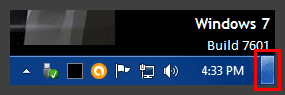
This happens happens when you move the mouse pointer to the button in the bottom right corner of the desktop.
Show Desktop.png
If you hover over the button, the open windows will "disappear" and this is indicated by slanted light and dark stripes.

I tried to take a screenshot showing the effect, but it was hard to see it on my background.
 
Last edited:

My Computer

Computer type
PC/Desktop
Computer Manufacturer/Model Number
n/a
OS
W7 Ultimate SP1, LM19.2 MATE, W10 Home 1703, W10 Pro 1703 VM, #All 64 bit
CPU
AMD Phenom II x6 1100T, 3.3 GHz
Motherboard
ASUS M4A88T-M/USB3 (AM3)
Memory
12GB DDR3 1333 G-Skill (4GB x 2), G-Skill (2GB x 2)
Graphics Card(s)
NVIDIA GeForce GTX 660
Sound Card
Realtek?
Monitor(s) Displays
Samsung S23B350
Screen Resolution
1920x1080
Hard Drives
WD Green 2TB (SATA), WD Green 3TB (SATA), WD Blue 4TB (SATA), WD Blue 6TB (SATA)
PSU
Cooler Master
Case
Antec GX300 Tower
Cooling
3x Antec TRICOOL 120mm Fans
Mouse
Wired Optical
Internet Speed
DSL
Antivirus
Avast
Browser
Pale Moon (64 bit)
Other Info
2018-12-27 Upgraded HDDs
2015-12-10 Upgraded case, graphics card, storage
2015-08-15 Upgraded motherboard & RAM
2015-07-15 Upgraded LM17.1 to LM17.2
Ahhh, I was all excited and ready to be called the king for my ability to find the answer. lol. The scepter was already yours!

Rofl. Yea, that was exactly it. Man, I thought I was going nuts as I'm on a new antidepressant and thought, uh oh, better call the doc.

Thank you very much for your response and helping to let me know my crazy doesn't go that far . . .errr, yet?

All blessings
Norien
 

My Computer

Computer type
PC/Desktop
OS
Windows 7 64 bit Home
Back
Top