Windows 7 Backup Bigger than Hard Drive

cabrams1987

New member
Local time
5:03 AM
Messages
1
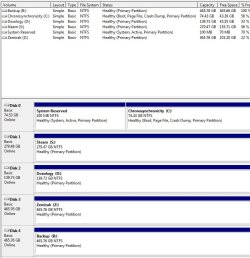
Alright so my C: Drive is a new SSD and is 80GB in size, with only 30GB used. When I run windows backup though, it says that the system image is not on just the c: drive, but also the s: drive, which is where i store my steam games. When I add the size used on the s: drive and the c: drive, that is roughly the size of my backup, therefore I am assuming that it is backing up my steam games, which I could careless about.

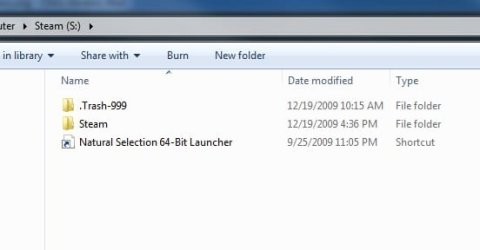
I do not understand why my s: drive is being included in the backup. When I originally installed 7, I just had the SSD plugged in. Also, I cannot find any files that are related to the operating system on my s: drive. Just steam games. And yes I enabled hidden folders to be viewed.

Does anyone have an idea why windows would do this? I attached some screen shots.
 

Attachments

  • Untitled1.jpg
    Untitled1.jpg
    26.8 KB · Views: 34
  • Untitled2.jpg
    Untitled2.jpg
    71.4 KB · Views: 80
  • Untitled3.jpg
    Untitled3.jpg
    13 KB · Views: 20

My Computer My Computer

OS
7
Alright so my C: Drive is a new SSD and is 80GB in size, with only 30GB used. When I run windows backup though, it says that the system image is not on just the c: drive, but also the s: drive, which is where i store my steam games. When I add the size used on the s: drive and the c: drive, that is roughly the size of my backup, therefore I am assuming that it is backing up my steam games, which I could careless about.

I do not understand why my s: drive is being included in the backup. When I originally installed 7, I just had the SSD plugged in. Also, I cannot find any files that are related to the operating system on my s: drive. Just steam games. And yes I enabled hidden folders to be viewed.

Does anyone have an idea why windows would do this? I attached some screen shots.

Windows Backup is probably trying to backup the whole of that Hard Drive. You should try WindowsEasyTransfer. It lets you choose what to back-up.

Thanks,
ZeshanA
 
Alright so my C: Drive is a new SSD and is 80GB in size, with only 30GB used. When I run windows backup though, it says that the system image is not on just the c: drive, but also the s: drive, which is where i store my steam games. When I add the size used on the s: drive and the c: drive, that is roughly the size of my backup, therefore I am assuming that it is backing up my steam games, which I could careless about.

I do not understand why my s: drive is being included in the backup. When I originally installed 7, I just had the SSD plugged in. Also, I cannot find any files that are related to the operating system on my s: drive. Just steam games. And yes I enabled hidden folders to be viewed.

Does anyone have an idea why windows would do this? I attached some screen shots.

Take the S: drive out while backuping, that way, it cant back it up. Then just put it back when youre done :D
 

My Computer My Computer

Computer Manufacturer/Model Number
Acer Veriton m261 (modded)
OS
Win 7 pro 64-bit, Ubuntu 9.10 64-bit
CPU
Intel Core 2 Duo 2.60 Ghz
Motherboard
Whatever came with the system
Memory
4 gb ddr2 667 Mhz
Graphics Card(s)
NVidia Geforce 9400 GS 1 gb ddr2 550 mhz GPU
Sound Card
Intergrated
Monitor(s) Displays
samsung SyncMaster 2494 24"
Screen Resolution
1080p
Hard Drives
80gb - IDE
750gb - SATA II
PSU
whatever came with the system
Case
whatever came with the system
Cooling
whatever came with the system
Keyboard
Apple Aluminium (Awesome)
Mouse
Some awesome Dell mouse, really good.
Internet Speed
100mbps
I do not understand why my s: drive is being included in the backup. When I originally installed 7, I just had the SSD plugged in. Also, I cannot find any files that are related to the operating system on my s: drive. Just steam games. And yes I enabled hidden folders to be viewed.

Does anyone have an idea why windows would do this? I attached some screen shots.
Hello cabrams1987, and welcome to Windows Seven Forums!

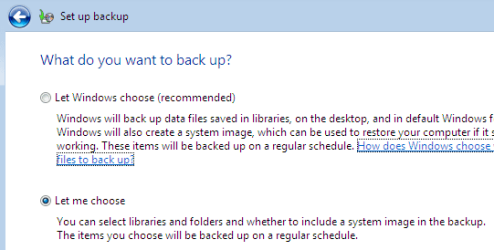
Click the Start button and type: backup. Change your settings to exclude the S: drive:

backup_01.png

backup_02.png

Cheers!
Robert
 

My Computer My Computer

OS
...
Alright so my C: Drive is a new SSD and is 80GB in size, with only 30GB used. When I run windows backup though, it says that the system image is not on just the c: drive, but also the s: drive, which is where i store my steam games. When I add the size used on the s: drive and the c: drive, that is roughly the size of my backup, therefore I am assuming that it is backing up my steam games, which I could careless about.

I do not understand why my s: drive is being included in the backup. When I originally installed 7, I just had the SSD plugged in. Also, I cannot find any files that are related to the operating system on my s: drive. Just steam games. And yes I enabled hidden folders to be viewed.

Does anyone have an idea why windows would do this? I attached some screen shots.

Take the S: drive out while backuping, that way, it cant back it up. Then just put it back when youre done :D

I believe it is "Backing-Up".........

That sounded WRONG :rolleyes:

ZeshanA
 
Alright so my C: Drive is a new SSD and is 80GB in size, with only 30GB used. When I run windows backup though, it says that the system image is not on just the c: drive, but also the s: drive, which is where i store my steam games. When I add the size used on the s: drive and the c: drive, that is roughly the size of my backup, therefore I am assuming that it is backing up my steam games, which I could careless about.

I do not understand why my s: drive is being included in the backup. When I originally installed 7, I just had the SSD plugged in. Also, I cannot find any files that are related to the operating system on my s: drive. Just steam games. And yes I enabled hidden folders to be viewed.

Does anyone have an idea why windows would do this? I attached some screen shots.

Take the S: drive out while backuping, that way, it cant back it up. Then just put it back when youre done :D

I believe it is "Backing-Up".........

That sounded WRONG :rolleyes:

ZeshanA

Sorry, but you get the point. Did it work?
 

My Computer My Computer

Computer Manufacturer/Model Number
Acer Veriton m261 (modded)
OS
Win 7 pro 64-bit, Ubuntu 9.10 64-bit
CPU
Intel Core 2 Duo 2.60 Ghz
Motherboard
Whatever came with the system
Memory
4 gb ddr2 667 Mhz
Graphics Card(s)
NVidia Geforce 9400 GS 1 gb ddr2 550 mhz GPU
Sound Card
Intergrated
Monitor(s) Displays
samsung SyncMaster 2494 24"
Screen Resolution
1080p
Hard Drives
80gb - IDE
750gb - SATA II
PSU
whatever came with the system
Case
whatever came with the system
Cooling
whatever came with the system
Keyboard
Apple Aluminium (Awesome)
Mouse
Some awesome Dell mouse, really good.
Internet Speed
100mbps
Back
Top