Windows 7 Backup Fails to Start

hawkeye62

New member
Member
Local time
3:37 AM
Messages
47
Location
Utah
As the title says the backup fails to start.

Control Panel > Backup and Restore > Create a system image >

"The backup application could not start due to an internal error: Server execution failed (0x80080005)."

Anyone have any thoughts?

Thanks, Jim
 

My Computer My Computer

At a glance

Windows 7 Professional 64bit SP1Intel Core i7 QUAD CORE 930 2.8 GHzKingston DDR3-1333 6GBXFX Radeon HD 5700 1GB
Computer Manufacturer/Model Number
Puget Custom Computers
OS
Windows 7 Professional 64bit SP1
CPU
Intel Core i7 QUAD CORE 930 2.8 GHz
Motherboard
Asus P6X58D Premium
Memory
Kingston DDR3-1333 6GB
Graphics Card(s)
XFX Radeon HD 5700 1GB
Sound Card
On Board
Monitor(s) Displays
Samsung SyncMaster 226 BW
Screen Resolution
1680x1050
Hard Drives
2 Western Digital Cavier Blue 500GB
PSU
Antec CP-850 850 Watt
Case
Antec P183
Cooling
Gelid Tranquillo
Keyboard
Microsoft Wirelsss 3000
Mouse
Kensington Expert Mouse K64325
Internet Speed
20 Mbps
First off fill in you specs. The top of every page in User PC.
A firewall or anti virus program can cause this to happen. What security software are you using. Not having Administration privileges can also cause this.
Welcome to the Windows 7 Forum.
 

My Computer My Computer

At a glance

Windows 10 Pro. 64/ version 1709 Windows 7 Pr...Intel i7-6800K @ 4.3Corsair Platinum 16 gig @2400EVGA GTX 1070 OC
Computer type
PC/Desktop
Computer Manufacturer/Model Number
Home made Desktop
OS
Windows 10 Pro. 64/ version 1709 Windows 7 Pro/64
CPU
Intel i7-6800K @ 4.3
Motherboard
ASUS X-99 Deluxe II
Memory
Corsair Platinum 16 gig @2400
Graphics Card(s)
EVGA GTX 1070 OC
Monitor(s) Displays
Asus 27" LED LCD/VE278Q
Screen Resolution
1920-1080 or 1280-720 HDMI
Hard Drives
INTEL SSD 730-240 Gb Sata 3.0/
PSU
EVGA Platium 1200W
Case
Phanteks Luxe Tempered Glass 8 fans/ one radiator
Cooling
XSPC/ Water Cooled CPU
Keyboard
Das 4 Professional
Mouse
Logitech M705/MX Anywhere 2-S
Internet Speed
100 mbits
Antivirus
Microsoft Security Essentials/ Malwarebytes Premium 3.0/ SAS
Browser
I.E. 11 default/Firefox/ ISP Time Warner Cable/Spectrum
Other Info
LG BluRay Burner/
Sound system-KLipsch-THX/
Icy Dock ssd Hot Swap bays.
First off fill in you specs. The top of every page in User PC.
A firewall or anti virus program can cause this to happen. What security software are you using. Not having Administration privileges can also cause this.
Welcome to the Windows 7 Forum.

Windows 7 Professional 64 bit SP1
Intel i7, 2.86 GHz
6 GB ram
Eset Nod32 anti virus

Thanks for any help, Jim

Edit: I disabled anti virus. Problem persists.
 
Last edited:

My Computer My Computer

At a glance

Windows 7 Professional 64bit SP1Intel Core i7 QUAD CORE 930 2.8 GHzKingston DDR3-1333 6GBXFX Radeon HD 5700 1GB
Computer Manufacturer/Model Number
Puget Custom Computers
OS
Windows 7 Professional 64bit SP1
CPU
Intel Core i7 QUAD CORE 930 2.8 GHz
Motherboard
Asus P6X58D Premium
Memory
Kingston DDR3-1333 6GB
Graphics Card(s)
XFX Radeon HD 5700 1GB
Sound Card
On Board
Monitor(s) Displays
Samsung SyncMaster 226 BW
Screen Resolution
1680x1050
Hard Drives
2 Western Digital Cavier Blue 500GB
PSU
Antec CP-850 850 Watt
Case
Antec P183
Cooling
Gelid Tranquillo
Keyboard
Microsoft Wirelsss 3000
Mouse
Kensington Expert Mouse K64325
Internet Speed
20 Mbps
Good afternoon. You must have Administration privileges to do this. If you do have Admin. rights turn off you computer, then disconnect the drive you are trying to install the backup on. Start your computer, once that is done plug your drive back in and see if windows picks it up. And I still don't see your specs in the lower left hand side of you post. The reason we need this is because every time some one tries to help they don't have to search through your post looking for your specs. Once done correctly you specs will be at the lower left of every one of your post. Check out my specs on this post and it will give you a good idea what we need.
 

My Computer My Computer

At a glance

Windows 10 Pro. 64/ version 1709 Windows 7 Pr...Intel i7-6800K @ 4.3Corsair Platinum 16 gig @2400EVGA GTX 1070 OC
Computer type
PC/Desktop
Computer Manufacturer/Model Number
Home made Desktop
OS
Windows 10 Pro. 64/ version 1709 Windows 7 Pro/64
CPU
Intel i7-6800K @ 4.3
Motherboard
ASUS X-99 Deluxe II
Memory
Corsair Platinum 16 gig @2400
Graphics Card(s)
EVGA GTX 1070 OC
Monitor(s) Displays
Asus 27" LED LCD/VE278Q
Screen Resolution
1920-1080 or 1280-720 HDMI
Hard Drives
INTEL SSD 730-240 Gb Sata 3.0/
PSU
EVGA Platium 1200W
Case
Phanteks Luxe Tempered Glass 8 fans/ one radiator
Cooling
XSPC/ Water Cooled CPU
Keyboard
Das 4 Professional
Mouse
Logitech M705/MX Anywhere 2-S
Internet Speed
100 mbits
Antivirus
Microsoft Security Essentials/ Malwarebytes Premium 3.0/ SAS
Browser
I.E. 11 default/Firefox/ ISP Time Warner Cable/Spectrum
Other Info
LG BluRay Burner/
Sound system-KLipsch-THX/
Icy Dock ssd Hot Swap bays.
Good afternoon. You must have Administration privileges to do this. If you do have Admin. rights turn off you computer, then disconnect the drive you are trying to install the backup on. Start your computer, once that is done plug your drive back in and see if windows picks it up. And I still don't see your specs in the lower left hand side of you post. The reason we need this is because every time some one tries to help they don't have to search through your post looking for your specs. Once done correctly you specs will be at the lower left of every one of your post. Check out my specs on this post and it will give you a good idea what we need.

Yes, I have Admin privileges. I don't understand why removing a drive and reinstalling it would have any affect. The failure to start occurs before I select a drive for the backup.

Thanks for your help, Jim
 

My Computer My Computer

At a glance

Windows 7 Professional 64bit SP1Intel Core i7 QUAD CORE 930 2.8 GHzKingston DDR3-1333 6GBXFX Radeon HD 5700 1GB
Computer Manufacturer/Model Number
Puget Custom Computers
OS
Windows 7 Professional 64bit SP1
CPU
Intel Core i7 QUAD CORE 930 2.8 GHz
Motherboard
Asus P6X58D Premium
Memory
Kingston DDR3-1333 6GB
Graphics Card(s)
XFX Radeon HD 5700 1GB
Sound Card
On Board
Monitor(s) Displays
Samsung SyncMaster 226 BW
Screen Resolution
1680x1050
Hard Drives
2 Western Digital Cavier Blue 500GB
PSU
Antec CP-850 850 Watt
Case
Antec P183
Cooling
Gelid Tranquillo
Keyboard
Microsoft Wirelsss 3000
Mouse
Kensington Expert Mouse K64325
Internet Speed
20 Mbps
Are you saying you get the error before the screen
Where do you want to save the backup?
appears.
 

My Computer My Computer

At a glance

Windows 7x64 Home Premium SP1Intel i7 2600kG.Skill Ripjaws (DDR3-1600) 2x4GBNvidia GeForce GTS 450; Intel HD Graphics 300...
Computer type
PC/Desktop
Computer Manufacturer/Model Number
Own build
OS
Windows 7x64 Home Premium SP1
CPU
Intel i7 2600k
Motherboard
ASUS P8Z68 Deluxe
Memory
G.Skill Ripjaws (DDR3-1600) 2x4GB
Graphics Card(s)
Nvidia GeForce GTS 450; Intel HD Graphics 3000(GT2+)
Monitor(s) Displays
Dell Ultrasharp IPS panel U2311H, Samsung SyncMaster P2350
Screen Resolution
1920x1080
Hard Drives
Samsung 850 Pro SSD 256GB, Samsung SSD 840 120GB, Seagates 1TB Barracuda ST31000528AS x2
PSU
Seasonic M12II 520W
Case
Lian Li Lancool PC-K60
Cooling
Case: 1x120mm, 3x140mm CPU: Hyper 212+
Keyboard
Logitech MK520 (wireless)
Mouse
Logitech MK520
Internet Speed
6-7 Mbps
Antivirus
Norton Security Premium, Malwarebytes on 2 (MSE on 3rd PC)
Browser
FireFox
Other Info
Audio: Logitech Z523 2.1
Yes, as soon as I click on make an image.

Regards, Jim
 

My Computer My Computer

At a glance

Windows 7 Professional 64bit SP1Intel Core i7 QUAD CORE 930 2.8 GHzKingston DDR3-1333 6GBXFX Radeon HD 5700 1GB
Computer Manufacturer/Model Number
Puget Custom Computers
OS
Windows 7 Professional 64bit SP1
CPU
Intel Core i7 QUAD CORE 930 2.8 GHz
Motherboard
Asus P6X58D Premium
Memory
Kingston DDR3-1333 6GB
Graphics Card(s)
XFX Radeon HD 5700 1GB
Sound Card
On Board
Monitor(s) Displays
Samsung SyncMaster 226 BW
Screen Resolution
1680x1050
Hard Drives
2 Western Digital Cavier Blue 500GB
PSU
Antec CP-850 850 Watt
Case
Antec P183
Cooling
Gelid Tranquillo
Keyboard
Microsoft Wirelsss 3000
Mouse
Kensington Expert Mouse K64325
Internet Speed
20 Mbps
Another check-

Type Services.msc in bottom search box:
Volume shadow copy
Windows backup
Microsoft software shadow copy provider

should be set to Manual
 

My Computer My Computer

At a glance

Windows 7x64 Home Premium SP1Intel i7 2600kG.Skill Ripjaws (DDR3-1600) 2x4GBNvidia GeForce GTS 450; Intel HD Graphics 300...
Computer type
PC/Desktop
Computer Manufacturer/Model Number
Own build
OS
Windows 7x64 Home Premium SP1
CPU
Intel i7 2600k
Motherboard
ASUS P8Z68 Deluxe
Memory
G.Skill Ripjaws (DDR3-1600) 2x4GB
Graphics Card(s)
Nvidia GeForce GTS 450; Intel HD Graphics 3000(GT2+)
Monitor(s) Displays
Dell Ultrasharp IPS panel U2311H, Samsung SyncMaster P2350
Screen Resolution
1920x1080
Hard Drives
Samsung 850 Pro SSD 256GB, Samsung SSD 840 120GB, Seagates 1TB Barracuda ST31000528AS x2
PSU
Seasonic M12II 520W
Case
Lian Li Lancool PC-K60
Cooling
Case: 1x120mm, 3x140mm CPU: Hyper 212+
Keyboard
Logitech MK520 (wireless)
Mouse
Logitech MK520
Internet Speed
6-7 Mbps
Antivirus
Norton Security Premium, Malwarebytes on 2 (MSE on 3rd PC)
Browser
FireFox
Other Info
Audio: Logitech Z523 2.1
Another check-

Type Services.msc in bottom search box:
Volume shadow copy
Windows backup
Microsoft software shadow copy provider

should be set to Manual

Yes, all three services are set to manual.

Regards, Jim
 

My Computer My Computer

At a glance

Windows 7 Professional 64bit SP1Intel Core i7 QUAD CORE 930 2.8 GHzKingston DDR3-1333 6GBXFX Radeon HD 5700 1GB
Computer Manufacturer/Model Number
Puget Custom Computers
OS
Windows 7 Professional 64bit SP1
CPU
Intel Core i7 QUAD CORE 930 2.8 GHz
Motherboard
Asus P6X58D Premium
Memory
Kingston DDR3-1333 6GB
Graphics Card(s)
XFX Radeon HD 5700 1GB
Sound Card
On Board
Monitor(s) Displays
Samsung SyncMaster 226 BW
Screen Resolution
1680x1050
Hard Drives
2 Western Digital Cavier Blue 500GB
PSU
Antec CP-850 850 Watt
Case
Antec P183
Cooling
Gelid Tranquillo
Keyboard
Microsoft Wirelsss 3000
Mouse
Kensington Expert Mouse K64325
Internet Speed
20 Mbps
When you go Control Panel/Backup and Restore and let us know if you see the device you are trying to put your backup on.
 

My Computer My Computer

At a glance

Windows 10 Pro. 64/ version 1709 Windows 7 Pr...Intel i7-6800K @ 4.3Corsair Platinum 16 gig @2400EVGA GTX 1070 OC
Computer type
PC/Desktop
Computer Manufacturer/Model Number
Home made Desktop
OS
Windows 10 Pro. 64/ version 1709 Windows 7 Pro/64
CPU
Intel i7-6800K @ 4.3
Motherboard
ASUS X-99 Deluxe II
Memory
Corsair Platinum 16 gig @2400
Graphics Card(s)
EVGA GTX 1070 OC
Monitor(s) Displays
Asus 27" LED LCD/VE278Q
Screen Resolution
1920-1080 or 1280-720 HDMI
Hard Drives
INTEL SSD 730-240 Gb Sata 3.0/
PSU
EVGA Platium 1200W
Case
Phanteks Luxe Tempered Glass 8 fans/ one radiator
Cooling
XSPC/ Water Cooled CPU
Keyboard
Das 4 Professional
Mouse
Logitech M705/MX Anywhere 2-S
Internet Speed
100 mbits
Antivirus
Microsoft Security Essentials/ Malwarebytes Premium 3.0/ SAS
Browser
I.E. 11 default/Firefox/ ISP Time Warner Cable/Spectrum
Other Info
LG BluRay Burner/
Sound system-KLipsch-THX/
Icy Dock ssd Hot Swap bays.
When you go Control Panel/Backup and Restore and let us know if you see the device you are trying to put your backup on.

I see a disk icon with a red X next to it and (D) Disconnected. BUT, (D) is not disconnected. And if I try to change the settings, I get the same error. I also uninstalled the (D) disk in device manager and rebooted so Windows would re-install it.

I have been doing a lot of experimenting with backups, making images, clones, etc. I think I made an image with Win7 Backup on (D) and then some time later I formatted (D).

Regards, Jim
 

My Computer My Computer

At a glance

Windows 7 Professional 64bit SP1Intel Core i7 QUAD CORE 930 2.8 GHzKingston DDR3-1333 6GBXFX Radeon HD 5700 1GB
Computer Manufacturer/Model Number
Puget Custom Computers
OS
Windows 7 Professional 64bit SP1
CPU
Intel Core i7 QUAD CORE 930 2.8 GHz
Motherboard
Asus P6X58D Premium
Memory
Kingston DDR3-1333 6GB
Graphics Card(s)
XFX Radeon HD 5700 1GB
Sound Card
On Board
Monitor(s) Displays
Samsung SyncMaster 226 BW
Screen Resolution
1680x1050
Hard Drives
2 Western Digital Cavier Blue 500GB
PSU
Antec CP-850 850 Watt
Case
Antec P183
Cooling
Gelid Tranquillo
Keyboard
Microsoft Wirelsss 3000
Mouse
Kensington Expert Mouse K64325
Internet Speed
20 Mbps
A disk icon with a red X should not affect the operation over on the left "Create a System image". When you select "Create a system image" Windows goes looking for available partitions to store an image. You are not locked into any partition which may have been setup in the regular Backup schedule settings.

"Change Settings" allows you to select another backup location for your file/folder backups (and image if you have that box ticked). Unless you explicitly assign a letter to an external HDD partition, the letter may change next time you connect the HDD. This would give you a red X.
I wouldn't expect "Change Settings" or the red X to have an impact on your specific problem.

If you have access to another external HDD with plenty of space do you still get an error?
 

My Computer My Computer

At a glance

Windows 7x64 Home Premium SP1Intel i7 2600kG.Skill Ripjaws (DDR3-1600) 2x4GBNvidia GeForce GTS 450; Intel HD Graphics 300...
Computer type
PC/Desktop
Computer Manufacturer/Model Number
Own build
OS
Windows 7x64 Home Premium SP1
CPU
Intel i7 2600k
Motherboard
ASUS P8Z68 Deluxe
Memory
G.Skill Ripjaws (DDR3-1600) 2x4GB
Graphics Card(s)
Nvidia GeForce GTS 450; Intel HD Graphics 3000(GT2+)
Monitor(s) Displays
Dell Ultrasharp IPS panel U2311H, Samsung SyncMaster P2350
Screen Resolution
1920x1080
Hard Drives
Samsung 850 Pro SSD 256GB, Samsung SSD 840 120GB, Seagates 1TB Barracuda ST31000528AS x2
PSU
Seasonic M12II 520W
Case
Lian Li Lancool PC-K60
Cooling
Case: 1x120mm, 3x140mm CPU: Hyper 212+
Keyboard
Logitech MK520 (wireless)
Mouse
Logitech MK520
Internet Speed
6-7 Mbps
Antivirus
Norton Security Premium, Malwarebytes on 2 (MSE on 3rd PC)
Browser
FireFox
Other Info
Audio: Logitech Z523 2.1
A disk icon with a red X should not affect the operation over on the left "Create a System image". When you select "Create a system image" Windows goes looking for available partitions to store an image. You are not locked into any partition which may have been setup in the regular Backup schedule settings.

"Change Settings" allows you to select another backup location for your file/folder backups (and image if you have that box ticked). Unless you explicitly assign a letter to an external HDD partition, the letter may change next time you connect the HDD. This would give you a red X.
I wouldn't expect "Change Settings" or the red X to have an impact on your specific problem.

If you have access to another external HDD with plenty of space do you still get an error?

"Change Settings" results in the same error. I am not able to do any action on the Backup page. Pushing any button on that page results in the same error. The "D" drive has 500GB of free space.

Thanks for your continued help, Jim
 

My Computer My Computer

At a glance

Windows 7 Professional 64bit SP1Intel Core i7 QUAD CORE 930 2.8 GHzKingston DDR3-1333 6GBXFX Radeon HD 5700 1GB
Computer Manufacturer/Model Number
Puget Custom Computers
OS
Windows 7 Professional 64bit SP1
CPU
Intel Core i7 QUAD CORE 930 2.8 GHz
Motherboard
Asus P6X58D Premium
Memory
Kingston DDR3-1333 6GB
Graphics Card(s)
XFX Radeon HD 5700 1GB
Sound Card
On Board
Monitor(s) Displays
Samsung SyncMaster 226 BW
Screen Resolution
1680x1050
Hard Drives
2 Western Digital Cavier Blue 500GB
PSU
Antec CP-850 850 Watt
Case
Antec P183
Cooling
Gelid Tranquillo
Keyboard
Microsoft Wirelsss 3000
Mouse
Kensington Expert Mouse K64325
Internet Speed
20 Mbps

My Computer My Computer

At a glance

Windows 7x64 Home Premium SP1Intel i7 2600kG.Skill Ripjaws (DDR3-1600) 2x4GBNvidia GeForce GTS 450; Intel HD Graphics 300...
Computer type
PC/Desktop
Computer Manufacturer/Model Number
Own build
OS
Windows 7x64 Home Premium SP1
CPU
Intel i7 2600k
Motherboard
ASUS P8Z68 Deluxe
Memory
G.Skill Ripjaws (DDR3-1600) 2x4GB
Graphics Card(s)
Nvidia GeForce GTS 450; Intel HD Graphics 3000(GT2+)
Monitor(s) Displays
Dell Ultrasharp IPS panel U2311H, Samsung SyncMaster P2350
Screen Resolution
1920x1080
Hard Drives
Samsung 850 Pro SSD 256GB, Samsung SSD 840 120GB, Seagates 1TB Barracuda ST31000528AS x2
PSU
Seasonic M12II 520W
Case
Lian Li Lancool PC-K60
Cooling
Case: 1x120mm, 3x140mm CPU: Hyper 212+
Keyboard
Logitech MK520 (wireless)
Mouse
Logitech MK520
Internet Speed
6-7 Mbps
Antivirus
Norton Security Premium, Malwarebytes on 2 (MSE on 3rd PC)
Browser
FireFox
Other Info
Audio: Logitech Z523 2.1
A red X does mean something. It means that the system (IT Department) or Windows 7 doesn't understand or allow what you are trying to do. A post as mjf requested would help. That is why I request to unhook the drive and hook it back up. It sound like a I.T. Department problem to me.
 

My Computer My Computer

At a glance

Windows 10 Pro. 64/ version 1709 Windows 7 Pr...Intel i7-6800K @ 4.3Corsair Platinum 16 gig @2400EVGA GTX 1070 OC
Computer type
PC/Desktop
Computer Manufacturer/Model Number
Home made Desktop
OS
Windows 10 Pro. 64/ version 1709 Windows 7 Pro/64
CPU
Intel i7-6800K @ 4.3
Motherboard
ASUS X-99 Deluxe II
Memory
Corsair Platinum 16 gig @2400
Graphics Card(s)
EVGA GTX 1070 OC
Monitor(s) Displays
Asus 27" LED LCD/VE278Q
Screen Resolution
1920-1080 or 1280-720 HDMI
Hard Drives
INTEL SSD 730-240 Gb Sata 3.0/
PSU
EVGA Platium 1200W
Case
Phanteks Luxe Tempered Glass 8 fans/ one radiator
Cooling
XSPC/ Water Cooled CPU
Keyboard
Das 4 Professional
Mouse
Logitech M705/MX Anywhere 2-S
Internet Speed
100 mbits
Antivirus
Microsoft Security Essentials/ Malwarebytes Premium 3.0/ SAS
Browser
I.E. 11 default/Firefox/ ISP Time Warner Cable/Spectrum
Other Info
LG BluRay Burner/
Sound system-KLipsch-THX/
Icy Dock ssd Hot Swap bays.
Hawkeye,
Please post a pic of your disk management display.

Pay careful attention to this write-up, especially the part about dragging the field separators so that no field is truncated.

HOW TO POST A SNAPSHOT OF DISK MANAGEMENT DISPLAY
Run disk management:
WIN | type DISKMGMT.MSC | ENTER
WIN
is the key with the wavy flag.

Maximize the output of Disk Management:
ALT-Spacebar key combo (this pops up a menu) followed by X key (selects Maximize) |
Drag the field separators (such as between Status and Capacity) to show entire field. This is very important, otherwise, needed info is not visible.

Make a snapshot:
WIN | type SNIPPING | ENTER | New
Drag the cursor around the area you want to snip.
File | Save as | select save location and name | Save

Post the snapshot:
Upload a File or Screenshot in Seven Forums


My Computer My Computer

At a glance

MS Windows 7 Ultimate SP1 64-bitAMD A10-4600M6.00 GB Dual-Channel DDR3 @ 798MHz (11-11-12-28)AMD Radeon HD 7660G
Computer Manufacturer/Model Number
Toshiba Satellite S875D-S7239 laptop
OS
MS Windows 7 Ultimate SP1 64-bit
CPU
AMD A10-4600M
Motherboard
AMD Pumori (Socket FT1)
Memory
6.00 GB Dual-Channel DDR3 @ 798MHz (11-11-12-28)
Graphics Card(s)
AMD Radeon HD 7660G
Sound Card
High Definition Audio Device
Monitor(s) Displays
Generic PnP Monitor (1600x900@60Hz)
Screen Resolution
1600x900@60Hz
Hard Drives
SSD 119GB Corsair CSSD-V128GB2 ATA Device
Keyboard
Standard PS/2 Keyboard
Mouse
HP Wireless Optical Mobile Mouse Model FHA-3410
Internet Speed
What the local pub, local coffee shop offers.
Other Info
Optical Drive:MATSHITA BD-CMB UJ160B ATA Device


Also have an Asus ha1002xp netbook with Win 7 Ultimate installed.
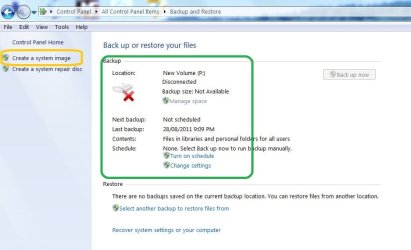
Here is a current screenshot from my main PC.
Backup-7_10_11.jpg
The red cross (inside the green region) means nothing when it comes to "Create a System Image" (inside the yellow region). I make images this way ALL the time.
It means that until I plug in my HDD (partition in fact) assigned the letter "P" I cannot run a "File/folder" backup unless I change the default location using "Change settings"

I have said all this before. This is not an opinion guys this is a fact.
My understanding all along is that the OP is talking about doing a "Create a system image" - inside the yellow highlighted area.
 

My Computer My Computer

At a glance

Windows 7x64 Home Premium SP1Intel i7 2600kG.Skill Ripjaws (DDR3-1600) 2x4GBNvidia GeForce GTS 450; Intel HD Graphics 300...
Computer type
PC/Desktop
Computer Manufacturer/Model Number
Own build
OS
Windows 7x64 Home Premium SP1
CPU
Intel i7 2600k
Motherboard
ASUS P8Z68 Deluxe
Memory
G.Skill Ripjaws (DDR3-1600) 2x4GB
Graphics Card(s)
Nvidia GeForce GTS 450; Intel HD Graphics 3000(GT2+)
Monitor(s) Displays
Dell Ultrasharp IPS panel U2311H, Samsung SyncMaster P2350
Screen Resolution
1920x1080
Hard Drives
Samsung 850 Pro SSD 256GB, Samsung SSD 840 120GB, Seagates 1TB Barracuda ST31000528AS x2
PSU
Seasonic M12II 520W
Case
Lian Li Lancool PC-K60
Cooling
Case: 1x120mm, 3x140mm CPU: Hyper 212+
Keyboard
Logitech MK520 (wireless)
Mouse
Logitech MK520
Internet Speed
6-7 Mbps
Antivirus
Norton Security Premium, Malwarebytes on 2 (MSE on 3rd PC)
Browser
FireFox
Other Info
Audio: Logitech Z523 2.1
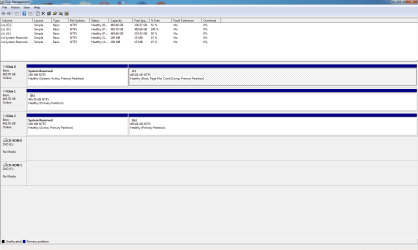
OK guys, here are two snips, Disk Management and Disk Backup. Drive "G" is a clone of drive "C" which I made with Macrium Reflect. Drive "D" was used in the past to make an image of "C" with Win7 Backup, but I formatted it after some experimenting with some other backup software. (Macrium Reflect and Acronis.)

Since I uninstalled "D" with Device Manager and rebooted so Windows would re-install it, what additional benefit would be derived from physically removing and re-installing it? I really don't want to take the box out of the cabinet, open the case, disconnect the drive, etc, etc, unless absolutely necessary.

Pressing any key on the Backup page results in the Server failed to connect 0x80080005 error. Create an image on the left panel or trying to change any setting, etc. all result in the error message. Edit: Actually anything that needs to start Backup fails. I can turn on and off the schedule, look for another backup image, etc.

Thanks for all of the help, Jim
 

Attachments

  • Disk Backup.PNG
    Disk Backup.PNG
    40.4 KB · Views: 16
  • Disk Management.PNG
    Disk Management.PNG
    26.6 KB · Views: 25

My Computer My Computer

At a glance

Windows 7 Professional 64bit SP1Intel Core i7 QUAD CORE 930 2.8 GHzKingston DDR3-1333 6GBXFX Radeon HD 5700 1GB
Computer Manufacturer/Model Number
Puget Custom Computers
OS
Windows 7 Professional 64bit SP1
CPU
Intel Core i7 QUAD CORE 930 2.8 GHz
Motherboard
Asus P6X58D Premium
Memory
Kingston DDR3-1333 6GB
Graphics Card(s)
XFX Radeon HD 5700 1GB
Sound Card
On Board
Monitor(s) Displays
Samsung SyncMaster 226 BW
Screen Resolution
1680x1050
Hard Drives
2 Western Digital Cavier Blue 500GB
PSU
Antec CP-850 850 Watt
Case
Antec P183
Cooling
Gelid Tranquillo
Keyboard
Microsoft Wirelsss 3000
Mouse
Kensington Expert Mouse K64325
Internet Speed
20 Mbps
Maybe I missed it but Disk 2 is new information. You need to be careful and it is generally not a good idea to have 2 "cloned" disks connected at the same time.

You can try the following:
1) disconnect disk 2 and make sure your PC still boots
2) Reassign a new volume letter to disk 1 (D: ) ....say G
3) reboot
4) go back into "change settings" and see what happens
 

My Computer My Computer

At a glance

Windows 7x64 Home Premium SP1Intel i7 2600kG.Skill Ripjaws (DDR3-1600) 2x4GBNvidia GeForce GTS 450; Intel HD Graphics 300...
Computer type
PC/Desktop
Computer Manufacturer/Model Number
Own build
OS
Windows 7x64 Home Premium SP1
CPU
Intel i7 2600k
Motherboard
ASUS P8Z68 Deluxe
Memory
G.Skill Ripjaws (DDR3-1600) 2x4GB
Graphics Card(s)
Nvidia GeForce GTS 450; Intel HD Graphics 3000(GT2+)
Monitor(s) Displays
Dell Ultrasharp IPS panel U2311H, Samsung SyncMaster P2350
Screen Resolution
1920x1080
Hard Drives
Samsung 850 Pro SSD 256GB, Samsung SSD 840 120GB, Seagates 1TB Barracuda ST31000528AS x2
PSU
Seasonic M12II 520W
Case
Lian Li Lancool PC-K60
Cooling
Case: 1x120mm, 3x140mm CPU: Hyper 212+
Keyboard
Logitech MK520 (wireless)
Mouse
Logitech MK520
Internet Speed
6-7 Mbps
Antivirus
Norton Security Premium, Malwarebytes on 2 (MSE on 3rd PC)
Browser
FireFox
Other Info
Audio: Logitech Z523 2.1
Maybe I missed it but Disk 2 is new information. You need to be careful and it is generally not a good idea to have 2 "cloned" disks connected at the same time.

You can try the following:
1) disconnect disk 2 and make sure your PC still boots
2) Reassign a new volume letter to disk 1 (D: ) ....say G
3) reboot
4) go back into "change settings" and see what happens

OK done, "change settings" brings up Backup which still fails with the same error message.

I put "G" drive in service to see if Backup would recognize it as a place to put images. It doesn't. I usually have "G" powered down. It is connected to an external SATA port and has a separate power supply, so all I have to do is turn off the power to the enclosure.

This is very frustrating. I am very disappointed in Windows 7. Seems to be way too fragile. I even tried the Upgrade Install to try and "fix" Windows 7 by the method shown on this forum. When I used Vista SP 2 as compatibility mode, the install failed with message that Windows 7 Professional could not be upgraded to Windows 7 Professional. And when I tried with Windows 7 compatibility mode it failed with a message that installed version is newer than the upgrade. So, I can't do any install except a fresh install which I would very much like to avoid.

Thanks for your continued help, Jim
 

My Computer My Computer

At a glance

Windows 7 Professional 64bit SP1Intel Core i7 QUAD CORE 930 2.8 GHzKingston DDR3-1333 6GBXFX Radeon HD 5700 1GB
Computer Manufacturer/Model Number
Puget Custom Computers
OS
Windows 7 Professional 64bit SP1
CPU
Intel Core i7 QUAD CORE 930 2.8 GHz
Motherboard
Asus P6X58D Premium
Memory
Kingston DDR3-1333 6GB
Graphics Card(s)
XFX Radeon HD 5700 1GB
Sound Card
On Board
Monitor(s) Displays
Samsung SyncMaster 226 BW
Screen Resolution
1680x1050
Hard Drives
2 Western Digital Cavier Blue 500GB
PSU
Antec CP-850 850 Watt
Case
Antec P183
Cooling
Gelid Tranquillo
Keyboard
Microsoft Wirelsss 3000
Mouse
Kensington Expert Mouse K64325
Internet Speed
20 Mbps
Back
Top