Hi All,
I tried to use windows 7 backup utility recently (for the first time on my new computer) and I get the "disk full" error while the target disk space has still 130 GB free.
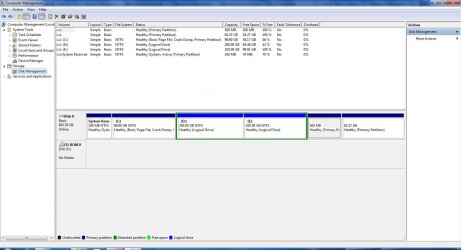
I have moved my USERS folder to my D drive (during the windows installation) to keep them separate from the system files and since I have some other files on my D drive, I chose the option of manually selecting the files to backup and I selected libraries, system images and some extra files on D drive. However, I am pretty sure that they should not be totally more than 110 GB as everything (except programs that should not be naturally backed up) is on D and it is only 110 GB full.
However, the backup stops and says not enough disk space to finish backup while the backup size is only around 90 GB and the disk containing the destination disk has still around 130 GB free.
It is strange because I have at most only 110 GB of data to be backed up. Even if it tries to backup everything on C it should add up 40-50 GB more which makes the total volume of files 150-160 GB which is still less than the target disk size (230 GB, and it is dedicated to backups, I have formatted it before).
Even if for any weird reason windows is trying to exceed the capacity of the destination disk, I should see a much larger file (not only a 90 GB one) and then received the error message, isn't it? I mean whatever he wants to do, he still has 130 GB of free space to write in before giving this error message!
Has anyone encountered the same problem?
Thanks,
I tried to use windows 7 backup utility recently (for the first time on my new computer) and I get the "disk full" error while the target disk space has still 130 GB free.
I have moved my USERS folder to my D drive (during the windows installation) to keep them separate from the system files and since I have some other files on my D drive, I chose the option of manually selecting the files to backup and I selected libraries, system images and some extra files on D drive. However, I am pretty sure that they should not be totally more than 110 GB as everything (except programs that should not be naturally backed up) is on D and it is only 110 GB full.
However, the backup stops and says not enough disk space to finish backup while the backup size is only around 90 GB and the disk containing the destination disk has still around 130 GB free.
It is strange because I have at most only 110 GB of data to be backed up. Even if it tries to backup everything on C it should add up 40-50 GB more which makes the total volume of files 150-160 GB which is still less than the target disk size (230 GB, and it is dedicated to backups, I have formatted it before).
Even if for any weird reason windows is trying to exceed the capacity of the destination disk, I should see a much larger file (not only a 90 GB one) and then received the error message, isn't it? I mean whatever he wants to do, he still has 130 GB of free space to write in before giving this error message!
Has anyone encountered the same problem?
Thanks,
My Computer
At a glance
Windows 7 Professional x64
- OS
- Windows 7 Professional x64