Windows 7 Basic Theme Freezing

Anyone?
 

My Computer

Computer type
PC/Desktop
Computer Manufacturer/Model Number
Custom Build
OS
Windows 7 Ultimate SP1 64 bit
CPU
Intel i5-3570k
Motherboard
Asus P8Z77-V Pro (2104)
Memory
G.Skill Ripjaws X 16GB (4x4 GB) DDR3 1600MHz
Graphics Card(s)
MSI HD 7870 2GB
Sound Card
Creative SB X-Fi HD USB
Monitor(s) Displays
Asus VE247H
Screen Resolution
1080p
Hard Drives
ADATA XPG SX900 256GB SSD
WD Black 2TB
PSU
XFX Pro 850W XXX Edition Semi-Modular
Case
Zalman Z11 Plus
Cooling
CM Hyper 212 Evo (2 mounted fans) + 6 fans
Keyboard
Das Keyboard Model S Professional MX Brown PS/2
Mouse
Logitech G700s
Sorry, I'm stumped. Doesn't appear to be hardware. Doesn't seem like graphics driver as both of your GPUs have the same issue. It's only on the less resource intensive themes. It survived reinstallation of Windows. SFC finds no issues.

It appears to be down to why animating windows causes the issue. If it were just the mouse freezing, I'd think that the mouse hook was hanging. This would mean the PC is not actually freezing, just the mouse. However you say you have a corresponding audio freeze as well. This may well still be a Hook issue. It's likely an event involving WindowState Property. But that doesn't explain why you have the problem, especially as a clean start showed no conflicts.

I'm unsure if/how you could capture the hook/event changes to diagnose the issue. I do see people with all kinds of temp freezing issues bypassing the problem by disabling the animate windows...

A Guy
 

My Computer

Computer type
PC/Desktop
OS
Windows 10 Home x64
CPU
INTEL Core i5-750 Quad-Core 3.37GHz
Motherboard
ASUS P7P55D
Memory
HyperX Fury Black Series 8GB (2 x 4GB) 1866Mhz
Graphics Card(s)
EVGA GeForce GTX 750 Superclocked 1GB 128-Bit GDDR5
Monitor(s) Displays
LG 32MA68HY 32" IPS
Screen Resolution
1920 x 1080
Hard Drives
Samsung 840 Evo 120GB, SEAGATE 500GB Barracuda® 7200.12, SATA 3 Gb/s, 7200 RPM, 16MB cache
PSU
ANTEC TruePower New TP-550, 80 PLUS, 550W
Case
ANTEC Three Hundred Illusion
Cooling
COOLER MASTER Hyper 212 Plus, 4 x 120mm 1 x 140mm Noctua's
Internet Speed
85 + Mbps
Antivirus
Avast
Browser
Vivaldi
I discovered another issue. When I convert a video using Handbrake and launch Battlefield 3, my computer becomes completely unresponsive. I can still use programs (it is a bit laggy) that are currently present except for Handbrake, BF3 and explorer.exe. My desktop and taskbar are also unresponsive. Any programs that I launch will be frozen or not open. What can cause this issue?
 

My Computer

Computer type
PC/Desktop
Computer Manufacturer/Model Number
Custom Build
OS
Windows 7 Ultimate SP1 64 bit
CPU
Intel i5-3570k
Motherboard
Asus P8Z77-V Pro (2104)
Memory
G.Skill Ripjaws X 16GB (4x4 GB) DDR3 1600MHz
Graphics Card(s)
MSI HD 7870 2GB
Sound Card
Creative SB X-Fi HD USB
Monitor(s) Displays
Asus VE247H
Screen Resolution
1080p
Hard Drives
ADATA XPG SX900 256GB SSD
WD Black 2TB
PSU
XFX Pro 850W XXX Edition Semi-Modular
Case
Zalman Z11 Plus
Cooling
CM Hyper 212 Evo (2 mounted fans) + 6 fans
Keyboard
Das Keyboard Model S Professional MX Brown PS/2
Mouse
Logitech G700s
I see MS released another version of it's Debug Diagnostic Tool

Download Debug Diagnostic Tool v2 Update 1 from Official Microsoft Download Center

The Debug Diagnostic Tool (DebugDiag) is designed to assist in troubleshooting issues such as hangs, slow performance, memory leaks or memory fragmentation, and crashes in any user-mode process.

It doesn't appear to be a simple tool, so you'd have to google for tutorials. I'll ask the Gurus again if there are easier ways to diagnose hangs.

A Guy
 

My Computer

Computer type
PC/Desktop
OS
Windows 10 Home x64
CPU
INTEL Core i5-750 Quad-Core 3.37GHz
Motherboard
ASUS P7P55D
Memory
HyperX Fury Black Series 8GB (2 x 4GB) 1866Mhz
Graphics Card(s)
EVGA GeForce GTX 750 Superclocked 1GB 128-Bit GDDR5
Monitor(s) Displays
LG 32MA68HY 32" IPS
Screen Resolution
1920 x 1080
Hard Drives
Samsung 840 Evo 120GB, SEAGATE 500GB Barracuda® 7200.12, SATA 3 Gb/s, 7200 RPM, 16MB cache
PSU
ANTEC TruePower New TP-550, 80 PLUS, 550W
Case
ANTEC Three Hundred Illusion
Cooling
COOLER MASTER Hyper 212 Plus, 4 x 120mm 1 x 140mm Noctua's
Internet Speed
85 + Mbps
Antivirus
Avast
Browser
Vivaldi
Hey there,

First a couple of points,
Your build is remarkably similar to mine :D


From reading through this, I haven't seen you reinstall the intel drivers for the chipset. These control how the motherboard sends information from one area to another.

Can you try doing this? http://dlcdnet.asus.com/pub/ASUS/misc/utils/Intel_Chipset_V9301021_XPWin7_8.zip

Also, the motherboard has a habit of being tempermental with USB 3 devices and conflicting drivers, this has, from experience, caused hanging and crash errors when doing anything from resizing windows to restarting. Can you remove them?

So can you ensure that all your mobo drivers are the latest available?
https://www.asus.com/Motherboards/P8Z77V_PRO/HelpDesk_Download/

You mentioned in your 1st post that you have updated your drivers, am i wrong to assume you mean your AMD Drivers?

Also, can you follow this guide and ensure that all your system devices are correctly installed : http://www.sevenforums.com/tutorials/97061-driver-install-device-manager.html


I'm going to try and take over from A Guy here, to see if we can solve your problem.
 

My Computer

Computer type
PC/Desktop
Computer Manufacturer/Model Number
Custom Build
OS
Windows 8.1
CPU
Intel i5 3750k OC'd 4.0Ghz
Motherboard
P8Z77-V LX3
Memory
16GB Vengence Corsair
Graphics Card(s)
GTX 770 OC 2GB Windforce
Sound Card
C-Media 7.1 Surround Card
Monitor(s) Displays
Asus 3D 23" & BenQ 24" & LG 19"
Screen Resolution
1920*1080, 1920*1080, 1440*900
Hard Drives
Crucial 512GB SSD
WD 1.5 TB
WD 500Gb
PSU
850MW Silverstone
Case
inWin DragonRider
Cooling
4 * 140mm LED Akasa, One 140mm Fan Akasa
Keyboard
Corsair k95
Mouse
R.A.T 7 Contagion
Internet Speed
152 Mb Fiber Optic
Antivirus
ESET Nod32
Browser
Waterfox x64 / Chrome x64
Other Info
Freenas / Plex Media server
Q6600
6Gb DDR3
6TB ZFS Raid
500W PSu
2 x Intel NIC's
I see MS released another version of it's Debug Diagnostic Tool

Download Debug Diagnostic Tool v2 Update 1 from Official Microsoft Download Center

The Debug Diagnostic Tool (DebugDiag) is designed to assist in troubleshooting issues such as hangs, slow performance, memory leaks or memory fragmentation, and crashes in any user-mode process.

It doesn't appear to be a simple tool, so you'd have to google for tutorials. I'll ask the Gurus again if there are easier ways to diagnose hangs.

A Guy

I've downloaded the Debug Diagnostic Tool and I've read a few tutorials. Most of them tell me to choose a process but I don't know which process to choose. I am not sure what I am supposed to diagnose.

Hey there,

First a couple of points,
Your build is remarkably similar to mine :D


From reading through this, I haven't seen you reinstall the intel drivers for the chipset. These control how the motherboard sends information from one area to another.

Can you try doing this? http://dlcdnet.asus.com/pub/ASUS/misc/utils/Intel_Chipset_V9301021_XPWin7_8.zip

Also, the motherboard has a habit of being tempermental with USB 3 devices and conflicting drivers, this has, from experience, caused hanging and crash errors when doing anything from resizing windows to restarting. Can you remove them?

So can you ensure that all your mobo drivers are the latest available?
https://www.asus.com/Motherboards/P8Z77V_PRO/HelpDesk_Download/

You mentioned in your 1st post that you have updated your drivers, am i wrong to assume you mean your AMD Drivers?

Also, can you follow this guide and ensure that all your system devices are correctly installed : http://www.sevenforums.com/tutorials/97061-driver-install-device-manager.html


I'm going to try and take over from A Guy here, to see if we can solve your problem.

Well I somehow solved my sound and maximizing/minimizing issue playing around with my hardware a bit. I unplugged my graphics card and used integrated graphics and unplugged and later replugged all my internal storage drives. But now my computer has another issue.

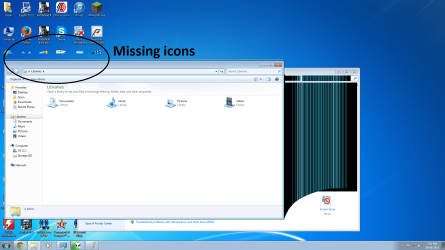
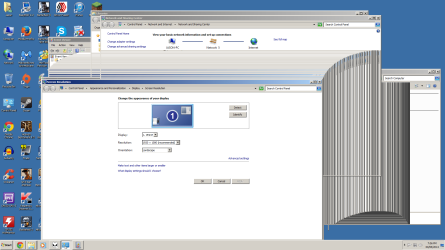
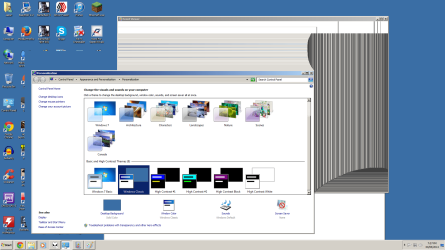
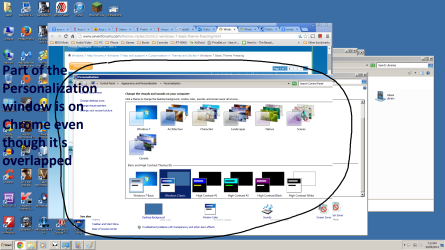
This is what happens when I move a window around.

Untitled.png
Untitled2.png
Untitled3.png
Untitled4.png
Untitled5.png

Is it a problem if I upgraded my mobo from P8Z77-V LX to P8Z77-V Pro and did not reinstall Windows 7? They are the same chipset but the Pro has a few more features. I also disabled the Asmedia USB and SATA controller in the BIOS.

I already tried installing the chipset driver. It said that a new version is already installed. I already installed all the drivers for my computer and there are no unknown drivers except for Asus Wifi Go.
 

My Computer

Computer type
PC/Desktop
Computer Manufacturer/Model Number
Custom Build
OS
Windows 7 Ultimate SP1 64 bit
CPU
Intel i5-3570k
Motherboard
Asus P8Z77-V Pro (2104)
Memory
G.Skill Ripjaws X 16GB (4x4 GB) DDR3 1600MHz
Graphics Card(s)
MSI HD 7870 2GB
Sound Card
Creative SB X-Fi HD USB
Monitor(s) Displays
Asus VE247H
Screen Resolution
1080p
Hard Drives
ADATA XPG SX900 256GB SSD
WD Black 2TB
PSU
XFX Pro 850W XXX Edition Semi-Modular
Case
Zalman Z11 Plus
Cooling
CM Hyper 212 Evo (2 mounted fans) + 6 fans
Keyboard
Das Keyboard Model S Professional MX Brown PS/2
Mouse
Logitech G700s
bump
 

My Computer

Computer type
PC/Desktop
Computer Manufacturer/Model Number
Custom Build
OS
Windows 7 Ultimate SP1 64 bit
CPU
Intel i5-3570k
Motherboard
Asus P8Z77-V Pro (2104)
Memory
G.Skill Ripjaws X 16GB (4x4 GB) DDR3 1600MHz
Graphics Card(s)
MSI HD 7870 2GB
Sound Card
Creative SB X-Fi HD USB
Monitor(s) Displays
Asus VE247H
Screen Resolution
1080p
Hard Drives
ADATA XPG SX900 256GB SSD
WD Black 2TB
PSU
XFX Pro 850W XXX Edition Semi-Modular
Case
Zalman Z11 Plus
Cooling
CM Hyper 212 Evo (2 mounted fans) + 6 fans
Keyboard
Das Keyboard Model S Professional MX Brown PS/2
Mouse
Logitech G700s
Back
Top