
Solved Windows 7 Black screen upon loading to login URGENT HELP

fight2fight

New member
Local time
6:44 AM
Messages
18
hi everyone.

i have bumped into a little problem, well i hope it is a little problem to fix, as i have tried a fair few things.

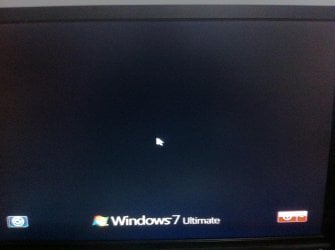
ok this is what im getting when i load my windows 7, theres no background or login image, and also when i was restarting my computer it done the same thing black background with the windows logo on the bottom while shutting down/restarting

"iv attached the image"


now want i done was, since i wanted to revert my icons back to stock i had these files in my backups for awhile and i replaced them with the current ones in system32

imageres.dll imagesp1.dll shell32.dll zipfldr.dll

this is the last thing i done till this happened.

now i have tried to run repair but wont detect anything and says you hardware attached etc. and i can't run system restore since i don't have it on.

if this helps i also running dual boot win 7 and xp, atm im on xp so i can access the win 7 system files.

please i really need help. thanks
 

Attachments
  • Picture 002.jpg
    Picture 002.jpg
    532.8 KB · Views: 14

My Computer My Computer

At a glance

XP, Vista
OS
XP, Vista
Try this:

1. Reboot while holding down the F8 key.
2. Choose safe mode with networking.
3. Google for the latest driver for your video card.
4. Download and install the new driver after uninstalling the old one.
5. Reboot your computer.

Also, you could try the repair option two or three times.

I don't want to nag, but when you're up and running, turn system restore back on - you know it makes sense. ;)
 

My Computer My Computer

At a glance

Windows 7 Ultimate SP1 64-BitIntel Core i7 870 @ 2.93GHz8Gb Dual-Channel DDR3 @ 664MHznVidia GeForce GTX 460 1024MB dedicated RAM
Computer Manufacturer/Model Number
HP Pavilion Elite 495UK
OS
Windows 7 Ultimate SP1 64-Bit
CPU
Intel Core i7 870 @ 2.93GHz
Motherboard
MSI 2A9C (CPU1)
Memory
8Gb Dual-Channel DDR3 @ 664MHz
Graphics Card(s)
nVidia GeForce GTX 460 1024MB dedicated RAM
Sound Card
Realtek HD Audio
Monitor(s) Displays
HP2310i
Screen Resolution
1920 x 1080
Hard Drives
1x1954GB Hitachi HDS22020ALA 330 (RAID), 1x1954GB Hitachi External for backup and storage
PSU
460W
Case
HP Elite
Cooling
Air cooled
Keyboard
Logitech K750 solar-powered keyboard
Mouse
Logitech Wireless M180 mouse
Internet Speed
2Mb
Other Info
Pure Avanti Flow Internet Radio with iPod Dock, 64Gb iPod, HP USB Speakers, Sony MDR-V500 Headphones, Sony Vaio F-Series Laptop
thanks for the reply.

hmm i forget to mention that that i also get the same result when i try safe mode, and also im pretty sure its not might video card, since i updated it recently. the issue happened when i replaced the system 32 files as i mention in the thread.

im going to give repair another shot using the disk instead through the boot up option.

and yea i will turn on system restore.
 

My Computer My Computer

At a glance

XP, Vista
OS
XP, Vista
i finally fixed the issue. what i did was i got the copies of those files from my freind since he has windows 7 and it up to date and replaced them while i was in xp as i have dual boot.

then as i select windows 7 on boot up i was prompt to repair so i accepted and this time it finally repaired some things as before it was only giving me errors. anyways i checked the log and it fixed those files i replaced early to match my windows 7.

and now its working great. :D
 

My Computer My Computer

At a glance

XP, Vista
OS
XP, Vista
Glad to hear it. Thanks for the feedback.
 

My Computer My Computer

At a glance

Windows 7 Ultimate SP1 64-BitIntel Core i7 870 @ 2.93GHz8Gb Dual-Channel DDR3 @ 664MHznVidia GeForce GTX 460 1024MB dedicated RAM
Computer Manufacturer/Model Number
HP Pavilion Elite 495UK
OS
Windows 7 Ultimate SP1 64-Bit
CPU
Intel Core i7 870 @ 2.93GHz
Motherboard
MSI 2A9C (CPU1)
Memory
8Gb Dual-Channel DDR3 @ 664MHz
Graphics Card(s)
nVidia GeForce GTX 460 1024MB dedicated RAM
Sound Card
Realtek HD Audio
Monitor(s) Displays
HP2310i
Screen Resolution
1920 x 1080
Hard Drives
1x1954GB Hitachi HDS22020ALA 330 (RAID), 1x1954GB Hitachi External for backup and storage
PSU
460W
Case
HP Elite
Cooling
Air cooled
Keyboard
Logitech K750 solar-powered keyboard
Mouse
Logitech Wireless M180 mouse
Internet Speed
2Mb
Other Info
Pure Avanti Flow Internet Radio with iPod Dock, 64Gb iPod, HP USB Speakers, Sony MDR-V500 Headphones, Sony Vaio F-Series Laptop

What exactly did you do? Did you reinstall the OS using another OEM OS disk or did you use a Windows 7 Recovery Disk?

I have the exact same problem as you when I try to log into Windows but I have no idea what I did that caused the problem.
 

My Computer My Computer

At a glance

Windows 7 Home Premium 64bitAMD A8-3850 APU with Radeon(tm) HD Graphics × 416GBAMD Radeon HD 6750
OS
Windows 7 Home Premium 64bit
CPU
AMD A8-3850 APU with Radeon(tm) HD Graphics × 4
Memory
16GB
Graphics Card(s)
AMD Radeon HD 6750
Hard Drives
2TB Hard drive
The method with replacing those files from healthy Windows 7 system worked perfectly! Thank you!
 

My Computer My Computer

At a glance

Windows 7 Ultimate x64
Computer type
PC/Desktop
OS
Windows 7 Ultimate x64
Back
Top