Hello,
My Old hard drive has Windows Vista Ultimate 64 bit installed on it. I purchased the Windows 7 Home Premium upgrade
and ran the upgrade. Removed the Vista hard drive, and can not start Windows 7.
Only issue on this system, I have upgraded two other systems without any problem.
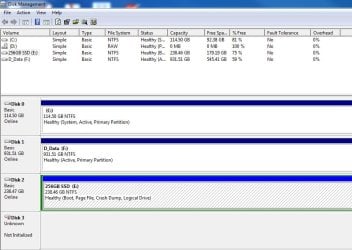
SSD with Windows 7 Home Premium upgrade on it, Hard drive with Windows Vista Ultimate on it.
Error Loading operating system.
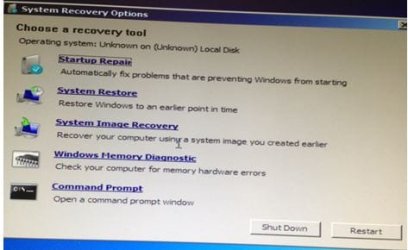
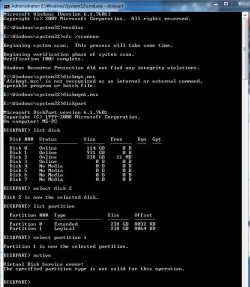
Insert Windows 7 setup disk, eventually choose command prompt, then ran bootrec.
It came up with four choices: /FixBoot, /FixMBR, /ScanOs, and /RebuildBcd
Vista drive is removed from the system.
bootrec /ScanOs shows:
successfully scanned windows installations.
Total identified Windows installations: 2
[1] D:\Windows
[2] D:\Windows.old.000\Windows
The operation completed successfully
bootrec /fixmbr
The operation completed successfully
bootrec /FixBoot
Element not found
bootrec /RebuildBcd
Total identified Windows installations: 2
[1] D:\Windows
Add installation to boot list? Yes(Y)/No(N)/All(A): Choose Y
[2] D:\Windows.old.000\Windows
Add installation to boot list? Yes(Y)/No(N)/All(A): Choose Y
Element not found
Reinserted the Vista hard drive, then did a bootrec /scanOs
[1] E:\Windows
[2] C:\Windows
[3] E:\Windows.old.000\Windows
bootrec /RebuildBcd
Total identified Windows installations: 3
[1] E:\Windows
Add installation to boot list? Yes(Y)/No(N)/All(A): Choose Y
[2] C:\Windows
Add installation to boot list? Yes(Y)/No(N)/All(A): Choose Y
[2] E:\Windows.old.000\Windows
Add installation to boot list? Yes(Y)/No(N)/All(A): Choose Y
Element not found
Reboot, then the prompt appears to select two Windows 7 and one Windows Vista.
From this point, If I choose the second Windows 7, I can get my Windows 7 to start.
Likewise, if I choose Vista, Vista starts.
What do I need to do to get Windows 7 to boot up without the vista disk installed?
Thank you.
My Old hard drive has Windows Vista Ultimate 64 bit installed on it. I purchased the Windows 7 Home Premium upgrade
and ran the upgrade. Removed the Vista hard drive, and can not start Windows 7.
Only issue on this system, I have upgraded two other systems without any problem.
SSD with Windows 7 Home Premium upgrade on it, Hard drive with Windows Vista Ultimate on it.
Error Loading operating system.
Insert Windows 7 setup disk, eventually choose command prompt, then ran bootrec.
It came up with four choices: /FixBoot, /FixMBR, /ScanOs, and /RebuildBcd
Vista drive is removed from the system.
bootrec /ScanOs shows:
successfully scanned windows installations.
Total identified Windows installations: 2
[1] D:\Windows
[2] D:\Windows.old.000\Windows
The operation completed successfully
bootrec /fixmbr
The operation completed successfully
bootrec /FixBoot
Element not found
bootrec /RebuildBcd
Total identified Windows installations: 2
[1] D:\Windows
Add installation to boot list? Yes(Y)/No(N)/All(A): Choose Y
[2] D:\Windows.old.000\Windows
Add installation to boot list? Yes(Y)/No(N)/All(A): Choose Y
Element not found
Reinserted the Vista hard drive, then did a bootrec /scanOs
[1] E:\Windows
[2] C:\Windows
[3] E:\Windows.old.000\Windows
bootrec /RebuildBcd
Total identified Windows installations: 3
[1] E:\Windows
Add installation to boot list? Yes(Y)/No(N)/All(A): Choose Y
[2] C:\Windows
Add installation to boot list? Yes(Y)/No(N)/All(A): Choose Y
[2] E:\Windows.old.000\Windows
Add installation to boot list? Yes(Y)/No(N)/All(A): Choose Y
Element not found
Reboot, then the prompt appears to select two Windows 7 and one Windows Vista.
From this point, If I choose the second Windows 7, I can get my Windows 7 to start.
Likewise, if I choose Vista, Vista starts.
What do I need to do to get Windows 7 to boot up without the vista disk installed?
Thank you.
My Computer
At a glance
Windows 7 Home Premium 32 bit
- OS
- Windows 7 Home Premium 32 bit