
Master Boot Record problem

CJW

New member
Power User
VIP
Local time
2:07 AM
Messages
439
I'm working on my parents computer & after having to take most of it apart & put it all back together correctly, I'm now stumped at getting it to boot correctly. I've gone through a few diagnostic routes & it all came down to a faulty/corrupt Master Boot Record.

I am able to get into Safe Mode w/Command Prompt so I can see if there is anything I want to get off the drive before I try reformatting & reinstallation. Of course, I've found a bunch of files but I don't know how to copy them to a Flash Drive using the Command Prompt. I tried attaching my drive to theirs & booting into my OS, but that did not work for some reason.

So, how do I copy files to a Flash Drive while in Safe Mode w/Command Prompt. Also, Would Bootrec /FIXBOOT -or- Bootrec /FIXMBR help me?

I believe my parents computer is running XP Media Center Edition.
 

My Computer

Computer type
PC/Desktop
Computer Manufacturer/Model Number
Self built comfuser
OS
10 Pro. 64Bit
CPU
AMD FX 4100, 4-Core Black Edition. Socket AM3+ ~ 3.60GHz
Motherboard
ASUS M5A97 LE R2.0
Memory
2x 4GB Kingston HyperX DDR3-1866 (PC3-14900) - 8GB Total
Graphics Card(s)
ASUS Radeon HD 6670-2GD3
Sound Card
Onboard High Definition Audio Device
Monitor(s) Displays
HP 2009m LCD
Screen Resolution
1600x900, True Color (32bit), 60Hertz
Hard Drives
WD Blue - 1TB, 3D NAND - SATA SSD
PSU
XFX Pro 450W Core Edition - Fully Wired
Case
Antec Super Lanboy
Cooling
Stock CPU fan + 2 (1 front, 1 back) 120mm Antec fans
Keyboard
Logitech MK700/MK710
Mouse
Logitech M705
Internet Speed
Frontier FiOS 50/50
Antivirus
Windows Security
Browser
Vivaldi
Other Info
1x ASUS DRW-24B1ST Multi-DVD Rewriter
1x RocketFish AIO Media Card Reader
1x WD 1TB Passport USB External Drive

My Computer

Computer type
Laptop
Computer Manufacturer/Model Number
Lenovo IdeaPad G580
OS
Windows 8.1/10 x64
CPU
Intel Core i5-3230M
Memory
8 GB
Graphics Card(s)
Intel HD Graphics 4000
Antivirus
Windows Defender, EMET, standard user account
Browser
Internet Explorer
somebody posted this batchfile:
rem bootrec fixers
bootrec /fixmbr
bootrec /fixboot
bootrec /ScanOs
bootrec /RebuildBcd
exit

-- I never tried yet, so I can't verify what happens.
 

My Computer

Computer type
PC/Desktop
Computer Manufacturer/Model Number
Antec desktop; Acer Aspire laptops
OS
Windows 7 Professional 64-bit
CPU
Desktop i5; Acers i5 & i7
Memory
desktop 16GB; 1 Acer 8GB & 1 Acer 16GB
Hard Drives
1TB split into 2 equal partitions [OS and data] usable by RJS
Internet Speed
AT&T DSL
Browser
FF, GChrome, msIE
Other Info
Windows 7 Firewall, Emsisoft AM/AV, MSE [scan-only], SpywareBlaster, Ruiware/BillP combine
What exactly does this mean from post #1?

I'm working on my parents computer & after having to take most of it apart & put it all back together correctly,

Check you boot order in the bios.
 

My Computer

Computer type
PC/Desktop
Computer Manufacturer/Model Number
Home made Desktop
OS
Windows 10 Pro. 64/ version 1709 Windows 7 Pro/64
CPU
Intel i7-6800K @ 4.3
Motherboard
ASUS X-99 Deluxe II
Memory
Corsair Platinum 16 gig @2400
Graphics Card(s)
EVGA GTX 1070 OC
Monitor(s) Displays
Asus 27" LED LCD/VE278Q
Screen Resolution
1920-1080 or 1280-720 HDMI
Hard Drives
INTEL SSD 730-240 Gb Sata 3.0/
PSU
EVGA Platium 1200W
Case
Phanteks Luxe Tempered Glass 8 fans/ one radiator
Cooling
XSPC/ Water Cooled CPU
Keyboard
Das 4 Professional
Mouse
Logitech M705/MX Anywhere 2-S
Internet Speed
100 mbits
Antivirus
Microsoft Security Essentials/ Malwarebytes Premium 3.0/ SAS
Browser
I.E. 11 default/Firefox/ ISP Time Warner Cable/Spectrum
Other Info
LG BluRay Burner/
Sound system-KLipsch-THX/
Icy Dock ssd Hot Swap bays.
LaybackBear, my guess is that if computer is a desktop, the OP probably removed everything, reseated everything, and post/booted to determine if any honest error lead to hdw hiccup. If laptop, can remove and reseat HD and RAM.

Addendum: LaybackBear's reply gave some great places for OP to look over, to make sure of, and so on.
 
Last edited:

My Computer

Computer type
PC/Desktop
Computer Manufacturer/Model Number
Antec desktop; Acer Aspire laptops
OS
Windows 7 Professional 64-bit
CPU
Desktop i5; Acers i5 & i7
Memory
desktop 16GB; 1 Acer 8GB & 1 Acer 16GB
Hard Drives
1TB split into 2 equal partitions [OS and data] usable by RJS
Internet Speed
AT&T DSL
Browser
FF, GChrome, msIE
Other Info
Windows 7 Firewall, Emsisoft AM/AV, MSE [scan-only], SpywareBlaster, Ruiware/BillP combine
Well I wasn't really looking for a guess.
What I'm looking for is information about the sata hard drive hook ups.
If they were changed the boot order could be wrong.
The system flag could also be wrong.
 

My Computer

Computer type
PC/Desktop
Computer Manufacturer/Model Number
Home made Desktop
OS
Windows 10 Pro. 64/ version 1709 Windows 7 Pro/64
CPU
Intel i7-6800K @ 4.3
Motherboard
ASUS X-99 Deluxe II
Memory
Corsair Platinum 16 gig @2400
Graphics Card(s)
EVGA GTX 1070 OC
Monitor(s) Displays
Asus 27" LED LCD/VE278Q
Screen Resolution
1920-1080 or 1280-720 HDMI
Hard Drives
INTEL SSD 730-240 Gb Sata 3.0/
PSU
EVGA Platium 1200W
Case
Phanteks Luxe Tempered Glass 8 fans/ one radiator
Cooling
XSPC/ Water Cooled CPU
Keyboard
Das 4 Professional
Mouse
Logitech M705/MX Anywhere 2-S
Internet Speed
100 mbits
Antivirus
Microsoft Security Essentials/ Malwarebytes Premium 3.0/ SAS
Browser
I.E. 11 default/Firefox/ ISP Time Warner Cable/Spectrum
Other Info
LG BluRay Burner/
Sound system-KLipsch-THX/
Icy Dock ssd Hot Swap bays.
Thanks for the replies, sorry for the delayed update.

1. I booted the computer using my 7 installation media.
2. Brought up the Command Prompt.
3. Ran the following commands: (Resulting text is in parenthesis)

bootrec /fixmbr (The operation completed successfully.)
bootrec /fixboot (The operation completed successfully.)
bootrec /rebuildbcd (Scanning all disks for Windows installations.)
(Please wait, since this may take a while...)
(Successfully scanned Windows installations.
Total identified Windows installations: 0
The operation completed successfully.)

4. I then exited & restarted the computer. The boot logo displayed, then the computer just rebooted itself. After the computer went through this rebooting loop 3 times (I was trying to type this up on my laptop at the time) the Log On to Windows window came up. So I entered the password & SUCCESS!

Not sure why it stated-Total identified Windows installations: 0; but it did work, so I'm happy. I was able to copy the pictures & other files I needed to a flash drive & now going to rebuild my parents a computer using spare parts; they don't know this yet though :)

Question: when at the Command Prompt, should I have entered the commands when the display stated:
X:\Sources -or- go to C: first?
 

My Computer

Computer type
PC/Desktop
Computer Manufacturer/Model Number
Self built comfuser
OS
10 Pro. 64Bit
CPU
AMD FX 4100, 4-Core Black Edition. Socket AM3+ ~ 3.60GHz
Motherboard
ASUS M5A97 LE R2.0
Memory
2x 4GB Kingston HyperX DDR3-1866 (PC3-14900) - 8GB Total
Graphics Card(s)
ASUS Radeon HD 6670-2GD3
Sound Card
Onboard High Definition Audio Device
Monitor(s) Displays
HP 2009m LCD
Screen Resolution
1600x900, True Color (32bit), 60Hertz
Hard Drives
WD Blue - 1TB, 3D NAND - SATA SSD
PSU
XFX Pro 450W Core Edition - Fully Wired
Case
Antec Super Lanboy
Cooling
Stock CPU fan + 2 (1 front, 1 back) 120mm Antec fans
Keyboard
Logitech MK700/MK710
Mouse
Logitech M705
Internet Speed
Frontier FiOS 50/50
Antivirus
Windows Security
Browser
Vivaldi
Other Info
1x ASUS DRW-24B1ST Multi-DVD Rewriter
1x RocketFish AIO Media Card Reader
1x WD 1TB Passport USB External Drive
Not sure why it stated-Total identified Windows installations: 0; but it did work, so I'm happy.

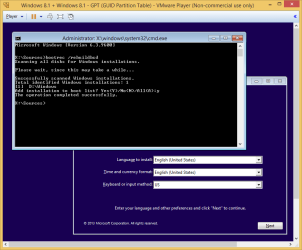
The bootrec /rebuildbcd command will search for Windows installations not included in the Boot Configuration Data (BCD) and then ask you if you'd like to add one or more to it.

bootrec rebuildbcd.png

bootrec /rebuildbcd

The bootrec /rebuildbcd command will search for Windows installations not included in the Boot Configuration Data (BCD) and then ask you if you'd like to add one or more to it.

You should see one of the following messages at the command line.

Option 1

Scanning all disks for Windows installations.

Please wait, since this may take a while...

Successfully scanned Windows installations.
Total identified Windows installations: 0
The operation completed successfully.

Option 2

Scanning all disks for Windows installations.

Please wait, since this may take a while...

Successfully scanned Windows installations.
Total identified Windows installations: 1
[1] C:\Windows
Add installation to boot list? Yes<Y>/No<N>/All<A>:

If you see:

Option 1: This result most likely means that Windows installation data in the BCD store exists but bootrec couldn't find any additional installations of Windows on your computer to add to the BCD.

Option 2: Enter Y or Yes to the "Add installation to boot list?" question.
 

My Computer

Computer type
Laptop
Computer Manufacturer/Model Number
Lenovo IdeaPad G580
OS
Windows 8.1/10 x64
CPU
Intel Core i5-3230M
Memory
8 GB
Graphics Card(s)
Intel HD Graphics 4000
Antivirus
Windows Defender, EMET, standard user account
Browser
Internet Explorer
genet:

Thanks for all the help. I copied what I needed & now going to build my parents a 'Frankenstein'. It won't be their main comfuser, just one the kids & grandkids can play on, so I won't need anything to beefy for them. :)
 

My Computer

Computer type
PC/Desktop
Computer Manufacturer/Model Number
Self built comfuser
OS
10 Pro. 64Bit
CPU
AMD FX 4100, 4-Core Black Edition. Socket AM3+ ~ 3.60GHz
Motherboard
ASUS M5A97 LE R2.0
Memory
2x 4GB Kingston HyperX DDR3-1866 (PC3-14900) - 8GB Total
Graphics Card(s)
ASUS Radeon HD 6670-2GD3
Sound Card
Onboard High Definition Audio Device
Monitor(s) Displays
HP 2009m LCD
Screen Resolution
1600x900, True Color (32bit), 60Hertz
Hard Drives
WD Blue - 1TB, 3D NAND - SATA SSD
PSU
XFX Pro 450W Core Edition - Fully Wired
Case
Antec Super Lanboy
Cooling
Stock CPU fan + 2 (1 front, 1 back) 120mm Antec fans
Keyboard
Logitech MK700/MK710
Mouse
Logitech M705
Internet Speed
Frontier FiOS 50/50
Antivirus
Windows Security
Browser
Vivaldi
Other Info
1x ASUS DRW-24B1ST Multi-DVD Rewriter
1x RocketFish AIO Media Card Reader
1x WD 1TB Passport USB External Drive
Update.
I was able to rebuild my parents computer (they don't know it yet) & everything is working good.

I was wondering if anyone can give me suggestions on how to get their XP Pro w/SP3 upgraded to 7 Pro w/SP1.
If I recall, I can't upgrade through Windows Update; but I need to get new media instead, correct?
 

My Computer

Computer type
PC/Desktop
Computer Manufacturer/Model Number
Self built comfuser
OS
10 Pro. 64Bit
CPU
AMD FX 4100, 4-Core Black Edition. Socket AM3+ ~ 3.60GHz
Motherboard
ASUS M5A97 LE R2.0
Memory
2x 4GB Kingston HyperX DDR3-1866 (PC3-14900) - 8GB Total
Graphics Card(s)
ASUS Radeon HD 6670-2GD3
Sound Card
Onboard High Definition Audio Device
Monitor(s) Displays
HP 2009m LCD
Screen Resolution
1600x900, True Color (32bit), 60Hertz
Hard Drives
WD Blue - 1TB, 3D NAND - SATA SSD
PSU
XFX Pro 450W Core Edition - Fully Wired
Case
Antec Super Lanboy
Cooling
Stock CPU fan + 2 (1 front, 1 back) 120mm Antec fans
Keyboard
Logitech MK700/MK710
Mouse
Logitech M705
Internet Speed
Frontier FiOS 50/50
Antivirus
Windows Security
Browser
Vivaldi
Other Info
1x ASUS DRW-24B1ST Multi-DVD Rewriter
1x RocketFish AIO Media Card Reader
1x WD 1TB Passport USB External Drive

My Computer

Computer type
PC/Desktop
Computer Manufacturer/Model Number
Home made Desktop
OS
Windows 10 Pro. 64/ version 1709 Windows 7 Pro/64
CPU
Intel i7-6800K @ 4.3
Motherboard
ASUS X-99 Deluxe II
Memory
Corsair Platinum 16 gig @2400
Graphics Card(s)
EVGA GTX 1070 OC
Monitor(s) Displays
Asus 27" LED LCD/VE278Q
Screen Resolution
1920-1080 or 1280-720 HDMI
Hard Drives
INTEL SSD 730-240 Gb Sata 3.0/
PSU
EVGA Platium 1200W
Case
Phanteks Luxe Tempered Glass 8 fans/ one radiator
Cooling
XSPC/ Water Cooled CPU
Keyboard
Das 4 Professional
Mouse
Logitech M705/MX Anywhere 2-S
Internet Speed
100 mbits
Antivirus
Microsoft Security Essentials/ Malwarebytes Premium 3.0/ SAS
Browser
I.E. 11 default/Firefox/ ISP Time Warner Cable/Spectrum
Other Info
LG BluRay Burner/
Sound system-KLipsch-THX/
Icy Dock ssd Hot Swap bays.
That's what I thought, thanks.
 

My Computer

Computer type
PC/Desktop
Computer Manufacturer/Model Number
Self built comfuser
OS
10 Pro. 64Bit
CPU
AMD FX 4100, 4-Core Black Edition. Socket AM3+ ~ 3.60GHz
Motherboard
ASUS M5A97 LE R2.0
Memory
2x 4GB Kingston HyperX DDR3-1866 (PC3-14900) - 8GB Total
Graphics Card(s)
ASUS Radeon HD 6670-2GD3
Sound Card
Onboard High Definition Audio Device
Monitor(s) Displays
HP 2009m LCD
Screen Resolution
1600x900, True Color (32bit), 60Hertz
Hard Drives
WD Blue - 1TB, 3D NAND - SATA SSD
PSU
XFX Pro 450W Core Edition - Fully Wired
Case
Antec Super Lanboy
Cooling
Stock CPU fan + 2 (1 front, 1 back) 120mm Antec fans
Keyboard
Logitech MK700/MK710
Mouse
Logitech M705
Internet Speed
Frontier FiOS 50/50
Antivirus
Windows Security
Browser
Vivaldi
Other Info
1x ASUS DRW-24B1ST Multi-DVD Rewriter
1x RocketFish AIO Media Card Reader
1x WD 1TB Passport USB External Drive
Back
Top