Windows 7 build 7601 "not genuine" after update

SmoovAsEggs

New member
Local time
2:56 PM
Messages
22
Hello all I am new here. 1st post. A few weeks back I turned my laptop on to see that after 4 years with my laptop that now my OS (Windows 7 home premium 64 bit) was somehow not genuine anymore. I've called Microsoft and talked to them 3 different times and have spent 6-7 hours trying different remedies to possible fix my issues. Nothing worked and they told me I would have to back up all my data and re-install Windows. Frustrated I gave up because I didn't have a hard drive big enough to back up all my data and I was fed up with all the dead ends Microsoft send me down. Since then I have recently purchased a external hard drive and done extensive reading and searching around the web to find a possible fix to my solution. That solution has yet to surface. Which is why I am here asking for help from anybody willing to assist.

Before anybody does try to help some background on the situation. My copy of Windows is legit and was pre installed on my laptop when I purchased it. My laptop will not connect to the Internet for some strange reason but I can do just about everything else on it. I do have access to the Internet on other PCs I have. I downloaded a program called Macrium Reflect to back up my data. I'm a noob on backing up and re-installing Windows because I've never had this issues before.

Thank you to anyone who took the time to read this and help please.
 

My Computer My Computer

At a glance

Windows 7 Home Premium 64bit
Computer type
PC/Desktop
OS
Windows 7 Home Premium 64bit
IF it cannot connect to the web it will turn Non genuine, it does a minor check every time you start-up and a major one every 90 days.
We need to find why its not connecting to the net before we can progress.
1st stop go controlpanel>>devicemanager> any ! or down arrows, on any driver, especially network adapters or problem devices.

Roy
 

My Computer My Computer

At a glance

W7 home premium 32bit/W7HP 64bit/w10 tp insid...E5300 dual core3gbNvidia Geforce 7100 Nforce 630i
Computer type
PC/Desktop
Computer Manufacturer/Model Number
medionl/Aspire 6930G/acer x55a
OS
W7 home premium 32bit/W7HP 64bit/w10 tp insider ring
CPU
E5300 dual core
Motherboard
medion MS7366
Memory
3gb
Graphics Card(s)
Nvidia Geforce 7100 Nforce 630i
Monitor(s) Displays
avixc
Internet Speed
n (isp resticted to 72)
Antivirus
mse/pands
Browser
palemoon
Other Info
Belkin Fd7050 n USB using Railink RT2870 drivers, more upto date
There is a yellow ! On "WD SES Device USB Device" under the Other Devices section
 

My Computer My Computer

At a glance

Windows 7 Home Premium 64bit
Computer type
PC/Desktop
OS
Windows 7 Home Premium 64bit
Hi Smmov,
If W7 is on that Western digital HD you need those drivers, should be on the CD that came with it.

Roy
 

My Computer My Computer

At a glance

W7 home premium 32bit/W7HP 64bit/w10 tp insid...E5300 dual core3gbNvidia Geforce 7100 Nforce 630i
Computer type
PC/Desktop
Computer Manufacturer/Model Number
medionl/Aspire 6930G/acer x55a
OS
W7 home premium 32bit/W7HP 64bit/w10 tp insider ring
CPU
E5300 dual core
Motherboard
medion MS7366
Memory
3gb
Graphics Card(s)
Nvidia Geforce 7100 Nforce 630i
Monitor(s) Displays
avixc
Internet Speed
n (isp resticted to 72)
Antivirus
mse/pands
Browser
palemoon
Other Info
Belkin Fd7050 n USB using Railink RT2870 drivers, more upto date
I just got the hard drive a few days ago. It came with no CD
 

My Computer My Computer

At a glance

Windows 7 Home Premium 64bit
Computer type
PC/Desktop
OS
Windows 7 Home Premium 64bit
OK
on your other comp search the WD site for that Model, copy the drivers to a usb stick and update it from there.

Roy
 

My Computer My Computer

At a glance

W7 home premium 32bit/W7HP 64bit/w10 tp insid...E5300 dual core3gbNvidia Geforce 7100 Nforce 630i
Computer type
PC/Desktop
Computer Manufacturer/Model Number
medionl/Aspire 6930G/acer x55a
OS
W7 home premium 32bit/W7HP 64bit/w10 tp insider ring
CPU
E5300 dual core
Motherboard
medion MS7366
Memory
3gb
Graphics Card(s)
Nvidia Geforce 7100 Nforce 630i
Monitor(s) Displays
avixc
Internet Speed
n (isp resticted to 72)
Antivirus
mse/pands
Browser
palemoon
Other Info
Belkin Fd7050 n USB using Railink RT2870 drivers, more upto date
Ok I downloaded the drivers and installed them onto the laptop now there is no yellow ! signs at all in the device manager section. But that still doesn't remedy the original issue with the operating system. Also of note. I now get a pop up on the start menu telling me that I need to re-install Windows.
 

My Computer My Computer

At a glance

Windows 7 Home Premium 64bit
Computer type
PC/Desktop
OS
Windows 7 Home Premium 64bit
Interesting, i have never heard/seen of a pop-up telling me to reinstall windows that's legit.
If its from MS it would also have an error code
It sounds more like a virus.
Download a copy of a portable AV, Emisoft's a good one, make sure its from thier site.

Roy
 

My Computer My Computer

At a glance

W7 home premium 32bit/W7HP 64bit/w10 tp insid...E5300 dual core3gbNvidia Geforce 7100 Nforce 630i
Computer type
PC/Desktop
Computer Manufacturer/Model Number
medionl/Aspire 6930G/acer x55a
OS
W7 home premium 32bit/W7HP 64bit/w10 tp insider ring
CPU
E5300 dual core
Motherboard
medion MS7366
Memory
3gb
Graphics Card(s)
Nvidia Geforce 7100 Nforce 630i
Monitor(s) Displays
avixc
Internet Speed
n (isp resticted to 72)
Antivirus
mse/pands
Browser
palemoon
Other Info
Belkin Fd7050 n USB using Railink RT2870 drivers, more upto date
I have McAfee installed and have had it for years. I also have malwarebites. But I don't think they're doing much since the Internet doesn't connect anymore. The message says "reinstall Windows. A change was made to Windows. You need to reinstall and activate Windows". Also another saying you may be a victim of software counterfeiting"
 

My Computer My Computer

At a glance

Windows 7 Home Premium 64bit
Computer type
PC/Desktop
OS
Windows 7 Home Premium 64bit
Hi Smoov,
You can still run a scan with Mwbytes, just untick the check for updates prior to scan in the dashboard.
MS might have asked you to uninstall MacAfee, I am just to see if thats the prob
USE thier uninstaller

Back to Internet.
for starters from an elevated command mode

ipconfig /flushdns .... press enter
ipconfig /registerdns .... press enter
netsh winsock reset .... press enter

REBOOT


Is it Ethernet/wifi/both that wont connect.
Have you run the Troubleshoot problems in Network and sharing centre.
Lets compare the SAME type of connection to a working one
Network sharing >> change adapter settings >> select connection RIGHT click >>
(details on the following 2 screens should be identical apart from the ipv6 address)
status >> detail.

Roy


Do you have a restore point prior to your problem, tick the show more box
 

My Computer My Computer

At a glance

W7 home premium 32bit/W7HP 64bit/w10 tp insid...E5300 dual core3gbNvidia Geforce 7100 Nforce 630i
Computer type
PC/Desktop
Computer Manufacturer/Model Number
medionl/Aspire 6930G/acer x55a
OS
W7 home premium 32bit/W7HP 64bit/w10 tp insider ring
CPU
E5300 dual core
Motherboard
medion MS7366
Memory
3gb
Graphics Card(s)
Nvidia Geforce 7100 Nforce 630i
Monitor(s) Displays
avixc
Internet Speed
n (isp resticted to 72)
Antivirus
mse/pands
Browser
palemoon
Other Info
Belkin Fd7050 n USB using Railink RT2870 drivers, more upto date
Ok running malwarebytes currently

And so to get this straight. I should uninstall McAfee?

After I entered ipconfig /flushdns

"Windows IP configuration

Could not flush the DNS Resolver Cache: Function failed during execution"

After I entered ipconfig /registerdns

"Windows IP configuration

Registration of DNS records failed: The RPC server is unavailable"

After I entered netsh winsock reset

"Successfully reset the Winsock Catalog.
You must restart the computer in order to complete the reset."

Going to reboot


The Ethernet and wifi both won't connect. I went through the whole troubleshoot with Microsoft on the phone and they gave up on me

The info on the network connection details screen comparing my laptop to a dell desktop is very different. The IPv4 DNS server is the same but that's about it except for the yes for the DHCP Enabled and NetBIOS over...

And no I don't have a restore point before this
 

My Computer My Computer

At a glance

Windows 7 Home Premium 64bit
Computer type
PC/Desktop
OS
Windows 7 Home Premium 64bit
Hi Smoov,
Both of those error messages relate to one service,
Check that DHCP has/is started and on Automatic
(controlpanel>> administrativeservice>> services>>scroll to DHCP RIGHT click(properties) > change to auto)

might also be handy if you could post any dissabled/manual services.

Uninstall Macafee YES, doesn't matter if your not online.
If its Paid reinstall after, otherwise just use MSE.
MBAM scan clean?

That pop-up, with the extra info you posted that IS the MS one, more of a banner than a pop-up, thats about your new WD.

MS also released a few botched updates recently that mucked up RPC, check the >> INSTALLED << list and DATE of your last updates, is that when your probs started, if so post a list of them.

Roy
 
Last edited:

My Computer My Computer

At a glance

W7 home premium 32bit/W7HP 64bit/w10 tp insid...E5300 dual core3gbNvidia Geforce 7100 Nforce 630i
Computer type
PC/Desktop
Computer Manufacturer/Model Number
medionl/Aspire 6930G/acer x55a
OS
W7 home premium 32bit/W7HP 64bit/w10 tp insider ring
CPU
E5300 dual core
Motherboard
medion MS7366
Memory
3gb
Graphics Card(s)
Nvidia Geforce 7100 Nforce 630i
Monitor(s) Displays
avixc
Internet Speed
n (isp resticted to 72)
Antivirus
mse/pands
Browser
palemoon
Other Info
Belkin Fd7050 n USB using Railink RT2870 drivers, more upto date
Ok so 1) I ran the malwarebytes and got 13 threats detected. All of which say "PUP.Optional.Babylon" and are categorized Potentially Unwanted Programs. They were all succesfully quarantined

2) I uninstalled McAfee

3) the DHCP Client was already on automatic

4) the DHCP Client had the option to start it. And I clicked that and after a few seconds of a bar filling green it stopped and then I got a error "Windows could not start the DHCP Client service on Local Computer. Error 5: Access is denied"

5) before I came here for help I removed about a dozen or so updates that were the initial cause of my issues. But nothing ever changed in regards to my OS working properly. So as of now the most recent updates were installed 2/11/16 (KB3127220, KB3127233, KB3115858, KB3134814, KB3124280, KB3122661, KB3134214, KB3122648, KB3126593, KB3126587)
 

My Computer My Computer

At a glance

Windows 7 Home Premium 64bit
Computer type
PC/Desktop
OS
Windows 7 Home Premium 64bit
Hi Smoove
You should be able to start:confused: it .
Thats the puppy thats stopping you gettin on the net it HAS to be started

Rats now i gotta figure out what causing the access denied

Do you run any tuneup utility or registry editor

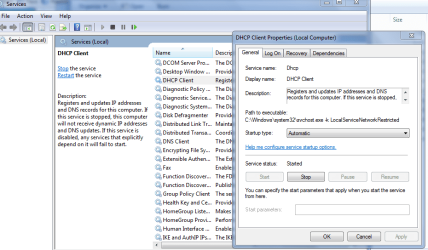
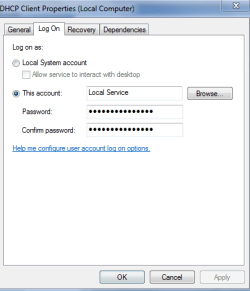
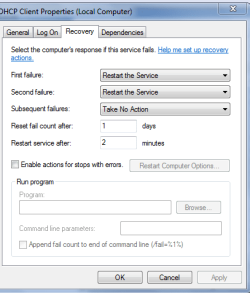
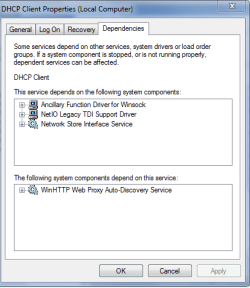
for starters can you compare mine to yours in the screenshots
Controlpanel >> administration tools >> services >> scroll to dhcp RIGHT click > properties.

Roy
 

Attachments

  • smv1.PNG
    smv1.PNG
    40.6 KB · Views: 1
  • smv2.PNG
    smv2.PNG
    9.6 KB · Views: 53
  • smv3.PNG
    smv3.PNG
    12.8 KB · Views: 53
  • smv4.PNG
    smv4.PNG
    13.1 KB · Views: 54

My Computer My Computer

At a glance

W7 home premium 32bit/W7HP 64bit/w10 tp insid...E5300 dual core3gbNvidia Geforce 7100 Nforce 630i
Computer type
PC/Desktop
Computer Manufacturer/Model Number
medionl/Aspire 6930G/acer x55a
OS
W7 home premium 32bit/W7HP 64bit/w10 tp insider ring
CPU
E5300 dual core
Motherboard
medion MS7366
Memory
3gb
Graphics Card(s)
Nvidia Geforce 7100 Nforce 630i
Monitor(s) Displays
avixc
Internet Speed
n (isp resticted to 72)
Antivirus
mse/pands
Browser
palemoon
Other Info
Belkin Fd7050 n USB using Railink RT2870 drivers, more upto date
No I don't even know what a tuneup utility is and I don't run registry editors

Your screenshots compared to my screen are almost identical except in general. My service status is STOPPED and I only have an option to hit start button. To which I get Error 5: Access is denied still.
 

My Computer My Computer

At a glance

Windows 7 Home Premium 64bit
Computer type
PC/Desktop
OS
Windows 7 Home Premium 64bit
Hi Smoov,
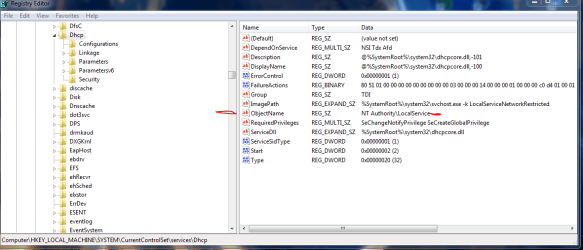
Can you check the registry entries here via regedit
HKLM>system>current control set >services>Dhcp ,
especially the marked one

Roy
 

Attachments

  • smoov.PNG
    smoov.PNG
    34 KB · Views: 2

My Computer My Computer

At a glance

W7 home premium 32bit/W7HP 64bit/w10 tp insid...E5300 dual core3gbNvidia Geforce 7100 Nforce 630i
Computer type
PC/Desktop
Computer Manufacturer/Model Number
medionl/Aspire 6930G/acer x55a
OS
W7 home premium 32bit/W7HP 64bit/w10 tp insider ring
CPU
E5300 dual core
Motherboard
medion MS7366
Memory
3gb
Graphics Card(s)
Nvidia Geforce 7100 Nforce 630i
Monitor(s) Displays
avixc
Internet Speed
n (isp resticted to 72)
Antivirus
mse/pands
Browser
palemoon
Other Info
Belkin Fd7050 n USB using Railink RT2870 drivers, more upto date
It looks identical to your screenshot
 

My Computer My Computer

At a glance

Windows 7 Home Premium 64bit
Computer type
PC/Desktop
OS
Windows 7 Home Premium 64bit
Hi Smmov,
can you run these elevated admin commands

net localgroup Administrators /add networkservice
press enter then

net localgroup Administrators /add localservice
press enter

Reboot

started/can you start it.

Roy
 

My Computer My Computer

At a glance

W7 home premium 32bit/W7HP 64bit/w10 tp insid...E5300 dual core3gbNvidia Geforce 7100 Nforce 630i
Computer type
PC/Desktop
Computer Manufacturer/Model Number
medionl/Aspire 6930G/acer x55a
OS
W7 home premium 32bit/W7HP 64bit/w10 tp insider ring
CPU
E5300 dual core
Motherboard
medion MS7366
Memory
3gb
Graphics Card(s)
Nvidia Geforce 7100 Nforce 630i
Monitor(s) Displays
avixc
Internet Speed
n (isp resticted to 72)
Antivirus
mse/pands
Browser
palemoon
Other Info
Belkin Fd7050 n USB using Railink RT2870 drivers, more upto date
Not sure if "started/" was supposed to be a command prompt but as I rebooted my laptop. The yellow error ! Is gone from my wifi icon. But as I open up all my internet browsers I can't actually get to a webpage

Chrome says "this webpage is not available DNS_PROBE_FINISHED_NXDOMAIN" for every site I try to access. I also tried Firefox

I tried to log in to another wifi and the same situation occurred
 

My Computer My Computer

At a glance

Windows 7 Home Premium 64bit
Computer type
PC/Desktop
OS
Windows 7 Home Premium 64bit
I also noticed that the Windows is not genuine error is now gone from the bottom of the screen
 

My Computer My Computer

At a glance

Windows 7 Home Premium 64bit
Computer type
PC/Desktop
OS
Windows 7 Home Premium 64bit
Back
Top