Solved Windows 7 , C drive filling up on its own !!

prayagdave93

New member
Local time
12:08 PM
Messages
8
I tried deleting the system restore points and cleaning all the junk and cache files.

Even tried managing the page index files and last time this problem occured i even deleted the hiberfil.sys and pageindex.sys ( something like that name ) . tried apps like WinDirstat and it pointed me out to the extra space being taken up by the " common files "

my C drive has filled up and common files are taking up all the extra space ( 47 Gb / 98 Gb )
and i dont think deleting them would be any smart ,
Please let me know what should i do ?
 

My Computer My Computer

At a glance

64 bit
Computer type
PC/Desktop
OS
64 bit
Re install windows :)

Post a shot of Disk Management

And please fill in your specs, completely 100%
 

My Computer My Computer

At a glance

Windows 10 Pro x64Intel Core i7 6700KGSkill TridentZ RGB 16GB 3600 16-16-16-36EVGA GTX 980 Ti SC x2
Computer type
PC/Desktop
Computer Manufacturer/Model Number
Skylake Special #666
OS
Windows 10 Pro x64
CPU
Intel Core i7 6700K
Motherboard
Asus Sabertooth Z170 Mark 1
Memory
GSkill TridentZ RGB 16GB 3600 16-16-16-36
Graphics Card(s)
EVGA GTX 980 Ti SC x2
Sound Card
Realtek High Definition
Monitor(s) Displays
AOC G2460PG
Screen Resolution
1920 x 1080 144Hz
Hard Drives
Samsung 860 Pro 256GB, Seagate Barracuda 4TB x2
PSU
EVGA 1000 P2, EVGA White Custom Braided Cables
Case
Corsair Vengeance C70 Gunmetal Black
Cooling
Corsair H100i v2, Corsair ML120 x2, Thermal Grizzly Kryonaut
Keyboard
Logitech G910 Orion Spectrum
Mouse
Logitech G700s
Internet Speed
Verizon Fios Quantum Gateway 75/75
Antivirus
Windows Defender, Malwarebytes Free 3.8.3
Browser
Chrome
Other Info
Corsair SP120 x4, LG Blu-ray Drive, Durabrand HT-395 100 Watt Dolby Digital Amp, Corsair H2100 Wireless 7.1 Headset
tried apps like WinDirstat and it pointed me out to the extra space being taken up by the " common files "

my C drive has filled up and common files are taking up all the extra space ( 47 Gb / 98 Gb )
and i dont think deleting them would be any smart ,
Please let me know what should i do ?

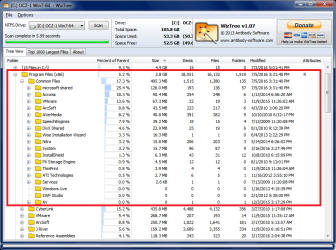
You need to drill down in Common Files and figure out what is using so much space.

The W7 system I'm on right now,
C:\Program Files (x86)\Common Files uses 495 MB
C:\Program Files\Common Files uses 282 MB

CommonFiles.png
 

My Computer My Computer

At a glance

Multi-Boot W7_Pro_x64 W8.1_Pro_x64 W10_Pro_x6...AMD Athlon II x4 6206GB GSkill DDR2 800AMD 4670 GPU + AMD 4200 IGP
Computer type
PC/Desktop
Computer Manufacturer/Model Number
home built
OS
Multi-Boot W7_Pro_x64 W8.1_Pro_x64 W10_Pro_x64 +Linux_VMs +Chromium_VM
CPU
AMD Athlon II x4 620
Motherboard
Gigabyte GA-MA785G-UD3H
Memory
6GB GSkill DDR2 800
Graphics Card(s)
AMD 4670 GPU + AMD 4200 IGP
Sound Card
on board Realtek ALC889A
Monitor(s) Displays
RCA 40" LCD TV, Insignia 32" LCD TV, HP 15" LCD monitor
Screen Resolution
1680 x 1050
Hard Drives
OCZ Vertex 3 120GB,
Samsung F3 1TB (3),
Several others - WD, Seagate, Hitachi, ...
PSU
Corsair 500 W
Case
Rosewill mid tower
Cooling
CM 90mm rifle
Keyboard
Gyration wireless, Logitech wireless, Dell USB wired
Mouse
Gyration wireless, Logitech wireless, V7 USB wired
Internet Speed
Spectrum - 100Mbps D / 10Mbps U
Antivirus
Avast, MBAM3, EMET, WinPatrol
Browser
Pale Moon, Firefox, IE
Other Info
2 multi-boot PC's
Mainly HTPC/Office/Gen purpose (no gaming).
Trendnet USB KVM.
LG DVD burner/Blue Ray Player.
Tray system for removable SATA backup drives.

Not currently OCd, under-volted.
I use Hybrid sleep, rarely re-boot or shutdown.

Hauppauge HD-PVR, Avermedia PCIe TV Tuner, Hauppauge PCI TV Tuner.
Mine is different but , The folder has a heck load of small size files , all equal in size..now i dont know which ones to delete and which ones to leave out.
 

My Computer My Computer

At a glance

64 bit
Computer type
PC/Desktop
OS
64 bit
You Windows 7 in C: drive is too small storage space.

Although you have 1 TB drive, you have used too big storage space for Games & Photos.

For the Disk-1 (2nd) HDD of 500 GB, you only use 170 GB or one-third of the HDD.

You can do a partition in the Disk-1 (2nd) HDD of 500GB

The best option is to move the partition "Photos" of 30 GB and "Games" occupy 60 GB.
Create 2 folders, "Photos" and "Games" in the Disk-1 (500 GB HDD) as folders, instead of partitions.
Copy the partition "Photos" on folders & files to Disk-1 "Photos" folder.
Copy the partition "Games" on filders & files to Disk-1 "Games" folder***option.

Do take note, do not copy both $RECYCLE.BIN and System Volume Information.
After copying, go back to 3-photos Device Management, and delete the partition "Photos"
As for the partition "Games" delete logical drive.*** option.

In this way you can deleted the partition "Photos" and extend your C: drive to have another 465 GB.
On the Disk-0 (the 1 TB HDD) click on the C: drive (to select) and
then right-click and select "Extend Volume". Choose how big that you want.

***You can let this partition to remain.
When doing the "Extend Volume" on the C: drive, you can take-over the "Photos" D: drive.

Note:
It is better not to delete the system restore points, as this will help you in case you encounter errors.
The System Restore points are created BEFORE installing new windows update.
If the latest windows update do encountered error, then you just do the system restore point before the update.

How did you just deleted the hiberfil.sys and pageindex.sys
They cannot just like files that you just deleted them.
Else the files will come back, if the deletion is not properly done.

This is an idea.
Your decision.
 

My Computer My Computer

At a glance

Windows 7 x64
Computer type
Laptop
Computer Manufacturer/Model Number
Toshiba L630 and L735
OS
Windows 7 x64
Hard Drives
240 GB SSD
@Eric3742 : I deleted them somehow and now i cant find them, plus you are talking about relocating space from one drive to another , that wont fix my problem because the disk is filling itself progressively and its not stopping.

I even deleted all the system restore points.
 

My Computer My Computer

At a glance

64 bit
Computer type
PC/Desktop
OS
64 bit
Did you have any internet security or antivirus & malware to protect.

I use this "SuperAntiSpyware" to regular check on my laptop, even i do have a permanent Internet Security "Panda".
The SuperAnitSpyware is a free version, and i used it after surfing.
This software can remove all the malware, virus, etc.

Your computer is acting this way, due to malware &or virus, etc.
Go and download and install, and go to the bottom right, to download updates.
Then click on "Scan this computer" and select "Do a quick scan" in less than 5 minutes.

You will be surprise to see how many malware, spyware, virus, etc; in your computer.
In my laptop, out of 250 GB for Windows OS, it only uses less than 70 GB.

Your current situation is due to malware++ and nothing to do with Windows OS.
That is the behavior as why your that folder keep adding files after files.

Whatever you do, this will continue to have, unless you resolve it first.

Edit: Do note that the free edition of the SuperAntiSpyware is not an active.
As i run after surfing, but to update the latest malware, virus, etc, before Quick Scan.
 

My Computer My Computer

At a glance

Windows 7 x64
Computer type
Laptop
Computer Manufacturer/Model Number
Toshiba L630 and L735
OS
Windows 7 x64
Hard Drives
240 GB SSD
It sounds like malware to me.
I would do as AddRAM suggested and re-install Windows.
 

My Computer My Computer

At a glance

Multi-Boot W7_Pro_x64 W8.1_Pro_x64 W10_Pro_x6...AMD Athlon II x4 6206GB GSkill DDR2 800AMD 4670 GPU + AMD 4200 IGP
Computer type
PC/Desktop
Computer Manufacturer/Model Number
home built
OS
Multi-Boot W7_Pro_x64 W8.1_Pro_x64 W10_Pro_x64 +Linux_VMs +Chromium_VM
CPU
AMD Athlon II x4 620
Motherboard
Gigabyte GA-MA785G-UD3H
Memory
6GB GSkill DDR2 800
Graphics Card(s)
AMD 4670 GPU + AMD 4200 IGP
Sound Card
on board Realtek ALC889A
Monitor(s) Displays
RCA 40" LCD TV, Insignia 32" LCD TV, HP 15" LCD monitor
Screen Resolution
1680 x 1050
Hard Drives
OCZ Vertex 3 120GB,
Samsung F3 1TB (3),
Several others - WD, Seagate, Hitachi, ...
PSU
Corsair 500 W
Case
Rosewill mid tower
Cooling
CM 90mm rifle
Keyboard
Gyration wireless, Logitech wireless, Dell USB wired
Mouse
Gyration wireless, Logitech wireless, V7 USB wired
Internet Speed
Spectrum - 100Mbps D / 10Mbps U
Antivirus
Avast, MBAM3, EMET, WinPatrol
Browser
Pale Moon, Firefox, IE
Other Info
2 multi-boot PC's
Mainly HTPC/Office/Gen purpose (no gaming).
Trendnet USB KVM.
LG DVD burner/Blue Ray Player.
Tray system for removable SATA backup drives.

Not currently OCd, under-volted.
I use Hybrid sleep, rarely re-boot or shutdown.

Hauppauge HD-PVR, Avermedia PCIe TV Tuner, Hauppauge PCI TV Tuner.
Mine is different but , The folder has a heck load of small size files , all equal in size..now i dont know which ones to delete and which ones to leave out.
Your infected.
 

My Computer My Computer

At a glance

Windows 8.1 x64
Computer type
PC/Desktop
OS
Windows 8.1 x64

My Computer My Computer

At a glance

Windows 10 Pro. 64/ version 1709 Windows 7 Pr...Intel i7-6800K @ 4.3Corsair Platinum 16 gig @2400EVGA GTX 1070 OC
Computer type
PC/Desktop
Computer Manufacturer/Model Number
Home made Desktop
OS
Windows 10 Pro. 64/ version 1709 Windows 7 Pro/64
CPU
Intel i7-6800K @ 4.3
Motherboard
ASUS X-99 Deluxe II
Memory
Corsair Platinum 16 gig @2400
Graphics Card(s)
EVGA GTX 1070 OC
Monitor(s) Displays
Asus 27" LED LCD/VE278Q
Screen Resolution
1920-1080 or 1280-720 HDMI
Hard Drives
INTEL SSD 730-240 Gb Sata 3.0/
PSU
EVGA Platium 1200W
Case
Phanteks Luxe Tempered Glass 8 fans/ one radiator
Cooling
XSPC/ Water Cooled CPU
Keyboard
Das 4 Professional
Mouse
Logitech M705/MX Anywhere 2-S
Internet Speed
100 mbits
Antivirus
Microsoft Security Essentials/ Malwarebytes Premium 3.0/ SAS
Browser
I.E. 11 default/Firefox/ ISP Time Warner Cable/Spectrum
Other Info
LG BluRay Burner/
Sound system-KLipsch-THX/
Icy Dock ssd Hot Swap bays.
Ok , thanks alot ! :)
I'll try using this antivirus, also if this doesnt work ill have to re install windows.
 

My Computer My Computer

At a glance

64 bit
Computer type
PC/Desktop
OS
64 bit
ok so i ran the antivirus and got rid of alot of viruses , malwares , spywares etc ( around 300 )
So after i did this i rand Windirstat again and still no change in size , also when i went in C drive and checked
for total space it excedded the C drive limit , the drive is of 97.5 Gb and its contents were 101 GB O.o
P.S. images below.

How do i clean all that space when i know the problem is in " common files " and i cant just delete them ?


My Computer My Computer

At a glance

64 bit
Computer type
PC/Desktop
OS
64 bit
You may have removed the virus how ever you have not removed what the virus has done.
There is a saying that goes "the dog is barking up the wrong tree"
Use your time to re-install windows, as you have been told by very experienced people.
Then you need to involve your self with better knowledge on how to avoid Virus and Malware and also what is a better security against an infestation as you now have.
I am not trying to be rude to you as we have all been on this same learning curve in our pasts also.
You have done well :-)
 

My Computer My Computer

At a glance

Windows 7 Ultimate x64 SP1 OEMIntel i7 3930KKingston Genesis KHX2133C11D3K4/32GAsus RTX 2070 Ti Turbo fan series
Computer type
PC/Desktop
Computer Manufacturer/Model Number
Owner Builder
OS
Windows 7 Ultimate x64 SP1 OEM
CPU
Intel i7 3930K
Motherboard
Asus X79 Deluxe
Memory
Kingston Genesis KHX2133C11D3K4/32G
Graphics Card(s)
Asus RTX 2070 Ti Turbo fan series
Sound Card
Creative Sound Blaster ZXR
Monitor(s) Displays
Samsung U32J39 UHD
Screen Resolution
3840 x 2160
Hard Drives
Samsung 860 Pro 256 GB
OCZ Vertex 4 512GB
Western Digital Black 4TB
PSU
Corsair AX850
Case
Gigabyte
Cooling
Push - Pull 120 mm Noctua PWM, Scythe Big Shuriken 2 Rev. B
Keyboard
Logitech K800 Backlit
Mouse
Logitech MX2 Master
Internet Speed
NBN 25 Mbps
Antivirus
Kaspersky Internet Security
Browser
Mozilla FireFox
Other Info
TP-Link Archer VR600v
Sennheiser TR220 WiFi Head Phones.
In Windows (file) Explorer, select one of the files you can't delete.
Hold down the SHIFT key, and press the DELETE key (keyboard keys).
This should give you a message to "Permanently Delete" (the file will not be moved to the recycle bin).
If you get that message, click Yes, and see if that deletes the file.
Let us know if this works.

You're out of disk space, so nothing may work correctly in Windows.
imho, you're lucky Windows is starting with no free space.
 

My Computer My Computer

At a glance

Multi-Boot W7_Pro_x64 W8.1_Pro_x64 W10_Pro_x6...AMD Athlon II x4 6206GB GSkill DDR2 800AMD 4670 GPU + AMD 4200 IGP
Computer type
PC/Desktop
Computer Manufacturer/Model Number
home built
OS
Multi-Boot W7_Pro_x64 W8.1_Pro_x64 W10_Pro_x64 +Linux_VMs +Chromium_VM
CPU
AMD Athlon II x4 620
Motherboard
Gigabyte GA-MA785G-UD3H
Memory
6GB GSkill DDR2 800
Graphics Card(s)
AMD 4670 GPU + AMD 4200 IGP
Sound Card
on board Realtek ALC889A
Monitor(s) Displays
RCA 40" LCD TV, Insignia 32" LCD TV, HP 15" LCD monitor
Screen Resolution
1680 x 1050
Hard Drives
OCZ Vertex 3 120GB,
Samsung F3 1TB (3),
Several others - WD, Seagate, Hitachi, ...
PSU
Corsair 500 W
Case
Rosewill mid tower
Cooling
CM 90mm rifle
Keyboard
Gyration wireless, Logitech wireless, Dell USB wired
Mouse
Gyration wireless, Logitech wireless, V7 USB wired
Internet Speed
Spectrum - 100Mbps D / 10Mbps U
Antivirus
Avast, MBAM3, EMET, WinPatrol
Browser
Pale Moon, Firefox, IE
Other Info
2 multi-boot PC's
Mainly HTPC/Office/Gen purpose (no gaming).
Trendnet USB KVM.
LG DVD burner/Blue Ray Player.
Tray system for removable SATA backup drives.

Not currently OCd, under-volted.
I use Hybrid sleep, rarely re-boot or shutdown.

Hauppauge HD-PVR, Avermedia PCIe TV Tuner, Hauppauge PCI TV Tuner.
@ everyone thanks for your kind help , I could not fix this problem without formatting my whole computer and reinstalling windows , and thats what i did and now my computer is as good as new. :)

The reason i was bent up on not reinstalling was because i had lost my CD's and also lost my key.
anyways i ended up watching alot of videos and reading alot of blogs and in the end i feel like i learnt something new and this will also help me in the future ! So it was a good experience afterll :)
 

My Computer My Computer

At a glance

64 bit
Computer type
PC/Desktop
OS
64 bit
@ everyone thanks for your kind help , I could not fix this problem without formatting my whole computer and reinstalling windows , and thats what i did and now my computer is as good as new. :)

The reason i was bent up on not reinstalling was because i had lost my CD's and also lost my key.
anyways i ended up watching alot of videos and reading alot of blogs and in the end i feel like i learnt something new and this will also help me in the future ! So it was a good experience afterll :)


There is a folder where it may have a lot of files of which some are small size files.

Location:

1. C:\Users\username\AppData\Local\Temp

2. Rename the username to your name of your account.

3. Select the whole path, including C:\ as this folder is in Windows, unless you had selected the C: drive.
Then paste it on the Top row of the Explorer where it have indicated, > Computer > and enter.

4. At Temp folder, select any file, and do "Ctrl A" which will highlights all files & folders in the Temp folder.

5. ***After all the files are highlighted, right-click anywhere in the selection that is highlighted.
Then Press+Hold the "Shift" key and use the mouse to select "Delete" and click.

6. This method is to delete (permanently) all the highlighted selection, so that these files do not go to the "Recycle Bin"
This means that you have permanently deleted all 'useless' files and not go to the recycle bin.

7. There will be a prompt to say that the file unable to delete, then click on "Skip" cause the file is active.
Normally one 1 or 2 files cannot be deleted.

8. Lastly, at the windows screen, right click on the "Recycle Bin" select "Empty Recycled Bin".

After you have done all these, you regain a lot of space.

Do take note of all these, as it will be helpful.
You can even no need to redo your C: drive as you have regain HDD storage space &or free up more space.

For both "Empty Recycled Bin" and that "Temp" folders, try to do it regularly to regain the storage space.

Sometimes if you want to remove/delete (permanently) certain files, , refer to pt 5.
 

My Computer My Computer

At a glance

Windows 7 x64
Computer type
Laptop
Computer Manufacturer/Model Number
Toshiba L630 and L735
OS
Windows 7 x64
Hard Drives
240 GB SSD
"Hard drive filling up on its own"???
Welcome to MS Windows!
Every day you run your computer, Windows will create JUNK files that will NEVER be removed, till YOU remove them.

I've taken dozens of service calls, where the complaint was "my PC is running so slow, I can't stand it any longer" (or some such verbiage)

First I tweak the OS for maximum efficiency, and then I start cleaning out the junk.
I use a little "Temp File Cleaner" that was written by a govt. IT specialist. It gets rid of at least 90% of the junk files on any PC. Then I run "WinUtilities" which finishes up the cleaning operation and then scans the registry for out of date and just plain BAD entries.
And, just for grins and giggles, I run Windows own "Disk Cleanup" in the Extended mode.*
* How to do that has been well documented on several Internet forums.

It's specifically designed to clean up Windows system areas.

Then I look at what's being loaded and run when the PC boots up. Cleaning up that area is mandatory for a good running PC.

With all that done, most people will tell me that their PC "didn't run that good when it was new".
I know....because a new PC is loaded with SAFE Defaults, that can seriously cripple its speed and efficiency.

But PC maintenance is not a once in a lifetime thing....it's something that should be done, like, weekly to keep a PC in really good operating condition.

For myself and my customers, I put my little "Temp File Cleaner" in our 'Startup' folder for a daily cleanup. I leave an icon (shortcut) to the Extended Mode "Disk Cleanup" on the desktop so it can be run as a part of a weekly maintenance procedure.

PC's should receive regular maintenance, just like a car, airplane, or any other High Tech piece of equipment. Failure to perform regular maintenance, is just looking for (creating) problems.

Cheers Mates!
TechnoMage :cool:
 
Last edited:

My Computer My Computer

At a glance

Win 7 Pro, SP1, x86, Win-11/Pro/64AMD8GB CrucialVarious
Computer type
PC/Desktop
Computer Manufacturer/Model Number
Various
OS
Win 7 Pro, SP1, x86, Win-11/Pro/64
CPU
AMD
Motherboard
Various
Memory
8GB Crucial
Graphics Card(s)
Various
Sound Card
OnBoard
Monitor(s) Displays
Acer 21.5"
Hard Drives
Crucial SSD, 500 GB
PSU
OEM
Case
SFF Slim Line Case
Cooling
OEM
Keyboard
eMachines
Mouse
Logitech Wireless
Internet Speed
varies
Antivirus
Windows Defender/Super Anti-Spyware
Browser
Firefox
Back
Top