Windows 7: Can't change setting System Properties > network ID setting

ltf123

New member
Local time
3:31 AM
Messages
2
Windows 7: Can't change setting System Properties > network ID setting

I am trying to add a refurbished HP system to my menagerie. It had Windows 7 Pro (64bit) installed when I got it. I went through the setup without any problems, created a user account for myself (Lewis), set the system name to TestPC and started installing and testing some software. Simple internet access (web page browsing) is working fine.

Today, I connected and external disk drive (from a Windows XP system) and I was able to successfully read anything on it. But when I attempted to delete a file, I was told I needed permission even though I am the administrator. I found some instructions at Microsoft for changing ownership of the files on the external drive, so I did that. It was then that I noticed the user name shown was Lewis(TestPC\Lewis) and I was still not able to delete files on the external drive.

Being primarily a Unix person, I have been fumbling around looking for something that would indicate why Windows felt the need to attach the system name to user names. In Computer>Properties>Computer name, domain and workgroup settings>System Properties>Computer Name>Network ID, I found a selection with the following description: "This computer is part of aa business network; I use it to connect to other computers at work". Since this is not true, I selected the other option and worked my way back out to restart the computer.

After the restart, that erroneous setting was still there. I have tried several more times to change it but they have all failed.

Any suggestions would be appreciated.

Thanks,
Lewis
 

My Computer My Computer

Computer type
PC/Desktop
Computer Manufacturer/Model Number
HP
OS
Windows 7 Pro 64bit
CPU
Intel Core 2 Duo E6550
Motherboard
HP 2820h
Memory
4 x 1 Gb. DDR2 PC2-6400
Graphics Card(s)
FPD1830 on Intel Q33 Express Chipset Family on motherboard
Hard Drives
Seagate ST3160815SV
Seagate FreeAgent USB Device
Antivirus
Microsoft Security Essentials
Browser
Firefox
Hi Lewis, welcome to the Seven Forums.

The \\DOMAIN_OR_PC_NAME\USERNAME combination is not erroneous, it's how Windows keeps track of users in your network (even if said network only has one Windows PC).

For Windows, when a computer does not belong to a domain, the PC name is used instead of a domain name. I am currently typing this using a laptop with name AGM-W8LAP02 (my own naming policy, my home network is called AGM and this is Windows 8 Laptop number 02). My complete username for this user profile I am currently using on this computer is \\AGM-W8LAP02\Kari. This combination \\DOMAIN_OR_PC_NAME\USERNAME does separate my user profile Kari on this computer from user profile Kari on other computers. User \\AGM-W8LAP02\Kari is not the same user than \\AGM-W7DESK01\Kari.

For Windows it's easier and more logical to use this naming policy even if your PC would be the only one in network. If you now add computers to your network which also contain user profile Lewis, Windows does not have to change the system to be able to separate users not only from other users on the same computer but also from same users on other computers.
 

My Computer My Computer

Computer type
Laptop
Computer Manufacturer/Model Number
HP ENVY 17-1150eg
OS
Windows 10 Pro x64 EN-GB
CPU
1.6 GHz Intel Core i7-720QM Processor
Memory
6 GB
Graphics Card(s)
ATI Mobility Radeon HD 5850 Graphics
Sound Card
Beats sound system with integrated subwoofer
Monitor(s) Displays
17" laptop display, 22" LED and 32" Full HD TV through HDMI
Screen Resolution
1600*900 (1), 1920*1080 (2&3)
Hard Drives
Internal: 2 x 500 GB SATA Hard Disk Drive 7200 rpm
External: 2TB for backups, 3TB USB3 network drive for media
Cooling
As Envy runs a bit warm, I have it on a Cooler Master pad
Keyboard
Logitech diNovo Media Desktop Laser (bluetooth)
Mouse
Logitech Performance Mouse MX
Internet Speed
50/10 Mbps VDSL
Antivirus
Windows Defender 4.3.9431.0
Browser
Maxthon 3.5.2., IE11
Kari - Thanks for the response. I understand the naming convention used to uniquely identify users. I thought Windows generally hide the addition of the system name from most user functions.

My problem is that when I take ownership of the files on the external drive, the \\SystemName\User is assigned as the owner but when I try to modify the files, I am told that I need to get permission from \\SystemName\User which I thought was me.

The other thing that muddies the water is the settings for the computer that indicates that windows thinks it is in a business domain, and all attempts to change that generate no error messages but do not change anything.
 

My Computer My Computer

Computer type
PC/Desktop
Computer Manufacturer/Model Number
HP
OS
Windows 7 Pro 64bit
CPU
Intel Core 2 Duo E6550
Motherboard
HP 2820h
Memory
4 x 1 Gb. DDR2 PC2-6400
Graphics Card(s)
FPD1830 on Intel Q33 Express Chipset Family on motherboard
Hard Drives
Seagate ST3160815SV
Seagate FreeAgent USB Device
Antivirus
Microsoft Security Essentials
Browser
Firefox
I assume I get a lot of negative feedback from senior geeks after saying this, but here it goes: I do not understand why a user should need to take ownership of a file or a folder. I am a quite experienced user, both private and profesionally, and last time I can remember taking ownership of something was with Windows 2000 over 10 years ago. When computer and network are properly set up, there should be no need for this. Exceptions might exist but for me that is a useless, never needed procedure.

Since that Windows 2000 I mentioned above, I have reinstalled, transferred user files and folders, done backups, copied files between Internet, various cloud services and my networked computers, never needing to take ownership of anything. But, as I said, it's over ten years I have needed to manually change ownership of a file or a folder.

That being said, here's an excellent tutorial about taking ownership: Tutorial: http://www.sevenforums.com/tutorials/129063-take-ownership-allow-prevent-users-groups.html.

Now about your business domain issue:

Windows 7 kind of always thinks it belongs to a domain. When no real domain exists, Windows considers the workgroup it belongs being a domain. This really even if your workgroup, your network only has one PC.

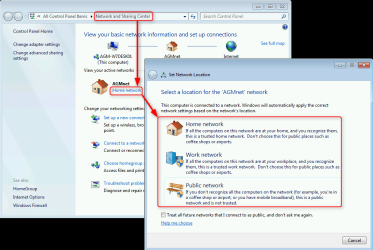
Within that workgroup, each PC can set network location as the user wishes. Available selections are Home, Work and Public. Basically, the Home and Work are the same, they both allow sharing between computers in same workgroup. For your Windows it's the same if it uses Home or Work network location,.

2014-05-23_21h37_51.png

Kari
 
Last edited:

My Computer My Computer

Computer type
Laptop
Computer Manufacturer/Model Number
HP ENVY 17-1150eg
OS
Windows 10 Pro x64 EN-GB
CPU
1.6 GHz Intel Core i7-720QM Processor
Memory
6 GB
Graphics Card(s)
ATI Mobility Radeon HD 5850 Graphics
Sound Card
Beats sound system with integrated subwoofer
Monitor(s) Displays
17" laptop display, 22" LED and 32" Full HD TV through HDMI
Screen Resolution
1600*900 (1), 1920*1080 (2&3)
Hard Drives
Internal: 2 x 500 GB SATA Hard Disk Drive 7200 rpm
External: 2TB for backups, 3TB USB3 network drive for media
Cooling
As Envy runs a bit warm, I have it on a Cooler Master pad
Keyboard
Logitech diNovo Media Desktop Laser (bluetooth)
Mouse
Logitech Performance Mouse MX
Internet Speed
50/10 Mbps VDSL
Antivirus
Windows Defender 4.3.9431.0
Browser
Maxthon 3.5.2., IE11
Back
Top