Windows 7 "Check for updates" window appears in blank!

gadp56

New member
Local time
8:04 AM
Messages
3
Location
Lima, Peru
I've tried some solutions to this rare situation and nothing.

I mean the following:
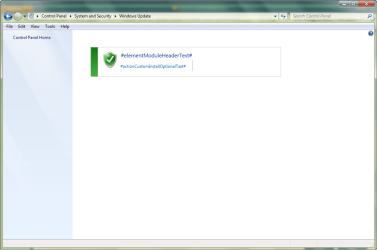
Windows 7 - 01 - Check for Update troubleshoot - Screenshot.png

By the way, I've noted that:
1.- In 'View-Choose Details' window, there is "Name" option only (may be this is normal):
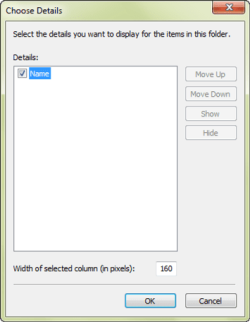
Windows 7 - 02 - Check for Update troubleshoot - View-Choose details - Screenshot.png

2.- But, in 'Tools-Folder Options' window, in the 'View' tab, option "Always show menus" (normally in "Files and Folders" section, second position) has disappeared!:
Windows 7 - 03 - Check for Update troubleshoot - Tools-Folder options ('Always show menus' disap.png
I didn't pressed the "Restore Defaults" button because I think this is for other purpose, isn't it?

So, I don't know what to do... I wonder someone of you may give me a hand to solve this...
In other words, please help me!

Thanks in advance,

gadp56
 
Last edited:

My Computer My Computer

Computer Manufacturer/Model Number
HP Pavilion dv2500
OS
Windows 7 Pro X64 SP1
CPU
AMD Turion 64 X2 TL-60 2.00GHz
Memory
3 GB
Hard Drives
Hitachi S-ATA, 250 GB

My Computer My Computer

Computer Manufacturer/Model Number
Dell XPS 15 L502x
OS
Windows 7 Ultimate x64 SP1
CPU
Core i7-2670QM
Memory
8GB DDR3 PC3-10600
Graphics Card(s)
Intel HD Graphics 3000 + GeForce GT 540M
Screen Resolution
1920x1080
Hard Drives
1TB 5400RPM Seagate

My Computer My Computer

Computer type
Laptop
Computer Manufacturer/Model Number
Asus K52F or Lenovo B51-80
OS
Win 7 x64 Home Premium (and x86 VirtualBox VM)/Win10
CPU
i3 370M/i7 6500U
Motherboard
Asus/Lenovo
Memory
8GB - finally :)/8GB
Graphics Card(s)
it's an i3, dude!/dual Intel&nVidia
Sound Card
onboard
Monitor(s) Displays
15.6" built-in
Screen Resolution
1366x768/1920x1080
Hard Drives
750GB Seagate internal
Sundry external drives attached to other computers on the local network
1TB SSD on the Lenovo
PSU
n/a
Internet Speed
as much as I can get - usually on a dongle/phone, so <1MB/s
Antivirus
MSE/Defender
Browser
IE11/12/Edge/Chrome/FF(if I must)
Windows 7 "Check for updates" window appears in blank! (Following)

What solutions did you try? Did you do a sfc /scannow operation? Have you run a complete virus and malware scan? Have you read this?

Solution: #elementModuleHeadertext# Windows update

First of all, thanks very much for your asap reply. Nevertheless, I'm learning a lot!
I'm so sorry I didn't do anything this past weekend...

Second, I've followed carefully step by step your indications, which means a lot of Windows restartings -indeed that's no problem, just explaining what I did.

1) sfc /scannow :
These are the results:
Useless perhaps, I copied the CBS.log file in a .txt
View attachment 01a sfc scannow - 2012-07-02 Results.txt

Here is the .log
View attachment 219358

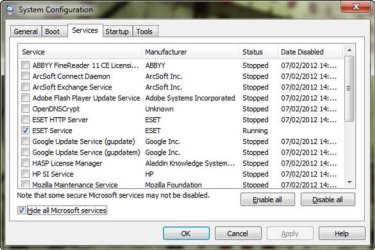
Please next see a capture of what I've seen after several restarts, ESET (Smart Security v4.2 Eng) always appears activated even after deselected it previously to a restart, and more than one time
02 MSConfig - System Conf 01.jpg

2) I've also run MicrosoftFixit.wu.Run.exe accordingly to the routine.
Told me something like it repaired 'what was possible'... nothing relevant (in my poor understanding), and it closed by itself.

But, the problem is still there... may be ESET causes it?...

One more thing, I've read the next supporting answer to this post telling me something about a trojan... I'm doing an ESET's in-deep running over all the hard disk (with two partitions) right now...
Let's see what happens anyway.

Do you have any additional suggestions, comments? Please let me know.
Perhaps and with very much time to this (!), I should do the routine one by one Services and Start items... what a big task...

Thanks to you again,

gadp56

Pd. Please excuse my poor english.
 

My Computer My Computer

Computer Manufacturer/Model Number
HP Pavilion dv2500
OS
Windows 7 Pro X64 SP1
CPU
AMD Turion 64 X2 TL-60 2.00GHz
Memory
3 GB
Hard Drives
Hitachi S-ATA, 250 GB
What solutions did you try? Did you do a sfc /scannow operation? Have you run a complete virus and malware scan? Have you read this?

Solution: #elementModuleHeadertext# Windows update


Word of warning!!
I accidentally click a link on that page, and MSE threw a fit with a Blacole download!
Encyclopedia entry: Trojan:JS/BlacoleRef.G - Learn more about malware - Microsoft Malware Protection Center

Thanks for this important information, I'm gonna see such entry. Let's see what happens,

gadp56
 

My Computer My Computer

Computer Manufacturer/Model Number
HP Pavilion dv2500
OS
Windows 7 Pro X64 SP1
CPU
AMD Turion 64 X2 TL-60 2.00GHz
Memory
3 GB
Hard Drives
Hitachi S-ATA, 250 GB
Back
Top