
Windows 7 clean install - BIOS questions & system startup time

OK, cool Paul, I will install afterwards.

For my screenshot above, does this look correct to you? If so I will tick all of the boxes and run it
 

My Computer My Computer

At a glance

Microsoft Windows 7 Professional 64-bitDual Xeon(R) CPU E5-2687W v3 @ 3.10GHz32.00 GBNVIDIA Quadro K4200
Computer type
PC/Desktop
Computer Manufacturer/Model Number
Dell Precision Tower 7910 Workstation
OS
Microsoft Windows 7 Professional 64-bit
CPU
Dual Xeon(R) CPU E5-2687W v3 @ 3.10GHz
Motherboard
Dell Inc. 0215PR
Memory
32.00 GB
Graphics Card(s)
NVIDIA Quadro K4200
Sound Card
(1) NVIDIA High Definition Audio (2) High Definition Audio
Hard Drives
(1) SK hynix SC210 2.5 7MM 256GB ATA Device
(2) ATA WDC WD4003FZEX-0 SCSI Disk Device
Antivirus
Avast Free and Malwarebytes Free
Browser
Chrome
Other Info
BIOS: BIOS Date: 04/14/15 18:58:26 Ver: A07.00
Hi RedLad,

OK, cool Paul, I will install afterwards.

For my screenshot above, does this look correct to you? If so I will tick all of the boxes and run it

Yes, tick them ALL.
 

My Computer My Computer

At a glance

Win 7 HP SP1 64-bit Vista HB SP2 32-bit Linux...Intel(R) Pentium(R) CPU P6200 @ 2.13GHz4.00 GBIntel(R) Graphics Media Accelerator HD
Computer type
Laptop
Computer Manufacturer/Model Number
Fujitsu LIFEBOOK
OS
Win 7 HP SP1 64-bit Vista HB SP2 32-bit Linux Mint 18.3
CPU
Intel(R) Pentium(R) CPU P6200 @ 2.13GHz
Motherboard
FUJITSU FJNBB06
Memory
4.00 GB
Graphics Card(s)
Intel(R) Graphics Media Accelerator HD
Sound Card
[1] Realtek High Definition Audio [2] Intel(R) Display Audio
Screen Resolution
1366 x 768 x 32 bits (4294967296 colors) @ 59 Hz
Hard Drives
TOSHIBA MK5076GSX
Antivirus
AVG FREE
Hi RedLad,

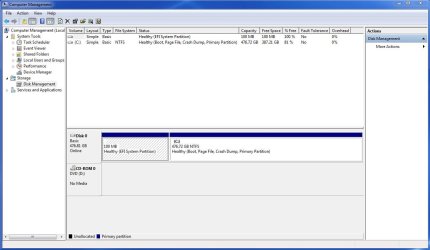
Can you post a screenshot of the Disk Management please?

Click Start => right-click Computer => click Manage => click Disk Management.
 

My Computer My Computer

At a glance

Win 7 HP SP1 64-bit Vista HB SP2 32-bit Linux...Intel(R) Pentium(R) CPU P6200 @ 2.13GHz4.00 GBIntel(R) Graphics Media Accelerator HD
Computer type
Laptop
Computer Manufacturer/Model Number
Fujitsu LIFEBOOK
OS
Win 7 HP SP1 64-bit Vista HB SP2 32-bit Linux Mint 18.3
CPU
Intel(R) Pentium(R) CPU P6200 @ 2.13GHz
Motherboard
FUJITSU FJNBB06
Memory
4.00 GB
Graphics Card(s)
Intel(R) Graphics Media Accelerator HD
Sound Card
[1] Realtek High Definition Audio [2] Intel(R) Display Audio
Screen Resolution
1366 x 768 x 32 bits (4294967296 colors) @ 59 Hz
Hard Drives
TOSHIBA MK5076GSX
Antivirus
AVG FREE
Here is the screenshot Paul. How does it look to you?
This is after the disk cleanup and a restart too btw
 

Attachments

  • Disk_Management.JPG
    Disk_Management.JPG
    78.3 KB · Views: 4

My Computer My Computer

At a glance

Microsoft Windows 7 Professional 64-bitDual Xeon(R) CPU E5-2687W v3 @ 3.10GHz32.00 GBNVIDIA Quadro K4200
Computer type
PC/Desktop
Computer Manufacturer/Model Number
Dell Precision Tower 7910 Workstation
OS
Microsoft Windows 7 Professional 64-bit
CPU
Dual Xeon(R) CPU E5-2687W v3 @ 3.10GHz
Motherboard
Dell Inc. 0215PR
Memory
32.00 GB
Graphics Card(s)
NVIDIA Quadro K4200
Sound Card
(1) NVIDIA High Definition Audio (2) High Definition Audio
Hard Drives
(1) SK hynix SC210 2.5 7MM 256GB ATA Device
(2) ATA WDC WD4003FZEX-0 SCSI Disk Device
Antivirus
Avast Free and Malwarebytes Free
Browser
Chrome
Other Info
BIOS: BIOS Date: 04/14/15 18:58:26 Ver: A07.00
Hi RedLad,

Here is the screenshot Paul. How does it look to you?
This is after the disk cleanup and a restart too btw

That seems to be a lot of HDD used for a clean install!
 

My Computer My Computer

At a glance

Win 7 HP SP1 64-bit Vista HB SP2 32-bit Linux...Intel(R) Pentium(R) CPU P6200 @ 2.13GHz4.00 GBIntel(R) Graphics Media Accelerator HD
Computer type
Laptop
Computer Manufacturer/Model Number
Fujitsu LIFEBOOK
OS
Win 7 HP SP1 64-bit Vista HB SP2 32-bit Linux Mint 18.3
CPU
Intel(R) Pentium(R) CPU P6200 @ 2.13GHz
Motherboard
FUJITSU FJNBB06
Memory
4.00 GB
Graphics Card(s)
Intel(R) Graphics Media Accelerator HD
Sound Card
[1] Realtek High Definition Audio [2] Intel(R) Display Audio
Screen Resolution
1366 x 768 x 32 bits (4294967296 colors) @ 59 Hz
Hard Drives
TOSHIBA MK5076GSX
Antivirus
AVG FREE
It does seem a lot doesn't it. This PC I have, it is jinxed a bit. It is set up in some strange different way. I did notice this back in 2015 when I did the clean install also. there was a lot of space taken up. I think it would be a waste of time for me to go looking for solutions, do you agree? I followed all of your steps correctly, I am almost certain of that..well except for forgetting to select the 'Never check for updates' option. What would you recommend to do Paul?
 

My Computer My Computer

At a glance

Microsoft Windows 7 Professional 64-bitDual Xeon(R) CPU E5-2687W v3 @ 3.10GHz32.00 GBNVIDIA Quadro K4200
Computer type
PC/Desktop
Computer Manufacturer/Model Number
Dell Precision Tower 7910 Workstation
OS
Microsoft Windows 7 Professional 64-bit
CPU
Dual Xeon(R) CPU E5-2687W v3 @ 3.10GHz
Motherboard
Dell Inc. 0215PR
Memory
32.00 GB
Graphics Card(s)
NVIDIA Quadro K4200
Sound Card
(1) NVIDIA High Definition Audio (2) High Definition Audio
Hard Drives
(1) SK hynix SC210 2.5 7MM 256GB ATA Device
(2) ATA WDC WD4003FZEX-0 SCSI Disk Device
Antivirus
Avast Free and Malwarebytes Free
Browser
Chrome
Other Info
BIOS: BIOS Date: 04/14/15 18:58:26 Ver: A07.00
RedLad,

It does seem a lot doesn't it. This PC I have, it is jinxed a bit. It is set up in some strange different way. I did notice this back in 2015 when I did the clean install also. there was a lot of space taken up. I think it would be a waste of time for me to go looking for solutions, do you agree? I followed all of your steps correctly, I am almost certain of that..well except for forgetting to select the 'Never check for updates' option. What would you recommend to do Paul?

There are two options available.

[1] Create a system image now!

[2a] Download and run TreeSize Free => TreeSize Free.

[2b] Run CCleaner to see if that reduces the space used!

What I would do is to create a system image now. Then you know if anything goes wrong you can re-image the OS. Then if you feel like it, you could do options [2a] and [2b] above. If it reduces the HDD size and the OS is still running smoothly then you can create another system image.

Create System Image: This way, if things go wrong in the future, you will be able to restore your OS back to the exact same state that it is now in a very short time. There are two imaging programs which are very popular among members here, the first is AOMEI Backupper Standard [FREE], and the second is Macrium Reflect [FREE].

I hope this helps!
 

My Computer My Computer

At a glance

Win 7 HP SP1 64-bit Vista HB SP2 32-bit Linux...Intel(R) Pentium(R) CPU P6200 @ 2.13GHz4.00 GBIntel(R) Graphics Media Accelerator HD
Computer type
Laptop
Computer Manufacturer/Model Number
Fujitsu LIFEBOOK
OS
Win 7 HP SP1 64-bit Vista HB SP2 32-bit Linux Mint 18.3
CPU
Intel(R) Pentium(R) CPU P6200 @ 2.13GHz
Motherboard
FUJITSU FJNBB06
Memory
4.00 GB
Graphics Card(s)
Intel(R) Graphics Media Accelerator HD
Sound Card
[1] Realtek High Definition Audio [2] Intel(R) Display Audio
Screen Resolution
1366 x 768 x 32 bits (4294967296 colors) @ 59 Hz
Hard Drives
TOSHIBA MK5076GSX
Antivirus
AVG FREE
Hi RedLad, how are you getting on? What stage are you at?
 

My Computer My Computer

At a glance

Win 7 HP SP1 64-bit Vista HB SP2 32-bit Linux...Intel(R) Pentium(R) CPU P6200 @ 2.13GHz4.00 GBIntel(R) Graphics Media Accelerator HD
Computer type
Laptop
Computer Manufacturer/Model Number
Fujitsu LIFEBOOK
OS
Win 7 HP SP1 64-bit Vista HB SP2 32-bit Linux Mint 18.3
CPU
Intel(R) Pentium(R) CPU P6200 @ 2.13GHz
Motherboard
FUJITSU FJNBB06
Memory
4.00 GB
Graphics Card(s)
Intel(R) Graphics Media Accelerator HD
Sound Card
[1] Realtek High Definition Audio [2] Intel(R) Display Audio
Screen Resolution
1366 x 768 x 32 bits (4294967296 colors) @ 59 Hz
Hard Drives
TOSHIBA MK5076GSX
Antivirus
AVG FREE
Hi Paul,
I installed Macrium and did an image. Beforehand I created a bootable disk, which I think I needed also so did that.

I then installed CCleaner and ran it but the disk space taken up is still the same, maybe 1GB got cleared up. That's all.

Later today, my plan is to add my 4TB drive, erase all data off that and then point the user folders to that. Documents, Pictures, Videos and all the relevant folders.

I am almost there! I just want to be able to do some work over Christmas, so pretty close now.
 

My Computer My Computer

At a glance

Microsoft Windows 7 Professional 64-bitDual Xeon(R) CPU E5-2687W v3 @ 3.10GHz32.00 GBNVIDIA Quadro K4200
Computer type
PC/Desktop
Computer Manufacturer/Model Number
Dell Precision Tower 7910 Workstation
OS
Microsoft Windows 7 Professional 64-bit
CPU
Dual Xeon(R) CPU E5-2687W v3 @ 3.10GHz
Motherboard
Dell Inc. 0215PR
Memory
32.00 GB
Graphics Card(s)
NVIDIA Quadro K4200
Sound Card
(1) NVIDIA High Definition Audio (2) High Definition Audio
Hard Drives
(1) SK hynix SC210 2.5 7MM 256GB ATA Device
(2) ATA WDC WD4003FZEX-0 SCSI Disk Device
Antivirus
Avast Free and Malwarebytes Free
Browser
Chrome
Other Info
BIOS: BIOS Date: 04/14/15 18:58:26 Ver: A07.00
RedLad,

I installed Macrium and did an image. Beforehand I created a bootable disk, which I think I needed also so did that.
:thumbsup:
I then installed CCleaner and ran it but the disk space taken up is still the same, maybe 1GB got cleared up. That's all.

To help identify where the HDD space is being used, perhaps you could download and run TreeSize Free => TreeSize Free.

Later today, my plan is to add my 4TB drive, erase all data off that and then point the user folders to that. Documents, Pictures, Videos and all the relevant folders.

Here is how to change the default location of folders in Win 7 => User Folders - Change Default Location.

I am almost there! I just want to be able to do some work over Christmas, so pretty close now.
:thumbsup:
 

My Computer My Computer

At a glance

Win 7 HP SP1 64-bit Vista HB SP2 32-bit Linux...Intel(R) Pentium(R) CPU P6200 @ 2.13GHz4.00 GBIntel(R) Graphics Media Accelerator HD
Computer type
Laptop
Computer Manufacturer/Model Number
Fujitsu LIFEBOOK
OS
Win 7 HP SP1 64-bit Vista HB SP2 32-bit Linux Mint 18.3
CPU
Intel(R) Pentium(R) CPU P6200 @ 2.13GHz
Motherboard
FUJITSU FJNBB06
Memory
4.00 GB
Graphics Card(s)
Intel(R) Graphics Media Accelerator HD
Sound Card
[1] Realtek High Definition Audio [2] Intel(R) Display Audio
Screen Resolution
1366 x 768 x 32 bits (4294967296 colors) @ 59 Hz
Hard Drives
TOSHIBA MK5076GSX
Antivirus
AVG FREE
Hi RedLad,

I installed Macrium and did an image. Beforehand I created a bootable disk, which I think I needed also so did that.

I personally use both AOMEI Partition Assistant and AOMEI Backupper.

You have to use whatever imaging program you feel comfortable with, because at the end of the day you are the one using it!
 

My Computer My Computer

At a glance

Win 7 HP SP1 64-bit Vista HB SP2 32-bit Linux...Intel(R) Pentium(R) CPU P6200 @ 2.13GHz4.00 GBIntel(R) Graphics Media Accelerator HD
Computer type
Laptop
Computer Manufacturer/Model Number
Fujitsu LIFEBOOK
OS
Win 7 HP SP1 64-bit Vista HB SP2 32-bit Linux Mint 18.3
CPU
Intel(R) Pentium(R) CPU P6200 @ 2.13GHz
Motherboard
FUJITSU FJNBB06
Memory
4.00 GB
Graphics Card(s)
Intel(R) Graphics Media Accelerator HD
Sound Card
[1] Realtek High Definition Audio [2] Intel(R) Display Audio
Screen Resolution
1366 x 768 x 32 bits (4294967296 colors) @ 59 Hz
Hard Drives
TOSHIBA MK5076GSX
Antivirus
AVG FREE
Hi Paul, I have been busy all day so only getting to check this out now. Then have to head off again in a while!

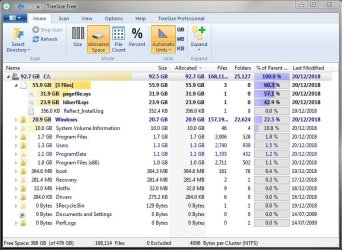
OK, so I have installed and ran TreeSize Free and this is a screenshot of the results. That is a handy little tool, thanks for telling me about it. I had a feeling that the pagefile had a part to play in this! Is it fixable?
 

Attachments

  • TreeSize_Result.JPG
    TreeSize_Result.JPG
    91.3 KB · Views: 0

My Computer My Computer

At a glance

Microsoft Windows 7 Professional 64-bitDual Xeon(R) CPU E5-2687W v3 @ 3.10GHz32.00 GBNVIDIA Quadro K4200
Computer type
PC/Desktop
Computer Manufacturer/Model Number
Dell Precision Tower 7910 Workstation
OS
Microsoft Windows 7 Professional 64-bit
CPU
Dual Xeon(R) CPU E5-2687W v3 @ 3.10GHz
Motherboard
Dell Inc. 0215PR
Memory
32.00 GB
Graphics Card(s)
NVIDIA Quadro K4200
Sound Card
(1) NVIDIA High Definition Audio (2) High Definition Audio
Hard Drives
(1) SK hynix SC210 2.5 7MM 256GB ATA Device
(2) ATA WDC WD4003FZEX-0 SCSI Disk Device
Antivirus
Avast Free and Malwarebytes Free
Browser
Chrome
Other Info
BIOS: BIOS Date: 04/14/15 18:58:26 Ver: A07.00
Gotta head off, will be back on tomorrow!
 

My Computer My Computer

At a glance

Microsoft Windows 7 Professional 64-bitDual Xeon(R) CPU E5-2687W v3 @ 3.10GHz32.00 GBNVIDIA Quadro K4200
Computer type
PC/Desktop
Computer Manufacturer/Model Number
Dell Precision Tower 7910 Workstation
OS
Microsoft Windows 7 Professional 64-bit
CPU
Dual Xeon(R) CPU E5-2687W v3 @ 3.10GHz
Motherboard
Dell Inc. 0215PR
Memory
32.00 GB
Graphics Card(s)
NVIDIA Quadro K4200
Sound Card
(1) NVIDIA High Definition Audio (2) High Definition Audio
Hard Drives
(1) SK hynix SC210 2.5 7MM 256GB ATA Device
(2) ATA WDC WD4003FZEX-0 SCSI Disk Device
Antivirus
Avast Free and Malwarebytes Free
Browser
Chrome
Other Info
BIOS: BIOS Date: 04/14/15 18:58:26 Ver: A07.00
Hi RedLad,

OK, so I have installed and ran TreeSize Free and this is a screenshot of the results. That is a handy little tool, thanks for telling me about it. I had a feeling that the pagefile had a part to play in this! Is it fixable?

I will answer the Hibernation [hiberfil.sys] question first.

I personally don't use Hibernation and have it Disabled. I usually put my computer to Sleep [I very rarely Shut Down]. Sleep uses just enough power to maintain the information in your computers memory [RAM]. Hibernate conserves even more power by physically writing the information in the memory [RAM] to the HDD, essentially shutting the computer down but not quite. The benefit of doing it this way is that it brings the computer back to life much quicker than doing a full Shut Down. The downside [as you have seen yourself] of doing it this way is that it physically writes the data to the HDD and you end up with a very big file. As I said, I use Sleep, and when I wake my computer up from Sleep it is alive within a few seconds.

I suggest you investigate the different options of Shut Down, Sleep, and Hibernation.

If you want to disable Hibernation then it can be done from an elevated command prompt:

Click Start.
  • In the search box type cmd.
  • Right-click the cmd icon from the search results under Programs and select Run as administrator.
  • The elevated command prompt window will now open.
Type powercfg.exe -h off [be careful of the spaces] and press Enter. You can always turn it back on by typing powercfg.exe -h on.

I hope this helps!
 

My Computer My Computer

At a glance

Win 7 HP SP1 64-bit Vista HB SP2 32-bit Linux...Intel(R) Pentium(R) CPU P6200 @ 2.13GHz4.00 GBIntel(R) Graphics Media Accelerator HD
Computer type
Laptop
Computer Manufacturer/Model Number
Fujitsu LIFEBOOK
OS
Win 7 HP SP1 64-bit Vista HB SP2 32-bit Linux Mint 18.3
CPU
Intel(R) Pentium(R) CPU P6200 @ 2.13GHz
Motherboard
FUJITSU FJNBB06
Memory
4.00 GB
Graphics Card(s)
Intel(R) Graphics Media Accelerator HD
Sound Card
[1] Realtek High Definition Audio [2] Intel(R) Display Audio
Screen Resolution
1366 x 768 x 32 bits (4294967296 colors) @ 59 Hz
Hard Drives
TOSHIBA MK5076GSX
Antivirus
AVG FREE
Hi Paul,


I ran that command prompt to turn off hibernation. So now the space went from 387GB free to 411GB. What about the other paging file part?
 

My Computer My Computer

At a glance

Microsoft Windows 7 Professional 64-bitDual Xeon(R) CPU E5-2687W v3 @ 3.10GHz32.00 GBNVIDIA Quadro K4200
Computer type
PC/Desktop
Computer Manufacturer/Model Number
Dell Precision Tower 7910 Workstation
OS
Microsoft Windows 7 Professional 64-bit
CPU
Dual Xeon(R) CPU E5-2687W v3 @ 3.10GHz
Motherboard
Dell Inc. 0215PR
Memory
32.00 GB
Graphics Card(s)
NVIDIA Quadro K4200
Sound Card
(1) NVIDIA High Definition Audio (2) High Definition Audio
Hard Drives
(1) SK hynix SC210 2.5 7MM 256GB ATA Device
(2) ATA WDC WD4003FZEX-0 SCSI Disk Device
Antivirus
Avast Free and Malwarebytes Free
Browser
Chrome
Other Info
BIOS: BIOS Date: 04/14/15 18:58:26 Ver: A07.00
Hi RedLad,

What about the other paging file part?

This will explain about the paging file => How to determine the appropriate page file size for 64-bit versions of Windows.

As you have 32GB of RAM, I will let you decide what is best for your system!

Here is a quote from the site above.

For example, when a lot of physical memory is installed, a page file might not be required to back the system commit charge during peak usage. The available physical memory alone might be large enough to do this.

Do this => click Start => click Control Panel => click System => click Advanced System Settings => click Performance => click the Advanced tab.

Under Virtual Memory click Change. It will give you all the information on the paging file. You could let the OS Automatically manage pageing file size and drives [if it isn't already].

I hope this helps!
 
Last edited:

My Computer My Computer

At a glance

Win 7 HP SP1 64-bit Vista HB SP2 32-bit Linux...Intel(R) Pentium(R) CPU P6200 @ 2.13GHz4.00 GBIntel(R) Graphics Media Accelerator HD
Computer type
Laptop
Computer Manufacturer/Model Number
Fujitsu LIFEBOOK
OS
Win 7 HP SP1 64-bit Vista HB SP2 32-bit Linux Mint 18.3
CPU
Intel(R) Pentium(R) CPU P6200 @ 2.13GHz
Motherboard
FUJITSU FJNBB06
Memory
4.00 GB
Graphics Card(s)
Intel(R) Graphics Media Accelerator HD
Sound Card
[1] Realtek High Definition Audio [2] Intel(R) Display Audio
Screen Resolution
1366 x 768 x 32 bits (4294967296 colors) @ 59 Hz
Hard Drives
TOSHIBA MK5076GSX
Antivirus
AVG FREE
Hi Paul,

I'm not at my PC right now but it nearly sure it is set to automatically adjust the paging file size. I will have a read through the link you sent. Earlier I did do some reading up online about paging files and some say they turn it off, others say to never do that then others say they have it set to 1 or 2GB. Then I think I read some were saying it should be set quite high. So I will have to read into it, but don't want to waste time on it :)
 

My Computer My Computer

At a glance

Microsoft Windows 7 Professional 64-bitDual Xeon(R) CPU E5-2687W v3 @ 3.10GHz32.00 GBNVIDIA Quadro K4200
Computer type
PC/Desktop
Computer Manufacturer/Model Number
Dell Precision Tower 7910 Workstation
OS
Microsoft Windows 7 Professional 64-bit
CPU
Dual Xeon(R) CPU E5-2687W v3 @ 3.10GHz
Motherboard
Dell Inc. 0215PR
Memory
32.00 GB
Graphics Card(s)
NVIDIA Quadro K4200
Sound Card
(1) NVIDIA High Definition Audio (2) High Definition Audio
Hard Drives
(1) SK hynix SC210 2.5 7MM 256GB ATA Device
(2) ATA WDC WD4003FZEX-0 SCSI Disk Device
Antivirus
Avast Free and Malwarebytes Free
Browser
Chrome
Other Info
BIOS: BIOS Date: 04/14/15 18:58:26 Ver: A07.00
Hi again, I am hoping you see this post Paul Black.

Firstly, Happy New Year :)

I noticed Windows was booting a bit slow, on my new wiped PC and thought to myself that there has to be an option in the BIOS that can help this. Maybe my boot sequence was off. So I opened up the BIOS options/interface. I did see that it was set to UEFI, which was all good I presumed, but noticed it had 2 Windows Boot Managers listed. I then clicked on the Legacy Boot to see what options it had, and it showed USB, DVD and the new SSD. I think in that order too. But I thought they wouldn't be taken into account as I had it set to UEFI anyway.

So, a long story short - I exited the BIOS and opted not to save any changes. However, now the PC will not boot up for me. I am getting the LSI message popping up, with the option to hit CTRL + R for options. I ignored this, then the next screen says:

'No Boot Device Found. Press any key to reboot the machine'

Now, this process keeps repeating. So I hit the CTRL + R to see the options for the LSI card, and it was set to 'Disabled' which is correct after all of the help the other guys in another thread on here gave before.

Any ideas how I can fix this? Thanks,

Paul
 

My Computer My Computer

At a glance

Microsoft Windows 7 Professional 64-bitDual Xeon(R) CPU E5-2687W v3 @ 3.10GHz32.00 GBNVIDIA Quadro K4200
Computer type
PC/Desktop
Computer Manufacturer/Model Number
Dell Precision Tower 7910 Workstation
OS
Microsoft Windows 7 Professional 64-bit
CPU
Dual Xeon(R) CPU E5-2687W v3 @ 3.10GHz
Motherboard
Dell Inc. 0215PR
Memory
32.00 GB
Graphics Card(s)
NVIDIA Quadro K4200
Sound Card
(1) NVIDIA High Definition Audio (2) High Definition Audio
Hard Drives
(1) SK hynix SC210 2.5 7MM 256GB ATA Device
(2) ATA WDC WD4003FZEX-0 SCSI Disk Device
Antivirus
Avast Free and Malwarebytes Free
Browser
Chrome
Other Info
BIOS: BIOS Date: 04/14/15 18:58:26 Ver: A07.00
Hi RedLad,

Happy New Year
However, now the PC will not boot up for me. I am getting the LSI message popping up, with the option to hit CTRL + R for options. I ignored this, then the next screen says:

'No Boot Device Found. Press any key to reboot the machine'

Now, this process keeps repeating. So I hit the CTRL + R to see the options for the LSI card, and it was set to 'Disabled' which is correct after all of the help the other guys in another thread on here gave before.

[1] Can you boot into Safe Mode?

[2] Boot into the DVD installation disk and run Startup Repair from the System Recovery Options menu.

NOTE: The light blue text below are links to the relevant websites and programs, just click them!

The SevenForums Run Startup Repair procedure can be found here => How to Run a Startup Repair in Windows 7.

Startup Repair Process

Startup Repair will try to repair computers that are un-bootable because of the following reasons:
  • Registry corruption.
  • Missing or damaged system and driver files.
  • Disk metadata corruption (MBR, partition table, and boot sector).
  • File system metadata corruption.
  • Installation of problematic or incompatible drivers.
  • Installation of incompatible Windows service packs and patches.
  • Corrupt boot configuration data.
  • Bad memory and hard disk hardware (detection only).
Startup Repair will not repair un-bootable systems caused by the following issues:
  • Malfunctioning firmware and other hardware components.
  • Problems with clean Windows installations or Windows upgrades (for example, from Windows XP to Windows Vista).
  • Windows logon errors.
  • Viruses and malicious software.
After Startup Repair has run, a text log with diagnostic information and repair results is generated. This log file is located here => C:\Windows\System32\Logfiles\Srt\SrtTrail.txt

I hope this helps!
 

My Computer My Computer

At a glance

Win 7 HP SP1 64-bit Vista HB SP2 32-bit Linux...Intel(R) Pentium(R) CPU P6200 @ 2.13GHz4.00 GBIntel(R) Graphics Media Accelerator HD
Computer type
Laptop
Computer Manufacturer/Model Number
Fujitsu LIFEBOOK
OS
Win 7 HP SP1 64-bit Vista HB SP2 32-bit Linux Mint 18.3
CPU
Intel(R) Pentium(R) CPU P6200 @ 2.13GHz
Motherboard
FUJITSU FJNBB06
Memory
4.00 GB
Graphics Card(s)
Intel(R) Graphics Media Accelerator HD
Sound Card
[1] Realtek High Definition Audio [2] Intel(R) Display Audio
Screen Resolution
1366 x 768 x 32 bits (4294967296 colors) @ 59 Hz
Hard Drives
TOSHIBA MK5076GSX
Antivirus
AVG FREE
Hi Paul,

I managed to get into the BIOS again and noticed that the boot mode was actually set to the legacy mode. My bad, sorry for wasting your time! I obviously had saved the changes after tinkering around with the settings, but didn't realize I had. My bad.
So all seems well now again, but the PC is still booting quite slow. Reason I say this my laptop fires up in 30 secs or less. The PC takes a min or so I reckon. I can live with it obviously, but I am just curious as to why it takes longer. The SSD in the PC would be better/more modern too.

Cheers,
Paul
 

My Computer My Computer

At a glance

Microsoft Windows 7 Professional 64-bitDual Xeon(R) CPU E5-2687W v3 @ 3.10GHz32.00 GBNVIDIA Quadro K4200
Computer type
PC/Desktop
Computer Manufacturer/Model Number
Dell Precision Tower 7910 Workstation
OS
Microsoft Windows 7 Professional 64-bit
CPU
Dual Xeon(R) CPU E5-2687W v3 @ 3.10GHz
Motherboard
Dell Inc. 0215PR
Memory
32.00 GB
Graphics Card(s)
NVIDIA Quadro K4200
Sound Card
(1) NVIDIA High Definition Audio (2) High Definition Audio
Hard Drives
(1) SK hynix SC210 2.5 7MM 256GB ATA Device
(2) ATA WDC WD4003FZEX-0 SCSI Disk Device
Antivirus
Avast Free and Malwarebytes Free
Browser
Chrome
Other Info
BIOS: BIOS Date: 04/14/15 18:58:26 Ver: A07.00
Back
Top