Windows 7 Clean Install constant shut down

Melissa

New member
Power User
Local time
12:15 AM
Messages
394
Dear Forum,

I had an issue with my lap top and went to a physical store and advised to do a clean install.

I followed the great tutorial offered by this forum. Created a formatted disk with an .iso. I had a few issues with the product key for my product and Microsoft Help / Support gave me a link for Professional instead of Premium.So now i have Professional installed and activated. I am slowly putting the Sony drivers back on.
I know from my previous model of Sony VAIO that the CPU runs hot.
I have a cooling fan plugged into the USB2.0.

The lap top is a Sony VAIO VPCEB46FG.

Can any offer a troubleshooting program that a newbie can understand? I will post back any further details if required. Have changed the BIOS back to booting from internal and when i do a clean boot I have observed that it has F12 Network in the cornèr. Have googled and unsure whethèŕ to tŕý installinģ original drivèŕs.
 

My Computer

Computer type
Laptop
Computer Manufacturer/Model Number
Sony VAIO / E Series VPCEB46FG
OS
Windows 7 Home Premium 64bit
CPU
Windows 7 Service Pack 1 x86 NTFS
Motherboard
AMD E-350 Processor
Memory
4 GB
Hard Drives
500GB
Other Info
1.6GHz

My Computer

Computer type
PC/Desktop
Computer Manufacturer/Model Number
Custom
OS
10 Pro x64
CPU
Ryzen 9 3900X
Motherboard
Asrock x370 Tachi
Memory
64GB(4x16GB) DDR4
Graphics Card(s)
EVGA 1080ti FTW3
Sound Card
ASUS Xonar Essence STX (V4 Bursons), ODAC rev B, NFB-11, O2
Monitor(s) Displays
3xASUS PB278Q/R, Optoma HD142X
Screen Resolution
3x1440p, 1080p
Hard Drives
512GB 850 EVO(OS, Programs)
4TB (Movies)
3TB (Downloads)
3TB (Programs)
1TB HDD (Games)
2x6TB R1 (videos)
PSU
AX760
Case
Fractal Define R5
Cooling
NH-D15S
Keyboard
Massdrop Ctrl with Box Navy's
Mouse
G903, Alioth XXL Mat
Internet Speed
280/40
Antivirus
MBAM, ESET
Browser
Canary 64 Bit
Other Info
I also own a Thinkpad P50 Xeon 4K, X220T, X1C5
Hello rvcjew,

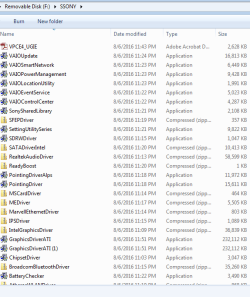
You have been most helpful. I have been going step by step in installing my drivers after a clean install. Prior to installing W7 again I went to the website and downloaded the drivers to an external as I was warned numerous times to back up everything.

I thought that the machine was still running rather hot and process of elimination would be perhaps the program you have suggested.

I received a message that after installing the program - Driver failed to load. Is this common?

Thanks again.

I will still try and keep installing the drivers and checking device manager if any issues - is that correct? I was unsure whether have Windows 7 Premium and now Professional would cause a conflict - but now I think not.
 

Attachments

  • core temp.PNG
    core temp.PNG
    31 KB · Views: 37
  • drivers.PNG
    drivers.PNG
    63.5 KB · Views: 37

My Computer

Computer type
Laptop
Computer Manufacturer/Model Number
Sony VAIO / E Series VPCEB46FG
OS
Windows 7 Home Premium 64bit
CPU
Windows 7 Service Pack 1 x86 NTFS
Motherboard
AMD E-350 Processor
Memory
4 GB
Hard Drives
500GB
Other Info
1.6GHz
Ah right forgot about that do you have SP1 installed, if so then run this update to then run that app fine.
https://www.microsoft.com/en-us/download/confirmation.aspx?id=46148

Via Core Temps Facebook page:

The source of the problem is the new digital signature of the Core Temp driver. This version comes with an updated driver, which is signed with the new digital signature certificate.
This certificate can only sign using the SHA-2 algorithm, and can't co-sign using the deprecated SHA-1 algorithm that older operating systems support. Because of this, Windows can't interpret this signature and considers it invalid. Thus a 64bit OS will not allow the driver to load and start.
Windows 7 requires a patch to add support for SHA-2 based digital signatures. You must have SP1 installed for the patch to work on your OS. (Sadly at this time this version will not run on Windows Vista 64bit, and I'm looking for a solution)
This update is required for Core Temp 1.1 and all future versions to work (in case you encounter this problem), otherwise you can keep using 1.0 RC9.
http://www.alcpu.com/CoreTemp/oldversions/CT10-rc9.zip

Windows 7 SP1, KB3033929
Download link: https://www.microsoft.com/.../download/confirmation.aspx...
Information: https://support.microsoft.com/en-us/kb/3033929
 

My Computer

Computer type
PC/Desktop
Computer Manufacturer/Model Number
Custom
OS
10 Pro x64
CPU
Ryzen 9 3900X
Motherboard
Asrock x370 Tachi
Memory
64GB(4x16GB) DDR4
Graphics Card(s)
EVGA 1080ti FTW3
Sound Card
ASUS Xonar Essence STX (V4 Bursons), ODAC rev B, NFB-11, O2
Monitor(s) Displays
3xASUS PB278Q/R, Optoma HD142X
Screen Resolution
3x1440p, 1080p
Hard Drives
512GB 850 EVO(OS, Programs)
4TB (Movies)
3TB (Downloads)
3TB (Programs)
1TB HDD (Games)
2x6TB R1 (videos)
PSU
AX760
Case
Fractal Define R5
Cooling
NH-D15S
Keyboard
Massdrop Ctrl with Box Navy's
Mouse
G903, Alioth XXL Mat
Internet Speed
280/40
Antivirus
MBAM, ESET
Browser
Canary 64 Bit
Other Info
I also own a Thinkpad P50 Xeon 4K, X220T, X1C5
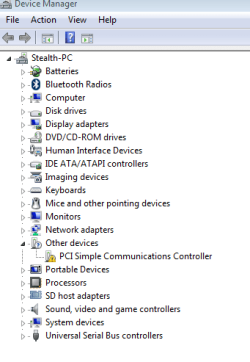
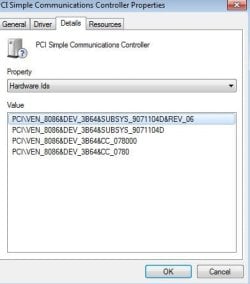
Ended up installing all drivers and can go to Device Manager and not receiving the error message - this was not a Windows 7 issue, so thought I would post in the Community forum over on the site to ensure correct drivers installed. I am now lowly going through the links provided by you. The first update was not working or I assume it will take quite a while for it to install.

What are the links for Windows 7 SP1, KB3033929? Just out of interest. I like to know, as I am a novice.
 

Attachments

  • pci error.PNG
    pci error.PNG
    12.7 KB · Views: 29
  • pci hardware.PNG
    pci hardware.PNG
    27.5 KB · Views: 29
  • sony community.JPG
    sony community.JPG
    35.3 KB · Views: 29

My Computer

Computer type
Laptop
Computer Manufacturer/Model Number
Sony VAIO / E Series VPCEB46FG
OS
Windows 7 Home Premium 64bit
CPU
Windows 7 Service Pack 1 x86 NTFS
Motherboard
AMD E-350 Processor
Memory
4 GB
Hard Drives
500GB
Other Info
1.6GHz
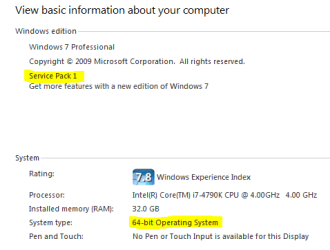
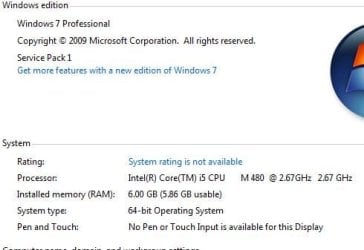
To clarify first check to make sure you have sp1 installed by going to the control panel then System and looking at the highlighted parts below. Then if you do have it to fix your device manger issue you need to install your chipset driver then your Intel management interface driver from the above mentioned support site.

Then reboot your computer and install this one https://www.microsoft.com/en-us/download/confirmation.aspx?id=46148 .
 

Attachments

  • system.PNG
    system.PNG
    15.1 KB · Views: 30

My Computer

Computer type
PC/Desktop
Computer Manufacturer/Model Number
Custom
OS
10 Pro x64
CPU
Ryzen 9 3900X
Motherboard
Asrock x370 Tachi
Memory
64GB(4x16GB) DDR4
Graphics Card(s)
EVGA 1080ti FTW3
Sound Card
ASUS Xonar Essence STX (V4 Bursons), ODAC rev B, NFB-11, O2
Monitor(s) Displays
3xASUS PB278Q/R, Optoma HD142X
Screen Resolution
3x1440p, 1080p
Hard Drives
512GB 850 EVO(OS, Programs)
4TB (Movies)
3TB (Downloads)
3TB (Programs)
1TB HDD (Games)
2x6TB R1 (videos)
PSU
AX760
Case
Fractal Define R5
Cooling
NH-D15S
Keyboard
Massdrop Ctrl with Box Navy's
Mouse
G903, Alioth XXL Mat
Internet Speed
280/40
Antivirus
MBAM, ESET
Browser
Canary 64 Bit
Other Info
I also own a Thinkpad P50 Xeon 4K, X220T, X1C5
Hello Malcolm,

Attached is my specs, so when I reboot next I will install the link. I am glad that I posted in this forum now.
 

Attachments

  • specs.JPG
    specs.JPG
    34.1 KB · Views: 29

My Computer

Computer type
Laptop
Computer Manufacturer/Model Number
Sony VAIO / E Series VPCEB46FG
OS
Windows 7 Home Premium 64bit
CPU
Windows 7 Service Pack 1 x86 NTFS
Motherboard
AMD E-350 Processor
Memory
4 GB
Hard Drives
500GB
Other Info
1.6GHz
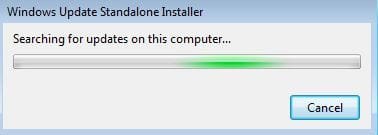
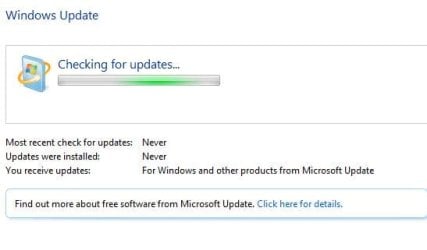
Okay, yeah that link should install okay as you have sp1 it might take a bit for it to do it, if it does not want to search for updates to see if it can install go to your update settings for windows update and pick never check for updates, reboot then try to install the link. Also since this is a clean install you more than likely have the bug that in normal windows update it just searches for updates forever and never finds them so you will want to do this procedure as well to fix that.


The solution:

You can ignore the stop service part and just leave it set to never check for updates instead as you do the process. Reboot after each KB is installed before installing the next one. When done then you can set your settings back to "check for but let me download them" or to automatic.

This has worked for me every time:

The solution:

Stop the Windows Update Service (wuauserv).
Download and install KB3050265
reboot
Download and install KB3102810
Reboot and check for updates again. All of our machines found their required updates in less than 5 minutes.
 

My Computer

Computer type
PC/Desktop
Computer Manufacturer/Model Number
Custom
OS
10 Pro x64
CPU
Ryzen 9 3900X
Motherboard
Asrock x370 Tachi
Memory
64GB(4x16GB) DDR4
Graphics Card(s)
EVGA 1080ti FTW3
Sound Card
ASUS Xonar Essence STX (V4 Bursons), ODAC rev B, NFB-11, O2
Monitor(s) Displays
3xASUS PB278Q/R, Optoma HD142X
Screen Resolution
3x1440p, 1080p
Hard Drives
512GB 850 EVO(OS, Programs)
4TB (Movies)
3TB (Downloads)
3TB (Programs)
1TB HDD (Games)
2x6TB R1 (videos)
PSU
AX760
Case
Fractal Define R5
Cooling
NH-D15S
Keyboard
Massdrop Ctrl with Box Navy's
Mouse
G903, Alioth XXL Mat
Internet Speed
280/40
Antivirus
MBAM, ESET
Browser
Canary 64 Bit
Other Info
I also own a Thinkpad P50 Xeon 4K, X220T, X1C5
Hi,
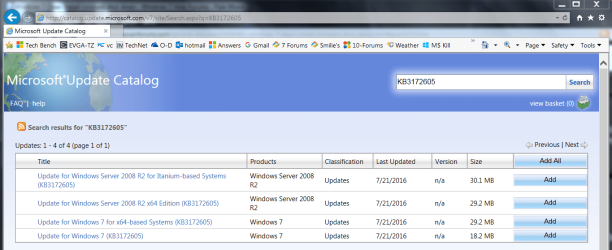
The only updates required to get the update system operating are KB3020369 & KB3172605
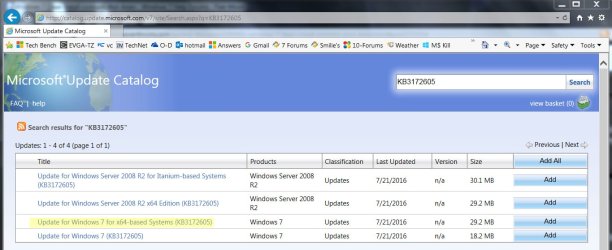
Which Micro... is playing cat and mouse with the downloads of KB3172605
So you might need to go to the Catalog using internet explorer
By right click internet explorer and use run as administrator so the 2 required browser add-ons will install quickly
Microsoft Update Catalog
ie11 run as admin.jpg

Yep
catalog KB3172605.PNG
 

My Computer

Computer type
PC/Desktop
Computer Manufacturer/Model Number
Custom assembled by me :}
OS
Win-7-Pro64bit 7-H-Prem-64bit
CPU
i7-5930K 2nd i9-9940x both water blocked VRM's too
Motherboard
ASUS SABERTOOTH X99 2nd ASUS x299 Apex
Memory
Trident-z 3200C14 2nd Trident-z 3600C16
Graphics Card(s)
EVGA 1080ti ftw3 2nd Titan Xp both water blocked
Sound Card
Built-in Realtek
Monitor(s) Displays
1-AOC G2460PG 24"G-Sync 144Hz/ 2nd 1-ASUS VG248QE 24" 144Hz
Screen Resolution
1920 x 1080 144Hz
Hard Drives
2-Samsung M.2 Evo & Evo Plus
2-Samsung 850 EVO 500GB SSD's/ 3-2.5 W.D. Black 1tb-&3-1tb/3-3.5 WD Black 1tb hdd's
PSU
EVGA SuperNOVA 1000-P2 2nd 1200-P2
Case
2-Corsair Obsidian Series 450D Black ATX Mid Tower
Cooling
Custom water loops
Keyboard
Logitech G710+/ 2nd Logitech G910
Mouse
2-RedDragon M901 Perdition 16400 dpi Gaming mouse = wired
Internet Speed
Comcast Ping 19ms 89.31mbps download speed 6.12mbps upload
Antivirus
Malwarebytes Pro/ Superantispyware Pro
Browser
FireFox & Pale moon
Other Info
2nd ASUS X299 Apex/Intel i9-9940x with Custom water loop/7H-Prem-x64/Corsair 450D case/Ram Trident-z 3600C16 4x8gb / Samsung970Evo plus 500gb SSD/Dual ssd EZ swap evo/PSU EVGA SuperNova 1200w-P2 80+Platinum/GPU Titan Xp /8-ML-140 on push-pull on 2-280GTX rads
Thank you for posting with the screen shots as I am a newbie.

Running the KB3172605 -
I went to Internet Explorer and downloaded to the basket and then to My Downloads folder.
I had to cancel - the other SP1 link given above as it was taking quite some time.
I do wish to have the updates running back to normal, so I do appreciate your assistance.

Does it usually pay to have patience to have my Windows 7 working back to normal and have updates operating as per usual.

Will post if I come across any future issues.

I know now to use Internet Explorer for most of these operations - thanks.
 

My Computer

Computer type
Laptop
Computer Manufacturer/Model Number
Sony VAIO / E Series VPCEB46FG
OS
Windows 7 Home Premium 64bit
CPU
Windows 7 Service Pack 1 x86 NTFS
Motherboard
AMD E-350 Processor
Memory
4 GB
Hard Drives
500GB
Other Info
1.6GHz
Hi,

Make sure KB3020369 is installed if not manually install it this is the main article page with all versions,
https://support.microsoft.com/en-us/kb/3020369
These other links do prompt you to download as soon as you click on them just to give you a heads up :)

Win-7 32 bit
https://download.microsoft.com/down...B0A-35769CBBE6B0/Windows6.1-KB3020369-x86.msu
Win-7 64 bit
https://download.microsoft.com/down...020-EC41D56B074F/Windows6.1-KB3020369-x64.msu

KB3172605
Win-7 32 bit
https://download.microsoft.com/down...A9C-6B30C3E1735A/Windows6.1-KB3172605-x86.msu

Win-7 64 bit
https://download.microsoft.com/down...67F-C713F7821374/Windows6.1-KB3172605-x64.msu
I'd imagine a reset using Option 3 here would help a lot on getting the update system sorted out properly
http://www.sevenforums.com/tutorials/91738-windows-update-reset.html
 
Last edited:

My Computer

Computer type
PC/Desktop
Computer Manufacturer/Model Number
Custom assembled by me :}
OS
Win-7-Pro64bit 7-H-Prem-64bit
CPU
i7-5930K 2nd i9-9940x both water blocked VRM's too
Motherboard
ASUS SABERTOOTH X99 2nd ASUS x299 Apex
Memory
Trident-z 3200C14 2nd Trident-z 3600C16
Graphics Card(s)
EVGA 1080ti ftw3 2nd Titan Xp both water blocked
Sound Card
Built-in Realtek
Monitor(s) Displays
1-AOC G2460PG 24"G-Sync 144Hz/ 2nd 1-ASUS VG248QE 24" 144Hz
Screen Resolution
1920 x 1080 144Hz
Hard Drives
2-Samsung M.2 Evo & Evo Plus
2-Samsung 850 EVO 500GB SSD's/ 3-2.5 W.D. Black 1tb-&3-1tb/3-3.5 WD Black 1tb hdd's
PSU
EVGA SuperNOVA 1000-P2 2nd 1200-P2
Case
2-Corsair Obsidian Series 450D Black ATX Mid Tower
Cooling
Custom water loops
Keyboard
Logitech G710+/ 2nd Logitech G910
Mouse
2-RedDragon M901 Perdition 16400 dpi Gaming mouse = wired
Internet Speed
Comcast Ping 19ms 89.31mbps download speed 6.12mbps upload
Antivirus
Malwarebytes Pro/ Superantispyware Pro
Browser
FireFox & Pale moon
Other Info
2nd ASUS X299 Apex/Intel i9-9940x with Custom water loop/7H-Prem-x64/Corsair 450D case/Ram Trident-z 3600C16 4x8gb / Samsung970Evo plus 500gb SSD/Dual ssd EZ swap evo/PSU EVGA SuperNova 1200w-P2 80+Platinum/GPU Titan Xp /8-ML-140 on push-pull on 2-280GTX rads
Dear Trashzone,

Your assistance has been amazing.

I proceeded to follow the Option 3 in the reset of Updates as I was in the middle of following the instructions to go to the download page on Microsoft downloads - Windows6.1-KB3033929-x64

What I am observing is the following
 

Attachments

  • update screen.JPG
    update screen.JPG
    27.1 KB · Views: 28
  • update screen 1.JPG
    update screen 1.JPG
    16 KB · Views: 29

My Computer

Computer type
Laptop
Computer Manufacturer/Model Number
Sony VAIO / E Series VPCEB46FG
OS
Windows 7 Home Premium 64bit
CPU
Windows 7 Service Pack 1 x86 NTFS
Motherboard
AMD E-350 Processor
Memory
4 GB
Hard Drives
500GB
Other Info
1.6GHz
Dear Trashzone,

Your assistance has been amazing.

I proceeded to follow the Option 3 in the reset of Updates as I was in the middle of following the instructions to go to the download page on Microsoft downloads - Windows6.1-KB3033929-x64

What I am observing is the following

Set your update settings to never check then reboot and install it if it won't continue from that spot.
 

My Computer

Computer type
PC/Desktop
Computer Manufacturer/Model Number
Custom
OS
10 Pro x64
CPU
Ryzen 9 3900X
Motherboard
Asrock x370 Tachi
Memory
64GB(4x16GB) DDR4
Graphics Card(s)
EVGA 1080ti FTW3
Sound Card
ASUS Xonar Essence STX (V4 Bursons), ODAC rev B, NFB-11, O2
Monitor(s) Displays
3xASUS PB278Q/R, Optoma HD142X
Screen Resolution
3x1440p, 1080p
Hard Drives
512GB 850 EVO(OS, Programs)
4TB (Movies)
3TB (Downloads)
3TB (Programs)
1TB HDD (Games)
2x6TB R1 (videos)
PSU
AX760
Case
Fractal Define R5
Cooling
NH-D15S
Keyboard
Massdrop Ctrl with Box Navy's
Mouse
G903, Alioth XXL Mat
Internet Speed
280/40
Antivirus
MBAM, ESET
Browser
Canary 64 Bit
Other Info
I also own a Thinkpad P50 Xeon 4K, X220T, X1C5
Dear Forum,

I am at a loss at what to do.

I have attempted the following:

1. After attempted the first suggestion, that did not work and was advised to install another update prior to the link posted. So I reset the updates as outlined in the Tutorial - Windows Update - How to Reset - Option Three

2. Went to control panel - Windows Update - Search for updates - this went for seven hours to no avail.

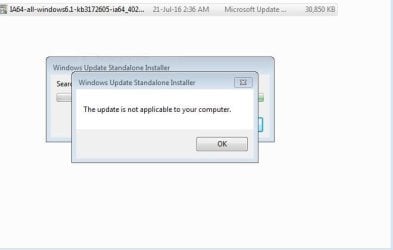
3. Clean boot - Installed IA64-all-windows6.1-kb3172605. It came up with an error message.

Do I start a new thread? I really wish to have updates operating back to normal.

Any assistance is greatly appreciated by this novice.

Mel
 

Attachments

  • update check 13-08-2016.JPG
    update check 13-08-2016.JPG
    28.9 KB · Views: 23
  • update message - 15-08-2016.JPG
    update message - 15-08-2016.JPG
    29.2 KB · Views: 23

My Computer

Computer type
Laptop
Computer Manufacturer/Model Number
Sony VAIO / E Series VPCEB46FG
OS
Windows 7 Home Premium 64bit
CPU
Windows 7 Service Pack 1 x86 NTFS
Motherboard
AMD E-350 Processor
Memory
4 GB
Hard Drives
500GB
Other Info
1.6GHz
Dear Forum,

I am at a loss at what to do.

I have attempted the following:

1. After attempted the first suggestion, that did not work and was advised to install another update prior to the link posted. So I reset the updates as outlined in the Tutorial - Windows Update - How to Reset - Option Three

2. Went to control panel - Windows Update - Search for updates - this went for seven hours to no avail.

3. Clean boot - Installed IA64-all-windows6.1-kb3172605. It came up with an error message.

Do I start a new thread? I really wish to have updates operating back to normal.

Any assistance is greatly appreciated by this novice.

Mel

You are having this issue as you are installing the update for Itanium systems as well as server edtion and not WIN 7 x64 systems.
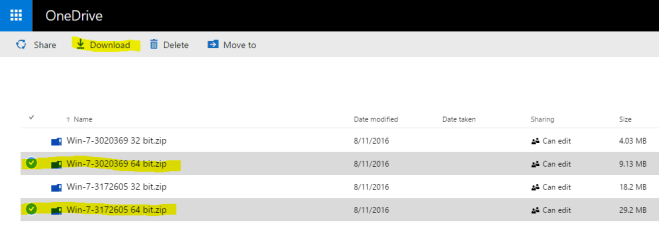
Use ThrashZones link instead and only download the x64 ones.
https://onedrive.live.com/?authkey=!AONKGfz5K6ZXWus&id=CAA2DC8F8EEEC3C8!2020&cid=CAA2DC8F8EEEC3C8

You should have picked the one in yellow in your old picture, also don't worry it's an easy mistake.
 

Attachments

  • catalog KB3172605.jpg
    catalog KB3172605.jpg
    369.1 KB · Views: 0
  • updates.PNG
    updates.PNG
    26.9 KB · Views: 0

My Computer

Computer type
PC/Desktop
Computer Manufacturer/Model Number
Custom
OS
10 Pro x64
CPU
Ryzen 9 3900X
Motherboard
Asrock x370 Tachi
Memory
64GB(4x16GB) DDR4
Graphics Card(s)
EVGA 1080ti FTW3
Sound Card
ASUS Xonar Essence STX (V4 Bursons), ODAC rev B, NFB-11, O2
Monitor(s) Displays
3xASUS PB278Q/R, Optoma HD142X
Screen Resolution
3x1440p, 1080p
Hard Drives
512GB 850 EVO(OS, Programs)
4TB (Movies)
3TB (Downloads)
3TB (Programs)
1TB HDD (Games)
2x6TB R1 (videos)
PSU
AX760
Case
Fractal Define R5
Cooling
NH-D15S
Keyboard
Massdrop Ctrl with Box Navy's
Mouse
G903, Alioth XXL Mat
Internet Speed
280/40
Antivirus
MBAM, ESET
Browser
Canary 64 Bit
Other Info
I also own a Thinkpad P50 Xeon 4K, X220T, X1C5
After receiving that message - I would have to reset the windows Update settings -correct?

I do feel silly that I went to the incorrect option in the Internet Explorer website. Thanks for educating me.
 

My Computer

Computer type
Laptop
Computer Manufacturer/Model Number
Sony VAIO / E Series VPCEB46FG
OS
Windows 7 Home Premium 64bit
CPU
Windows 7 Service Pack 1 x86 NTFS
Motherboard
AMD E-350 Processor
Memory
4 GB
Hard Drives
500GB
Other Info
1.6GHz
After receiving that message - I would have to reset the windows Update settings -correct?

I do feel silly that I went to the incorrect option in the Internet Explorer website. Thanks for educating me.

Everyone makes mistakes :), I don't get what you mean by what message but I would just set the pc to never check for updates in windows update on the left side then reboot, then install those files, reboot and set the settings back to "check but let me download them" then it should check for updates and just let it look for about ten minutes should find about 400 of them if its a clean install. I have never had to reset anything after a clean install and these files. So I would just try the files and check before doing the reset again.
 

My Computer

Computer type
PC/Desktop
Computer Manufacturer/Model Number
Custom
OS
10 Pro x64
CPU
Ryzen 9 3900X
Motherboard
Asrock x370 Tachi
Memory
64GB(4x16GB) DDR4
Graphics Card(s)
EVGA 1080ti FTW3
Sound Card
ASUS Xonar Essence STX (V4 Bursons), ODAC rev B, NFB-11, O2
Monitor(s) Displays
3xASUS PB278Q/R, Optoma HD142X
Screen Resolution
3x1440p, 1080p
Hard Drives
512GB 850 EVO(OS, Programs)
4TB (Movies)
3TB (Downloads)
3TB (Programs)
1TB HDD (Games)
2x6TB R1 (videos)
PSU
AX760
Case
Fractal Define R5
Cooling
NH-D15S
Keyboard
Massdrop Ctrl with Box Navy's
Mouse
G903, Alioth XXL Mat
Internet Speed
280/40
Antivirus
MBAM, ESET
Browser
Canary 64 Bit
Other Info
I also own a Thinkpad P50 Xeon 4K, X220T, X1C5
Hi,
The only 2 reasons you'd get that message is if KB3020369 is not installed it does need to be installed first,
Or if sp1 is not installed.

Click the Start button and type in the search box
system information
Hit the enter key or click on the same suggestion

You'll land on the system summery page
On the top left click on Edit and Select all
The Edit and Copy

Open a reply here and right click and select Paste.

KB3020369 found some better links for the updates :)
Win-7 32 bit
https://download.microsoft.com/down...B0A-35769CBBE6B0/Windows6.1-KB3020369-x86.msu
Win-7 64 bit
https://download.microsoft.com/down...020-EC41D56B074F/Windows6.1-KB3020369-x64.msu

KB3172605
Win-7 32 bit
https://download.microsoft.com/down...A9C-6B30C3E1735A/Windows6.1-KB3172605-x86.msu

Win-7 64 bit
https://download.microsoft.com/down...67F-C713F7821374/Windows6.1-KB3172605-x64.msu
 

My Computer

Computer type
PC/Desktop
Computer Manufacturer/Model Number
Custom assembled by me :}
OS
Win-7-Pro64bit 7-H-Prem-64bit
CPU
i7-5930K 2nd i9-9940x both water blocked VRM's too
Motherboard
ASUS SABERTOOTH X99 2nd ASUS x299 Apex
Memory
Trident-z 3200C14 2nd Trident-z 3600C16
Graphics Card(s)
EVGA 1080ti ftw3 2nd Titan Xp both water blocked
Sound Card
Built-in Realtek
Monitor(s) Displays
1-AOC G2460PG 24"G-Sync 144Hz/ 2nd 1-ASUS VG248QE 24" 144Hz
Screen Resolution
1920 x 1080 144Hz
Hard Drives
2-Samsung M.2 Evo & Evo Plus
2-Samsung 850 EVO 500GB SSD's/ 3-2.5 W.D. Black 1tb-&3-1tb/3-3.5 WD Black 1tb hdd's
PSU
EVGA SuperNOVA 1000-P2 2nd 1200-P2
Case
2-Corsair Obsidian Series 450D Black ATX Mid Tower
Cooling
Custom water loops
Keyboard
Logitech G710+/ 2nd Logitech G910
Mouse
2-RedDragon M901 Perdition 16400 dpi Gaming mouse = wired
Internet Speed
Comcast Ping 19ms 89.31mbps download speed 6.12mbps upload
Antivirus
Malwarebytes Pro/ Superantispyware Pro
Browser
FireFox & Pale moon
Other Info
2nd ASUS X299 Apex/Intel i9-9940x with Custom water loop/7H-Prem-x64/Corsair 450D case/Ram Trident-z 3600C16 4x8gb / Samsung970Evo plus 500gb SSD/Dual ssd EZ swap evo/PSU EVGA SuperNova 1200w-P2 80+Platinum/GPU Titan Xp /8-ML-140 on push-pull on 2-280GTX rads
Hi,
The only 2 reasons you'd get that message is if KB3020369 is not installed it does need to be installed first,
Or if sp1 is not installed.

Or if they are installing the update for Itanium machines and not the amd x64 platform. I'm pretty sure that is the issue at the moment. Will have to wait for Melissa's reply to know for sure.
 

My Computer

Computer type
PC/Desktop
Computer Manufacturer/Model Number
Custom
OS
10 Pro x64
CPU
Ryzen 9 3900X
Motherboard
Asrock x370 Tachi
Memory
64GB(4x16GB) DDR4
Graphics Card(s)
EVGA 1080ti FTW3
Sound Card
ASUS Xonar Essence STX (V4 Bursons), ODAC rev B, NFB-11, O2
Monitor(s) Displays
3xASUS PB278Q/R, Optoma HD142X
Screen Resolution
3x1440p, 1080p
Hard Drives
512GB 850 EVO(OS, Programs)
4TB (Movies)
3TB (Downloads)
3TB (Programs)
1TB HDD (Games)
2x6TB R1 (videos)
PSU
AX760
Case
Fractal Define R5
Cooling
NH-D15S
Keyboard
Massdrop Ctrl with Box Navy's
Mouse
G903, Alioth XXL Mat
Internet Speed
280/40
Antivirus
MBAM, ESET
Browser
Canary 64 Bit
Other Info
I also own a Thinkpad P50 Xeon 4K, X220T, X1C5
Sorry for not getting back to the Forum with the information.

I am lowly going through the processes as Sony VAIO Update and some other drivers where not operating and slowly ironing out those issues.
So process of elimination between manufacturer based issues versus Microsoft.

If you are informing me that there are some 400 updates - I am assuming pending the speed of the lap top etc -- may take some time. I have removed the first update downloaded for the Itanium machines.

I have done a clean boot again - on restart attempted to install Update KB3020369 first as per advised above.

Hopefully this is the information required.

Thank you Forum.
OS Name Microsoft Windows 7 Professional
Version 6.1.7601 Service Pack 1 Build 7601
Other OS Description Not Available
OS Manufacturer Microsoft Corporation
System Name STEALTH-PC
System Manufacturer Sony Corporation
System Model VPCEB46FG
System Type x64-based PC
Processor Intel(R) Core(TM) i5 CPU M 480 @ 2.67GHz, 2667 Mhz, 2 Core(s), 4 Logical Processor(s)
BIOS Version/Date American Megatrends Inc. R1170Y8, 28-Jan-11
SMBIOS Version 2.6
Windows Directory C:\Windows
System Directory C:\Windows\system32
Boot Device \Device\HarddiskVolume2
Locale United States
Hardware Abstraction Layer Version = "6.1.7601.17514"
User Name Stealth-PC\Stealth
Time Zone W. Australia Standard Time
Installed Physical Memory (RAM) 6.00 GB
Total Physical Memory 5.86 GB
Available Physical Memory 1.03 GB
Total Virtual Memory 11.7 GB
Available Virtual Memory 5.95 GB
Page File Space 5.86 GB
Page File C:\pagefile.sys
 

My Computer

Computer type
Laptop
Computer Manufacturer/Model Number
Sony VAIO / E Series VPCEB46FG
OS
Windows 7 Home Premium 64bit
CPU
Windows 7 Service Pack 1 x86 NTFS
Motherboard
AMD E-350 Processor
Memory
4 GB
Hard Drives
500GB
Other Info
1.6GHz
Back
Top