Windows 7 conflicts with Vista

If you press the windows key + R and get the run box up, type cmd for the command prompt.

then enter each of the following lines

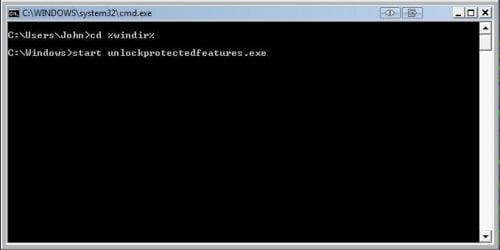
cd %windir%

start unlockProtectedFeatures.exe

If the protected feature box starts, try turning it off
 

My Computer

Computer type
PC/Desktop
OS
Windows 11 Workstation
i can get the cmd promt up but it states it cant find ''unlockprotectedfeatures.exe'' :(
is there any other commands that might clear the mistake..??

:o
 

My Computer

Computer Manufacturer/Model Number
myself
OS
SEVEN x64
CPU
Q9450 @ 3.6GHZ 1.34v
Motherboard
ASUS P5K PREMIUM P35
Memory
8GB 1066 buffalo firestix @ 1152mhz CL5
Graphics Card(s)
Sapphire HD 5970 + GTX260 (physX)
Sound Card
Creative X-FI Xtreme Gamer
Monitor(s) Displays
SAMSUNG 20'' & SAMSUNG 23'' (dual screens)
Screen Resolution
2048x1152 & 1680x1050
Hard Drives
1x seagate 160gb IDE & 1x seagate 160gb SATA
PSU
XCILIO 850w (78A)
Case
CM590 1x 120x38mm & 2x92x38mm / 4x 120x25mm
Cooling
AC7 PRO @ 92x38mm blower, Lamptron military bus bay controll
Keyboard
LOGITECH E110
Mouse
logitech NX5
Internet Speed
2MB
Other Info
its a continual ''work in progress''....
Was the command run in the windows dir?

i.e. c:\windows\

Also if you can see your win7 drive from vista check that unlockProtectedFeatures.exe is still in the win7 windows directory
 

My Computer

Computer type
PC/Desktop
OS
Windows 11 Workstation
Was the command run in the windows dir?

i.e. c:\windows\

Also if you can see your win7 drive from vista check that .exe is still in the win7 windows directory

this is how i ran the commands....

>cd %windir%

>start unlockprotectedfeatures.exe

is this correct..?

i cannot find ''unlockprotectedfeatures'' in the W7 windows directory..while browsing through vista ??

& i cant get in to roll it back, can i start the ''system restore'' with a command.??

sorry to be a droning NUB ...

:)
 

My Computer

Computer Manufacturer/Model Number
myself
OS
SEVEN x64
CPU
Q9450 @ 3.6GHZ 1.34v
Motherboard
ASUS P5K PREMIUM P35
Memory
8GB 1066 buffalo firestix @ 1152mhz CL5
Graphics Card(s)
Sapphire HD 5970 + GTX260 (physX)
Sound Card
Creative X-FI Xtreme Gamer
Monitor(s) Displays
SAMSUNG 20'' & SAMSUNG 23'' (dual screens)
Screen Resolution
2048x1152 & 1680x1050
Hard Drives
1x seagate 160gb IDE & 1x seagate 160gb SATA
PSU
XCILIO 850w (78A)
Case
CM590 1x 120x38mm & 2x92x38mm / 4x 120x25mm
Cooling
AC7 PRO @ 92x38mm blower, Lamptron military bus bay controll
Keyboard
LOGITECH E110
Mouse
logitech NX5
Internet Speed
2MB
Other Info
its a continual ''work in progress''....
While in Vista download unlockprotectedfeatures.exe from shawns tutorial and copy it into your win7 windows directory

when you run the commands from 7 it should look something like this


Capture1.JPG
 

My Computer

Computer type
PC/Desktop
OS
Windows 11 Workstation
unfortunately that didn't worked john....

but im sending this from W7 now, i can open any programs straight from the task manager, so there must be a way to re enable the desktop....

i tried sys restore & that wont work, seeing as i can access anything on here surly there is a way to switch the desktop back on either through an app or command...:cry::cry:

its perfectly configured except for the desktop.

:)
 

My Computer

Computer Manufacturer/Model Number
myself
OS
SEVEN x64
CPU
Q9450 @ 3.6GHZ 1.34v
Motherboard
ASUS P5K PREMIUM P35
Memory
8GB 1066 buffalo firestix @ 1152mhz CL5
Graphics Card(s)
Sapphire HD 5970 + GTX260 (physX)
Sound Card
Creative X-FI Xtreme Gamer
Monitor(s) Displays
SAMSUNG 20'' & SAMSUNG 23'' (dual screens)
Screen Resolution
2048x1152 & 1680x1050
Hard Drives
1x seagate 160gb IDE & 1x seagate 160gb SATA
PSU
XCILIO 850w (78A)
Case
CM590 1x 120x38mm & 2x92x38mm / 4x 120x25mm
Cooling
AC7 PRO @ 92x38mm blower, Lamptron military bus bay controll
Keyboard
LOGITECH E110
Mouse
logitech NX5
Internet Speed
2MB
Other Info
its a continual ''work in progress''....
try

cd %windir%

explorer.exe
 

My Computer

Computer type
PC/Desktop
OS
Windows 11 Workstation
i see the problem i have.....i cannot select ''run as admin'' on the CMD prompt in the task manager :(

i think im just gonna format the 2nd HDD tonight & run a fresh installation (& steer well clear of this fancy taskbar), i have learn t quite a bit from my mistakes this time around :o & i don't have those crappy modem drivers holding me up, & now i can configure the router from memory :D

.... its all good fun. ;)

cheers for all your help john, i will be back on W7 by tomorrow night so its not that bad ....a new install is no biggie to repeat ;)
 

My Computer

Computer Manufacturer/Model Number
myself
OS
SEVEN x64
CPU
Q9450 @ 3.6GHZ 1.34v
Motherboard
ASUS P5K PREMIUM P35
Memory
8GB 1066 buffalo firestix @ 1152mhz CL5
Graphics Card(s)
Sapphire HD 5970 + GTX260 (physX)
Sound Card
Creative X-FI Xtreme Gamer
Monitor(s) Displays
SAMSUNG 20'' & SAMSUNG 23'' (dual screens)
Screen Resolution
2048x1152 & 1680x1050
Hard Drives
1x seagate 160gb IDE & 1x seagate 160gb SATA
PSU
XCILIO 850w (78A)
Case
CM590 1x 120x38mm & 2x92x38mm / 4x 120x25mm
Cooling
AC7 PRO @ 92x38mm blower, Lamptron military bus bay controll
Keyboard
LOGITECH E110
Mouse
logitech NX5
Internet Speed
2MB
Other Info
its a continual ''work in progress''....
Hello SK.

I had trouble with a a WU update today myself', it froze and I had to do a hard shutdown to clear it. I'm having no problem with the taskbar though; everything is running fine otherwise.

Sorry to hear you're having troubles.


Later :confused: Ted
 

My Computer

Computer Manufacturer/Model Number
* BFK Customs *
OS
W 7 64-bit Ultimate
CPU
Intel Q9550 Yorkfield
Motherboard
ASUS P5Q Pro
Memory
8GB Dominator 8500C5D
Graphics Card(s)
ATI : XFX 5870
Sound Card
Realtek HD Audio 7-1
Monitor(s) Displays
1x 47" LCD HDMI & 3x 26" LCD HDMI
Screen Resolution
1920x1080P & 1920x1200
Hard Drives
1x 80GB Intel X25-M G2 SSD : 1x 500GB & 1x 640GB WD Caviar Black(s)
PSU
Corsair 620HX
Case
Cooler Master RC-690
Cooling
Tuniq Tower 120, 2x 140mm and 3x 120mm case fans
Keyboard
Microsoft 500
Mouse
Razer Diamondback 3G
Internet Speed
14 Mb/s
Other Info
1x Koutech 3Gb/s SATA HDD Hot Swap Rack
Back
Top