
Windows 7 Constant Hard Drive Activity - Computer Slow to Respond

Wipe out your pagefile settings too for a bit: no page file, I would not want you having multiple ones, and especially one on the same hard drive windows is on, unless unavoidable. (typical laptop scenario)
8000+ page file is unnecessary, I would min/max like 2048 later. Never letting Windows control it.

What happens with min/max same, the same sectors are set as that pagefile and it will never change (unless you change it) so it's best to have the HD defragged ahead of this so it's all contiguous sectors that get written/read saving wear and tear on the head from jumping around all over the place, of course if it's a SSD, you don't want to ever defrag those.

If you are totally at your wits end, I would last resort try Optimal settings in your BIOS (of course make note of what you are using now, before doing this) Good info to have on hand any way and pretty hard to have all memorized.

But that's after doing others suggestions also, I am a big wipe and drop fan myself, but I know what I am doing, but hate it now because I have 2 companies I have to email and get new codes for their programs every stinking time I wipe and drop.

Guess I'll be trying your page file suggestion next!

No idea what you mean by "OPTIMAL settings in your BIOS". I know how to get into the BIOS but have no experience with "tweaking" there.

C.
 

My Computer My Computer

At a glance

Microsoft Windows 7 Home Premium 64-bit 7601 ...Intel(R) Core(TM) i5 CPU 650 @ 3.20GHz8.00 GBATI Radeon HD 5570
Computer type
PC/Desktop
Computer Manufacturer/Model Number
Gateway
OS
Microsoft Windows 7 Home Premium 64-bit 7601 Multiprocessor Free Service Pack 1
CPU
Intel(R) Core(TM) i5 CPU 650 @ 3.20GHz
Motherboard
Gateway FX6840
Memory
8.00 GB
Graphics Card(s)
ATI Radeon HD 5570
Sound Card
(1) ATI High Definition Audio Device (2) Realtek High Defi
Screen Resolution
1920 x 1080 x 32 bits (4294967296 colors) @ 60 Hz
Hard Drives
(1) ST31000528AS (2) ST31000528AS (3) Generic- Compact Flash USB Device (4) Generic- MicroSD USB Device (5) Generic- MS/MS-Pro/HG USB Device (6) Generic- SD/MMC USB Device (7) Generic- xD-Picture USB Device
The BIOS has pre-configured defaults,or it should, and OPTIMAL settings is usually one, that is what I am referring to.
 

My Computer My Computer

At a glance

Windows 7 Ultimate Retail Box (64-bit install...AMD FX-8350 CPU v1.15 (or 1.0F) BIOS was requ...8G CAS-7 G-Skill DDR3 @1333 (2 fours) [mobo n...Radeon HD 7950 [3 gigs of GDDR5] MSI Twin Fro...
Computer type
PC/Desktop
Computer Manufacturer/Model Number
Self Built Custom
OS
Windows 7 Ultimate Retail Box (64-bit installed) + Service Pack 1
CPU
AMD FX-8350 CPU v1.15 (or 1.0F) BIOS was required!
Motherboard
MSI 890FXA-GD70
Memory
8G CAS-7 G-Skill DDR3 @1333 (2 fours) [mobo nonOC max rec'd]
Graphics Card(s)
Radeon HD 7950 [3 gigs of GDDR5] MSI Twin Frozr model
Sound Card
Realtek High Definition Audio (onboard mobo, ALC-889 chip)
Monitor(s) Displays
2 WS LED Monitors: One LG One Viewsonic
Screen Resolution
1920 by 1080
Hard Drives
SSD for OS: Samsung 840 Pro
SSD for VM and utilities: Adata SX900
7200 RPM SATA HDs for the rest: Hitachi and Seagate
PSU
Corsair TX850 - 850W max, in service since August 2010.
Case
Thermaltake Armor A90
Cooling
Thermaltake Spin Q CPU Cooler, in service since August 2010
Keyboard
Logitech G11
Mouse
Logitech M310 Wireless
Internet Speed
100 Megabit broadband supposedly upgraded from 50 (Cable)
Antivirus
Bitdefender Internet Security 2014 suite
Browser
Pale Moon 64-bit main, also IceDragon, Opera, and Maxthon.
Other Info
CompTIA A+ certified (220-800 series) in July 2013.
Wipe out your pagefile settings too for a bit: no page file, I would not want you having multiple ones, and especially one on the same hard drive windows is on, unless unavoidable. (typical laptop scenario)
8000+ page file is unnecessary, I would min/max like 2048 later. Never letting Windows control it.

Applied the pagefile steps you mentioned. After doing this, boot time returned to the 2 minute range from the 8 - 9 minute range that was being experienced following the Kaspersky update. The original issue (heavy HD write activity and slow system response) continues to exist.

About to conclude that a clean install of Windows 7 as suggested above is the only option left for dealing with the issue. Until I get myself completely resigned to doing the clean install thing, I've decided to use the sleep function instead of shut-down/boot whever possible. This will minimize the impact of the issue unless something else (such as a Windows update) requires a shut-down/boot sequence.

Thx for the advice everyone has offered.

C.
 

My Computer My Computer

At a glance

Microsoft Windows 7 Home Premium 64-bit 7601 ...Intel(R) Core(TM) i5 CPU 650 @ 3.20GHz8.00 GBATI Radeon HD 5570
Computer type
PC/Desktop
Computer Manufacturer/Model Number
Gateway
OS
Microsoft Windows 7 Home Premium 64-bit 7601 Multiprocessor Free Service Pack 1
CPU
Intel(R) Core(TM) i5 CPU 650 @ 3.20GHz
Motherboard
Gateway FX6840
Memory
8.00 GB
Graphics Card(s)
ATI Radeon HD 5570
Sound Card
(1) ATI High Definition Audio Device (2) Realtek High Defi
Screen Resolution
1920 x 1080 x 32 bits (4294967296 colors) @ 60 Hz
Hard Drives
(1) ST31000528AS (2) ST31000528AS (3) Generic- Compact Flash USB Device (4) Generic- MicroSD USB Device (5) Generic- MS/MS-Pro/HG USB Device (6) Generic- SD/MMC USB Device (7) Generic- xD-Picture USB Device
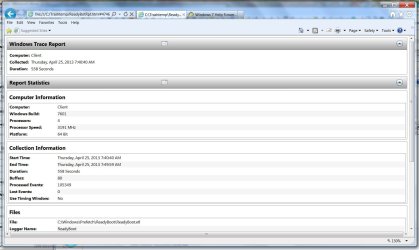
New questions about my issue - I used Tracerpt to display information about one of the files
(C:\Windows\Prefetch\ReadyBoot\ReadyBoot.etl) that is shown by Windows Resource Monitor to be the object of much of the HD write activity that I see that slows down my machine for several minutes. Screenshot of ReadyBoot report attached.

The ReadyBoot report shows that ReadyBoot ran for over 9 minutes and is larger than 20M - this roughly coincides with the amount of time I see heavy HD write activity and computer slowdown.

So the questions:

1. What exactly is ReadyBoot and what does it do?
2. Can it be disabled - at least temporarily in order to see if it is the cause of my problem? If so, how is this done?

C.
 

Attachments

  • ReadyBoot ScreenShot.jpg
    ReadyBoot ScreenShot.jpg
    127.3 KB · Views: 6

My Computer My Computer

At a glance

Microsoft Windows 7 Home Premium 64-bit 7601 ...Intel(R) Core(TM) i5 CPU 650 @ 3.20GHz8.00 GBATI Radeon HD 5570
Computer type
PC/Desktop
Computer Manufacturer/Model Number
Gateway
OS
Microsoft Windows 7 Home Premium 64-bit 7601 Multiprocessor Free Service Pack 1
CPU
Intel(R) Core(TM) i5 CPU 650 @ 3.20GHz
Motherboard
Gateway FX6840
Memory
8.00 GB
Graphics Card(s)
ATI Radeon HD 5570
Sound Card
(1) ATI High Definition Audio Device (2) Realtek High Defi
Screen Resolution
1920 x 1080 x 32 bits (4294967296 colors) @ 60 Hz
Hard Drives
(1) ST31000528AS (2) ST31000528AS (3) Generic- Compact Flash USB Device (4) Generic- MicroSD USB Device (5) Generic- MS/MS-Pro/HG USB Device (6) Generic- SD/MMC USB Device (7) Generic- xD-Picture USB Device
My first post on here. Experiencing the exact same problem. Haven't done much to identify the cause. But the problem started right after my Bitdefender Antivirus Free Edition upgraded itself to a new version.
 

My Computer My Computer

At a glance

Windows 7 Home Premium 64bitIntel Core i5-2430M CPU @ 2.40Ghz6.00 GB
Computer type
Laptop
Computer Manufacturer/Model Number
Acer
OS
Windows 7 Home Premium 64bit
CPU
Intel Core i5-2430M CPU @ 2.40Ghz
Memory
6.00 GB
Hard Drives
1 TB
Antivirus
Bitdefender Antivirus Free Edition
Uninstalling Bitdefender hasn't solved the problem. After reading the whole post, I guess reinstalling windows is the only way of clearing this problem. :(
 

My Computer My Computer

At a glance

Windows 7 Home Premium 64bitIntel Core i5-2430M CPU @ 2.40Ghz6.00 GB
Computer type
Laptop
Computer Manufacturer/Model Number
Acer
OS
Windows 7 Home Premium 64bit
CPU
Intel Core i5-2430M CPU @ 2.40Ghz
Memory
6.00 GB
Hard Drives
1 TB
Antivirus
Bitdefender Antivirus Free Edition

My Computer My Computer

At a glance

Windows 10 ProAMD Ryzen 5 2400G Processor with Radeon RX Ve...G.SKILL Ripjaws V Series 16GB (2 x 8GB) 288-P...2047MB NVIDIA GeForce GTX 1060 6GB (EVGA)
Computer type
PC/Desktop
Computer Manufacturer/Model Number
Custom Built
OS
Windows 10 Pro
CPU
AMD Ryzen 5 2400G Processor with Radeon RX Vega 11 Graphics
Motherboard
ASRock X470 Master SLI/AC AM4 AMD Promontory X470 SATA 6Gb/s
Memory
G.SKILL Ripjaws V Series 16GB (2 x 8GB) 288-Pin DDR4 SDRAM D
Graphics Card(s)
2047MB NVIDIA GeForce GTX 1060 6GB (EVGA)
Sound Card
Motherboard Built in
Monitor(s) Displays
Acer R240HY bidx 23.8-Inch IPS HDMI DVI VGA (1920 x 1080) Wi
Screen Resolution
1920 x 1080
Hard Drives
1TB Sandisk SSD PLUS (Main drive)
500 GB Seagate 7200 RPM (Games)
500 GB Western Digital 7200 RPM (Virtual Machines)
PSU
CORSAIR TX Series TX650M 650W 80+ Gold Modular Power Supply
Case
CORSAIR CARBIDE SPEC-02 Mid-Tower Gaming Case, Red LED Fan
Cooling
220mm, two 120mm, and four 60mm fans
Keyboard
Wired Dell keyboard
Mouse
Wireless Logitech mouse
Internet Speed
250mb down, 30mb up
Antivirus
Panda Cloud Antivirus
Browser
Chrome-ish x64
Other Info
Your awesome for reading this.
Tried selective startup as mentioned in the link, but the problem still persists.

Thanks anyways for the reply. :)
 

My Computer My Computer

At a glance

Windows 7 Home Premium 64bitIntel Core i5-2430M CPU @ 2.40Ghz6.00 GB
Computer type
Laptop
Computer Manufacturer/Model Number
Acer
OS
Windows 7 Home Premium 64bit
CPU
Intel Core i5-2430M CPU @ 2.40Ghz
Memory
6.00 GB
Hard Drives
1 TB
Antivirus
Bitdefender Antivirus Free Edition
response?

I did just have no problem with my PC, however this topic was interesting for me, and so I have looked a bit deeper and I found this topic here:

http://www.sevenforums.com/performance-maintenance/56688-disk-thrashing-disable-readyboot-not-readyboost-3.html

There is an external link here:

Something else to disable on Win7 - ReadyBoot - Solid State Drives (SSD) - Storage Forums

which tells you how to turn it off ;) ...once you do that, check in again and tell us how is your machine doing.

Also, I am having no problems on any of my machines, so whatever, just wanted to help ...even registered for that...
 

My Computer My Computer

At a glance

windows 7 Ultimate x64 (*3 on different machi...
OS
windows 7 Ultimate x64 (*3 on different machines)
I respect is an old thread but thought I would chime in.

Same issue. I tracked it down to readyboot, which when I disable (Can be disabled in performance monitor data collection sets) it is auto reenabled by the next reboot. Interestingly windows 8 and 10 will disable it when a SSD is detected.

In my case as my boot drive is a SSD the pc boots fast, and I can login ok but the hdd/ssd activity is insane for usually between about 30 seconds and up to a couple of minutes. Microsoft sadly seem to have a thing for background tasks ever since vista launched.

So the guide Something else to disable on Win7 - ReadyBoot - Solid State Drives (SSD) - Storage Forums I can confirm is no good as windows 7 turns it back on.
 

My Computer My Computer

At a glance

windows 8.1 Pro x64intel i5 4670k @ 4.3ghz16 gig ram ddr3 @ 1600 corsair vengeanceevga 970 GTX 4 GIG FTW ACX 2.0
Computer type
PC/Desktop
Computer Manufacturer/Model Number
home built
OS
windows 8.1 Pro x64
CPU
intel i5 4670k @ 4.3ghz
Motherboard
asus z87-plus
Memory
16 gig ram ddr3 @ 1600 corsair vengeance
Graphics Card(s)
evga 970 GTX 4 GIG FTW ACX 2.0
Sound Card
asus xonar D2X
Monitor(s) Displays
benq gw2765ht
Screen Resolution
2560x1440
Hard Drives
Samsung 850 pro SSD 512gig - boot device wooosh
WD black cavalier 640gig WD6401AALS
Seagate 500gig ST3500630AS
WD 2TB Green WDC20EARS
2 x WD Red 3TB WD30EFRX
Samsung 750gig HD753LG - on asmedia controller
PSU
coolermaster silent pro 600watt modular
Case
fractal define R4
Cooling
artic freezer i30, 3 case fans
Keyboard
microsoft business ps2 keyboard
Mouse
microsoft optical black mouse
Internet Speed
80/20 FTTC SkyBB
Antivirus
Nod32 AV v8, HitmanProAlert, SRP, System Hardening
Browser
Chrome x64
Other Info
Intel controller is in AHCI mode currently using IaSTOR 12.8.0.1016 drivers
The constant arrogant respones on this website is shocking. Does it make you feel clever using big sentences like have you scanned for error.s Ugh you people make me sick. I have been scrolling through these useless forums trying to find an explanation as to why two of my Windows 7 machines are constantly thrashing and freezing. It never happened on XP or Linux or Mac. But anyway thought I would just thrown in my two cents. Could the indexing service have something do with the constant slow performance of Windows 7? Because my hard drive light is blinking solid too!
 

My Computer My Computer

At a glance

windows 7 home premium 64 bit
Computer type
PC/Desktop
Computer Manufacturer/Model Number
acer dell
OS
windows 7 home premium 64 bit
Hi Jon,
Dont think its the indexing service, you could always turn it OF.
Thrashing and >> Freezing << sounds more like a driver problem.
Pop over to the BSOD subforum follow the posting requirement.
and please fill in the specs for the comps.

Roy

And finally
Supercallerfragalisticexpialidotious. thanks to Mary Poppins
 

My Computer My Computer

At a glance

W7 home premium 32bit/W7HP 64bit/w10 tp insid...E5300 dual core3gbNvidia Geforce 7100 Nforce 630i
Computer type
PC/Desktop
Computer Manufacturer/Model Number
medionl/Aspire 6930G/acer x55a
OS
W7 home premium 32bit/W7HP 64bit/w10 tp insider ring
CPU
E5300 dual core
Motherboard
medion MS7366
Memory
3gb
Graphics Card(s)
Nvidia Geforce 7100 Nforce 630i
Monitor(s) Displays
avixc
Internet Speed
n (isp resticted to 72)
Antivirus
mse/pands
Browser
palemoon
Other Info
Belkin Fd7050 n USB using Railink RT2870 drivers, more upto date
Old thread, I know, but here's an aspect not previously mentioned. The high disk activity plus unresponsiveness occurs for me when my machine is coming out of sleep, though not every time. After a reboot, there is high disk activity, but the system behaves normally. I have found that when it's unresponsive after coming out of sleep, a reboot clears it up. Though most often ctrl-alt-del is not responsive, and I have to cycle the power.
 

My Computer My Computer

At a glance

Windows 7 Pro 64i5-3
Computer type
PC/Desktop
Computer Manufacturer/Model Number
Dell Optiplex 3010
OS
Windows 7 Pro 64
CPU
i5-3
I tried everything I could find online to try to correct a Windows 7 machine that had inexplicably high disk usage. At some point I saw that it could be a power issue. As it turns out, I had just replaced the battery a couple of weeks earlier. When I put back the old battery, the problem disappeared. I am not certain if the new battery was flawed or if the problem was corrected by power flushing the laptop, but I sure hope this helps someone. Good luck to all.
 

My Computer My Computer

At a glance

Windows 7 Professional
Computer type
PC/Desktop
OS
Windows 7 Professional
Back
Top