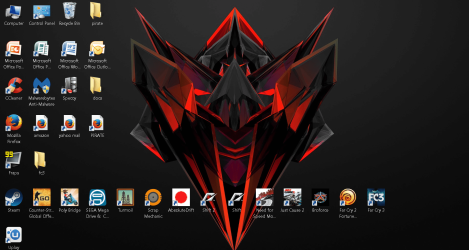
windows 7 desktop icons moving

dipdapslap

Banned
Local time
3:52 PM
Messages
106
my windows 7 destop icons keep moving and i dont know what to do its annoying:mad:
 

My Computer

Computer type
PC/Desktop
Computer Manufacturer/Model Number
custom built
OS
windows 7 professional x64
CPU
AMD Athlon X4 860K Quad-Core 3.7GHz
Motherboard
asus a68HM-plus
Memory
8gb of ram 1x4gb 1x4gb
Graphics Card(s)
ASUS AMD Radeon R7 360 OC 2GB GDDR5
Sound Card
blank
Monitor(s) Displays
hitachi 32inch tv
Screen Resolution
1920x1080
Hard Drives
wd blue 1tb drive
PSU
evga 500w 80 plus
Case
sharkoon
Cooling
sharkoon fans
Keyboard
logitech
Mouse
logitech
Internet Speed
1000000000000000000000000000000000000000000000000000000 mbs
Antivirus
mlg pro antivirus trickshot sim
Browser
netscape
Have you tried updating any Video card drivers? Outdated Nvidia cards in particular can cause this.

I'm assuming of course you've already unchecked auto-arrange. If not right click on an empty space of your desktop > choose view > uncheck auto arrange. This should do it, if not check drivers as mentioned first. Hope this helps!
 

My Computer

Computer type
Laptop
Computer Manufacturer/Model Number
MSI GE72VR Apache Pro-416
OS
Windows 10x64 Build 1709
CPU
Intel i7 7700HQ Kaby Lake
Motherboard
Micro-Star Intl. MS-179B (U3C1)
Memory
16 GB DDR4 @2400
Graphics Card(s)
Nvidia Geforce GTX 1060
Screen Resolution
1920x1080 120Hz
Hard Drives
256 GB Nvme M.2 SSD

1TB HDD@7200
Cooling
Cooler Blast 4
Keyboard
Steel Series
Antivirus
Bit Defender Free
Browser
Edge
My apu graphics driver is up to date I will try the 2nd suggestion
 

My Computer

Computer type
PC/Desktop
Computer Manufacturer/Model Number
custom built
OS
windows 7 professional x64
CPU
AMD Athlon X4 860K Quad-Core 3.7GHz
Motherboard
asus a68HM-plus
Memory
8gb of ram 1x4gb 1x4gb
Graphics Card(s)
ASUS AMD Radeon R7 360 OC 2GB GDDR5
Sound Card
blank
Monitor(s) Displays
hitachi 32inch tv
Screen Resolution
1920x1080
Hard Drives
wd blue 1tb drive
PSU
evga 500w 80 plus
Case
sharkoon
Cooling
sharkoon fans
Keyboard
logitech
Mouse
logitech
Internet Speed
1000000000000000000000000000000000000000000000000000000 mbs
Antivirus
mlg pro antivirus trickshot sim
Browser
netscape
i had allready unchecked it and it still does it
 

My Computer

Computer type
PC/Desktop
Computer Manufacturer/Model Number
custom built
OS
windows 7 professional x64
CPU
AMD Athlon X4 860K Quad-Core 3.7GHz
Motherboard
asus a68HM-plus
Memory
8gb of ram 1x4gb 1x4gb
Graphics Card(s)
ASUS AMD Radeon R7 360 OC 2GB GDDR5
Sound Card
blank
Monitor(s) Displays
hitachi 32inch tv
Screen Resolution
1920x1080
Hard Drives
wd blue 1tb drive
PSU
evga 500w 80 plus
Case
sharkoon
Cooling
sharkoon fans
Keyboard
logitech
Mouse
logitech
Internet Speed
1000000000000000000000000000000000000000000000000000000 mbs
Antivirus
mlg pro antivirus trickshot sim
Browser
netscape
hello this is still not solved can i have some help
 

My Computer

Computer type
PC/Desktop
Computer Manufacturer/Model Number
custom built
OS
windows 7 professional x64
CPU
AMD Athlon X4 860K Quad-Core 3.7GHz
Motherboard
asus a68HM-plus
Memory
8gb of ram 1x4gb 1x4gb
Graphics Card(s)
ASUS AMD Radeon R7 360 OC 2GB GDDR5
Sound Card
blank
Monitor(s) Displays
hitachi 32inch tv
Screen Resolution
1920x1080
Hard Drives
wd blue 1tb drive
PSU
evga 500w 80 plus
Case
sharkoon
Cooling
sharkoon fans
Keyboard
logitech
Mouse
logitech
Internet Speed
1000000000000000000000000000000000000000000000000000000 mbs
Antivirus
mlg pro antivirus trickshot sim
Browser
netscape
my windows 7 destop icons keep moving and i dont know what to do its annoying:mad:

I had (past tense) the same problem. I'd set my desktop icons exactly were I wanted them, and as soon as I'd reboot, they would be in different locations.

I think I must have posted that annoyance on at least six forums, and no-one could, or at least WOULD tell me how to fix it. Well, I finally figured it out that when I had a 'Theme' running, and it was running a Slide Show, that's when the icons would move.

BUT.... if I would set my desktop icons where I wanted them, and then go into desktop properties and select a single picture like the MS Window screen, and then reboot, my icons would stay were I put them.
Then if I wanted the Slide Show, I could turn that on again, and my icons would not move.

So, to keep your desktop icons where you put them, you must pick a single picture for your desktop background and NOT a slide show, and then reboot, to lock the icons in place.

All that stuff is saved to your registry, which resides in RAM memory, while Windows is running, and is only written back to the Permanent Registry on your hard drive, when you shut down your computer.
That's a very good reason to shut down your computer when you're done using it....like any other appliance.

Cheers Mate!
TechnoMage :cool:
 

My Computer

Computer type
PC/Desktop
Computer Manufacturer/Model Number
Various
OS
Win 7 Pro, SP1, x86, Win-11/Pro/64
CPU
AMD
Motherboard
Various
Memory
8GB Crucial
Graphics Card(s)
Various
Sound Card
OnBoard
Monitor(s) Displays
Acer 21.5"
Hard Drives
Crucial SSD, 500 GB
PSU
OEM
Case
SFF Slim Line Case
Cooling
OEM
Keyboard
eMachines
Mouse
Logitech Wireless
Internet Speed
varies
Antivirus
Windows Defender/Super Anti-Spyware
Browser
Firefox
my desktop background is a still pic
 

Attachments

  • back.PNG
    back.PNG
    1.5 MB · Views: 1

My Computer

Computer type
PC/Desktop
Computer Manufacturer/Model Number
custom built
OS
windows 7 professional x64
CPU
AMD Athlon X4 860K Quad-Core 3.7GHz
Motherboard
asus a68HM-plus
Memory
8gb of ram 1x4gb 1x4gb
Graphics Card(s)
ASUS AMD Radeon R7 360 OC 2GB GDDR5
Sound Card
blank
Monitor(s) Displays
hitachi 32inch tv
Screen Resolution
1920x1080
Hard Drives
wd blue 1tb drive
PSU
evga 500w 80 plus
Case
sharkoon
Cooling
sharkoon fans
Keyboard
logitech
Mouse
logitech
Internet Speed
1000000000000000000000000000000000000000000000000000000 mbs
Antivirus
mlg pro antivirus trickshot sim
Browser
netscape
Right click on the empty space on the desktop.

On the "Sort by" made sure nothing is selected or ticked.

On the "View" made sure the Auto arranged is not ticked.

On the "View" made sure the "Align icons to grid" is not ticked.

Check your picture size is the same as the desktop size.
 

My Computer

Computer type
Laptop
Computer Manufacturer/Model Number
Toshiba L630 and L735
OS
Windows 7 x64
Hard Drives
240 GB SSD
Auto arranged is not ticked.
Align icons to grid was ticket now not tice
and what do you mean Check your picture size is the same as the desktop size
 

My Computer

Computer type
PC/Desktop
Computer Manufacturer/Model Number
custom built
OS
windows 7 professional x64
CPU
AMD Athlon X4 860K Quad-Core 3.7GHz
Motherboard
asus a68HM-plus
Memory
8gb of ram 1x4gb 1x4gb
Graphics Card(s)
ASUS AMD Radeon R7 360 OC 2GB GDDR5
Sound Card
blank
Monitor(s) Displays
hitachi 32inch tv
Screen Resolution
1920x1080
Hard Drives
wd blue 1tb drive
PSU
evga 500w 80 plus
Case
sharkoon
Cooling
sharkoon fans
Keyboard
logitech
Mouse
logitech
Internet Speed
1000000000000000000000000000000000000000000000000000000 mbs
Antivirus
mlg pro antivirus trickshot sim
Browser
netscape
This problem is only uncheck of auto arrange icons so you do right click and select view and tick on auto arrange icons .
 

My Computer

Computer type
PC/Desktop
OS
window 7
I use a program called "Desktop Restore". Run program, restart computer then hold "shift + RMB" on desktop, save icon position. If they move do a "shift + RMB"and restore. hope this helps
 

My Computer

Computer type
PC/Desktop
Computer Manufacturer/Model Number
custom build
OS
windows 7 64 bit Home Premium
thanks timeclock its worked:)
 

My Computer

Computer type
PC/Desktop
Computer Manufacturer/Model Number
custom built
OS
windows 7 professional x64
CPU
AMD Athlon X4 860K Quad-Core 3.7GHz
Motherboard
asus a68HM-plus
Memory
8gb of ram 1x4gb 1x4gb
Graphics Card(s)
ASUS AMD Radeon R7 360 OC 2GB GDDR5
Sound Card
blank
Monitor(s) Displays
hitachi 32inch tv
Screen Resolution
1920x1080
Hard Drives
wd blue 1tb drive
PSU
evga 500w 80 plus
Case
sharkoon
Cooling
sharkoon fans
Keyboard
logitech
Mouse
logitech
Internet Speed
1000000000000000000000000000000000000000000000000000000 mbs
Antivirus
mlg pro antivirus trickshot sim
Browser
netscape
Back
Top