
jamierdonald
New member
- Local time
- 12:59 PM
- Messages
- 2
Hello,
I work in a school and one of the pupils has done something to change the appearance of the display/changed the icon sizes. I have tried zooming out and quitting the zoom function, i have checked that the resolution is correct and i have tried pressing the Windows +/- keys all to no avail. I have also tried the pressing ctrl and scrolling the mouse wheel, again this does not help.
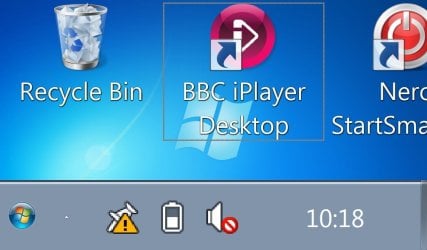
The desktop background is normal which might give a clue to the issue, i don't know. The main problem i have is that due to the size of the windows and icons it is not possible to navigate the explorer windows. Any idea of how to fix this? I took a screen grab of the desktop as it is-please see attachment.
Thanks in advance.
I work in a school and one of the pupils has done something to change the appearance of the display/changed the icon sizes. I have tried zooming out and quitting the zoom function, i have checked that the resolution is correct and i have tried pressing the Windows +/- keys all to no avail. I have also tried the pressing ctrl and scrolling the mouse wheel, again this does not help.
The desktop background is normal which might give a clue to the issue, i don't know. The main problem i have is that due to the size of the windows and icons it is not possible to navigate the explorer windows. Any idea of how to fix this? I took a screen grab of the desktop as it is-please see attachment.
Thanks in advance.
Attachments
My Computer
At a glance
windows 7
- OS
- windows 7


