
kittenSandwich
New member
- Local time
- 8:24 AM
- Messages
- 6
hello, i'm new here. 
this is my problem:
i cannot boot into windows 7 or reinstall it.
Every time I boot my computer up, it goes straight to windows recovery. It displays:
Startup Repair
start Windows Normally.
this computer originally had windows vista OEM installed, and has had a bunch of problems (various BSODs, i can list them later since i don't have them on hand), especially startup problems. i've gotten different BSODs from time to time. This has been going on for a year.
So I decided to upgrade Vista to Windows 7. Windows 7 worked fine at first, but then it started to display problems again (blue screens, random shutdowns and reboots).
I decided to do a clean install on my main partition (i have a separate partition for misc. files) and then my computer seemed to be okay. After a while, I started to experience random reboots and maybe a BSOD or two (that i wasn't able to record). I was still able to use system recovery from the Windows 7 disc, but recently it stopped working altogether.
in summary, i've tried...
- booting into safe mode (it loads drivers, but it hangs)
- booting with the official windows 7 install disc (it used to work-- now it doesn't)
- booting with windows 7 installed on a usb drive
- booting with the repair cd that i made when my OS was still functioning.
booting from the discs and usb drive gets me as far as the "loading windows" screen, but the four colored lights that make up the windows logo don't show up. the screen just hangs.
NOTHING WORKS.
my last resort is to wipe the entire hard drive clean and reformat it using Knoppix (live linux OS). i've backed up all my files, and all i have to do is wipe it clean. but before i do that, i'd appreciate any sort of help. i've gone thru pages and forums, and almost all of them always list "use the windows install dvd!" of course, it's not one of my options right now. i know reinstalling windows could probably solve this, but i just can't right now...
i've also tried installing ubuntu, but couldn't due to a "kernel panic." i'm not too familiar with linux systems, so i just let it go.
some questions:
- is it possible that my MBR is corrupted? i haven't received any error codes about it, though, and i don't know too much about it.
- is my hard drive failing? it's not making any sort of disturbing noise that i can discern (yet).
thanks in advance. any help is appreciated!
---
also, relevant specs (according to the bottom of my computer) because i forgot. this computer was purchased in 2007.
HP pavilion m9200t cto
windows 7 64 bit
intel core 2 quad q9300
6gb DDR RAM
Nvidia GeForce 8500GT
750 GB 7200 RPM SATA 3GB/S HDD (SeaGate ATA ST3750640AS)
this is my problem:
i cannot boot into windows 7 or reinstall it.
Every time I boot my computer up, it goes straight to windows recovery. It displays:
Startup Repair
start Windows Normally.
this computer originally had windows vista OEM installed, and has had a bunch of problems (various BSODs, i can list them later since i don't have them on hand), especially startup problems. i've gotten different BSODs from time to time. This has been going on for a year.
So I decided to upgrade Vista to Windows 7. Windows 7 worked fine at first, but then it started to display problems again (blue screens, random shutdowns and reboots).
I decided to do a clean install on my main partition (i have a separate partition for misc. files) and then my computer seemed to be okay. After a while, I started to experience random reboots and maybe a BSOD or two (that i wasn't able to record). I was still able to use system recovery from the Windows 7 disc, but recently it stopped working altogether.
in summary, i've tried...
- booting into safe mode (it loads drivers, but it hangs)
- booting with the official windows 7 install disc (it used to work-- now it doesn't)
- booting with windows 7 installed on a usb drive
- booting with the repair cd that i made when my OS was still functioning.
booting from the discs and usb drive gets me as far as the "loading windows" screen, but the four colored lights that make up the windows logo don't show up. the screen just hangs.
NOTHING WORKS.
my last resort is to wipe the entire hard drive clean and reformat it using Knoppix (live linux OS). i've backed up all my files, and all i have to do is wipe it clean. but before i do that, i'd appreciate any sort of help. i've gone thru pages and forums, and almost all of them always list "use the windows install dvd!" of course, it's not one of my options right now. i know reinstalling windows could probably solve this, but i just can't right now...
i've also tried installing ubuntu, but couldn't due to a "kernel panic." i'm not too familiar with linux systems, so i just let it go.
some questions:
- is it possible that my MBR is corrupted? i haven't received any error codes about it, though, and i don't know too much about it.
- is my hard drive failing? it's not making any sort of disturbing noise that i can discern (yet).
thanks in advance. any help is appreciated!
---
also, relevant specs (according to the bottom of my computer) because i forgot. this computer was purchased in 2007.
HP pavilion m9200t cto
windows 7 64 bit
intel core 2 quad q9300
6gb DDR RAM
Nvidia GeForce 8500GT
750 GB 7200 RPM SATA 3GB/S HDD (SeaGate ATA ST3750640AS)
Last edited:
My Computer
- OS
- Windows 7 Home Premium 64bit

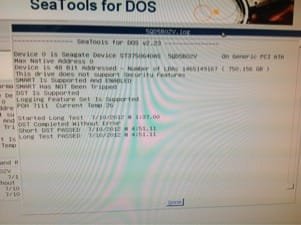
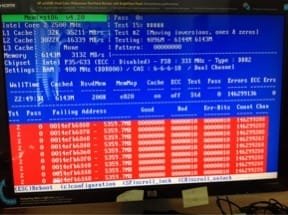
 Sometimes I assume a little too much!

 but at least i have my OS startup problems solved. thanks for all the help, ztruker, greg.


