Windows 7 does not boot when I unplug optical drive.

patchypower

New member
Local time
8:51 PM
Messages
11
*Solved!*Windows 7 does not boot when I unplug optical drive.

Hi Guys. I just built a new pc a few days ago. I am running windows 7 ultimate activated and all. It runs perfect. I used my brothers optical drive to install windows 7. When I unplug the optical drive windows wont boot at all. It shows teh logo for about half a second and then restarts over and over. I manually turn of the pc and plug the optical drive back in.....and it boots fine with no problems. Im not sure what could be the problem and any help would be appreciated.

Im running the following:

3570k
tx750 corsair psu
16 gb corsair vengeance ram
H100
crucial m4 256 ssd
wd 1 TB caviar black hdd
 
Last edited:

My Computer

OS
Windows 7 Ultimate x64
What logo do you mean? the windows boot flag?

Just plugging in the optical drive... system boots. You don't have any disk in optical then?
 

My Computer

Computer type
Laptop
Computer Manufacturer/Model Number
ACER ASPIRE 5742G
OS
Microsoft Windows 7 Home Premium 64-bits 7601 Multiprocessor Free Service Pack 1
CPU
Intel(R) Core(TM) i3 CPU M 370 @ 2.40GHz
Motherboard
Acer Aspire 5742G
Memory
4,00 GB
Graphics Card(s)
ATI Mobility Radeon HD 5400 Series
Sound Card
(1) AMD High Definition Audio Device (2) Realtek High Defi
Screen Resolution
1366 x 768 x 32 bits (4294967296 colors) @ 60 Hz
Hard Drives
WDC WD5000BEVT-22ZAT0
What logo do you mean? the windows boot flag?

Just plugging in the optical drive... system boots. You don't have any disk in optical then?

Im sorry I was a little unclear. Yes, the windows boot flag with the black background. With the optical sata dvd drive the system boots fine. When I un plug it...it will show the boot flag for about a second and then restarts and does the same thing. Also, there is no disk in the optical drive.
 

My Computer

OS
Windows 7 Ultimate x64

My Computer

Computer type
Laptop
Computer Manufacturer/Model Number
ACER ASPIRE 5742G
OS
Microsoft Windows 7 Home Premium 64-bits 7601 Multiprocessor Free Service Pack 1
CPU
Intel(R) Core(TM) i3 CPU M 370 @ 2.40GHz
Motherboard
Acer Aspire 5742G
Memory
4,00 GB
Graphics Card(s)
ATI Mobility Radeon HD 5400 Series
Sound Card
(1) AMD High Definition Audio Device (2) Realtek High Defi
Screen Resolution
1366 x 768 x 32 bits (4294967296 colors) @ 60 Hz
Hard Drives
WDC WD5000BEVT-22ZAT0
Have you checked your boot order settings in the BIOS?

Also, do you still have the Windows DVD in your optical drive?

Is it an external drive?
 
Last edited:

My Computer

Computer Manufacturer/Model Number
HP Pavilion Elite 495UK
OS
Windows 7 Ultimate SP1 64-Bit
CPU
Intel Core i7 870 @ 2.93GHz
Motherboard
MSI 2A9C (CPU1)
Memory
8Gb Dual-Channel DDR3 @ 664MHz
Graphics Card(s)
nVidia GeForce GTX 460 1024MB dedicated RAM
Sound Card
Realtek HD Audio
Monitor(s) Displays
HP2310i
Screen Resolution
1920 x 1080
Hard Drives
1x1954GB Hitachi HDS22020ALA 330 (RAID), 1x1954GB Hitachi External for backup and storage
PSU
460W
Case
HP Elite
Cooling
Air cooled
Keyboard
Logitech K750 solar-powered keyboard
Mouse
Logitech Wireless M180 mouse
Internet Speed
2Mb
Other Info
Pure Avanti Flow Internet Radio with iPod Dock, 64Gb iPod, HP USB Speakers, Sony MDR-V500 Headphones, Sony Vaio F-Series Laptop
system properties->advanced settings: there can Disable Automatic Restart on System Failure permanently
 

My Computer

Computer type
Laptop
Computer Manufacturer/Model Number
ACER ASPIRE 5742G
OS
Microsoft Windows 7 Home Premium 64-bits 7601 Multiprocessor Free Service Pack 1
CPU
Intel(R) Core(TM) i3 CPU M 370 @ 2.40GHz
Motherboard
Acer Aspire 5742G
Memory
4,00 GB
Graphics Card(s)
ATI Mobility Radeon HD 5400 Series
Sound Card
(1) AMD High Definition Audio Device (2) Realtek High Defi
Screen Resolution
1366 x 768 x 32 bits (4294967296 colors) @ 60 Hz
Hard Drives
WDC WD5000BEVT-22ZAT0
Have you checked you boot order settings in the BIOS?

Also, do you still have the Windows DVD in your optical drive?

Is it an external drive?

No windows dvd in the drive. The boot order is set to the crucial m4 ssd is primary. Its not an external drive.
 

My Computer

OS
Windows 7 Ultimate x64
Hi Guys. I just built a new pc a few days ago. I am running windows 7 ultimate activated and all. It runs perfect. I used my brothers optical drive to install windows 7. When I unplug the optical drive windows wont boot at all. It shows teh logo for about half a second and then restarts over and over. I manually turn of the pc and plug the optical drive back in.....and it boots fine with no problems. Im not sure what could be the problem and any help would be appreciated.

Im running the following:

3570k
tx750 corsair psu
16 gb corsair vengeance ram
H100
crucial m4 256 ssd
wd 1 TB caviar black hdd

Boot up into the bios and change the boot order there to HDD first.
 

My Computer

Computer Manufacturer/Model Number
Toshiba Satellite S875D-S7239 laptop
OS
MS Windows 7 Ultimate SP1 64-bit
CPU
AMD A10-4600M
Motherboard
AMD Pumori (Socket FT1)
Memory
6.00 GB Dual-Channel DDR3 @ 798MHz (11-11-12-28)
Graphics Card(s)
AMD Radeon HD 7660G
Sound Card
High Definition Audio Device
Monitor(s) Displays
Generic PnP Monitor (1600x900@60Hz)
Screen Resolution
1600x900@60Hz
Hard Drives
SSD 119GB Corsair CSSD-V128GB2 ATA Device
Keyboard
Standard PS/2 Keyboard
Mouse
HP Wireless Optical Mobile Mouse Model FHA-3410
Internet Speed
What the local pub, local coffee shop offers.
Other Info
Optical Drive:MATSHITA BD-CMB UJ160B ATA Device


Also have an Asus ha1002xp netbook with Win 7 Ultimate installed.
Hi Guys. I just built a new pc a few days ago. I am running windows 7 ultimate activated and all. It runs perfect. I used my brothers optical drive to install windows 7. When I unplug the optical drive windows wont boot at all. It shows teh logo for about half a second and then restarts over and over. I manually turn of the pc and plug the optical drive back in.....and it boots fine with no problems. Im not sure what could be the problem and any help would be appreciated.

Im running the following:

3570k
tx750 corsair psu
16 gb corsair vengeance ram
H100
crucial m4 256 ssd
wd 1 TB caviar black hdd

Boot up into the bios and change the boot order there to HDD first.

Actually let me take a look and see if I set it right. I would set it to the ssd (the os was installed to the ssd) right?
 

My Computer

OS
Windows 7 Ultimate x64
Correct.
 

My Computer

Computer Manufacturer/Model Number
Toshiba Satellite S875D-S7239 laptop
OS
MS Windows 7 Ultimate SP1 64-bit
CPU
AMD A10-4600M
Motherboard
AMD Pumori (Socket FT1)
Memory
6.00 GB Dual-Channel DDR3 @ 798MHz (11-11-12-28)
Graphics Card(s)
AMD Radeon HD 7660G
Sound Card
High Definition Audio Device
Monitor(s) Displays
Generic PnP Monitor (1600x900@60Hz)
Screen Resolution
1600x900@60Hz
Hard Drives
SSD 119GB Corsair CSSD-V128GB2 ATA Device
Keyboard
Standard PS/2 Keyboard
Mouse
HP Wireless Optical Mobile Mouse Model FHA-3410
Internet Speed
What the local pub, local coffee shop offers.
Other Info
Optical Drive:MATSHITA BD-CMB UJ160B ATA Device


Also have an Asus ha1002xp netbook with Win 7 Ultimate installed.
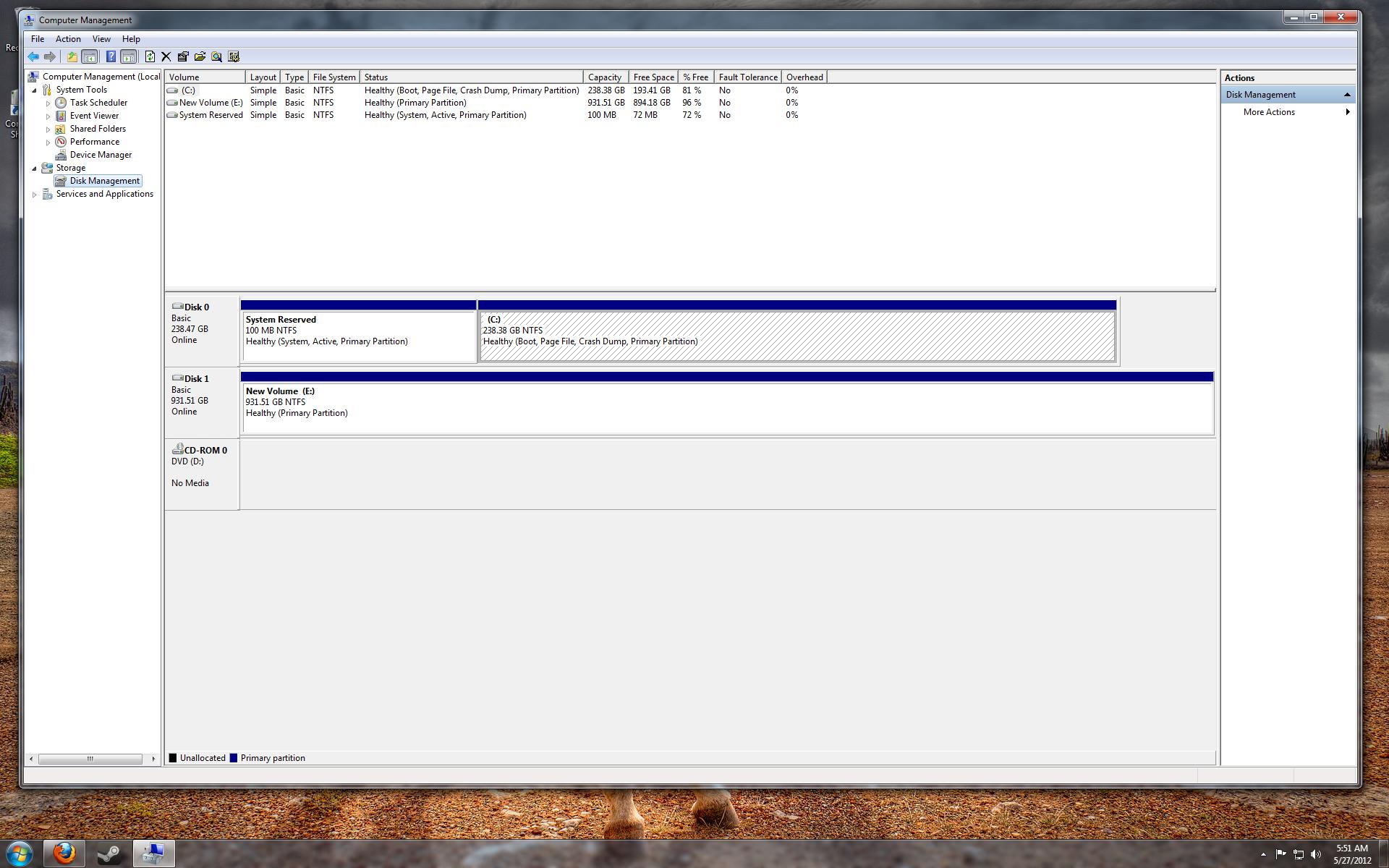
Please post a screenshot of disk managment with status field large enough to see everything
 

My Computer

Computer type
Laptop
Computer Manufacturer/Model Number
ACER ASPIRE 5742G
OS
Microsoft Windows 7 Home Premium 64-bits 7601 Multiprocessor Free Service Pack 1
CPU
Intel(R) Core(TM) i3 CPU M 370 @ 2.40GHz
Motherboard
Acer Aspire 5742G
Memory
4,00 GB
Graphics Card(s)
ATI Mobility Radeon HD 5400 Series
Sound Card
(1) AMD High Definition Audio Device (2) Realtek High Defi
Screen Resolution
1366 x 768 x 32 bits (4294967296 colors) @ 60 Hz
Hard Drives
WDC WD5000BEVT-22ZAT0

My Computer

Computer type
Laptop
Computer Manufacturer/Model Number
ACER ASPIRE 5742G
OS
Microsoft Windows 7 Home Premium 64-bits 7601 Multiprocessor Free Service Pack 1
CPU
Intel(R) Core(TM) i3 CPU M 370 @ 2.40GHz
Motherboard
Acer Aspire 5742G
Memory
4,00 GB
Graphics Card(s)
ATI Mobility Radeon HD 5400 Series
Sound Card
(1) AMD High Definition Audio Device (2) Realtek High Defi
Screen Resolution
1366 x 768 x 32 bits (4294967296 colors) @ 60 Hz
Hard Drives
WDC WD5000BEVT-22ZAT0
Hmmmm, I went back into the bios and made sure the boot order as set to the ssd. Shut it down. Unplugged the optical drive. Windows logo shows for about a second and then gives me the option to launch windows normally (will restart over and over again)...or repair. I tried repair but there was no solution to my problem and then it gave me the option the restore to a different time. I rolled it back and still, it wouldnt boot. Checked the bios again and same thing. I plug the optical drive back in....and it boots up fine.
 

My Computer

OS
Windows 7 Ultimate x64
Please post a screenshot of disk managment with status field large enough to see everything

This what you are asking for?

hXqL3.jpg
 

My Computer

OS
Windows 7 Ultimate x64
In the bios, can you completely disable the optical drive? If yes, then disable. If you can remove the optical drive from the list of boot devices, then remove it.

Be sure and upload a maximized disk management display as requested by Kaktussoft.

HOW TO POST A SNAPSHOT OF DISK MANAGEMENT DISPLAY
Run disk management:
WIN |
type DISKMGMT.MSC | ENTER
WIN=
key with Microsoft logo on top.


Maximize the output of Disk Management:
ALT-Spacebar
key combo | X key (selects Maximize) |
Drag the field separators (such as between Status and Capacity) to show entire field.


Make a snapshot:
WIN |
type SNIPPING | ENTER | New
Drag the cursor around the area you want to snip.
File | Save as | select save location and name | Save


Post the snapshot:
Post a File or Screenshot in Seven Forums
 

My Computer

Computer Manufacturer/Model Number
Toshiba Satellite S875D-S7239 laptop
OS
MS Windows 7 Ultimate SP1 64-bit
CPU
AMD A10-4600M
Motherboard
AMD Pumori (Socket FT1)
Memory
6.00 GB Dual-Channel DDR3 @ 798MHz (11-11-12-28)
Graphics Card(s)
AMD Radeon HD 7660G
Sound Card
High Definition Audio Device
Monitor(s) Displays
Generic PnP Monitor (1600x900@60Hz)
Screen Resolution
1600x900@60Hz
Hard Drives
SSD 119GB Corsair CSSD-V128GB2 ATA Device
Keyboard
Standard PS/2 Keyboard
Mouse
HP Wireless Optical Mobile Mouse Model FHA-3410
Internet Speed
What the local pub, local coffee shop offers.
Other Info
Optical Drive:MATSHITA BD-CMB UJ160B ATA Device


Also have an Asus ha1002xp netbook with Win 7 Ultimate installed.
patchyposer,

If you will use the snipping tool and let it use png, then you will get a better quality picture.

If you use DiskMgmt.MSC, then you get a display without the navigation pane which also helps.
 

My Computer

Computer Manufacturer/Model Number
Toshiba Satellite S875D-S7239 laptop
OS
MS Windows 7 Ultimate SP1 64-bit
CPU
AMD A10-4600M
Motherboard
AMD Pumori (Socket FT1)
Memory
6.00 GB Dual-Channel DDR3 @ 798MHz (11-11-12-28)
Graphics Card(s)
AMD Radeon HD 7660G
Sound Card
High Definition Audio Device
Monitor(s) Displays
Generic PnP Monitor (1600x900@60Hz)
Screen Resolution
1600x900@60Hz
Hard Drives
SSD 119GB Corsair CSSD-V128GB2 ATA Device
Keyboard
Standard PS/2 Keyboard
Mouse
HP Wireless Optical Mobile Mouse Model FHA-3410
Internet Speed
What the local pub, local coffee shop offers.
Other Info
Optical Drive:MATSHITA BD-CMB UJ160B ATA Device


Also have an Asus ha1002xp netbook with Win 7 Ultimate installed.
Please post a screenshot of disk managment with status field large enough to see everything

This what you are asking for?

hXqL3.jpg
Nice. All boot related stuff is on SSD. HDD isn't involved in boot process whatsover. Since it boots fine with optical drive attached (no disk inserted) .... MBR, bootsector, bootmgr and bcdmenu is fine. Even with optical drive detached it boots to windows.... but crashes.

Let me think.... did you install special drivers/software to make the optical work in windows? Or is this just a clean install? So you didn't install any special sata drivers during install or in win7?
 

My Computer

Computer type
Laptop
Computer Manufacturer/Model Number
ACER ASPIRE 5742G
OS
Microsoft Windows 7 Home Premium 64-bits 7601 Multiprocessor Free Service Pack 1
CPU
Intel(R) Core(TM) i3 CPU M 370 @ 2.40GHz
Motherboard
Acer Aspire 5742G
Memory
4,00 GB
Graphics Card(s)
ATI Mobility Radeon HD 5400 Series
Sound Card
(1) AMD High Definition Audio Device (2) Realtek High Defi
Screen Resolution
1366 x 768 x 32 bits (4294967296 colors) @ 60 Hz
Hard Drives
WDC WD5000BEVT-22ZAT0
patchyposer,

If you will use the snipping tool and let it use png, then you will get a better quality picture.

If you use DiskMgmt.MSC, then you get a display without the navigation pane which also helps.


Not sure if this is any better
 

Attachments

  • Disk Management.png
    Disk Management.png
    242.6 KB · Views: 3

My Computer

OS
Windows 7 Ultimate x64
Please post a screenshot of disk managment with status field large enough to see everything

This what you are asking for?

hXqL3.jpg
Nice. All boot related stuff is on SSD. HDD isn't involved in boot process whatsover. Since it boots fine with optical drive attached (no disk inserted) .... MBR, bootsector, bootmgr and bcdmenu is fine. Even with optical drive detached it boots to windows.... but crashes.

Let me think.... did you install special drivers/software to make the optical work in windows? Or is this just a clean install? So you didn't install any special sata drivers during install or in win7?

Nope. No special drivers that I can remember. It was a fresh install. Built the PC. Then borrowed my brothers optical drive and popped in the disc and installed windows 7. Yeah, without the optical drive it boots to the windows flag logo with the black background for about a second and stops then takes me to the black scrren with the options to launch windows 7 normally or repair.
 

My Computer

OS
Windows 7 Ultimate x64
Back
Top