
Hi all,
Our computers at work were upgraded to Windows 7. Before we were on Windows XP.
As we are some kind of servicedesk we are using two screens for better support.
One monitor is a DELL monitor the other monitor is a HP monitor
After the Windows 7 upgrade I can t move from one screen to another. I have twice the same Screen on both my desktops so it s no hardware issue
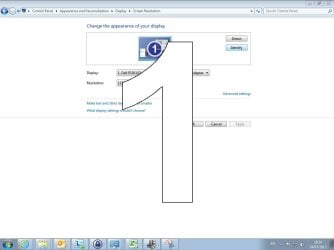
When i go to Control Panel\Appearance and Personalization\Display\Screen Resolution the second screen is not visable.
When i click detect nothing happens, when i click identify i see a big 1 in both screen.
I saw the technician replacing my HD during the upgrade so that most be related.
Any suggestions how i can activate my second screen again?
My system details
Operating System
Windows 7 Enterprise 64-bit SP1
CPU
Intel Pentium E5700 @ 3.00GHz 36 °C
Wolfdale 45nm Technology
Ram : 4.00GB Single-Channel DDR3 @ 399MHz (6-6-6-15)
Motherboard : Dell Inc. 0200DY (CPU)
Graphics
DELL P1911 (1152x864@1Hz)
16MB ATI Standard VGA Graphics Adapter (Dell)
Hard Drives
WDC WD2500AAJS-75M0A0 ATA Device
regards T
Our computers at work were upgraded to Windows 7. Before we were on Windows XP.
As we are some kind of servicedesk we are using two screens for better support.
One monitor is a DELL monitor the other monitor is a HP monitor
After the Windows 7 upgrade I can t move from one screen to another. I have twice the same Screen on both my desktops so it s no hardware issue
When i go to Control Panel\Appearance and Personalization\Display\Screen Resolution the second screen is not visable.
When i click detect nothing happens, when i click identify i see a big 1 in both screen.
I saw the technician replacing my HD during the upgrade so that most be related.
Any suggestions how i can activate my second screen again?
My system details
Operating System
Windows 7 Enterprise 64-bit SP1
CPU
Intel Pentium E5700 @ 3.00GHz 36 °C
Wolfdale 45nm Technology
Ram : 4.00GB Single-Channel DDR3 @ 399MHz (6-6-6-15)
Motherboard : Dell Inc. 0200DY (CPU)
Graphics
DELL P1911 (1152x864@1Hz)
16MB ATI Standard VGA Graphics Adapter (Dell)
Hard Drives
WDC WD2500AAJS-75M0A0 ATA Device
regards T
Attachments
My Computer
- Computer type
- PC/Desktop
- Computer Manufacturer/Model Number
- ASUS K53S
- OS
- MS Windows 7 Home Premium 64-bit SP1
- CPU
- Intel Core i7 2670QM @ 2.20GHZ
- Motherboard
- ASUSTeK Computer Inc. K53SV (CPU 1)
- Memory
- 8.00 GB Dual-Channel DDR3 @ 665MHz
- Graphics Card(s)
- 2047MB GeForce GT 540M (ASUStek Computer Inc)
- Sound Card
- Realtek High Definition Audio
- Monitor(s) Displays
- 1
- Hard Drives
- 596GB Hitachi HTS547564A9E384 (SATA)
- Internet Speed
- 29,5 MBPS DOWNL AND 6 UPLOAD
- Antivirus
- Microsoft Security Essentials, SUPERANTISPYWARE
- Browser
- CHROME,IE
- Other Info
- i love to travel also
i have lived in Hungary & Ireland & Germany and Belgium
and worked in the Netherlands as i used to live in a bordertown.....
Hi all
God bless
Peace


