Windows 7 emails, where are they stored?

steveengland

New member
Local time
9:14 AM
Messages
1
I am using Windows 7 Home Premium 64 bit on a Toshiba Laptop. I believe that I downloaded a virus. The result is that my Windows will not start up, even in SAFE MODE and all attempts to repair the operating system have failed. My intention is to transfer all my data and emails onto a memory stick then use Toshiba's Format Hard Disk facility to reload the operating system from it's partition on the hard disk.Since the operating system will not start up, even in safe mode, I only have access to my data via the DOS COMMAND PROMPT. So far I have saved all my DATA to a memory stick by using the DOS 'Copy' command. I now need to save my EMAILS. Can anyone tell me the FULL DIRECTORY PATH where Windows 7/Windows Live Mail emails are stored. It will be no use telling me to click on 'this menu' then click on properties etc. because I have NO ACCESS to ANY menus at all. I must be able to find the emails manually in the FULL DIRECTORY PATH while in the DOS Command Prompt. I will then use the DOS 'Copy' command to transfer the emails to a memory stick.Thanks in advance for any help.
 

My Computer My Computer

At a glance

windows 7 Home 64bitig33 GB
Computer Manufacturer/Model Number
Toshiab L650 1M8
OS
windows 7 Home 64bit
CPU
ig3
Memory
3 GB
Hard Drives
250 GB Sata
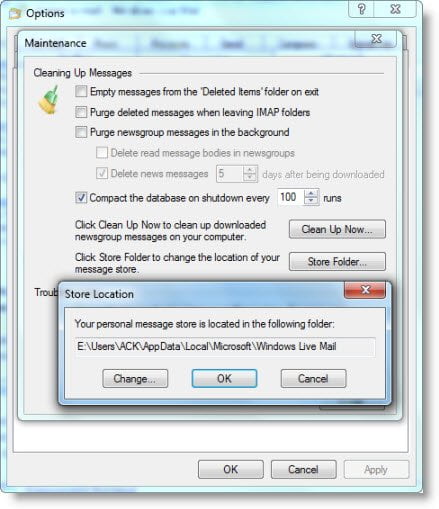
I realise that you are not looking to change the location, but contained in the link and illustration below is the suggested likely path (depending on which drive your programs are installed):
How to change the location of Windows Live Mail Store Folder | The Windows Club

To identify its location, open Windows Live Mail > Tools > Options > Advanced > Maintenance > Store Folder.
wlmailstore.jpg


If your Windows is installed on E drive, you will see it at E:\Users\ACK\AppData\Local\Microsoft\Windows Live Mail

You may if you wish, also change the locations of the Store folder here.

 
Last edited:

My Computer My Computer

At a glance

Windows 7 Home Premium 64bitIntel(R) Core(TM) i3-2120 CPU @ 3.30GHz3.00 GB(1) Intel(R) HD Graphics (2) VNC Mirror Driver
Computer type
PC/Desktop
Computer Manufacturer/Model Number
Packard Bell
OS
Windows 7 Home Premium 64bit
CPU
Intel(R) Core(TM) i3-2120 CPU @ 3.30GHz
Motherboard
Packard Bell IPISB-AG
Memory
3.00 GB
Graphics Card(s)
(1) Intel(R) HD Graphics (2) VNC Mirror Driver
Sound Card
Realtek High Definition Audio
Monitor(s) Displays
AIO LCD
Screen Resolution
1920 x 1080
Hard Drives
WDC WD10EADX-22TDHB0 ATA Device
Fixed hard disk media
4 partitions
931.51 GB
Keyboard
Wireless
Mouse
Wireless
Antivirus
Microsoft Security Essentials
Browser
IE; Firefox
Other Info
Also:
Samsung N220 Plus Netbook - Windows 7 Home
HP laptop
iPad 5
Back
Top