Windows 7: Error 0xc00000e9: Unexpected I/O error

RegiKing

New member
Local time
7:13 AM
Messages
22
Hello guys, I'm a bit desperate with this issue.

My girlfriend was playing a game in her laptop. Something in her game made her a bit upset that she hit her laptop. She says that as soon as she hit the laptop, the laptop froze, so she shut it down. When she turned it back on, Windows displayed 2 messages, (bare with me, I'm Mexican and I'm about to translate spanish messages into english) Startup repair (recommended) and Start Windows Normally. Whichever I chose, Windows went into a "Loading Windows Files" with a big gray bar below, it fills to about 1/4, stops and then shows:

"Big long message detailing how I might have a flash memory inserted and or faulty HDD" along with

"Error 0xc00000e9: Unexpected I/O error" and then it loops, showing the first 2 messages and into this error message.

I have been searching everywhere, and even though I haven't tried many of the solutions for this problem I can at least say what I have done so far.

First, I can open F8, Advance Boot Settings. No matter what I do, if I Startup Repair, Safe Boot, Avoid restarting, etc, it ends up at the I/O Error, meaning F8 is useless so far.

F2, F12, do not help. There is no USB, SD and such connected to the laptop.

I have opened the laptop, removed the HDD, re-inserted it and nothing. I connected the HDD to my laptop, ran "chkdsk /f /x /(other command which I already forgot)" in cmd as an administrator and scanned the HDD with Windows Defender in Windows 8 running in my MacBook Pro (not as a virtual machine, running Windows 8 as 2nd operating system) and no problems were shown, so I can safely say the HDD is fine; which I hope, it means I must not reinstall Windows or format it.

I don't have any discs with Windows 7 and such to be able to run a System Repair from the disc. I have removed the CD/DVD driver physically, boot the pc and received the same error message. If I should try running repair disc from a CD or USB, from where could I get the software to be able to use it, preferably on a USB?

What could be the problem? What else could I do to fix it?

The laptop is a LENOVO G470, Intel Core i5, Radeon Graphics, Windows 7 64bits.

Thanks in advance.
 

My Computer My Computer

Computer type
Laptop
Computer Manufacturer/Model Number
HP Pavilion dv4-1623la
OS
Windows 8.1 x64
CPU
Intel(R) Core(TM) i5-2415M CPU @ 2.30 (x4)
Memory
8.00 GB
Graphics Card(s)
Interl(R) HD Graphics 3000
Sound Card
Cirrus Logic CS4206B (AB 28)
Monitor(s) Displays
Generic PnP Monitor
Screen Resolution
1280 x 800
Hard Drives
BOOTCAMP (C:)
200 GB
Antivirus
Windows Defender
First of all Reg mate she hit the laptop and you don't need to be rocket scientist to know they are easy to break. The bang could have damaged all manner of thing from small ribbon cable joints to the drive itself - what was she thinking??

The chdsk you mentioned did you try the chkdsk C: /r option?

Try reseating the RAM and anything that is removable - easily.

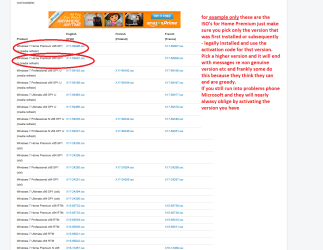
If you have data backed up then you may be up for a system clean install and for that you can use this as long as you have the activation code on the sticker and pick the right version of Windows.
http://www.sevenforums.com/tutorials/219487-clean-reinstall-factory-oem-windows-7-a.html < read tis carefully and see my pic for getting the version.
Plus doing this you will get rid of all the bloatware that Lenovo put on the machine.


But check out the other stuff first.
 

Attachments

  • ISO.PNG
    ISO.PNG
    41.1 KB · Views: 7

My Computer My Computer

Computer type
PC/Desktop
Computer Manufacturer/Model Number
Own build (new) Desk1 / Asus ROG Win 7 / Desk2 1st build
OS
Desk1 7 Home Prem / Desk2 10 Pro / Main lap Asus ROG 10 Pro 2 laptop Toshiba 7 Pro Asus P2520 7 & 10
CPU
Desk1 i5 3750K / Laptop i7 GTX 860M / Desk2 i5 2500
Motherboard
Desk1 Asus P877-V / Desk2 Gigabyte H67 UD3H / Laptop ?
Memory
Desk1 8GB (1866) / Desk2 16GB (1333) / Laptop 8Gb DDR3
Graphics Card(s)
Desk 1& 2NVidia GTX 650 & Laptops on board Intel
Sound Card
Desk 1 & 2 -XONAR DG Realtek High Def audio Laptop
Monitor(s) Displays
Desk 1 Benq HD 2450 / Desk2 Philips 24" / Laptop 17.5"
Screen Resolution
1920x1080 D1 & D2 & Laptop 1
Hard Drives
Desk1 Samsung 120GB 830 SSD
Asus ROG 256GB 850 Pro SSD
Desk2 Samsung 840 256 SSD
Toshiba 120GB EVO
PSU
Desk 1 Corsair HX 1050/ Laptop ? / Desk 2 Corsair HX 650
Case
Desk 1 Cooler HAF XM ? Toshiba laptop / Desk2 Coolermaster
Cooling
Fans on all Desk1 -2 Desk2 - all Coolermasters 5 Laptop ?
Keyboard
Desk 1 MS Sidewinder X6 Desk 2 MS Sidewinder X 4
Mouse
Desk 1&2 - Gigabyte MS 900 gamer - laptop - Logitec wireless
Internet Speed
ADSL2+
Other Info
One other Desktop (tester) and spare Toshba laptop both with SSD's
Running Kaspersky 2016 ISS on all machines config'd identically
Logitec audio stereo systems on each machine (x3)
Canon MG5250MFC
Router/modem TP-Link running WPA2SK
0xc00000e9 normally relates to a hard drive communication error during start up.

as youve removed it and replaced I think it may have a) loosened a cable that plugs into the sata controller on the mobo, or caused damage to the drive.

taking the entire thing apart and checking all cables is one thing, and next would be as stated above a fresh install.

p.s.. never play multiplayer with your missus.. you maybe next in line for a beating!! :p
 

My Computer My Computer

Computer type
PC/Desktop
Computer Manufacturer/Model Number
Built by badgers!!!
OS
Windows 7 Ultimate x64, & Mac OS X 10.9.2
CPU
Intel Core i5 2500k
Motherboard
Asus P8z68 LE
Memory
Corsair Vengence 8gb 1866mhz
Graphics Card(s)
Nvidia GTX 770 OC
Monitor(s) Displays
2x ASUS LED 22" IPS
Screen Resolution
3840x1080
Hard Drives
240GB Crucial M500 SSD
120gb Corsair Force 3 SSD
1TB Western Digital
PSU
Corsair HX650w Modular
Case
Corsair Air 540
Cooling
Corsair H60 Push/Pull
Keyboard
Corsair K70/ Logitech G27 wheel
Mouse
Saitek R.A.T 9
Internet Speed
Too slow!
Other Info
AMD fusion E350N Home server-Windows Home Server 2011 (also made by badgers!)
2011 Macbook 2.4ghz Core2Duo, 4gb ddr3, 120gb Ocz Vertex SSD
Well that might be hard Badger mate as most laptops have a block with the SATA connections molded into it - there usually are no leads as such so I am thinking maybe that hit may have bent the contacts or cracked that block.
 

Attachments

  • LAPTOP DRIVE.PNG
    LAPTOP DRIVE.PNG
    129.8 KB · Views: 2

My Computer My Computer

Computer type
PC/Desktop
Computer Manufacturer/Model Number
Own build (new) Desk1 / Asus ROG Win 7 / Desk2 1st build
OS
Desk1 7 Home Prem / Desk2 10 Pro / Main lap Asus ROG 10 Pro 2 laptop Toshiba 7 Pro Asus P2520 7 & 10
CPU
Desk1 i5 3750K / Laptop i7 GTX 860M / Desk2 i5 2500
Motherboard
Desk1 Asus P877-V / Desk2 Gigabyte H67 UD3H / Laptop ?
Memory
Desk1 8GB (1866) / Desk2 16GB (1333) / Laptop 8Gb DDR3
Graphics Card(s)
Desk 1& 2NVidia GTX 650 & Laptops on board Intel
Sound Card
Desk 1 & 2 -XONAR DG Realtek High Def audio Laptop
Monitor(s) Displays
Desk 1 Benq HD 2450 / Desk2 Philips 24" / Laptop 17.5"
Screen Resolution
1920x1080 D1 & D2 & Laptop 1
Hard Drives
Desk1 Samsung 120GB 830 SSD
Asus ROG 256GB 850 Pro SSD
Desk2 Samsung 840 256 SSD
Toshiba 120GB EVO
PSU
Desk 1 Corsair HX 1050/ Laptop ? / Desk 2 Corsair HX 650
Case
Desk 1 Cooler HAF XM ? Toshiba laptop / Desk2 Coolermaster
Cooling
Fans on all Desk1 -2 Desk2 - all Coolermasters 5 Laptop ?
Keyboard
Desk 1 MS Sidewinder X6 Desk 2 MS Sidewinder X 4
Mouse
Desk 1&2 - Gigabyte MS 900 gamer - laptop - Logitec wireless
Internet Speed
ADSL2+
Other Info
One other Desktop (tester) and spare Toshba laptop both with SSD's
Running Kaspersky 2016 ISS on all machines config'd identically
Logitec audio stereo systems on each machine (x3)
Canon MG5250MFC
Router/modem TP-Link running WPA2SK
some do have flat ribon style cables trailing off them though. not all, not many but some do lol.
an acer I was doing a screen replacement on recently did! as did my previous Asus and my current macbook :p
 

My Computer My Computer

Computer type
PC/Desktop
Computer Manufacturer/Model Number
Built by badgers!!!
OS
Windows 7 Ultimate x64, & Mac OS X 10.9.2
CPU
Intel Core i5 2500k
Motherboard
Asus P8z68 LE
Memory
Corsair Vengence 8gb 1866mhz
Graphics Card(s)
Nvidia GTX 770 OC
Monitor(s) Displays
2x ASUS LED 22" IPS
Screen Resolution
3840x1080
Hard Drives
240GB Crucial M500 SSD
120gb Corsair Force 3 SSD
1TB Western Digital
PSU
Corsair HX650w Modular
Case
Corsair Air 540
Cooling
Corsair H60 Push/Pull
Keyboard
Corsair K70/ Logitech G27 wheel
Mouse
Saitek R.A.T 9
Internet Speed
Too slow!
Other Info
AMD fusion E350N Home server-Windows Home Server 2011 (also made by badgers!)
2011 Macbook 2.4ghz Core2Duo, 4gb ddr3, 120gb Ocz Vertex SSD
The hit was done near where the power button is, so if looked from below, it's around where the air vent is.

I'll re-read you guys answers tomorrow, it's a bit late already.

Again, thanks in advance.
 

My Computer My Computer

Computer type
Laptop
Computer Manufacturer/Model Number
HP Pavilion dv4-1623la
OS
Windows 8.1 x64
CPU
Intel(R) Core(TM) i5-2415M CPU @ 2.30 (x4)
Memory
8.00 GB
Graphics Card(s)
Interl(R) HD Graphics 3000
Sound Card
Cirrus Logic CS4206B (AB 28)
Monitor(s) Displays
Generic PnP Monitor
Screen Resolution
1280 x 800
Hard Drives
BOOTCAMP (C:)
200 GB
Antivirus
Windows Defender
Can you sen a pic of the area where she hit it? then we can look up the disassembly guides to see what lies below.

Yep Badger I have come across them but far and few between and I find the Toshiba ones (ribbon cables) especially fiddly and flimsy to work with.

Having said what we have it could be damage to anywhere really as I said it depends on how hard this machine was hit eh? IT could be anything form a dislodged cable to a cracked motherboard:(
 

My Computer My Computer

Computer type
PC/Desktop
Computer Manufacturer/Model Number
Own build (new) Desk1 / Asus ROG Win 7 / Desk2 1st build
OS
Desk1 7 Home Prem / Desk2 10 Pro / Main lap Asus ROG 10 Pro 2 laptop Toshiba 7 Pro Asus P2520 7 & 10
CPU
Desk1 i5 3750K / Laptop i7 GTX 860M / Desk2 i5 2500
Motherboard
Desk1 Asus P877-V / Desk2 Gigabyte H67 UD3H / Laptop ?
Memory
Desk1 8GB (1866) / Desk2 16GB (1333) / Laptop 8Gb DDR3
Graphics Card(s)
Desk 1& 2NVidia GTX 650 & Laptops on board Intel
Sound Card
Desk 1 & 2 -XONAR DG Realtek High Def audio Laptop
Monitor(s) Displays
Desk 1 Benq HD 2450 / Desk2 Philips 24" / Laptop 17.5"
Screen Resolution
1920x1080 D1 & D2 & Laptop 1
Hard Drives
Desk1 Samsung 120GB 830 SSD
Asus ROG 256GB 850 Pro SSD
Desk2 Samsung 840 256 SSD
Toshiba 120GB EVO
PSU
Desk 1 Corsair HX 1050/ Laptop ? / Desk 2 Corsair HX 650
Case
Desk 1 Cooler HAF XM ? Toshiba laptop / Desk2 Coolermaster
Cooling
Fans on all Desk1 -2 Desk2 - all Coolermasters 5 Laptop ?
Keyboard
Desk 1 MS Sidewinder X6 Desk 2 MS Sidewinder X 4
Mouse
Desk 1&2 - Gigabyte MS 900 gamer - laptop - Logitec wireless
Internet Speed
ADSL2+
Other Info
One other Desktop (tester) and spare Toshba laptop both with SSD's
Running Kaspersky 2016 ISS on all machines config'd identically
Logitec audio stereo systems on each machine (x3)
Canon MG5250MFC
Router/modem TP-Link running WPA2SK
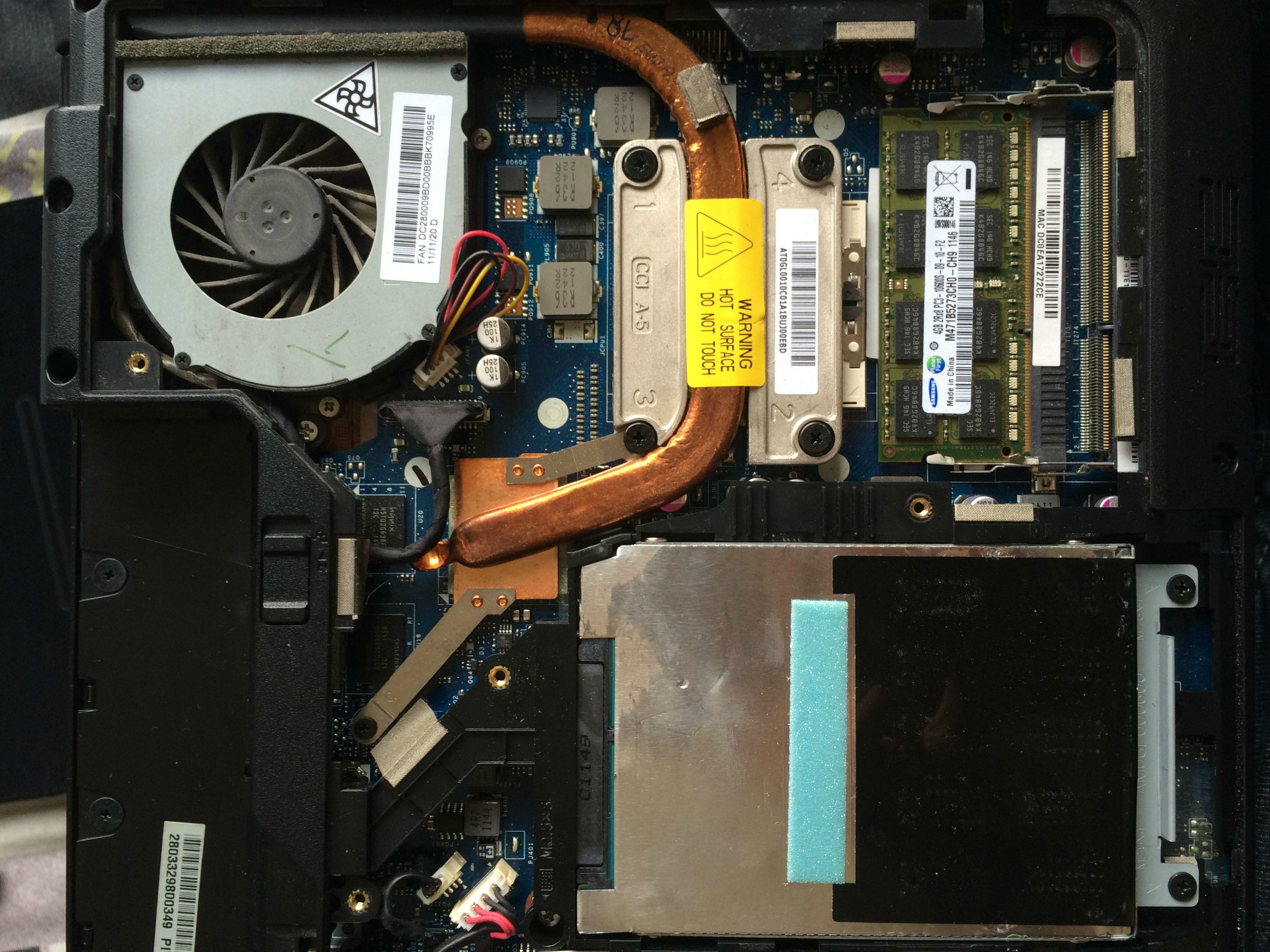
Here are 2 photos of where the hit was done, seen from above and below. At first, I thought it was just near the power button, but she now confirms being in all the left-edge-side of the laptop. So I examined the RAM, go it off and inserted it back on, and the error persists. I'll try to do the backup of the HDD at night if any physical error slips away from you guys (I'm not too good at dealing with the hardware).

7YZ2IGa.jpg

l8d2viw.jpg
 

My Computer My Computer

Computer type
Laptop
Computer Manufacturer/Model Number
HP Pavilion dv4-1623la
OS
Windows 8.1 x64
CPU
Intel(R) Core(TM) i5-2415M CPU @ 2.30 (x4)
Memory
8.00 GB
Graphics Card(s)
Interl(R) HD Graphics 3000
Sound Card
Cirrus Logic CS4206B (AB 28)
Monitor(s) Displays
Generic PnP Monitor
Screen Resolution
1280 x 800
Hard Drives
BOOTCAMP (C:)
200 GB
Antivirus
Windows Defender
Here is a pic that may helkp you sort some things out if you are ok with doing it. It could be that the thermal compound under the CPU and GPU heatsink is dried out and cracked and therefore not cooling the devices properly - this will cause shutdowns etc.

That said the hit could have damaged the drive itself as some of the internals are quite delicate.
 

Attachments

  • HIT.PNG
    HIT.PNG
    190.7 KB · Views: 4

My Computer My Computer

Computer type
PC/Desktop
Computer Manufacturer/Model Number
Own build (new) Desk1 / Asus ROG Win 7 / Desk2 1st build
OS
Desk1 7 Home Prem / Desk2 10 Pro / Main lap Asus ROG 10 Pro 2 laptop Toshiba 7 Pro Asus P2520 7 & 10
CPU
Desk1 i5 3750K / Laptop i7 GTX 860M / Desk2 i5 2500
Motherboard
Desk1 Asus P877-V / Desk2 Gigabyte H67 UD3H / Laptop ?
Memory
Desk1 8GB (1866) / Desk2 16GB (1333) / Laptop 8Gb DDR3
Graphics Card(s)
Desk 1& 2NVidia GTX 650 & Laptops on board Intel
Sound Card
Desk 1 & 2 -XONAR DG Realtek High Def audio Laptop
Monitor(s) Displays
Desk 1 Benq HD 2450 / Desk2 Philips 24" / Laptop 17.5"
Screen Resolution
1920x1080 D1 & D2 & Laptop 1
Hard Drives
Desk1 Samsung 120GB 830 SSD
Asus ROG 256GB 850 Pro SSD
Desk2 Samsung 840 256 SSD
Toshiba 120GB EVO
PSU
Desk 1 Corsair HX 1050/ Laptop ? / Desk 2 Corsair HX 650
Case
Desk 1 Cooler HAF XM ? Toshiba laptop / Desk2 Coolermaster
Cooling
Fans on all Desk1 -2 Desk2 - all Coolermasters 5 Laptop ?
Keyboard
Desk 1 MS Sidewinder X6 Desk 2 MS Sidewinder X 4
Mouse
Desk 1&2 - Gigabyte MS 900 gamer - laptop - Logitec wireless
Internet Speed
ADSL2+
Other Info
One other Desktop (tester) and spare Toshba laptop both with SSD's
Running Kaspersky 2016 ISS on all machines config'd identically
Logitec audio stereo systems on each machine (x3)
Canon MG5250MFC
Router/modem TP-Link running WPA2SK
Back
Top